
Entwodiksyon
Manyèl sa a bay enfòmasyon esansyèl pou operasyon san danje epi efikas Black ou a.view BV6300 Pro rugged smartphone. Please read this manual thoroughly before using your device to ensure proper functionality and to prevent damage.
Ki sa ki nan bwat la
Verifye ke tout atik yo prezan nan anbalaj pwodwi ou a:
- Nwaview BV6300 Pwofesyonèl Telefòn Entèlijan
- USB kab
- Adaptè pouvwa
- Ekoutè
- Zouti èkstrè SIM
- Screen Protector (pre-applied)
- Spare Screen Protector

Imaj: Nwa aview BV6300 Pro retail box contents, showing the smartphone, USB cable, power adapter, earbuds, SIM ejector tool, and screen protectors.
Enstalasyon
1. Enstalasyon Kat SIM
- Etenn aparèy la.
- Jwenn plato kat SIM lan sou bò telefòn nan.
- Mete zouti pou retire kat SIM lan nan ti twou ki akote plato a epi peze byen fèm jiskaske plato a soti.
- Place your Nano-SIM cards (up to two) and/or a microSD card into the designated slots on the tray. Ensure the metal contacts face downwards.
- Pouse plato a tounen nan telefòn nan avèk prekosyon jiskaske li kole ak kò aparèy la.
2. Premye Chajman
Anvan premye itilizasyon an, chaje Black ou nèt.view BV6300 Pro. Connect the USB cable to the phone's Type-C port and the power adapter, then plug the adapter into a wall outlet. The charging indicator will appear on the screen.

Imaj: Nwa aview BV6300 Pro being charged via its USB-C port and also demonstrating wireless charging capability on a pad.
3. Power On/Off
- To power on: Press and hold the Power button (located on the right side) until the Blackview logo a parèt.
- To power off: Press and hold the Power button, then select "Power off" from the options on the screen.
Enstriksyon Operasyon
1. Android 10 System Overview
Nwa ouview BV6300 Pro runs on Android 10, offering an intuitive user experience with features like Gesture Navigation, Dark Mode, Grayscale, Privacy Protect, and a new interface. Explore the settings menu to customize your device.

Image: Various screens of the Blackview BV6300 Pro showcasing the Android 10 operating system, including settings, home screen, and feature icons like Gesture Navigation and Dark Mode.
2. Itilizasyon kamera
Nwa aview BV6300 Pro is equipped with a 16MP HDR Quad Rear Camera and a 13MP Front Camera. Open the Camera app to access various shooting modes.
- Kamera dèyè: Features a 16MP main sensor, an 8MP 120° ultra-wide angle lens, and additional macro and depth sensors.
- Kamera devan: A 13MP sensor for high-resolution selfies and video calls.
- Mòd Fiziyad: Includes Night Mode for low-light conditions, Slow Motion for dynamic video, and Macro for close-up shots.

Imaj: Yon reprezantasyon vizyèl nan Nwa aview BV6300 Pro's camera system, highlighting its quad rear cameras and front camera, along with examples of photos taken using different modes such as Ultra-Wide Angle, Night Mode, Mono, Slow Motion, and Macro.
3. Karakteristik sekirite
Your device supports Face Unlock and Fingerprint Unlock for secure access.
- Debloke figi: Register your face in the security settings for quick and convenient unlocking.
- Degaje anprent: The fingerprint sensor is located on the rear of the device. Register your fingerprints in the security settings for secure access.
4. Koneksyon
The BV6300 Pro supports Dual SIM 4G VoLTE for enhanced call quality and network coverage. It also includes NFC for contactless payments and data transfer.
Videyo: Yon Nwa ofisyèlview prezantasyon videyoasing the BV6300 Pro's features, including its slim body, IP68/IP69K water and MIL-STD-810G drop resistance, quad rear cameras, 13MP front camera, 5.7-inch display, NFC, fingerprint unlock, MediaTek Helio P70 processor, 6GB RAM, 128GB ROM, Type-C port, 4380mAh battery with 18W wired and 10W wireless fast charge, Dual 4G VoLTE, global bands, and Android 10 Dark Theme.
Videyo: Yon Nwa ofisyèlview video highlighting the BV6300 Pro's ruggedness, slim design, and key specifications such as IP68 & IP69K, MIL-STD-810G, MediaTek Helio P70, 6GB RAM, 128GB ROM, Samsung 16MP Quad Camera, and 4380mAh Battery.
Antretyen
Pou asire lonjevite ak pèfòmans optimal Black ou aview BV6300 Pro, follow these maintenance guidelines:
- Netwayaj: Use a soft, dry cloth to clean the device. Avoid chemical solvents or abrasive materials.
- Rezistans dlo: The device is IP68/IP69K rated for water and dust resistance. Ensure all port covers are securely closed before exposing the phone to water. Do not intentionally submerge the device in corrosive liquids.
- Swen batri: Avoid extreme temperatures. Do not disassemble or puncture the battery. Use only the provided charger or compatible power sources.
- Pwoteksyon enpak: While rugged, avoid unnecessary drops or impacts. The MIL-STD-810G rating indicates resistance to certain drops, but extreme force can still cause damage.
Depanaj
Si ou rankontre pwoblèm ak Black ou aview BV6300 Pro, refer to the following common solutions:
- Aparèy la bloke/pa reponn: Peze epi kenbe bouton Pouvwa a pandan apeprè 10-15 segonn pou fòse yon rekòmanse.
- Pwoblèm chaj: Ensure the USB cable and power adapter are securely connected. Try a different outlet or charging accessory. Check the charging port for any debris.
- Pwoblèm koneksyon rezo: Tcheke si kat SIM ou a byen antre. Verifye ke done mobil yo aktive nan paramèt yo. Si pwoblèm yo pèsiste, rekòmanse aparèy la oswa kontakte founisè rezo ou a.
- Kalite Kamera: Ensure the camera lenses are clean and free of smudges. For optimal results, use appropriate lighting and experiment with different camera modes.
Espesifikasyon
| Mak | Nwaview |
| Non modèl | BV6300 Pro |
| Kapasite Depo memwa | 128 GB |
| Wireless Carrier | T-mobil |
| Teknoloji selilè | 2G, 3G, 4G |
| Koneksyon Teknoloji | Bluetooth, fil |
| Kantite plas kat SIM | Doub SIM |
| Kalite Connector | 3.5mm Jack, USB Type C |
| Kapasite batri | 4380 Miliamp Orè |
| Biometric Security Feature | Rekonesans figi |
| Nivo rezistans dlo | Waterproof (IP68/IP69K) |
| Rear Facing Camera Photo Sensor Resolution | 16 MP |
| Rezolisyon Capteur Optik | 16.0, 8.0 MP |
| Mòd Fiziyad | Night Mode, Slow Motion |
| Ane ki gen konpòtman egzanplè | 2020 |

Imaj: Yon ilistrasyon Nwa aview BV6300 Pro's internal components, highlighting the CPU (MediaTek Helio P70), 6GB RAM, and 128GB ROM, with an indication for an optional 128GB SD card.
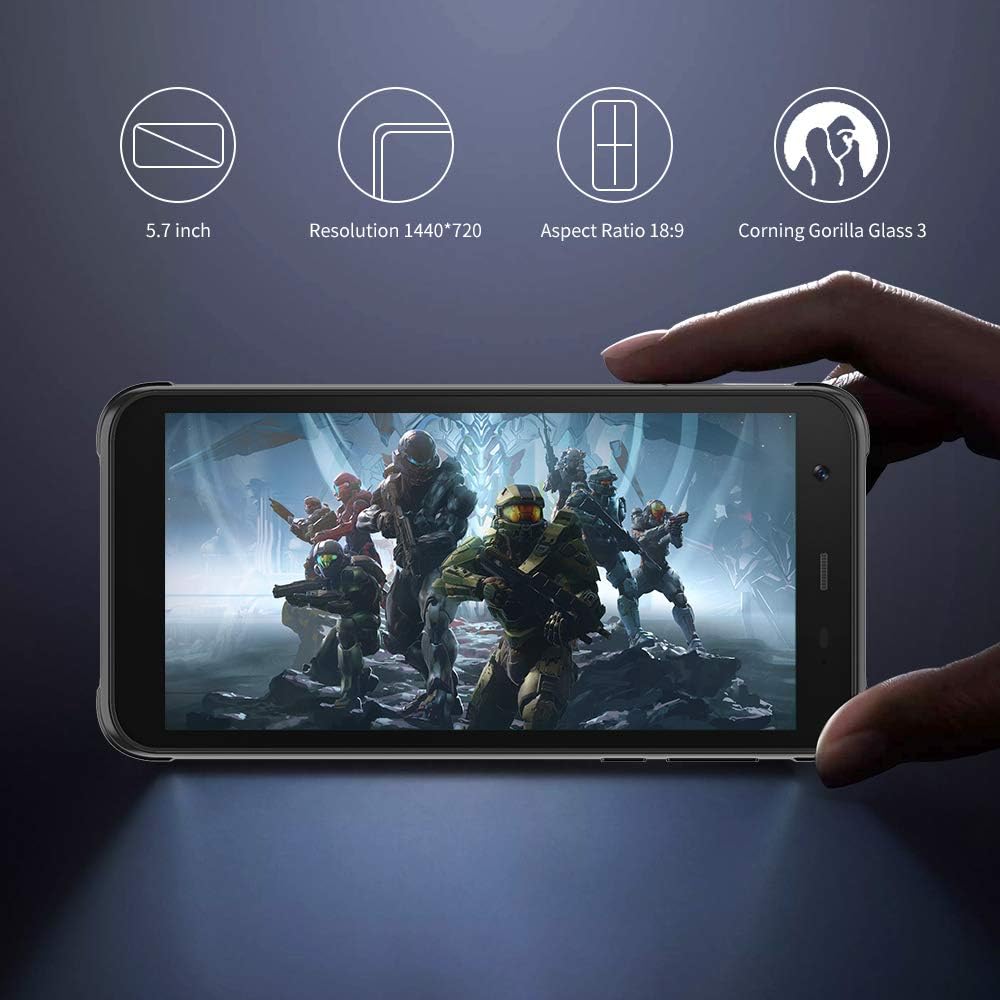
Imaj: Nwa aview BV6300 Pro held in a hand, displaying its 5.7-inch screen with a resolution of 1440x720, an 18:9 aspect ratio, and Corning Gorilla Glass 3 protection.

Image: Technical drawing of the Blackview BV6300 Pro showing its dimensions: 159.6mm height, 78.2mm width, and 11.6mm thickness.
Garanti ak sipò
For warranty information and customer support, please refer to the documentation included with your purchase or visit the official Blackview websit la. Kenbe prèv acha ou pou reklamasyon garanti.