
Zeblaze Vibe 3 GPS
Manyèl Itilizatè Mont Entelijan GPS Zeblaze Vibe 3
Model: Vibe 3 GPS
Entwodiksyon
Thank you for choosing the Zeblaze Vibe 3 GPS Smart Watch. This manual provides comprehensive instructions to help you set up, operate, and maintain your device, ensuring you get the most out of its advanced features. The Zeblaze Vibe 3 GPS is designed to enhance your fitness journey and daily life with its robust tracking capabilities and smart notifications.

Imaj: Devan view of the Zeblaze Vibe 3 GPS Smart Watch, showcasing its vibrant display with activity metrics like steps, calories burned, and heart rate. The watch features a durable black casing and a comfortable silicone strap.
Karakteristik kle
- 1.3-inch IPS Full-Round Color Touch Screen: Bay vizyèl klè ak navigasyon entwisyon.
- Integrated GPS/GLONASS: For precise outdoor activity tracking without needing your phone.
- Siveyans batman kè 24/7: Advanced optical sensor for continuous and accurate heart rate data.
- Mòd milti-espò: Supports various activities like running, cycling, and more, with detailed data analysis.
- Suivi dòmi: Monitors light and deep sleep patterns to help improve sleep quality.
- Notifikasyon Smart: Receive alerts for calls, SMS, and app notifications directly on your wrist.
- Long lavi batri: Optimized power consumption for extended usage.
- Rezistans dlo IP67: Designed to withstand splashes and brief immersion.
- Konpatibilite: Works with both iOS and Android smartphones via the Fundo app.
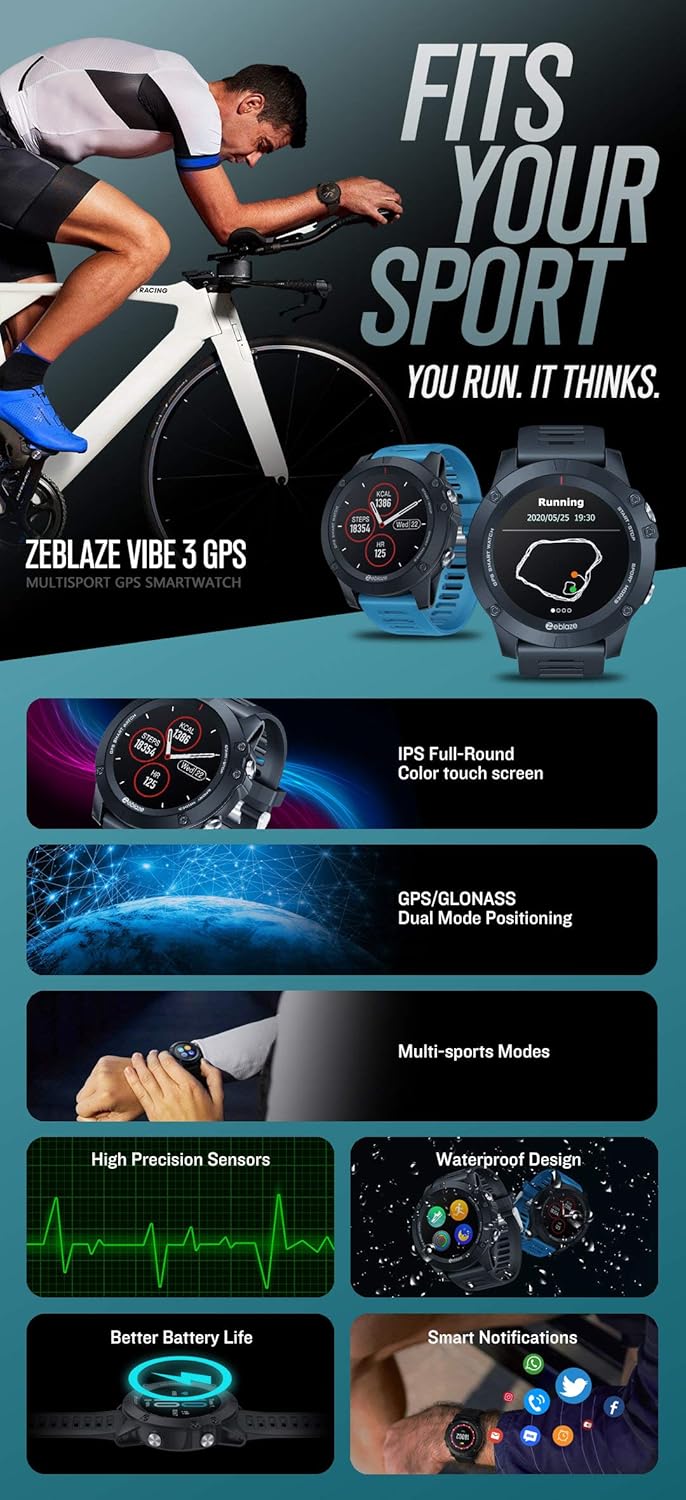
Image: An infographic highlighting the key features of the Zeblaze Vibe 3 GPS Smart Watch, including its IPS color touch screen, GPS/GLONASS dual-mode positioning, multi-sports modes, high-precision sensors, waterproof design, better battery life, and smart notification capabilities.
Gid Enstalasyon
1. Chaje Aparèy la
Before first use, fully charge your Zeblaze Vibe 3 GPS Smart Watch.
- Konekte kab chaje yo bay la nan pò a chaje sou do a nan mont lan.
- Branche bout USB kab la nan yon adaptè kouran USB estanda (5V/1A rekòmande) oubyen nan yon pò USB òdinatè.
- The watch display will show a charging indicator. A full charge takes approximately 3 hours.
2. Telechaje epi enstale aplikasyon an
The Zeblaze Vibe 3 GPS Smart Watch requires the "Fundo" app for full functionality and data synchronization.
- Pou aparèy iOS: Chèche pou "Fundo" in the Apple App Store.
- Pou aparèy android: Chèche pou "Fundo" in the Google Play Store.
- Alternatively, scan the QR code provided in the watch's packaging or on the watch screen (if available) to download the app.

Image: A visual guide demonstrating the "Fundo" app connection process, including icons for downloading from the Apple App Store and Google Play Store. This app is essential for synchronizing watch data and accessing advanced features.
3. Konekte mont lan ak telefòn entelijan ou
- Asire w ke Bluetooth aktive sou smartphone ou.
- Open the Fundo app on your smartphone.
- Follow the on-screen instructions within the app to add a new device.
- Select "Zeblaze Vibe 3 GPS" from the list of available devices.
- Konfime demann koneksyon an sou mont ou ak sou telefòn entelijan ou.
- Yon fwa li konekte, mont lan ap senkronize tan ak done yo ak telefòn ou.
Enstriksyon Operasyon
Navigasyon debaz
- Ekran manyen: Swipe left/right, up/down to navigate through menus and screens. Tap to select an option.
- Bouton bò: The watch features physical buttons for quick access to functions like "Start/Stop" and "Sport Modes". Refer to the watch face for specific button labels.
Siveyans batman kè
The Zeblaze Vibe 3 GPS continuously monitors your heart rate.
- Pou view batman kè ou kounye a, glise sou ekran batman kè a sou mont lan.
- Asire w ke mont lan byen sere sou ponyèt ou pou lekti yo egzak.
- Detailed heart rate data and historical trends can be viewed in the Fundo app.

Image: This image illustrates the watch's high-precision GPS capabilities, showing a map of a tracked route, and its all-day heart rate monitoring feature with a graph of heart rate fluctuations over time.
GPS ak Suivi Aktivite
The built-in GPS allows for accurate tracking of outdoor activities.
- To start an outdoor activity (e.g., running), navigate to the "Sport Modes" menu.
- Select your desired activity. The watch will attempt to acquire a GPS signal.
- Once GPS is locked, press the "Start" button to begin tracking.
- During the activity, the watch will display real-time data such as distance, pace, duration, and heart rate.
- Press "Stop" to pause or end the activity. Data will be saved and synced to the Fundo app.
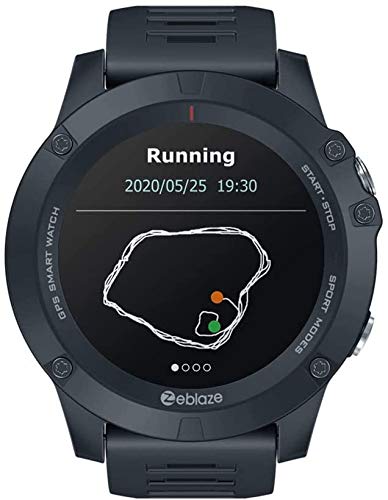
Image: The watch face showing "Running" mode with a visual representation of a GPS-tracked route, indicating the watch's ability to record outdoor activities accurately.
Mòd milti-espò
The watch supports various exercise modes to accurately track your sports activities.
- Access "Sport Modes" from the main menu.
- Choose from a selection of pre-set activities.
- The watch will use its sensors to record relevant data for your chosen activity.

Image: This composite image demonstrates the watch's multi-sport tracking capabilities, showing individuals engaged in various exercises like cycling and rope climbing. It also illustrates the sleep tracking feature, displaying sleep patterns (deep vs. light sleep) on the watch face.
Siveyans dòmi
Wear the watch to bed to automatically track your sleep patterns.
- The watch will record your light sleep, deep sleep, and awake times.
- View detailed sleep analysis and recommendations in the Fundo app.
Notifikasyon entelijan
Once paired with your smartphone, the watch can display notifications.
- Ensure notification permissions are enabled for the Fundo app in your phone's settings.
- Incoming calls, SMS messages, and alerts from selected apps will appear on your watch screen.
- You can dismiss notifications from the watch.

Image: This image highlights the smart notification capabilities of the watch, showing various app icons (WhatsApp, Twitter, Facebook, YouTube, SMS) appearing on the watch face. It also showcases other smart features such as real-time weather, music control, smart alarm clock, timer, remote photography, countdown, and find my phone.
Antretyen
Netwaye Mont Ou
- Regilyèman netwaye ka mont lan ak braslè ak yon mou, damp twal.
- For the charging contacts and heart rate sensor on the back, use a dry cotton swab to gently remove any dust or debris.
- Evite itilize pwodui chimik ki fò oswa materyèl abrazif, paske yo ka domaje mont lan.
Rezistans dlo (IP67)
The Zeblaze Vibe 3 GPS Smart Watch is rated IP67 water resistant. This means it is protected from dust and can withstand immersion in water up to 1 meter for up to 30 minutes.
- It is suitable for daily use, such as hand washing, rain, or splashes.
- Li se pa recommended for swimming, showering with hot water, or diving.
- Avoid exposing the watch to high-pressure water or steam.
- If the watch gets wet, dry it thoroughly before charging.

Image: This image illustrates the extended battery life of the watch, showing different usage scenarios (basic watch mode, daily use mode, continuous GPS). It also emphasizes the IP67 water resistance, depicting the watch being used in water-related activities like kayaking and swimming (though caution is advised for prolonged immersion).
Swen batri
- Pou pwolonje lavi batri a, evite dechaje mont lan nèt souvan.
- Charge the watch using only the provided cable.
- Sere mont lan nan yon kote ki fre epi sèk lè w pa itilize li pou yon bon bout tan.
Depanaj
| Pwoblèm | Solisyon posib |
|---|---|
| Gade pa limen | Asire w ke mont lan chaje nèt. Konekte l nan plato a pou omwen 30 minit. |
| Pa ka konekte ak smartphone la |
|
| Lekti batman kè ki pa kòrèk |
|
| GPS signal not found or inaccurate |
|
| Notifikasyon pa parèt |
|
Espesifikasyon
| Karakteristik | Detay |
|---|---|
| Mak | Zeblaze |
| Modèl | Vibe 3 GPS |
| Ka Dyamèt | Apeprè. 50.5 mm |
| Ka epesè | Apeprè. 15.9 mm |
| Pwa | Apeprè. 56 g |
| Materyèl kò | DLC (Drilling Carbon Coating) |
| Bann Materyèl | 24mm Sport Strap (TPU) |
| Suitable for Wrist Size | 135 - 230 milimèt |
| Ekspozisyon | 1.3'' IPS Full-Round Color Touch Screen |
| Rezolisyon | 240x240 piksèl |
| Platfòm | Nordic 52832 + GPS |
| GPS | GPS/GLONASS |
| Detèktè | Heart-rate sensor, Proximity sensor, Accelerometer |
| Bluetooth vèsyon | Bluetooth 4.0 |
| Batri | 280 mAh |
| Tan pou chaje | Apeprè. 3 èdtan |
| Water & Dust Proof Grade | IP67 |
| Aparèy sipòte | Android 4.4 oswa iOS 9.0 ak pi wo a |
| Aplikasyon | Fundo |

Imaj: Dèyè a view of the Zeblaze Vibe 3 GPS Smart Watch, clearly showing the optical heart rate sensor and charging contacts. This part of the watch rests against the wrist during use.
Garanti ak sipò
For warranty information, please refer to the warranty card included in your product packaging or contact the retailer from whom you purchased the device.
For technical support, software updates, and frequently asked questions, please visit the official Zeblaze websit oswa kontakte sèvis kliyan yo.
Nòt: Battery life may vary based on usage, settings, and many other factors, meaning that actual results may vary.
Ask a question about this manual
Ask about setup, troubleshooting, compatibility, parts, safety, or missing instructions. Manuals+ will review the question and use this page’s manual context to help answer it.