
1. Plis paseview
The BLACK+DECKER BCF601AA Alkaline Cordless Screwdriver is designed for quick and efficient driving and removal of screws in various household projects. This compact and versatile tool comes with a 42-piece accessory set, providing a wide range of bits for different applications. Its ergonomic design and integrated features enhance user convenience and productivity.
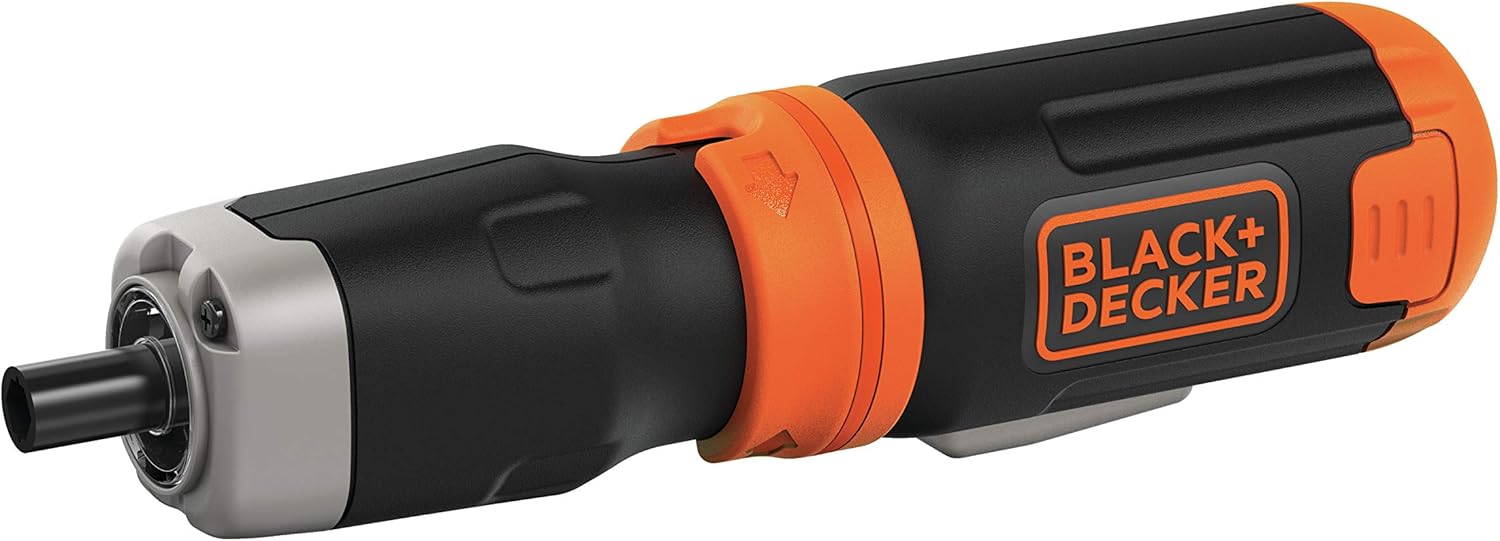
Figure 1: BLACK+DECKER BCF601AA Cordless Screwdriver with a Phillips bit inserted.
Karakteristik kle:
- Vitès 220 RPM: Provides quick driving for various tasks.
- Arbr Ekstansyon: Offers further reach for accessing tight or recessed areas.
- Limyè ki ap dirije entegre: Illuminates poorly lit work surfaces for improved visibility.
- Ideal Sizes: Includes a variety of 1-inch screwdriver bits suitable for frequent use and installation projects.
- Magnetic Drive Guide: Helps to hold screws in place for easier starting.
2. Enstalasyon
2.1 Enstalasyon batri
The BLACK+DECKER BCF601AA screwdriver operates on four (4) AA alkaline batteries. To install or replace batteries:
- Locate the battery compartment at the base of the screwdriver handle.
- Squeeze the two pressure points on the sides of the battery compartment cover and pull it downwards to remove.
- Insert four (4) fresh AA alkaline batteries, ensuring correct polarity (+/-) as indicated inside the compartment.
- Glise kouvèti konpatiman batri a tounen nan plas li jiskaske li fè yon klik byen fèm.
2.2 Bit Insertion
The screwdriver uses standard 1-inch hex shank bits. To insert a bit:
- Select the appropriate bit from the 42-piece accessory set for your task.
- Simply push the bit firmly into the chuck at the front of the screwdriver until it is seated. The bits are held in place by friction.
- To remove a bit, pull it straight out from the chuck.

Figure 2: The included 42-piece screwdriver bit set.
3. Operasyon Enstriksyon
3.1 Limen/Etenn ak Kontwòl Direksyon
The screwdriver features a simple two-button control for operation and direction:
- Peze a gòch bouton to rotate the bit counter-clockwise (for unscrewing).
- Peze a bouton dwat to rotate the bit clockwise (for screwing).
- Release the button to stop the rotation.
3.2 Sekirite Lock
To prevent accidental activation, the screwdriver is equipped with a safety lock mechanism. This is typically a collar or switch near the chuck:
- Rotate the collar to the 'locked' position (often indicated by a padlock symbol) when not in use or during storage. This will prevent the buttons from being pressed.
- Rotate the collar to the 'unlocked' position to enable the forward/reverse buttons for operation.
3.3 Limyè LED entegre
The screwdriver includes an LED light to illuminate your work area:
- The LED light automatically activates when either the forward or reverse button is pressed, providing visibility in dimly lit spaces.

Figi 3: Side view of the screwdriver, highlighting its compact design.
3.4 Using the Extension Shaft
For tasks requiring extended reach or access to confined areas, the screwdriver features an extension shaft:
- To attach the extension shaft, align it with the chuck and push it firmly until it locks into place.
- Insert your desired screwdriver bit into the end of the extension shaft.
- To remove the extension shaft, pull it firmly away from the screwdriver.

Figure 4: Screwdriver with the extension shaft for increased reach.
4. Antretyen
4.1 Netwayaj
- Kenbe fant vantilasyon zouti a pwòp pou anpeche li chofe twòp.
- Sèvi ak yon mou, damp cloth to clean the exterior of the screwdriver. Do not use harsh chemicals or abrasive cleaners.
- Asire w ke zouti a sèk anvan ou sere l.
4.2 Swen Batri
- Always use high-quality alkaline batteries for optimal performance.
- Remove batteries from the tool if it will not be used for an extended period to prevent leakage.
- Jete pil yo itilize yon fason responsab selon règleman lokal yo.
4.3 Bit Care
- Store screwdriver bits in their provided case to keep them organized and prevent loss or damage.
- Replace worn or damaged bits to ensure efficient and safe operation.
NAN. Depanaj
Pwoblèm komen ak solisyon:
- Screwdriver not turning on:
- Check if the safety lock is disengaged.
- Asire w ke pil yo enstale kòrèkteman ak polarite apwopriye.
- Replace old or depleted batteries with fresh ones.
- Bit slipping or not engaging screw:
- Ensure the correct bit type and size are used for the screw head.
- Check if the bit is fully inserted into the chuck or extension shaft.
- Replace worn or damaged bits.
- Rediksyon nan puisans oswa vitès:
- Pil yo ka fèb; ranplase yo.
- Ensure the tool is not being overloaded with tasks beyond its intended capacity.
6. Espesifikasyon
| Karakteristik | Detay |
|---|---|
| Mak | BLACK+DECKER |
| Non modèl | BCF601AA |
| Sous pouvwa | Alkaline Batteries (4 x AA) |
| Vitès | 220 RPM |
| Jwèt Head Style | Flat, Phillips |
| Materyèl | Metal, Plastik |
| Koulè | Nwa |
| Karakteristik espesyal | Cordless, Integrated LED Light, Extension Shaft, Magnetic Drive Guide |
| Itilizasyon Rekòmande | Amelyorasyon Kay |
7. Garanti ak sipò
For warranty information, technical support, or service inquiries, please refer to the documentation included with your product or visit the official BLACK+DECKER websit la. Kenbe resi acha ou kòm prèv acha pou reklamasyon garanti.
Ou ka jwenn plis enfòmasyon ak enfòmasyon pou kontakte yo sou Magazen BLACK+DECKER sou Amazon.