
1. Entwodiksyon
This manual provides essential information for the safe and efficient use of your Amazon Fire HD 10 tablet (2021 release). Please read it thoroughly before operating your device.
Karakteristik kle
- Fast and Responsive: Powered by an octa-core processor and 3 GB RAM, offering 50% more RAM than the previous generation.
- Batri ki dire lontan: Up to 12 hours of battery life for reading, browsing, video, and music.
- Ekspozisyon vivan: 10.1-inch 1080p Full HD display, 10% brighter than the previous generation, with over 2 million pixels.
- Ampdepo: Available with 32 GB or 64 GB internal storage, expandable up to 1 TB with a microSD card (sold separately).
- Aplikasyon konpatibilite: Access to popular apps like Netflix, Facebook, Disney+, Instagram, TikTok, and more via Amazon’s Appstore.
- Zouti pwodiktivite: Supports apps like Microsoft Office, OneNote, and Dropbox for enhanced productivity.
- Konsepsyon dirab: Thinner and lighter than the previous generation, with a screen strengthened by aluminosilicate glass.
- Fonksyonalite ekran divize: Allows two compatible apps to be open side-by-side for multitasking.
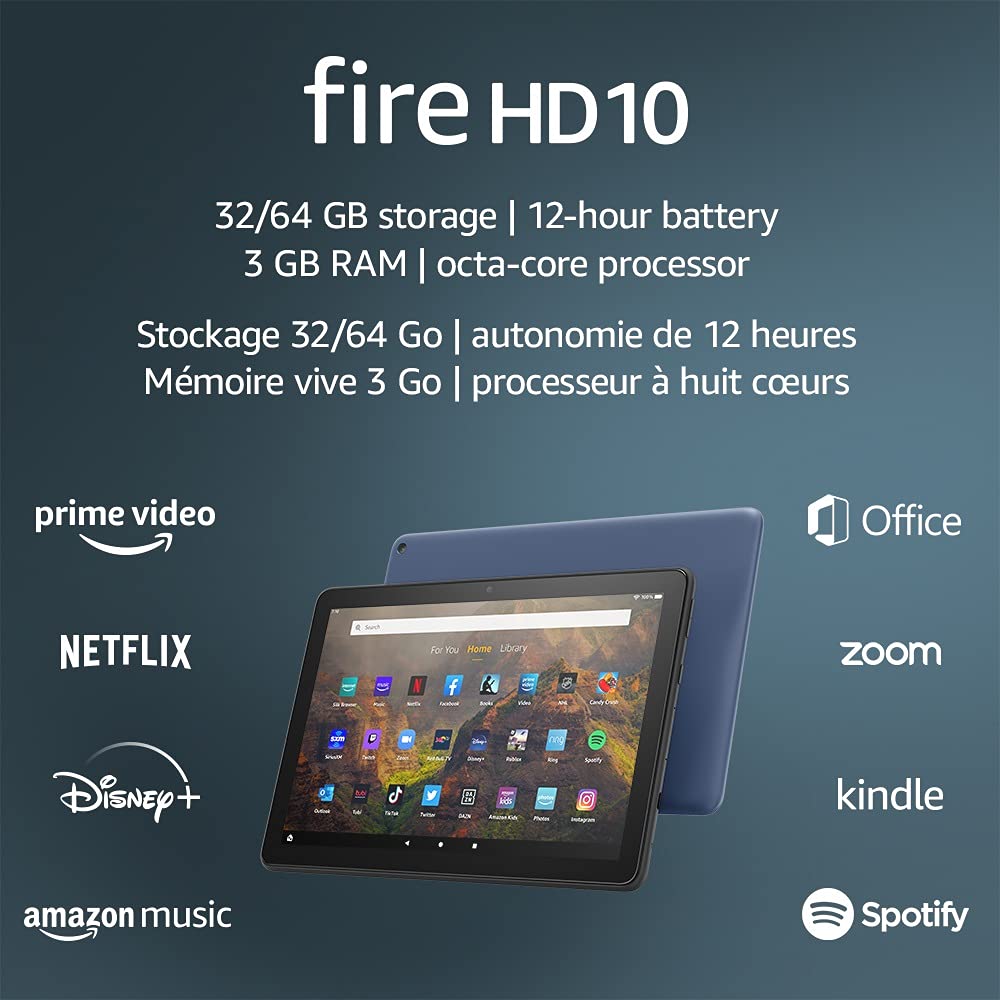
Image 1.1: The Amazon Fire HD 10 tablet highlighting its 32/64 GB storage, 12-hour battery, 3 GB RAM, and octa-core processor, alongside logos of supported applications such as Prime Video, Netflix, Disney+, Amazon Music, Office, Zoom, Kindle, and Spotify.
2. Enstalasyon
2.1 Debale ak Premye Chajman
Upon receiving your Fire HD 10 tablet, carefully remove all components from the packaging. Before first use, it is recommended to fully charge the device.
- Connect the provided USB-C (2.0) cable to the tablet's USB-C port.
- Plug the other end of the USB-C cable into the 9W power adapter.
- Ploge adaptè pouvwa a nan yon priz miray.
- A full charge from 0% to 100% typically takes approximately 4 hours while the device is in standby mode.
2.2 Limen/Etenyen
- Pou limen: Peze epi kenbe bouton pouvwa a ki sitiye sou kote tablèt la jiskaske logo Amazon an parèt sou ekran an.
- Pou etenn: Press and hold the power button until a power options menu appears. Select 'Power Off'.
- Pou rekòmanse: Nan meni opsyon pouvwa a, chwazi 'Rekòmanse'.
2.3 Koneksyon Wi-Fi
To access online content and services, connect your Fire HD 10 to a Wi-Fi network.
- Sou ekran prensipal la, glise anba soti anwo pou ouvri panèl Anviwònman rapid yo.
- Tape icon nan Wi-Fi.
- Chwazi rezo Wi-Fi ou vle a nan lis rezo ki disponib yo.
- Si yo mande w, antre modpas rezo a epi tape sou 'Konekte'.
- The tablet supports 2.4 GHz and 5.0 GHz networks. Ad-hoc (peer-to-peer) Wi-Fi networks are not supported.
2.4 Konfigirasyon Kont
During the initial setup process, you will be guided to register your Fire HD 10 to an Amazon account. This is necessary to download apps, access Amazon content, and utilize cloud services.
- Follow the on-screen prompts to sign in with an existing Amazon account or create a new one.
- Ensure your account details are accurate for full functionality.
3. Operasyon Enstriksyon
3.1 Navige nan Entèfas la
The Fire HD 10 tablet features a touch-sensitive display for interaction.
- Tape: To select an item, open an app, or activate a button.
- Glise: Pou defile nan paj, lis, oubyen chanje ant ekran prensipal yo.
- Zoom-pou-Zoom: Pou agrandi oswa diminye imaj yo, web paj, oubyen dokiman.
- Long Press: Pou jwenn aksè nan meni kontèkstal yo oubyen deplase ikòn aplikasyon yo.
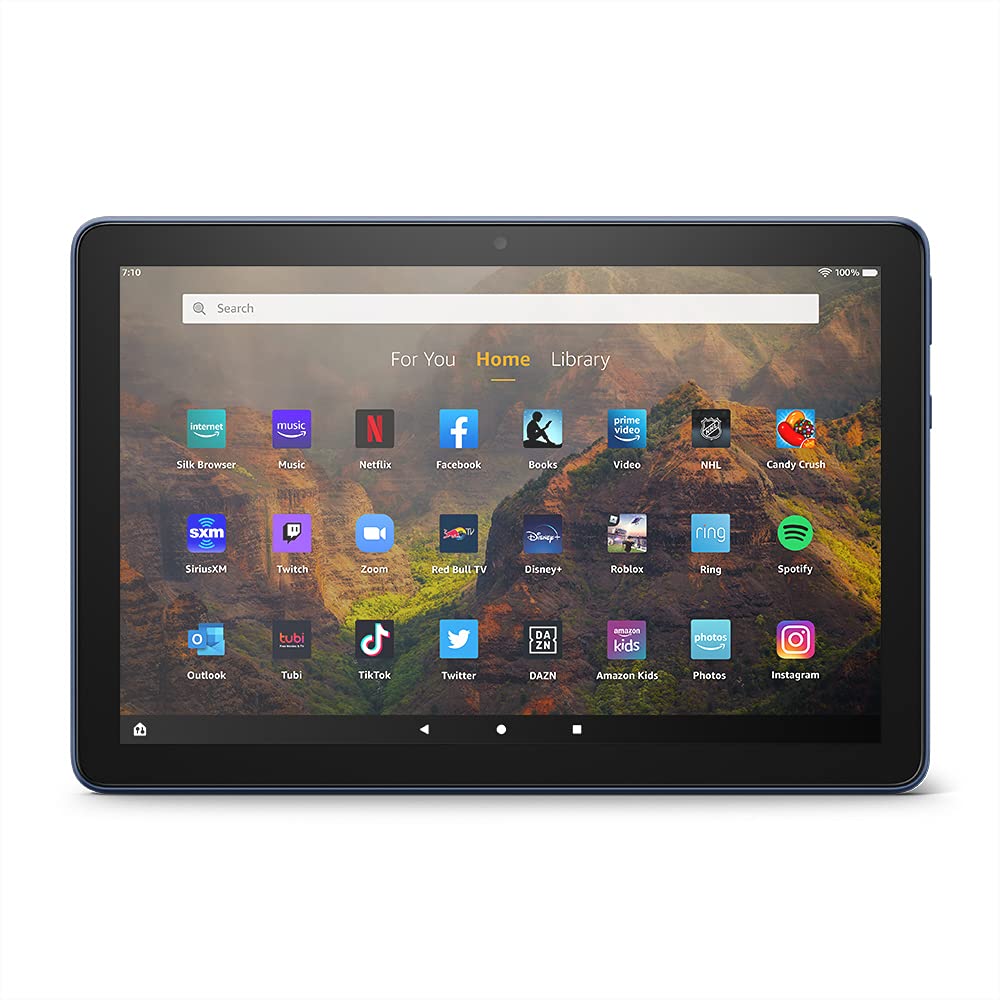
Image 3.1: The Amazon Fire HD 10 tablet's home screen, showcasing a grid of application icons including Silk Browser, Music, Netflix, Facebook, Books, Video, NHL, Candy Crush, SiriusXM, Twitch, Zoom, Red Bull TV, Disney+, Roblox, Ring, Spotify, Outlook, Tubi, TikTok, Twitter, DAZN, Amazon Kids, Photos, and InstagRAM.
3.2 Itilizasyon Aplikasyon yo
Applications can be downloaded from the Amazon Appstore. Google Play is not supported.
- Tap an app icon on the Home screen to launch it.
- To find new apps, open the 'Appstore' application.
- Some apps may require a subscription for full access.

Image 3.2: A collage of content available on the Amazon Fire HD 10 tablet, featuring book covers like 'The Silent Patient', Amazon Original series and movies such as 'The Wilds', 'Coming to America', 'The Expanse', 'Dune', 'Hanna', 'One Night in Miami', 'Sound of Metal', 'The Marvelous Mrs. Maisel', 'Upload', and 'The Boys', alongside social media app logos for TikTok, Facebook, and Twitter.
3.3 Split Screen Multitasking
The Fire HD 10 supports split screen functionality, allowing two compatible applications to run side-by-side.
- Louvri premye aplikasyon ou vle itilize a.
- Swipe up from the bottom of the screen to reveal the navigation bar.
- Peze lontan sou ikòn premye aplikasyon an nan aplikasyon ki sot pase yo view.
- Select 'Split Screen' from the options.
- Choose a second compatible app from your recent apps or app drawer to fill the other half of the screen.

Image 3.3: The Amazon Fire HD 10 tablet, shown with an optional Bluetooth keyboard case, demonstrating its split-screen capability. Two applications are open simultaneously: a calendar app on the left and a messaging app on the right, illustrating enhanced productivity.
3.4 Itilizasyon Kamera
The tablet is equipped with a 2 MP front-facing camera and a 5 MP rear-facing camera, both capable of 720p HD video recording.
- Open the 'Camera' app from your Home screen or app drawer.
- Tape bouton deklanchè a pou pran yon foto.
- Chanje ant kamera devan ak dèyè a lè w sèvi ak ikòn aktive/dezaktive kamera a.
- Chwazi mòd videyo pou anrejistre videyo.
3.5 Audio and Bluetooth
The Fire HD 10 includes dual integrated speakers and a 3.5 mm stereo jack for headphones. It also supports Bluetooth 5.0 LE.
- Connect wired headphones or external speakers via the 3.5 mm jack.
- To pair Bluetooth devices (headphones, speakers, microphones, LE accessories):
- Go to 'Settings' > 'Connected Devices' > 'Bluetooth'.
- Asire Bluetooth aktive.
- Select your device from the list of available devices and follow pairing instructions.
3.6 Jesyon Depo
Your Fire HD 10 comes with either 32 GB or 64 GB of internal storage. You can expand this by up to 1 TB using a microSD card.
- To insert a microSD card: Locate the microSD slot on the side of the tablet, open the cover, and gently insert the card until it clicks into place.
- Manage storage by going to 'Settings' > 'Storage'. Here you can view usage and move compatible apps or media to the microSD card.
4. Antretyen
4.1 Swen Batri
- Avoid exposing the tablet to extreme temperatures, as this can degrade battery performance.
- Pou yon batri ki dire pi lontan, evite vide batri a nèt souvan oubyen evite kite l a 100% chaj pandan yon bon bout tan.
- Use only the provided 9W power adapter and USB-C cable for charging.
4.2 Netwaye Aparèy la
- Turn off the tablet before cleaning.
- Sèvi ak yon twal mou ki pa gen pousyè pou siye ekran an ak kò a dousman.
- Pou tach ki difisil pou retire, yon ti kras dampen the cloth with water. Avoid using harsh chemicals, abrasive cleaners, or aerosol sprays.
4.3 Mizajou lojisyèl
Amazon periodically releases software updates to improve performance and add new features. Ensure your device is connected to Wi-Fi to receive these updates.
- Updates are typically downloaded and installed automatically.
- You can manually check for updates by going to 'Settings' > 'Device Options' > 'System Updates'.
NAN. Depanaj
5.1 Aparèy la pa reponn
- If the device is frozen or unresponsive, press and hold the power button for approximately 20 seconds to force a restart.
- Ensure the device has sufficient battery charge. Connect it to the charger and try powering it on again.
5.2 Pwoblèm Koneksyon Wi-Fi
- Verify that Wi-Fi is enabled in Quick Settings or 'Settings' > 'Wireless'.
- Ensure you are within range of your Wi-Fi router.
- Rekòmanse routeur Wi-Fi ou a ak modèm ou a.
- Forget the network in 'Settings' > 'Wireless' and reconnect, re-entering the password if necessary.
5.3 Aplikasyon ki kraze oswa ki pa chaje
- Fèmen epi relouvri aplikasyon an.
- Clear the app's cache: Go to 'Settings' > 'Apps & Games' > 'Manage All Applications', select the problematic app, and tap 'Clear Cache'.
- Asire w ke lojisyèl tablèt ou a ajou.
- Si pwoblèm nan pèsiste, konsidere dezinstale epi reenstale aplikasyon an.
5.4 Batri ki dire lontan
- Diminye klète ekran an.
- Fèmen aplikasyon ou pa itilize k ap fonksyone nan background nan.
- Etenn Wi-Fi a oswa Bluetooth la lè w pa ap itilize li.
- Limite itilizasyon done an background pou aplikasyon yo.
- Check 'Settings' > 'Battery' to identify apps consuming the most power.
6. Espesifikasyon
| Karakteristik | Detay |
|---|---|
| Jenerasyon | 11yèm jenerasyon, lage 2021 |
| Ekspozisyon | Brilliant 10.1” 1080p display (1920 x 1200) with over 2 million pixels (224 ppi). Screen strengthened with aluminosilicate glass. |
| Gwosè | 247mm x 166mm x 9.2mm |
| Pwa | 465 grams (Actual size and weight may vary) |
| CPU & RAM | Octa-core 2.0 GHz ak 3 GB RAM |
| Depo | 32 GB (24.2 GB available) or 64 GB (55.0 GB available) internal storage. Expandable up to 1 TB with microSD card. |
| Lavi batri | Up to 12 hours of mixed usage (reading, web, video, music). Varies by settings and usage. |
| Tan chaj | Approx. 4 hours (0-100%) with provided 9W adapter in standby. |
| Koneksyon WiFi | Supports 2.4 GHz and 5.0 GHz networks. Does not support ad-hoc networks. |
| Pò | USB-C (2.0) for charging, microSD slot for external storage. |
| Odyo | 3.5 mm stereo jack, dual integrated speakers, external volume controls. |
| Detèktè | Akseleromèt, detèktè limyè anbyen. |
| Espesifikasyon Kamera | 2 MP front-facing, 5 MP rear-facing cameras with 720p HD video recording. |
| Mikwofòn | 2 mikwofòn entegre. |
| Sèvis Kote yo | Location-based services via WiFi. |
| Koulè ki disponib | Black, Denim. |
| Bluetooth | Built-in Bluetooth 5.0 LE with A2DP support for stereo headphones, speakers, microphone, and LE accessories. |
6.1 Karakteristik Aksè
The Fire HD 10 tablet includes various accessibility features to assist users. These can be accessed via 'Settings' > 'Accessibility'.
- VwaView Lektè ekran: Bay fidbak oral pou itilizatè ki avèg oswa ki gen pwoblèm vizyon.
- Agrandisè ekran: Pèmèt itilizatè yo rale/retresi epi deplase sou ekran an.
- Aksè Chanjman: Enables interaction for users with motor impairments via compatible Bluetooth devices.
- Lekti Kindle awotvwa: Alexa ka li liv Kindle yo awotvwa.
- Montre Anviwònman: Includes options for Closed Captioning, Font Size, Display Size, High Contrast Text, Color Inversion, Color Correction, and Convert Stereo to Mono audio. (Note: Captions are not available for all content.)
7. Garanti ak sipò
7.1 Enfòmasyon sou Garanti
Your Amazon Fire HD 10 tablet comes with a 1-year limited warranty and service. Optional 1-year, 2-year, and 3-year extended warranties are available for purchase separately for customers in Canada.
Use of the Fire HD 10 tablet is subject to Amazon's Conditions of Use and associated terms.
7.2 Enkli nan bwat la
The following items are included with your Fire HD 10 tablet:
- Tablèt Fire HD 10
- Kab USB-C (2.0)
- 9W adaptè pouvwa
- Gid Quick Start
7.3 Plis Sipò
For additional assistance, please visit the Amazon Device Support website or contact Amazon Customer Service.