
1. Entwodiksyon
Thank you for choosing the Ourlife Kids Camera OU-630. This digital camera is designed for children, offering 1080p Full HD video recording, 12MP photo resolution, and a unique 60x macro magnification function for exploring the micro-world. It features a 3.5-inch large screen, various creative filters, games, and music playback. Please read this manual carefully to ensure proper use and maintenance of your camera.
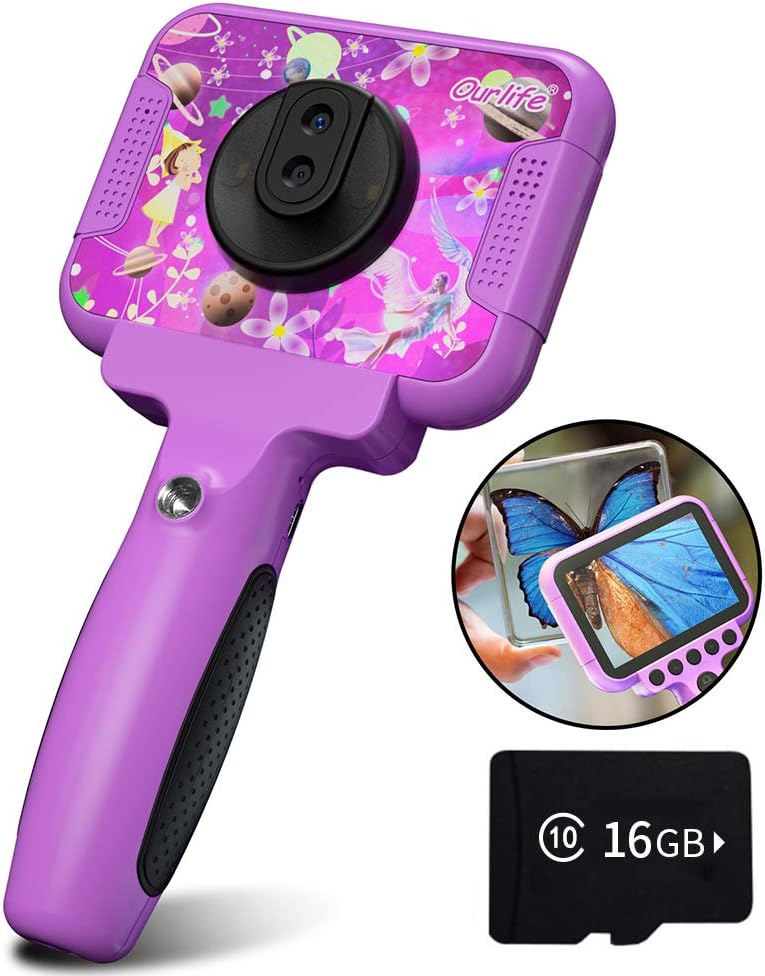
Image 1.1: The Ourlife Kids Camera OU-630, highlighting its design and macro capability.
2. Pake kontni
Tanpri verifye pake a pou asire w ke tout atik yo la:
- Kids Camera x 1
- 16GB TF Card x 1
- Base Bracket x 1
- USB chaje kab x 1
- Manyèl itilizatè x 1
- Neck Lanyard x 1
- Men braslè x 1

Image 2.1: Contents of the Ourlife Kids Camera OU-630 package.
3. Pwodwi souview
Familyarize w avèk konpozan ak kontwòl kamera a:
- Ekspozisyon ekran: 3.5-inch color screen for viewmete foto, videyo, ak navige nan meni yo.
- Lantiy prensipal: For standard photography and video.
- Lantiy Macro: Dedicated lens for 60x magnification.
- Bouton kontwòl: M (Menu), Up, OK, Down, Power, Shutter/LED.
- Manch: Ergonomically designed for child-friendly grip.
- Pò USB: Pou chaje ak transfè done.
- TF Kat plas: Pou mete kat memwa.

Image 3.1: Key features and specifications of the Ourlife Kids Camera OU-630.
Tablo Fonksyon bouton
| Bouton | Mòd kamera | Mòd anrejistreman | Mòd Mizik | Mòd jwèt | Lektur mòd |
|---|---|---|---|---|---|
| M | Retounen nan meni an | ||||
| ▲ | Change filters/Frames Long press: Zoom in | Change filters/Frames | Chante anvan | Deplase agoch | Previous photo |
| OK | Long press: Open/Close LED light | OK | Choose music/story | OK | Jwe / Pòz |
| ▼ | Change filters/Frames Long press: Zoom out | Change filters/Frames | Next chante | Deplase dwat | Pwochen foto |
| ⏻ | Switch to Splicing mode | Retounen nan meni an | NULL | NULL | Efase |
| ◎ | Pran Foto | Retounen nan meni an | NULL | NULL | NULL |
Image 3.2: Detailed functions of each button across different modes.
4. Enstalasyon
4.1. Chaje Kamera a
Before first use, fully charge the camera. Connect the included USB charging cable to the camera's USB port and to a compatible USB power source (e.g., computer, wall adapter). The charging indicator light will show the charging status. A full charge provides approximately 3 hours of use.
4.2. Mete kat TF la
The camera requires a TF (MicroSD) card to store photos and videos. A 16GB TF card is included. Locate the TF card slot on the side of the camera. Gently insert the TF card with the metal contacts facing down until it clicks into place. To remove, push the card in again until it springs out.
5. Operasyon Enstriksyon
5.1. Power On/Off
- Pou pouvwa sou, peze epi kenbe la Power button (⏻) jiskaske ekran an limen.
- Pou koupe pouvwa a, peze epi kenbe Power button (⏻) jiskaske ekran an etenn.
5.2. Navigasyon meni
Sèvi ak la Anlè (▲) epi Desann (▼) buttons to navigate through menu options. Press the bouton OK to confirm a selection. Press the M (Meni) bouton to return to the previous menu or the main menu.
5.3. Pran foto
- Soti nan meni prensipal la, chwazi la Ikòn kamera ak peze OK.
- Ankadre foto ou a lè l sèvi avèk ekran an.
- Peze a Shutter button (◎) pou pran yon foto.
- Sèvi ak la Anlè (▲) epi Desann (▼) buttons to change filters or frames. Long press Anlè (▲) rale nan, peze long Desann (▼) pou rale soti.
5.4. Anrejistreman videyo
- Soti nan meni prensipal la, chwazi la Videyo icon ak peze OK.
- Peze a Shutter button (◎) pou kòmanse anrejistreman.
- Peze a Shutter button (◎) ankò pou sispann anrejistreman.
- Sèvi ak la Anlè (▲) epi Desann (▼) buttons to change filters or frames during recording.
5.5. Fonksyon Makro
The camera features a dedicated macro lens for 60x magnification, ideal for observing small objects. The optimal focal length for macro photography is 20-40mm.
- To switch between the main lens and macro lens, long press the Shutter button (◎).
- When in macro mode, position the camera close to the subject (20-40mm distance).
- Use the included base bracket for stability during macro shots to prevent hand shake.
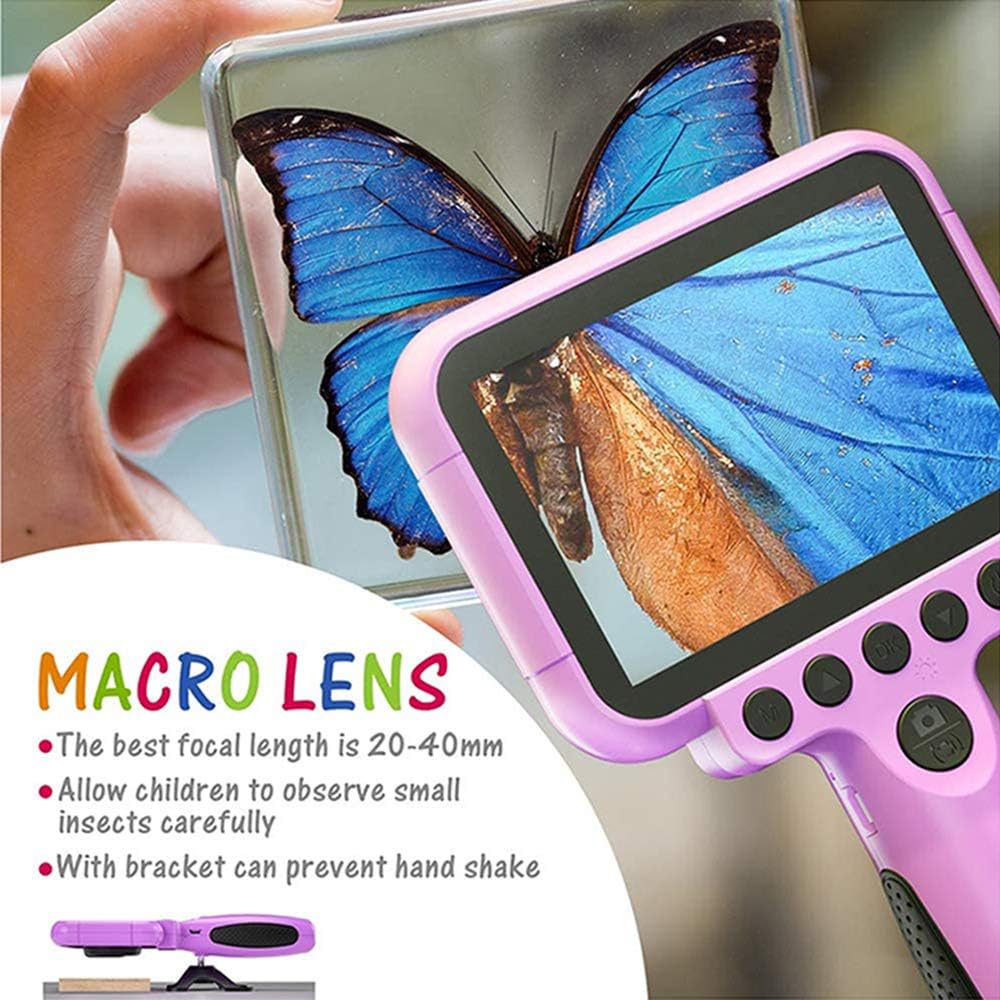
Image 5.1: Demonstrating the macro lens function for detailed observation.

Image 5.2: Switching between HD and Macro lenses.
5.6. Patchwork Mode (Splicing Mode)
This mode allows you to combine two separate photos into one. It includes various border patterns.
- In Camera Mode, press the Power button (⏻) to switch to Splicing (Patchwork) mode.
- Follow the on-screen prompts to take two photos that will be merged.
- Select from 9 available border patterns.

Image 5.3: Using the Patchwork Mode to combine images.
5.7. Mòd Mizik
The camera supports MP3 music playback. Store your favorite music files on the TF card. From the main menu, select the Mizik icon ak peze OK. Sèvi ak la Anlè (▲) epi Desann (▼) buttons to select songs, and OK jwe/poz.
5.8. Jwèt
The camera includes pre-installed games for entertainment. From the main menu, select the Game icon ak peze OK. Use the navigation buttons to play.
5.9. Mode lèktur
Pou view your captured photos and videos, select the Photos/Video Playback icon soti nan meni prensipal la ak peze OK. Sèvi ak la Anlè (▲) epi Desann (▼) buttons to browse, and OK to play videos or view photos. To delete a file, peze la Power button (⏻) pandan viewing li.
5.10. Anviwònman
Access camera settings by selecting the Anviwònman icon from the main menu. Here you can adjust various parameters such as date/time, language, resolution, and more.
6. Antretyen
- Kenbe kamera a pwòp lè w siye l avèk yon twal mou epi sèk.
- Avoid exposing the camera to extreme temperatures, direct sunlight, or moisture.
- Pa eseye demonte oswa repare kamera a tèt ou.
- Ensure the TF card is inserted correctly to prevent data loss.
- Charge the camera regularly to maintain battery health.
NAN. Depanaj
- Kamera pa limen: Asire w batri a chaje. Konekte l nan yon sous kouran epi eseye ankò.
- Pa ka pran foto/videyo: Check if a TF card is inserted and if it has sufficient storage space.
- Move kalite imaj: Ensure the lens is clean. Check lighting conditions. For macro shots, ensure correct focal distance (20-40mm).
- Kamera a bloke: Press and hold the Power button to force a restart.
- TF card error: Reinsert the TF card. If the issue persists, try formatting the card (this will erase all data) or use a different TF card.
8. Espesifikasyon
| Karakteristik | Detay |
|---|---|
| Nimewo Modèl | OU-630 |
| Rezolisyon toujou efikas | 12 MP |
| Rezolisyon videyo | 1080p |
| Gwosè ekran | 3.5 pous |
| Estabilizasyon Imaj | Digital |
| Kalite lantiy | Macro (60x zoom) |
| Kalite batri | 1 Lityòm Polymère (enkli) |
| Koneksyon Teknoloji | USB |
| Kalite medya sipòte | Kat SD |
| Mòd Fiziyad | Loop recording, Continuous shooting, Timed photo, Macro photography, Filter photos |
| Dimansyon atik (D x W x H) | 3.94"D x 7.28"W x 0.79"H |
9. Garanti & Sipò
O sa aurlife Kids Camera OU-630 comes with a 12-mwa garanti from the date of purchase. This warranty covers manufacturing defects and workmanship. It does not cover damage caused by misuse, accidents, unauthorized repairs, or normal wear and tear.
For technical support, warranty claims, or any questions regarding your product, please contact Ourlife customer service. Refer to the contact information provided on the product packaging or the official Ourlsi websit.