
Entwodiksyon
Thank you for choosing the DOOGEE S58 PRO Rugged Smartphone. This manual provides essential information for setting up, operating, maintaining, and troubleshooting your device. Please read it carefully to ensure optimal performance and longevity of your smartphone.
The DOOGEE S58 PRO is designed for durability, featuring IP68/IP69K water and dust resistance, and a robust build to withstand challenging environments.
Kontni pake
Asire w tout atik yo prezan nan pake pwodwi w la:
- DOOGEE S58 PRO rezistan Smartphone
- Kalite-C USB kab
- Type-C to 3.5mm Headphone Adapter
- Charger
- Anti-explosion Film (Screen Protector)
- Card Slot Opener
- Fistibal
- Manyèl Itilizatè (dokiman sa a)
Aparèy souview
The DOOGEE S58 PRO is built with a rugged design for enhanced durability. Its construction includes multiple rigid layers and a silicone liner for exceptional shock absorption, similar to materials used in off-road vehicle tires.

Imaj: Devan ak dèyè view of the DOOGEE S58 PRO, highlighting its rugged construction and IP68 rating. The design incorporates elements for shock absorption.
Gid Enstalasyon
1. Chaje batri a
Before first use, fully charge the device. Connect the Type-C USB cable to the phone's charging port and the other end to the provided charger. Plug the charger into a power outlet. The 5180mAh battery typically provides 2-3 days of normal use on a full charge.

Imaj: Diagram illustrating the internal 5180mAh battery of the DOOGEE S58 PRO, with indicators for standby, music, video, calling, and gaming durations.
2. Enstale Kat SIM ak Kat MicroSD
Locate the SIM card tray on the side of the phone. Use the provided card slot opener to eject the tray. Insert your Nano-SIM cards and/or a MicroSD card (for expandable storage up to 256GB) into the designated slots. Ensure the cards are correctly oriented. Carefully reinsert the tray until it clicks into place. The SIM card slot is protected by an O-ring for water resistance.
3. Powering On / Off
- Pou limen: Peze epi kenbe bouton Pouvwa a jiskaske logo DOOGEE a parèt.
- To power off: Press and hold the Power button, then select "Power off" from the options on the screen.
4. Inisyal Enstalasyon
Upon first power-on, follow the on-screen instructions to set up your device. This includes selecting your language, connecting to a Wi-Fi network, setting up your Google account, and configuring security features.
Enstriksyon Operasyon
1. Sistèm operasyon Android 10
Your DOOGEE S58 PRO runs on Android 10.0, offering a user-friendly interface and access to a wide range of applications via the Google Play Store. Navigate using gestures or the traditional navigation bar.
2. Pèfòmans ak Depo
Equipped with 6GB RAM and 64GB ROM, powered by an efficient MediaTek Helio P22 octa-core CPU, the S58 PRO ensures smooth operation for browsing, video playback, and 3D gaming. The internal storage can be expanded up to 256GB using a MicroSD card.

Imaj: Visual representation of the DOOGEE S58 PRO's 6GB RAM and 64GB ROM, emphasizing its fluid and speedy performance for various applications.
3. Karakteristik Kamera
The S58 PRO features a versatile camera system:
- Kamera dèyè: 16MP AI Triple Camera (SONY IMX298 main sensor) with additional 2MP Portrait and 2MP Macro lenses.
- Kamera devan: 16MP (SAMSUNG sensor).
- Mòd Kamera Anba Dlo: Utilize this mode for capturing photos and videos in aquatic environments, leveraging the phone's IP68 rating.

Imaj: Depiction of the DOOGEE S58 PRO's camera setup, including the 16MP AI Triple Rear Camera and 16MP Front Camera, along with examples of photos taken with the main, portrait, and macro lenses.
4. Navigasyon ak Konektivite
- Global Navigation Systems: The S58 PRO supports GPS, Galileo, Glonass, and Beidou for precise positioning, ensuring you can find your way anywhere.
- Wireless NFC: For convenient contactless payments and data exchange.
- Koneksyon: Supports 4G and 3G cellular networks, Wi-Fi, and Bluetooth.

Imaj: A collage showing the DOOGEE S58 PRO's support for four satellite navigation systems (GPS, Galileo, Glonass, Beidou), wireless NFC functionality, and a selection of pre-installed utility tools like Compass, Sound Meter, and Magnifier.
5. Custom Key and Utility Tools
The device includes a customizable physical key for quick access to frequently used apps or functions. Additionally, a suite of outdoor utility tools is pre-installed, including Compass, Sound meter, Pic hanging, Gradienter, Height measure, Magnifier, Protractor, Plumb bob, and Warning.
Antretyen ak Swen
1. Rezistans kont dlo ak pousyè
The DOOGEE S58 PRO is IP68 and IP69K certified, meaning it is resistant to submersion up to 1 meter underwater for 24 hours and can withstand high-pressure, high-temperature water jets. It also meets MIL-STD-810G standards for durability.
- Ensure all port covers (USB-C, SIM tray) are securely closed before exposing the phone to water or dust.
- If the phone gets wet, wipe it dry with a clean cloth before charging or opening any ports.
- Evite ekspoze telefòn nan nan tanperati ekstrèm ki pa nan limit fonksyònman li (-55°C a 70°C).
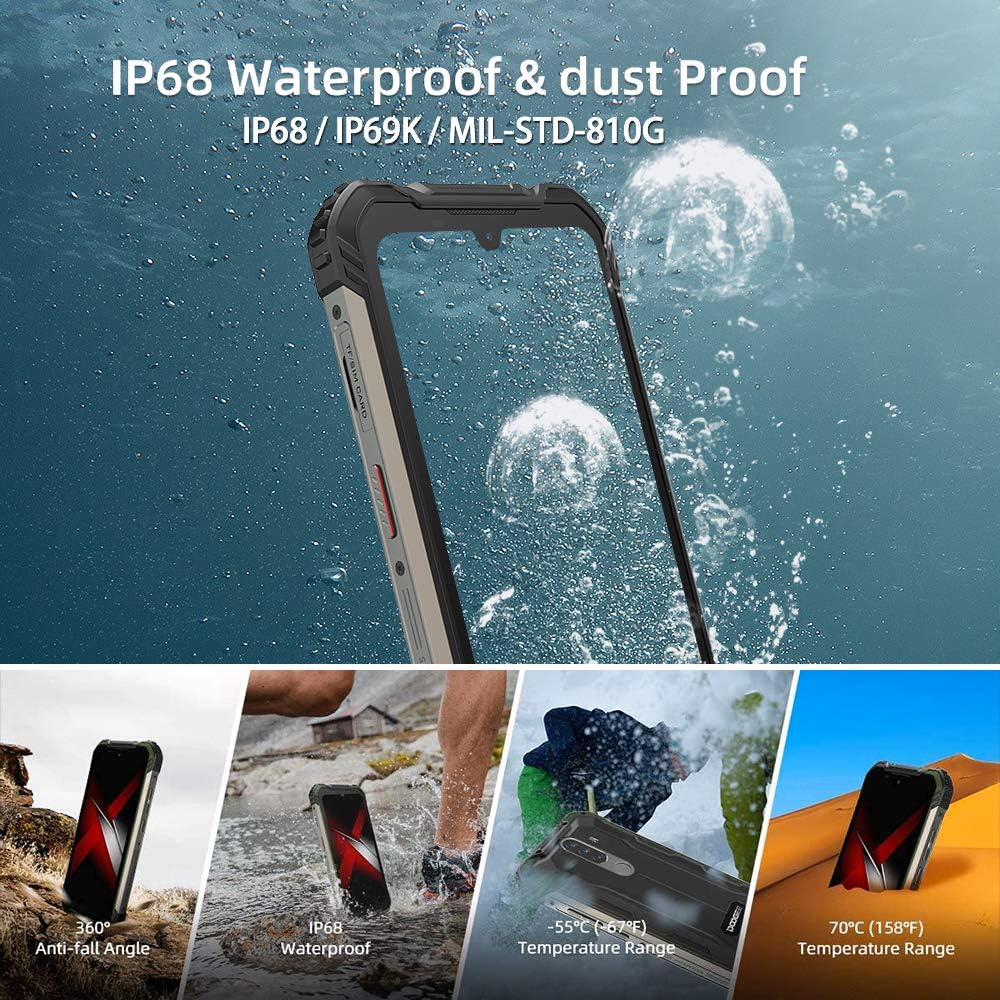
Imaj: Visual demonstration of the DOOGEE S58 PRO's IP68 waterproof and dustproof capabilities, including resistance to drops, water immersion, and extreme temperatures ranging from -55°C to 70°C.
2. Netwayaj
Netwaye aparèy la ak yon mou, damp cloth. Avoid using harsh chemicals or abrasive materials, which can damage the phone's protective coatings.
3. Swen batri
To prolong battery life, avoid fully discharging the battery frequently. Charge the phone using only the provided charger and cable. Extreme temperatures can affect battery performance and lifespan.
Depanaj
If you encounter issues with your DOOGEE S58 PRO, refer to the following common solutions:
- Aparèy pa soumen: Asire w batri a chaje. Konekte chajè a epi tann kèk minit anvan ou eseye limen l ankò.
- Aplikasyon yo ap plante oswa bloke: Close the problematic app and reopen it. If the issue persists, restart the phone. Ensure your apps are updated to their latest versions.
- Siyal rezo pòv: Tcheke si kat SIM ou a byen antre. Deplase nan yon zòn ki gen pi bon rezo.
- Water or dust ingress: If you suspect water or dust has entered the device despite its ratings, power off the phone immediately and allow it to dry completely. Do not attempt to charge it while wet.
- Pwoblèm ekran: If the screen is unresponsive, try restarting the device. Ensure the anti-explosion film (screen protector) is correctly applied and not interfering with touch sensitivity.
For more complex issues, consider performing a factory reset (back up your data first) or contact customer support.
Espesifikasyon
| Karakteristik | Detay |
|---|---|
| Mak | DOOGEE |
| Modèl | DOOGEE S58 PRO |
| Sistèm operasyon | Android 10.0 |
| Processeur | MediaTek Helio P22 Octa-core CPU |
| RAM | 6 GB |
| Depo Entèn (ROM) | 64 GB (Expandable up to 256GB via MicroSD) |
| Ekspozisyon | 5.71-inch CORNING GORILLA GLASS HD+ Waterdrop, 720 x 1520 Resolution |
| Kamera dèyè | 16MP AI Triple Camera (SONY IMX298) + 2MP + 2MP |
| Kamera devan | 16MP (SAMSUNG) |
| Batri | 5180 mAh Lityòm Ion |
| Dlo & Pousyè Rezistans | IP68, IP69K, MIL-STD-810G |
| Dimansyon | 16.28 x 8.1 x 1.59 cm |
| Pwa | 284 g |
| Koneksyon | 4G, 3G, Wi-Fi, Bluetooth, NFC |
| Navigasyon | GPS, Galileo, Glonass, Beidou |
| Tanperati Fonksyònman | -55 ° C a 70 ° C |
Garanti ak sipò
For warranty information, please refer to the warranty card included in your product packaging or contact your point of purchase. Warranty terms and conditions may vary by region and retailer.
If you require technical assistance or have questions not covered in this manual, please contact the seller or DOOGEE customer support through their official websit.