
VILINICE BM-55BXD101
Manyèl Itilizatè Monitè Tibebe VILINICE
Model: BM-55BXD101
Pwodwi souview
The VILINICE 5.5 inch 720P Video Baby Monitor provides a reliable and comprehensive solution for monitoring your baby. Designed with advanced features, it ensures peace of mind for parents through clear video, two-way communication, and smart monitoring modes. This manual will guide you through the setup, operation, and maintenance of your baby monitor system.

Image: The VILINICE Baby Monitor system, featuring the 5.5-inch parent unit and the camera unit.
Karakteristik kle
- 5.5" LCD Screen & 720P HD Image Quality: Provides a high-resolution display for clear viewing of your baby.
- Fonksyonalite Pan & Tilt: Camera can move 270° horizontally and 110° vertically, with 2x zoom, for comprehensive room coverage.
- Pale nan de-fason: Allows for clear audio conversations between the parent unit and the baby's room.
- Smart VOX Mode: Automatically activates the display when sound is detected, conserving battery life.
- Temperature Sensor & Alarm Remind: Monitors room temperature and allows setting of feeding reminders.
- Long lavi batri: Built-in 5000mAh rechargeable battery offers up to 10 hours in display mode and 24 hours in audio-only mode.
- Ranje siyal pwolonje: Real-time transmission monitoring up to 900 feet (150-300 meters).
- Ekspansyon plizyè kamera: Supports connection of up to four cameras.
- Lullabies: Melodi entegre pou kalme tibebe w la.
Kontni pake
Tanpri verifye ke tout atik sa yo enkli nan pakè ou a:
- 1 x VILINICE Baby Monitor Parent Unit (5.5" LCD Display)
- 1 x VILINICE Baby Camera Unit
- 2 x Power Adapters (one for parent unit, one for camera)
- 1 x Mi Mount Support
- 1 x manyèl itilizatè
Enstalasyon
1. Chaje Inite Paran an
Before initial use, fully charge the parent unit. Connect one power adapter to the parent unit's charging port and plug it into a standard electrical outlet. The battery indicator on the screen will show charging progress. A full charge typically takes several hours.
2. Alimente inite kamera a
Connect the second power adapter to the camera unit's power input and plug it into a standard electrical outlet. The camera unit will automatically power on once connected.
3. Pozisyon Kamera a
Place the camera unit in a strategic location that provides an optimal view of your baby's crib or play area. Ensure the camera is placed at a safe distance from the baby and any cords are secured to prevent entanglement. The camera can be placed on a flat surface or mounted to a wall using the provided bracket.
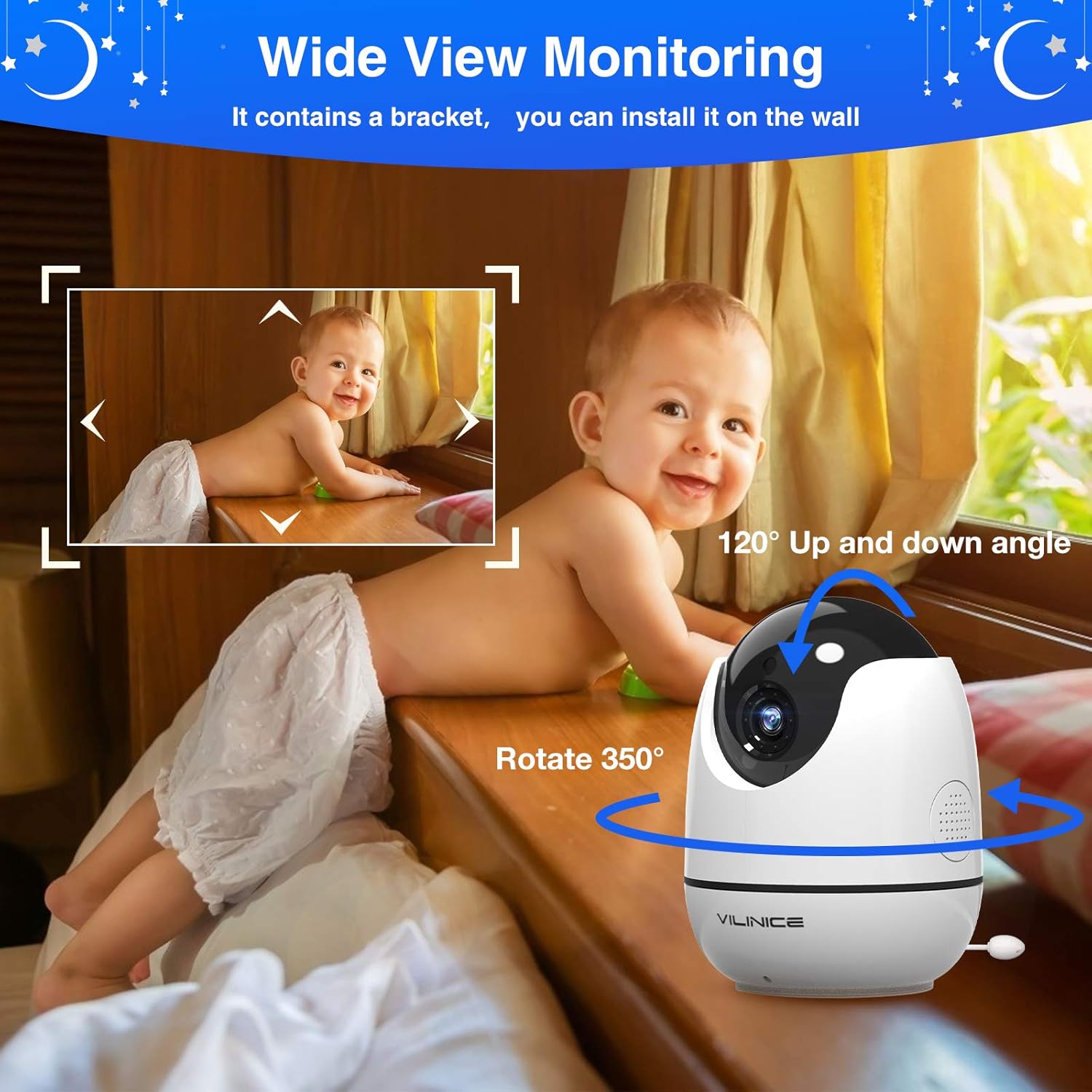
Image: The VILINICE camera unit demonstrating its wall mounting capability for flexible placement.
4. Koneksyon Inisyal
The parent unit and camera unit are pre-paired at the factory. Once both units are powered on and within range, they should automatically connect. If no connection is established, refer to the 'Add Camera' section in the operating instructions to manually pair the units.
Enstriksyon Operasyon
Kontwòl Inite Paran yo
Familiarize yourself with the buttons and functions on the parent unit:
- MENI/OK: Press to access the main menu or confirm a selection.
- CAM: Use to switch between multiple connected cameras.
- Bouton flèch (Anwo/Anba/Agoch/Dwat): Navigate through menu options and control camera pan/tilt.
- ZOOM: Magnify or de-magnify the video image.
- PALE: Press and hold to activate two-way communication with the camera unit.
- POUVWA: Peze epi kenbe pou limen oswa etenn inite paran an.

Imaj: Yon gwo plan view of the VILINICE parent unit, illustrating the control buttons and the 5.5-inch display.
Fonksyon Pale nan de-fason
Pou pale ak tibebe w la, peze epi kenbe bouton an PALE button on the parent unit. Your voice will be transmitted through the camera's speaker. Release the button to hear your baby's sounds.

Image: An illustration depicting the two-way audio conversation feature, showing interaction between the parent unit and the baby.
VOX Mode (Voice Operated eXchange)
The VOX mode helps conserve battery life. When enabled, the parent unit's display will turn off if no sound is detected from the baby's room. The display will automatically reactivate when the camera detects sound above a pre-set sensitivity level. You can adjust the VOX sensitivity (Low, Medium, High) in the parent unit's menu.

Image: A visual explanation of the VOX function, showing the monitor's screen activating upon detecting sound.
Vizyon lannwit
The camera is equipped with infrared LEDs that automatically activate in low-light conditions. This provides a clear black and white image of your baby, even in complete darkness, ensuring continuous monitoring day and night.

Image: A split image demonstrating the clear visibility provided by the night vision feature compared to daytime viewing.
Siveyans Tanperati
The camera unit features a built-in temperature sensor. The current room temperature will be displayed on the parent unit's screen. You can set alerts for temperature ranges in the menu to ensure your baby's comfort.
Rapèl pou manje
Utilize the feeding reminder function in the parent unit's menu to set alarms for scheduled feeding times, helping you maintain a consistent routine for your baby.
Lullabies
Access the lullaby feature through the parent unit's menu to play soothing melodies directly from the camera unit, helping your baby fall asleep.
Antretyen
- Netwayaj: Use a soft, dry, lint-free cloth to clean the camera lens and the parent unit screen. Do not use abrasive cleaners, solvents, or harsh chemicals.
- Vantilasyon: Ensure that the ventilation openings on both the camera and parent units are not blocked by dust or debris to prevent overheating.
- Depo: When not in use for extended periods, store the monitor system in a cool, dry place, away from direct sunlight and extreme temperatures.
- Kondisyon anviwònman: Avoid exposing the units to water, high humidity, or direct heat sources.
Depanaj
| Pwoblèm | Solisyon |
|---|---|
| No picture or sound on parent unit. | Ensure both the parent unit and camera unit are powered on and within range. Check all power connections. Recharge the parent unit battery if it is low. |
| Poor picture quality or weak signal. | Move the parent unit closer to the camera unit. Reduce obstacles such as walls, furniture, or other electronic devices that may cause interference. |
| Parent unit battery drains quickly. | Ensure the unit is fully charged before use. Utilize VOX mode to conserve battery life. Reduce screen brightness in the settings. |
| Two-way talk function not working. | Confirm that the TALK button is pressed and held firmly while speaking. Check the volume levels on both the parent unit and camera. |
| VOX mode is too sensitive or not sensitive enough. | Adjust the VOX sensitivity level (Low, Medium, High) in the parent unit's menu settings to suit your environment. |
| Parent unit screen stopped working. | Try performing a hard reset by disconnecting power from both units, waiting for approximately 30 seconds, then reconnecting. If the issue persists, contact customer support for warranty service. |
| Charging cord does not stay connected to the unit. | Ensure the charging cable is fully inserted and not damaged. Try a different power outlet. If the charging port on the unit appears loose or damaged, contact customer support. |
Espesifikasyon
- Modèl: BM-55BXD101
- Gwosè ekspozisyon: 5.5 pous LCD
- Rezolisyon videyo: 720P HD
- Battery Capacity (Parent Unit): 5000mAh Li-Ion
- Lavi batri: Up to 10 hours (display on), 24 hours (audio only)
- Ranje san fil: 150-300 meters (900 feet)
- Pan / Panche: 270 ° orizontal, 110 ° vètikal
- Koneksyon: Wireless (2.4GHz FHSS for direct connection, not Wi-Fi dependent)
- Karakteristik: Two-Way Talk, VOX Mode, Night Vision, Temperature Sensor, Lullabies, Feeding Reminder, Multi-Camera Support (up to 4 cameras)
- Kalite montaj: Tabletop oswa miray mòn
- Pwa atik: Apeprè 4.79 liv (2.17 kg)
- Dimansyon pake: 7.8 x 7 x 4.5 pous
Garanti ak sipò
The VILINICE Baby Monitor is backed by a 24-mwa garanti from the date of purchase. This warranty covers manufacturing defects and ensures reliable operation of your device.
For any inquiries, technical assistance, or to initiate a warranty claim, please contact VILINICE customer support. Refer to the contact information provided in the original user manual included with your product or visit the official VILINICE websit la pou jwenn dènye enfòmasyon sou sipò a.
Note: When contacting support for warranty claims, it is advisable to keep a record of your communication for reference.
Ask a question about this manual
Ask about setup, troubleshooting, compatibility, parts, safety, or missing instructions. Manuals+ will review the question and use this page’s manual context to help answer it.