
EONCHARM 1315
Manyèl Itilizatè Kontwòl Remot Inivèsèl
Modèl: 1315
Brand: EONCHARM
Entwodiksyon
This manual provides comprehensive instructions for the EONCHARM Universal Remote Control, designed to be compatible with a wide range of Samsung televisions. This remote offers a straightforward, plug-and-play experience, requiring no complex setup or programming. It is an ideal replacement for your original Samsung TV remote, restoring full functionality and convenience.
Karakteristik pwodwi
- Infrared replacement remote compatible with all Samsung Smart TV, LED, LCD, HDTV, and 3D Series TVs.
- Compatible with all Samsung series TVs, including models from 2017 to 2024.
- Simple, compact, and ergonomic design for easy grip and handling.
- No programming or setup required; ready to use out of the box.
- Offers stable performance and farther transmitting distance.
- Includes dedicated shortcut buttons for NETFLIX, Prime Video, and Hulu for quick access to streaming services.
- Replaces various Samsung remote models, including BN59-01315A, BN59-01315J, BN59-01301A, BN59-01175N, BN59-01199F, AA59-00741A, AA59-00786A, AA59-00602A, BN59-01247A, AA59-00743A, BN59-01175B, AA59-00818A, AA59-00603A, BN59-01199G, and others.
Kontni pake
- 1 x EONCHARM Universal Remote Control (Model 1315)
Remak: Pil AAA yo pa enkli epi yo dwe achte separeman.
Enstalasyon
Enstalasyon batri
- Jwenn lòj batri a sou do a nan kontwòl remote la.
- Glise kouvèti batri a anba oswa nan direksyon flèch la endike a pou ouvri li.
- Mete de (2) pil AAA, asire w ke tèminal pozitif (+) ak negatif (-) yo byen aliyen ak mak ki anndan konpatiman an.
- Remèt kouvèti batri a lè w glise l tounen nan plas li jiskaske li fè yon klik byen fèm.
Once batteries are installed, the remote is ready for immediate use with compatible Samsung TVs. No pairing or programming is required.

Enstriksyon Operasyon
The EONCHARM Universal Remote Control features a standard layout with clearly labeled buttons for intuitive operation. Below is a guide to the primary functions of each button.
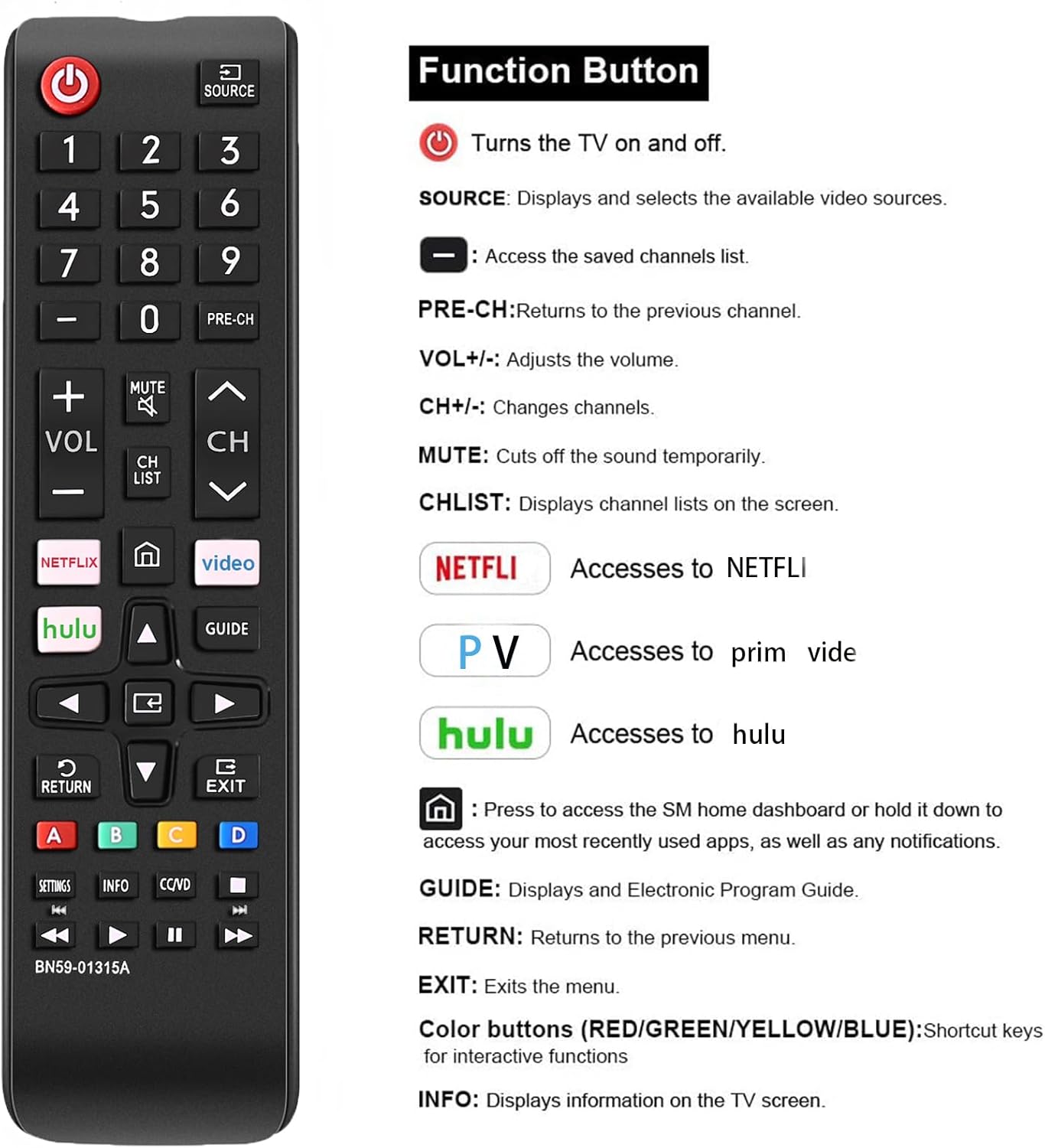
| Bouton | Fonksyon |
|---|---|
| POUVWA (⏻) | Vire televizyon an sou yo ak sou. |
| SOUS | Displays and selects available video sources (e.g., HDMI 1, AV, TV). |
| Bouton nimewo (0-9) | Antre nimewo chanèl yo dirèkteman. |
| PRE-CH | Retounen nan chanèl anvan an. |
| VOL +/- | Ajiste nivo volim. |
| CH ^/v | Chanje chanèl monte oswa desann. |
| BÈN | Cuts the sound temporarily. |
| LIS CH | Displays channel lists on the screen. |
| NETFLIX | Directly accesses the NETFLIX application. |
| Premye Videyo | Directly accesses the Prime Video application. |
| Hulu | Directly accesses the Hulu application. |
| Lakay (⌂) | Press to access the Smart Hub home dashboard or hold it down to access your most recently used apps, as well as any notifications. |
| Flèch Navigasyon (Anwo, Anba, Agoch, Adwat) | Navige nan meni ak opsyon. |
| ANTRE | Konfime seleksyon yo. |
| GID | Displays the Electronic Program Guide (EPG). |
| TOUNEN | Retounen nan meni oswa ekran anvan an. |
| Sòti | Kite meni oswa aplikasyon aktyèl la. |
| Bouton koulè (A, B, C, D) | Shortcut keys for interactive functions, specific to TV content or applications. |
| PARAMÈT | Aksè nan meni paramèt televizyon an. |
| ENFO | Montre enfòmasyon sou pwogram oswa kontni aktyèl la. |
| CC/VD | Activates Closed Captions/Video Description. |
| Bouton Kontwòl Medya (Jwe, Pòz, Sispann, Remonte, Avanse rapid) | Kontwole lèktur medya yo. |

Konpatibilite
This EONCHARM Universal Remote Control is designed for broad compatibility with Samsung televisions. It supports:
- All Samsung Smart TV models.
- Samsung LCD, LED, HDTV, and 3D Series TVs.
- Samsung TVs from various years, including 2017, 2018, 2019, 2020, 2021, 2022, 2023, and 2024 series.
- Common screen sizes such as 43, 50, 55, 58, 65, and 75 inches.
It is a direct replacement for many original Samsung remote models, ensuring seamless integration without the need for complex setup procedures.


Antretyen
Ranplasman batri
When the remote control's performance degrades (e.g., reduced range, unresponsive buttons), it is likely time to replace the batteries. Follow the battery installation steps outlined in the Setup section.
Netwayaj
Pou netwaye kontwòl remote la, sèvi ak yon twal mou epi sèk. Pou pousyè tè ki difisil pou retire, siye l yon ti kras.ampen the cloth with water or a mild, non-abrasive cleaner. Do not use harsh chemicals or abrasive materials, as these can damage the remote's surface or internal components. Avoid getting moisture into the battery compartment or any openings.
Depo
Store the remote control in a cool, dry place away from direct sunlight, extreme temperatures, and high humidity. If the remote will not be used for an extended period, it is advisable to remove the batteries to prevent leakage and potential damage.
Depanaj
- Remote pa reponn:
- Asire w ke pil yo byen mete ak polarite ki kòrèk la.
- Ranplase pil ki fin vye oswa ki fin itilize yo ak nouvo pil AAA.
- Asire w pa gen okenn obstak ant telekòmand lan ak detèktè enfrawouj televizyon an.
- Dirije telekòmand lan dirèkteman nan direksyon detèktè televizyon an.
- Bouton yo kole oswa yo pa reponn:
- Netwaye kontwòl remote la jan sa dekri nan seksyon Antretyen an.
- If the issue persists after cleaning and battery replacement, the remote may be damaged and require replacement.
- Remote controls some functions but not others:
- Verify that your TV model is a Samsung TV. This remote is specifically designed for Samsung TVs.
- Ensure the TV's firmware is up to date, as some older TVs might have limited compatibility with newer remote features.
Espesifikasyon
| Karakteristik | Detay |
|---|---|
| Dimansyon pwodwi | 2.36 x 1.97 x 3.1 pous |
| Pwa atik | 2.11 ons |
| Nimewo Modèl | 1315 |
| Batri obligatwa | 2 pil AAA (pa enkli) |
| Mak | EONCHARM |
| Karakteristik espesyal | Ergonomik konsepsyon |
| Koulè | Nwa |
| Max Kantite Aparèy Sipòte | 50 (refers to internal capability, designed for Samsung TVs) |
| Aparèy konpatib | Television (Samsung TVs) |
Garanti ak sipò
For information regarding warranty coverage or technical support, please refer to the product packaging or contact the retailer from whom you purchased the EONCHARM Universal Remote Control. Keep your proof of purchase for any warranty claims.
Ask a question about this manual
Ask about setup, troubleshooting, compatibility, parts, safety, or missing instructions. Manuals+ will review the question and use this page’s manual context to help answer it.