
1. Entwodiksyon
Welcome to your new qunyiCO Y10 Android Tablet. This manual provides essential information for setting up, operating, and maintaining your device. Please read it thoroughly to ensure optimal performance and longevity.
Enfòmasyon sou Sekirite
- Do not expose the tablet to extreme temperatures or direct sunlight.
- Avoid dropping or subjecting the tablet to strong impacts.
- Sèvi ak sèlman plato ak Pwodwi pou Telefòn yo bay la.
- Keep the tablet away from water and other liquids.
- Do not attempt to disassemble or repair the tablet yourself.
2. Pwodwi souview
Konpozan fizik yo
The qunyiCO Y10 tablet features a sleek design with essential ports and buttons for ease of use.
Devan View

This image shows the front of the qunyiCO Y10 tablet, highlighting its 10.1-inch IPS HD display.
Dèyè View

This image displays the back of the qunyiCO Y10 tablet, featuring the rear camera and the qunyiCO logo.
Bouton ak pò
Familiarize yourself with the location of key controls and connections.
An illustrative diagram highlighting key features such as Android 10.0, Quad-core CPU, 5000mAh battery, 10.1-inch display, 2.4GHz Wi-Fi, Dual Camera, 2GB RAM + 32GB ROM, and 1280x800 IPS HD.
- Power/Volume Buttons: Located on the side for power on/off and volume control.
- Kas ekoutè Jack: Standard 3.5mm audio output.
- Plas kat SD: Pou depo ekspansyon jiska 128GB.
- Pò chaje: Pò mikwo USB pou chaje.
- Kamera: 2MP front camera and 8MP rear camera.
3. Enstalasyon
Inisyal chaje
Before first use, fully charge your tablet using the provided power adapter.
Power On/Off
- Pouvwa sou: Press and hold the Power button until the qunyiCO logo appears.
- Pouvwa Off: Peze epi kenbe bouton Power la, answit chwazi "Power off" nan opsyon yo.
- Rekòmanse: Peze epi kenbe bouton Pouvwa a, answit chwazi "Rekòmanse" nan opsyon yo.
Premye fwa Enstalasyon
Swiv enstriksyon ki parèt sou ekran an pou w konplete konfigirasyon inisyal la, tankou seleksyon lang lan, koneksyon Wi-Fi a, epi koneksyon ak kont Google la.
4. Operasyon Enstriksyon
Navigasyon debaz
Your tablet runs on Android 11, offering an intuitive user interface.
- Jès manyen: Tape pou chwazi, glise pou defile, pense pou agrandi.
- Ekran Kay: Access your apps and widgets.
- Notifikasyon: Swipe down from the top to view notifikasyon ak paramèt rapid.
Wi-Fi Koneksyon
Konekte nan yon rezo Wi-Fi pou jwenn aksè nan entènèt la.
- Ale nan Anviwònman > Rezo ak entènèt > Wi-Fi.
- Aktive Wi-Fi a On.
- Chwazi rezo ou vle a nan lis la epi antre modpas la si yo mande w.
Jesyon App
Telechaje epi jere aplikasyon yo nan Google Play Store la.

This image illustrates the tablet's screen with various popular application icons, demonstrating its compatibility with a wide range of apps.
- Louvri a Jwe magazen app.
- Chèche pou aplikasyon ak jwèt.
- Tape Enstale pou telechaje.
Itilizasyon Kamera
Capture photos and videos using the built-in cameras.

A visual comparison demonstrating the clarity and quality of images captured by the tablet's 2MP front and 8MP rear cameras.
- Louvri a Kamera app.
- Switch between front and rear cameras as needed.
- Tape bouton deklanchè a pou pran yon foto oswa pou kòmanse/sispann anrejistreman videyo.
5. Jesyon Depo
Depo Entèn
The tablet comes with 32GB of internal storage for your apps and files.
Depo dilatabl
You can expand the storage up to 128GB using a microSD card.
This image visually represents the tablet's storage capabilities, indicating 32GB of internal ROM and the option to expand up to 128GB, suitable for storing various media and applications.
- Mete kat microSD la nan plas yo deziyen an.
- Follow on-screen prompts to format the card if necessary.
- Note: While expandable up to 128GB, 32GB is recommended for optimal performance. Larger cards may slow down the system.
6. Enfòmasyon sou batri
Lavi batri
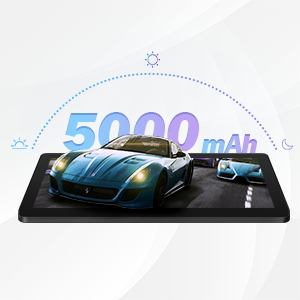
The qunyiCO Y10 is equipped with a 5000mAh battery, providing up to 8 hours of usage on a single charge, depending on usage patterns.

An image highlighting the 5000mAh battery, with icons indicating approximate usage times for video playback (6H), gaming (6H), and browsing (12H), showcasing its long-lasting capability.
Chaje
Use the provided charger to ensure proper charging and battery health.
- Connect the charger to the tablet's charging port and a power outlet.
- Ikòn batri a sou ekran an ap endike estati chaj.
7. Koneksyon
Wi-Fi
Supports 2.4G Wi-Fi for stable internet connection.
Bluetooth
Connect to Bluetooth devices such as headphones or speakers.
- Ale nan Anviwònman > Aparèy ki konekte > Bluetooth.
- Aktive Bluetooth On.
- Chwazi aparèy ou vle konekte avè l la nan lis la.
8. Miltimedya
Jwi kontni
The 1280x800 IPS HD display provides clear visuals for various media.
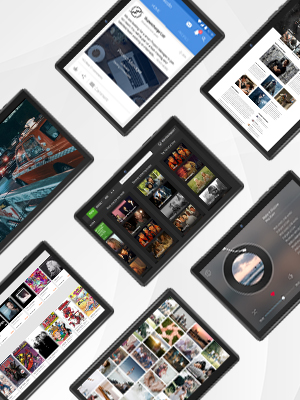
This image presents a collage of tablet screens, each showing different forms of digital content such as social media feeds, news articles, movie interfaces, and music players, emphasizing the tablet's versatility for media consumption.
You can enjoy movies, music, photos, and e-books.
Videyo pwodwi ofisyèl la
Gade videyo ofisyèl sa a pou yon vizyon anplis.view of the qunyiCO Y10 Tablet's features and capabilities.
This video, titled "qunyiCO Y10 Tablet 10 inch Android 10.0", provides a comprehensive look at the tablet's design, performance, and user experience.
NAN. Depanaj
Pwoblèm komen ak solisyon yo
| Pwoblèm | Kòz Potansyèl | Solisyon |
|---|---|---|
| Tablet keeps shutting off / rebooting | Software glitch, low battery, faulty charger/port, overheating. | Ensure full charge. Perform a factory reset if software related. Check charger and port for damage. Avoid heavy usage in hot environments. |
| Manyen ekran pa reponn | Software freeze, screen protector interference, physical damage. | Restart the tablet. Remove any screen protectors. If problem persists, contact support. |
| Won't charge | Damaged charging cable/adapter, dirty charging port, battery issue. | Try a different compatible charger. Clean the charging port gently. If still no charge, battery may need service. |
| Pwoblèm koneksyon Wi-Fi | Incorrect password, router issues, tablet software glitch. | Double-check password. Restart router and tablet. Forget and reconnect to the network. |
| Apps flip/rotate incorrectly | Auto-rotate setting, app compatibility, sensor issue. | Check auto-rotate settings in quick panel/settings. Some apps may not support all orientations. If persistent, sensor may be faulty. |
10. Espesifikasyon
Detay teknik
| Karakteristik | Detay |
|---|---|
| Modèl | Y10 |
| Sistèm operasyon | Android 11 |
| Processeur | 1.6 GHz kat-nwayo (Allwinner) |
| RAM | 2 GB DDR4 SDRAM |
| Depo Entèn | 32 GB |
| Depo dilatabl | Jiska 128 GB (MicroSD) |
| Gwosè ekran | 10.1 pous |
| Rezolisyon ekran | 1280x800 IPS HD |
| Kamera dèyè | 8 MP |
| Kamera devan | 2 MP |
| Batri | 5000mAh Lityòm Ion |
| Koneksyon | Wi-Fi (2.4G), Bluetooth |
| Dimansyon (LxWxH) | 9.62 x 6.83 x 0.39 pous |
| Pwa atik | 1.08 liv |
11. Antretyen
Netwayaj ak Swen
- Sèvi ak yon twal mou ki pa gen pousyè pou netwaye ekran an ak kò tablèt la.
- Pa sèvi ak pwodui netwayaj abrazif oswa solvang.
- Keep the tablet in a protective case to prevent scratches and damage.
Mizajou lojisyèl
Tcheke regilyèman pou wè si sistèm nan ap fonksyone byen pou asire pi bon pèfòmans ak sekirite.
- Ale nan Anviwònman > Sistèm > Aktyalizasyon sistèm lan.
- Swiv enstriksyon ki sou ekran an pou telechaje epi enstale nenpòt mizajou ki disponib.
12. Garanti & Sipò
Enfòmasyon sou Garanti
Your qunyiCO Y10 tablet comes with a standard manufacturer's warranty. Please refer to the warranty card included in your product packaging for specific terms and conditions.
Sipò pou Kliyan
For technical assistance, troubleshooting beyond this manual, or warranty claims, please contact qunyiCO customer support through their official websit la oswa enfòmasyon kontak yo bay nan dokimantasyon pwodwi ou a.
You can also visit the official qunyiCO store on Amazon for more information: qunyiCO Store.