
1. Entwodiksyon
This manual provides detailed instructions for the safe and effective use of the Walfront PM6508 Digital Temperature Humidity Meter. This device is designed for high-precision measurement of ambient temperature and relative humidity, offering features such as data hold, backlight display, and wet bulb/dew point temperature calculations. It is suitable for various applications including home, office, industrial settings, and environmental monitoring.
2. Enfòmasyon sou Sekirite
Please read and understand all safety warnings and operating instructions before using this instrument. Failure to follow these instructions may result in electric shock, fire, or injury.
- Pa sèvi ak mèt la si li sanble domaje oswa si kouvèti pil la pa byen fèmen.
- Avoid exposing the meter to extreme temperatures, direct sunlight, or high humidity for prolonged periods.
- Do not attempt to repair or modify the meter. Refer all servicing to qualified personnel.
- Retire pil yo si ou pa sèvi ak mèt la pou yon bon bout tan pou evite flit.
- Keep the sensor area clean and free from obstructions to ensure accurate readings.
3. Pwodwi souview
The Walfront PM6508 is a compact and portable digital meter designed for accurate environmental measurements. It features an easy-to-read LCD display with backlight and intuitive button controls.

Figi 3.1: Devan view of the Walfront PM6508 meter with key components labeled. This includes the temperature and humidity sensor at the top, the HD display, various control buttons (Power, Max/Min, Data Hold, Data Storage, Unit Switch, Backlight), and an anti-fall protective sleeve.
3.1 Karakteristik kle
- Segondè Precision Sensor: Provides accurate temperature and humidity readings.
- Ekran LCD ak ekleraj dèyè: Asire yon lizibilite klè nan divès kondisyon ekleraj.
- Fonksyon kenbe done: Li bloke lekti aktyèl la sou ekran an.
- Depo done: Stores up to 100 groups of measurement data.
- Wet Bulb & Dew Point Temperature: Calculates and displays these critical environmental parameters.
- Chanje inite: Chanje fasilman ant Sèlsiyis (°C) ak Farennayt (°F).
- Fèmen otomatik: Conserves battery life.
- Endikatè ki ba pouvwa: Avètisman lè pil yo bezwen ranplase.
3.2 Kontni pake a

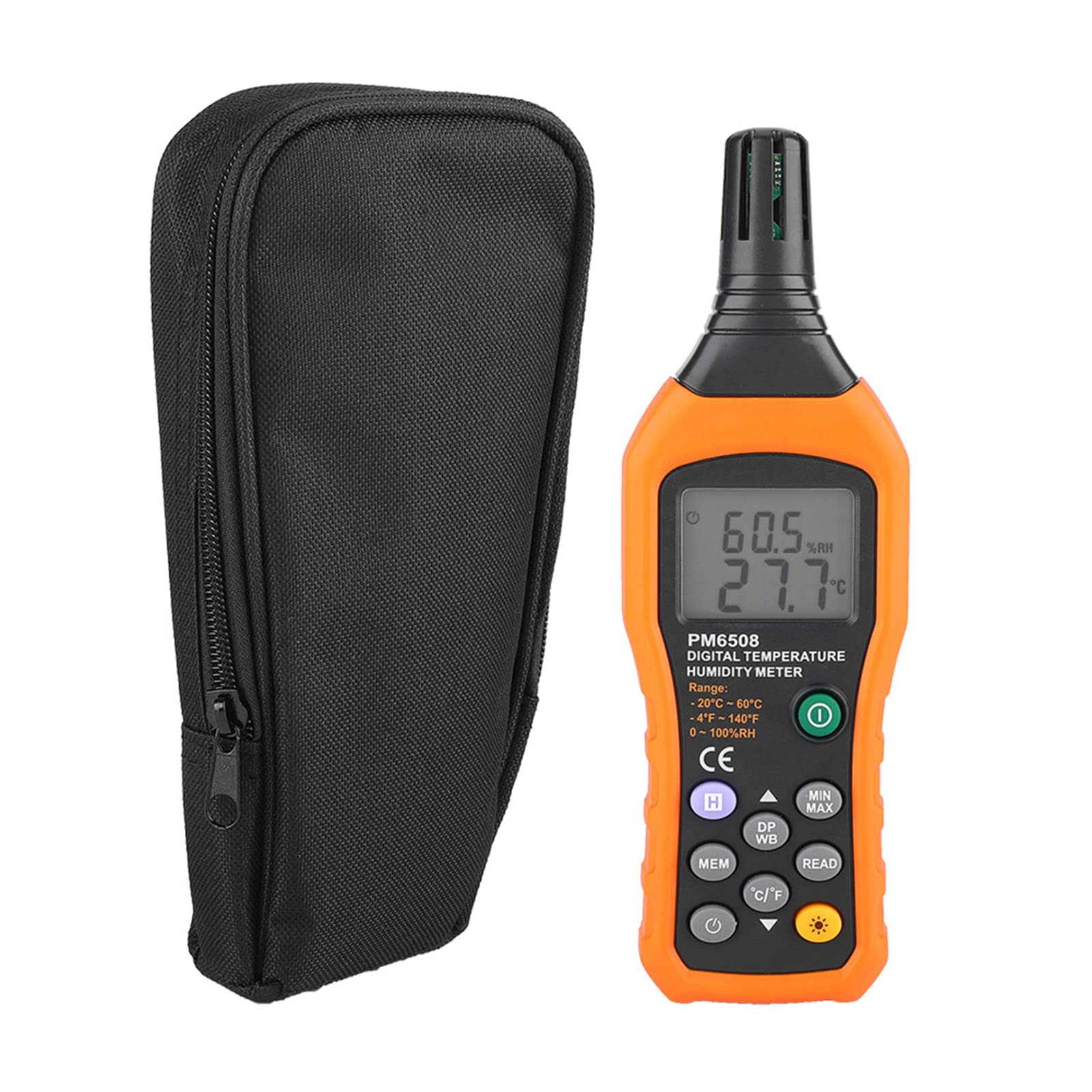
Figi 3.2: The Walfront PM6508 meter shown alongside its portable storage bag, indicating typical package contents.
- Walfront PM6508 Digital Temperature Humidity Meter
- Sak Depo pòtab
- Manyèl itilizatè
4. Enstalasyon
4.1 Enstalasyon batri
The PM6508 meter requires 4 x 1.5V AAA batteries (not included) for operation.
- Jwenn kouvèti konpatiman pil la sou dèyè mèt la.
- Glise kouvèti batri a anba pou ouvri li.
- Insert four AAA batteries, ensuring correct polarity (+ and -) as indicated inside the compartment.
- Remèt kouvèti batri a lè w glise l tounen nan plas li jiskaske li fè yon klik byen fèm.
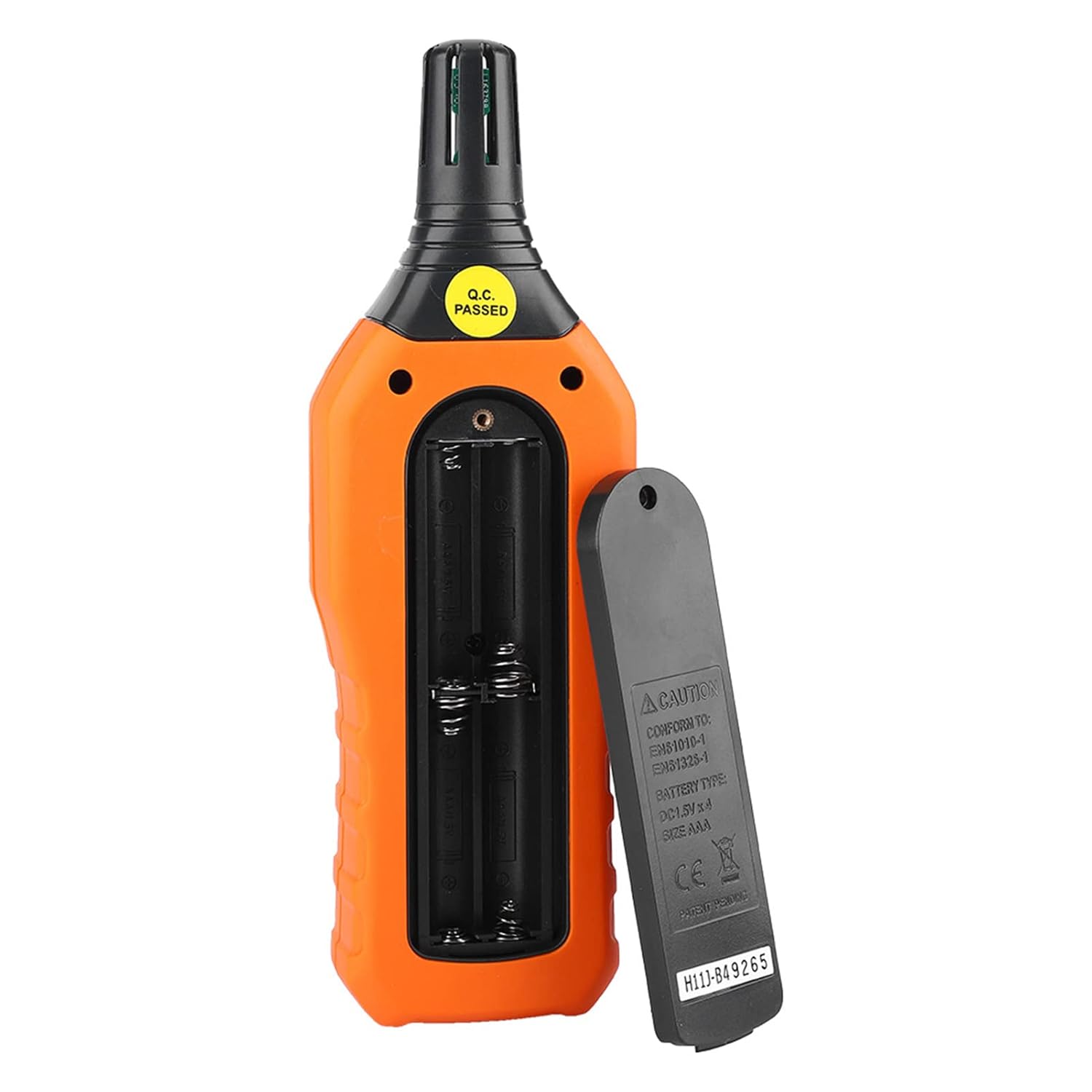
Figi 4.1: Dèyè view of the meter showing the open battery compartment for AAA battery installation.
5. Operasyon Enstriksyon
5.1 Power On/Off
- Peze a green power button (
 ) to turn the meter on.
 - Peze epi kenbe la gray power button () for approximately 2 seconds to turn the meter off. The meter also features an automatic shut-down function to conserve battery life.
5.2 Pran mezi
Once powered on, the meter will immediately begin displaying real-time temperature and humidity readings on the LCD screen. Ensure the sensor at the top of the device is exposed to the environment you wish to measure.

Figi 5.1: The meter in use, displaying temperature and humidity readings on its LCD screen.
5.3 Chanjman Inite (°C/°F)
To switch between Celsius (°C) and Fahrenheit (°F) temperature units:
- Peze a bouton °C/°F () located on the keypad. The display will update to show readings in the selected unit.
5.4 Fonksyon ekleraj dèyè
To activate or deactivate the display backlight:
- Peze a bouton backlight () to toggle the backlight on or off. This is useful for reading in low-light conditions.
5.5 Data Hold (H)
To freeze the current readings on the display:
- Peze a bouton H (). The "H" icon will appear on the display, indicating that the data is held.
- Peze a bouton H again to release the data hold and resume real-time measurements.
5.6 Maximum/Minimum (MIN/MAX) Measurement
Pou view the maximum or minimum recorded values:
- Peze a bouton MIN/MAX () once to display the maximum temperature and humidity recorded since the meter was powered on or the function was reset.
- Peze a bouton MIN/MAX again to display the minimum temperature and humidity.
- Peze a bouton MIN/MAX a third time to exit the MIN/MAX mode and return to real-time readings.
5.7 Data Storage (MEM) and Retrieval (READ)
The meter can store up to 100 groups of measurement data.
- To Store Data: Peze a Bouton MEM () to save the current temperature and humidity readings. The display will briefly show a memory location number.
- To Retrieve Data: Peze a bouton LI () to enter data retrieval mode. Use the Bouton MEM to scroll through stored data records.
- To Exit Retrieval: Peze a bouton LI again to exit data retrieval mode.
5.8 Wet Bulb (WB) and Dew Point (DP) Temperature
To display Wet Bulb or Dew Point temperatures:
- Peze a DP/WB button () once to display the Dew Point temperature.
- Peze a DP/WB button again to display the Wet Bulb temperature.
- Peze a DP/WB button a third time to return to standard temperature and humidity display.
6. Antretyen
6.1 Netwayaj
- Siye c mèt laasing ak yon mou, damp twal. Pa sèvi ak pwodui netwayaj abrazif oswa solvang.
- Keep the sensor area clean and free from dust or debris to ensure accurate readings. Do not insert any objects into the sensor opening.
6.2 Depo
- When not in use for extended periods, remove the batteries to prevent leakage and damage to the device.
- Sere mèt la nan yon kote ki fre epi sèk, lwen limyè solèy dirèk ak tanperati ekstrèm.
- Utilize the provided portable storage bag for protection during storage and transport.
NAN. Depanaj
| Pwoblèm | Kòz posib | Solisyon |
|---|---|---|
| Kontè a pa limen. |
|
|
| Lekti ki pa kòrèk. |
|
|
| Ekran an fèb oswa li ap tranble. |
|
|
| Cannot store or retrieve data. |
|
|
8. Espesifikasyon
The following table outlines the technical specifications for the Walfront PM6508 Digital Temperature Humidity Meter.


Figi 8.1: Detailed technical specifications including ranges, resolution, and precision for temperature, humidity, wet bulb, and dew point measurements, along with general parameters.
| Paramèt | Valè |
|---|---|
| Modèl | PM6508 |
| Ranje Tanperati Anbyen | -20 a 60 °C (-4 a 140 °F) |
| Ambient Temperature Precision | ±1.5 °C (-20 to 0 °C, 45 to 60 °C), ±0.5 °C (0 to 45 °C) |
| Ranje imidite relatif | 0% - 100% RH |
| Relative Humidity Precision | ±4.0% (0-20%, 80-100%), ±3.0% (20-80%) |
| Ranje tanperati anpoul mouye | -20 a 60 °C (4 a 140 °F) |
| Wet Bulb Temperature Precision | ±1.5 °C (-20 to 0 °C, 45 to 60 °C), ±0.5 °C (0 to 45 °C) |
| Ranje Tanperati Dew Point | -50 a 60 °C (-58 a 140 °F) |
| Dew Point Temperature Precision | ±1.5 °C (-50 to 0 °C, 45 to 60 °C), ±0.5 °C (0 to 45 °C) |
| Rezolisyon | 0.1 °C / °F / %RH |
| Depo Done | 100 gwoup |
| Pwovizyon pou pouvwa | 4 x 1.5V AAA Battery (not included) |
| Dimansyon (L x W x H) | 180 x 60 x 29 mm (7.1 x 2.4 x 1.1 pous) |
| Pwa | 254 g (9 ons) |
| Operasyon Imidite | 0% - 100% (san kondansasyon) |
9. Aplikasyon
The Walfront PM6508 is suitable for a wide range of applications requiring accurate temperature and humidity monitoring.

Figi 9.1: Examples of environments where the PM6508 meter can be effectively used for temperature and humidity monitoring.
- Residential and Office Environments: Monitoring indoor climate for comfort and health.
- Industrial Production: Ensuring optimal conditions for manufacturing processes.
- Warehousing and Storage: Protecting goods sensitive to temperature and humidity, such as in wine cellars or general storage.
- Agrikilti: Monitoring conditions in planting sheds, greenhouses, and aquaculture.
- Research and Development Laboratories: Maintaining precise environmental controls for experiments.
- Sistèm HVAC: Assisting in the evaluation and maintenance of heating, ventilation, and air conditioning systems.
10. Garanti ak sipò
Walfront products are designed for reliability and performance. For warranty information, technical support, or service inquiries, please refer to the contact information provided with your purchase or visit the official Walfront websit la. Tanpri konsève prèv acha ou a pou reklamasyon garanti.