
1. Entwodiksyon
This manual provides detailed instructions for the setup, operation, and maintenance of your BMW Multi-Function Clock, Alarm, and Weather Station. This device combines a digital clock, an alarm with a snooze function, and a weather station that displays temperature. Please read this manual carefully before use to ensure proper functionality and to maximize your experience with the product.
2. Pake kontni
Tanpri verifye sa ki nan pake a lè w ap debale l. Si gen nenpòt atik ki manke oswa ki domaje, kontakte machann ou an.
- BMW Multi-Function Clock, Alarm, and Weather Station Unit
- Manyèl Itilizatè (dokiman sa a)
3. Enstalasyon
3.1. Enstalasyon batri
Aparèy la mande 2 pil AAA (pa enkli) pou operasyon. Swiv etap sa yo pou enstale pil yo:
- Jwenn kouvèti konpatiman batri a sou dèyè aparèy la.
- Dousman glise oswa leve kouvèti a pou ouvri konpatiman an.
- Mete de pil AAA, asire w polarite ki kòrèk la (+ ak -) jan yo endike anndan konpatiman an.
- Ranplase kouvèti lòj batri a byen.
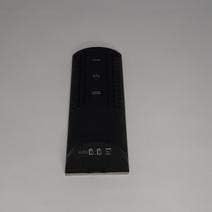
Figi 3.1: Retounen view of the device, illustrating the battery compartment and control buttons for setup.
3.2. Premye Limen
After battery installation, the device display will illuminate, and it will typically show a default time or begin searching for a signal (if applicable for weather functions). Proceed to the operating instructions to set the time and other functions.
4. Operasyon Enstriksyon
4.1. Mete Tan ak Dat
To set the current time and date:
- Peze epi kenbe la MÒD button (usually located on the back or side) for a few seconds until the time display starts flashing.
- Sèvi ak la UP or DESANN buttons (often labeled '+' or '-') to adjust the hour.
- Peze MÒD again to confirm the hour and move to the minutes.
- Ajiste minit yo lè l sèvi avèk la UP or DESANN bouton.
- Kontinye peze MÒD and adjusting with MWEN / DESANN for year, month, and day settings.
- Peze MÒD yon dènye fwa pou sòti nan mòd konfigirasyon an.
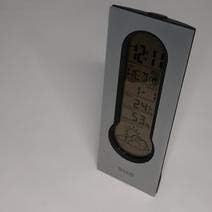
Figi 4.1: Front display of the device, showing the digital clock, temperature, and weather forecast icons.
4.2. Mete Alam
Pou fikse lè alam la:
- Nan mòd ekspozisyon tan nòmal, peze la ALAM bouton (oswa MÒD repeatedly until 'AL' or an alarm icon appears).
- Peze epi kenbe la ALAM bouton an jiskaske lè alam lan kòmanse flache.
- Sèvi ak la UP or DESANN bouton yo pou mete lè alam ou vle a.
- Peze ALAM again to confirm the hour and move to the minutes.
- Ajiste minit yo lè l sèvi avèk la UP or DESANN bouton.
- Peze ALAM one last time to save the alarm setting. An alarm icon will typically appear on the display to indicate the alarm is active.
4.3. Using Snooze Function
Lè alam la son, peze la SNOOZE button (usually a large button on the top of the unit) to temporarily silence the alarm. The alarm will sound again after a few minutes (typically 5-10 minutes, depending on the model). To turn off the alarm completely, press any other button or let it ring until it automatically stops.

Figi 4.2: Top view of the device, highlighting the prominent SNOOZE button.
4.4. Ekspozisyon Tanperati
The device continuously displays the ambient temperature. The temperature unit (Celsius or Fahrenheit) can usually be switched by pressing a dedicated button (e.g., 'C/F' or 'TEMP') or by holding down one of the adjustment buttons during time setting.
4.5. Weather Station Function
The integrated weather station provides a basic weather forecast using graphical icons (e.g., sun, clouds, rain). This forecast is based on internal barometric pressure changes and is an estimation for the local area. It is not connected to external weather services.
5. Antretyen
5.1. Netwayaj
To clean the device, use a soft, dry cloth. Do not use abrasive cleaners, solvents, or chemical sprays, as these can damage the surface and electronic components. Avoid getting moisture into the device.
5.2. Ranplasman batri
When the display dims or functions become erratic, it is time to replace the batteries. Follow the battery installation steps in Section 3.1. Always replace both batteries at the same time with new AAA batteries.
NAN. Depanaj
Si ou rankontre pwoblèm ak aparèy ou an, tanpri al gade pwoblèm ak solisyon komen sa yo:
- Ekran an vid oswa li pa klere byen:
Check if batteries are installed correctly. Replace with fresh AAA batteries. - Lè a oswa dat la pa kòrèk:
Refer to Section 4.1 to reset the time and date. Ensure you confirm each setting step. - Alam lan pa sonnen:
Verify that the alarm is set and activated (look for an alarm icon on the display). Ensure the volume is not set to zero if adjustable. - Temperature reading seems inaccurate:
Ensure the device is not placed in direct sunlight, near heat sources, or in drafts, which can affect readings. Allow some time for the sensor to stabilize after placement. - Weather forecast icons are not changing:
The weather forecast is based on local barometric pressure changes and may take time to update. It provides a general trend, not a precise forecast.
7. Espesifikasyon
| Karakteristik | Detay |
|---|---|
| Mak | BMW |
| Nimewo Modèl | 06017443015007 |
| Karakteristik espesyal | Alarm, Snooze, Temperature Display |
| Sous pouvwa | Batri |
| Kalite batri | 2 x AAA pil (pa enkli) |
| ASIN | B089QGJ9VR |
8. Garanti ak sipò
This product is covered by a standard manufacturer's warranty. For specific warranty terms and conditions, please refer to the documentation provided at the time of purchase or contact your retailer. For technical support or service inquiries, please reach out to the point of purchase or the manufacturer's customer service department.