
Entwodiksyon
This manual provides essential instructions for the safe and efficient operation of your Topp Pro TPM6250MKII Professional Expandable Mixer. Please read this manual thoroughly before using the device to ensure proper setup, operation, and maintenance. Retain this manual for future reference.
Enfòmasyon sou Sekirite
- Sous pouvwa: Only connect the mixer to a power source specified in the specifications section. Ensure the voltage matche ak rejyon ou an.
- Vantilasyon: Pa bloke ouvèti vantilasyon yo. Asire w ke gen ase lè k ap sikile toutotou aparèy la pou anpeche l chofe twòp.
- Imidite: Do not expose the unit to rain or moisture. Avoid placing liquid-filled objects on the mixer.
- Sèvis: Konfye tout sèvis bay pèsonèl sèvis kalifye. Pa eseye fè reparasyon pwodui sa a tèt ou.
- Netwayaj: Dekonekte kouran an anvan ou netwaye. Sèvi ak yon twal sèk sèlman.
Enstalasyon
1. Debake
Carefully remove the mixer from its packaging. Inspect the unit for any signs of damage that may have occurred during transit. Retain the packaging for future transport or storage.
2. Konekte pouvwa
Connect the provided power cord to the AC inlet on the rear panel of the mixer. Plug the other end into a suitable electrical outlet. Ensure the mixer's power switch is in the OFF position before connecting to power.

Deskripsyon imaj: This image displays the rear panel of the Topp Pro TPM6250MKII mixer. Visible components include the AC power inlet, ventilation grilles, and output jacks, along with regulatory labels. This view is crucial for understanding power connections and overall unit ventilation.
3. Connecting Audio Inputs
The TPM6250MKII features multiple input channels. Each channel typically includes XLR inputs for microphones and 1/4" TRS inputs for line-level sources. Connect your microphones, instruments, or other audio devices to the appropriate input jacks.
- Antre Mikwofòn (XLR): Use balanced XLR cables for microphones.
- Antre Liy (1/4" TRS): Use 1/4" TRS cables for line-level devices such as keyboards, drum machines, or other mixers.
- Antre RCA: Dedicated RCA inputs are available for connecting consumer audio devices like CD players or media players.
4. Konekte Sorti Audio
Konekte oratè prensipal ou yo oswa kouran an amplifier to the main output jacks. The mixer typically provides XLR outputs for balanced connections to professional audio equipment.
- Main Outputs (XLR): Connect to your main PA system or powered speakers using balanced XLR cables.
- Monitor Outputs: If available, connect to stage monitors or headphones for monitoring purposes.
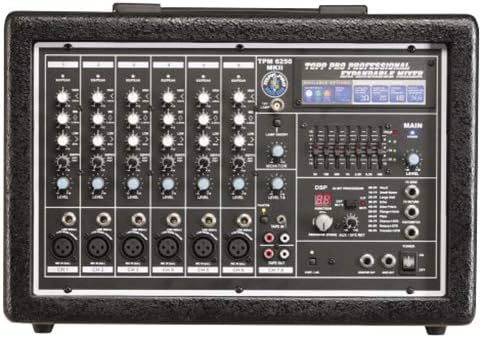
Deskripsyon imaj: This image shows the front control panel of the Topp Pro TPM6250MKII mixer. It highlights the various input channels with their respective gain, EQ, and level controls, along with the master section, DSP effects, and main output controls. This view is essential for understanding the mixer's operational layout.
5. Premye Limen
Once all connections are secure, switch the mixer's power to the ON position. Observe the power indicator light. Ensure all volume controls are set to their minimum level before playing any audio.
Enstriksyon Operasyon
1. Channel Controls
- GAY: Adjusts the input sensitivity for each channel. Set this to achieve a strong signal without clipping (distortion).
- EQ (Egalizasyon): Typically includes HIGH, MID, and LOW controls to shape the tone of each input.
- NIVO: Controls the output volume of the individual channel to the main mix.
2. Sòti prensipal la
The MAIN LEVEL fader or knob controls the overall output volume of the mixer. Adjust this to the desired listening level for your main speakers.
3. Efè DSP yo
The TPM6250MKII features a Digital Signal Processor (DSP) for effects. Use the DSP controls to select and apply various effects such as reverb, delay, or chorus to your audio. Refer to the display and dedicated controls for effect selection and parameter adjustment.
4. Siveyans
Use the MONITOR controls to adjust the level of the mix sent to your headphones or stage monitors. This allows performers to hear themselves and other instruments clearly.
Antretyen
1. Netwayaj
Before cleaning, ensure the mixer is powered off and disconnected from the power source. Use a soft, dry cloth to wipe down the exterior. Do not use liquid cleaners, abrasive materials, or solvents, as these can damage the finish and internal components.
2. Depo
When not in use for extended periods, store the mixer in a cool, dry place, away from direct sunlight and extreme temperatures. If possible, use the original packaging or a protective case to prevent dust accumulation and physical damage.
3. Vantilasyon
Regularly check that the ventilation grilles on the unit are free from dust and debris to ensure proper heat dissipation.
Depanaj
| Pwoblèm | Kòz posib | Solisyon |
|---|---|---|
| Pa gen pouvwa | Power cord disconnected; power switch off; faulty outlet. | Tcheke koneksyon kòd kouran an; asire w ke switch kouran an limen; teste priz la ak yon lòt aparèy. |
| Pa gen pwodiksyon son | Main level down; channel level down; faulty cables; speakers off/disconnected. | Increase MAIN LEVEL; increase individual channel LEVEL; check all audio cables; ensure speakers are powered and connected. |
| Son defòme | Input GAIN too high; output level too high; faulty cable/device. | Reduce input GAIN; reduce MAIN LEVEL; test with different cables/devices. |
| No effect sound | DSP effect level set to zero; effect not selected. | Increase DSP effect level; ensure an effect is selected and applied to the desired channel. |
Espesifikasyon
| Karakteristik | Detay |
|---|---|
| Mak | Topp Pro |
| Nimewo Modèl | TPM6250MKII |
| Kalite Ekipman | Audio Mixer |
| Repons Frekans | 20Hz a 22kHz, +/-3dB |
| Genyen | 50 dB |
| Antre liy | Elektwonikman balanse |
| Enpedans Antre Mikwofòn | 1.5 k ohm |
| Sortie pouvwa | 300W RMS at 1kHz, THD=1%, Load=4Ohm |
| Pwa nèt | 9.70 kg (21.38 liv) |
| Sous pouvwa | Fil elektrik |
| Koneksyon Teknoloji | XLR, TRS |
| Sòti Connector Kalite | XLR |
| Antre odyo | Analog XLR, 1/4" or RCA jacks |
Garanti ak sipò
For warranty information and technical support, please refer to the documentation provided with your purchase or visit the official Topp Pro websit la. Kenbe prèv acha ou pou reklamasyon garanti.
For further assistance, contact Topp Pro customer service.