
BESDER ZX-X2-W/200W
BESDER Smart Home Security FULL HD 1080P IP WiFi Camera User Manual
Model: ZX-X2-W/200W
Entwodiksyon
Thank you for choosing the BESDER Smart Home Security Camera. This manual provides detailed instructions for setting up, operating, and maintaining your camera. Please read this manual carefully before use to ensure proper functionality and safety.
This camera offers Full HD 1080P resolution, Pan/Tilt functionality, Two-Way Audio, and IR Night Vision for comprehensive home surveillance. It supports both wired and WiFi connections, mobile monitoring via iOS and Android apps, and cloud services.
Kontni pake
Tanpri verifye sa ki nan pake a lè w ap ouvri li. Si gen nenpòt atik ki manke oswa ki domaje, tanpri kontakte sèvis kliyan.
- 1 x BESDER IP Camera 1080P
- 1 x manyèl itilizatè
- 1 x DC 5V Power Supply
- 1 x Small Bracket
- Vis ak ploge miray pou monte
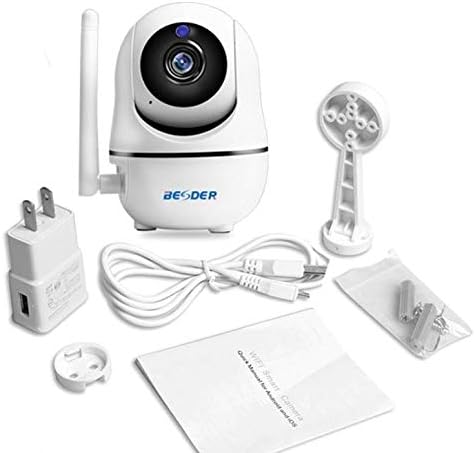
Figi 1: Package contents of the BESDER Smart Home Security Camera, showing the camera unit, power adapter, USB cable, mounting bracket, screws, and the user manual.
Pwodwi souview
Familiarize yourself with the various components of your BESDER Smart Home Security Camera.
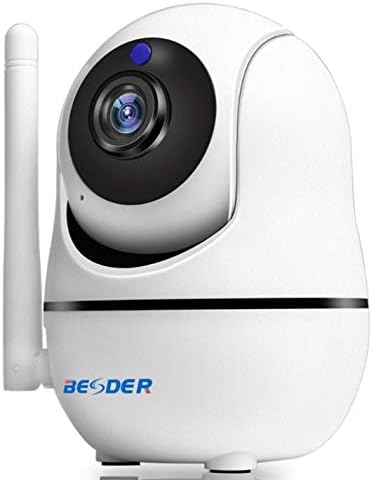
Figi 2: Devan view of the BESDER Smart Home Security Camera, highlighting the camera lens, infrared LEDs for night vision, and the status indicator light.

Figi 3: Dèyè view of the BESDER Smart Home Security Camera, detailing the memory card slot (for microSD up to 128GB), reset button, built-in speaker, DC 5V power input, and the Ethernet network port for wired connection.
Konpozan kle:
- Lantiy kamera: Kaptire videyo footage.
- IR poul: Bay ekleraj enfrawouj pou vizyon lannwit.
- Limyè Endikatè Estati: Indicates camera status (e.g., power on, network connection).
- Mikwofòn: For audio input and two-way audio communication.
- Oratè: For audio output and two-way audio communication.
- Plas pou kat memwa: Supports microSD cards up to 128GB for local storage.
- Bouton Reyajiste: Itilize pou retabli paramèt faktori yo.
- DC 5V Antre pouvwa: Konekte ak adaptè kouran ki founi an.
- Pò Rezo (RJ45): Pou koneksyon Ethernet filaire.
Enstalasyon
1. Limen
- Connect the DC 5V power adapter to the camera's power input port.
- Ploge adaptè pouvwa a nan yon priz miray.
- The camera will power on, and the status indicator light will illuminate. Wait for the camera to complete its self-test (it may pan and tilt).
2. Network Connection (Wired or Wireless)
The camera supports both wired (Ethernet) and wireless (Wi-Fi) connections.
Koneksyon filaire:
- Connect one end of an Ethernet cable (not included) to the camera's network port.
- Konekte lòt bout kab Ethernet la ak routeur ou a oswa switch rezo a.
- The camera will automatically connect to the network.
Wireless (Wi-Fi) Connection:
- Download the recommended mobile application (e.g., XMEYE or iCsee) from your device's app store (iOS or Android).
- Anrejistre yon kont epi konekte.
- Follow the in-app instructions to add your camera. This typically involves scanning a QR code on the camera or using a Wi-Fi configuration method (e.g., AP mode, SmartLink).
- Ensure your mobile device is connected to the 2.4GHz Wi-Fi network you intend to connect the camera to.
- Enter your Wi-Fi password when prompted by the app.
- The camera will attempt to connect to your Wi-Fi network. Once connected, the status indicator light will change (refer to app or camera manual for specific light indications).
3. Enstalasyon Kat MicroSD (Si ou vle)
- Ensure the camera is powered off before inserting or removing the microSD card.
- Locate the microSD card slot (refer to Figure 3).
- Gently insert the microSD card into the slot with the gold contacts facing down until it clicks into place.
- Power on the camera. You may need to format the SD card via the mobile app settings for optimal performance.
Enstriksyon Operasyon
1. Mobile Monitoring (iOS/Android)
- Open the XMEYE or iCsee app on your smartphone.
- Chwazi kamera ou nan lis aparèy yo pou view manje a ap viv.
- Use the on-screen controls to pan (horizontal rotation) and tilt (vertical rotation) the camera lens.
- Access playback of recorded footage stored on the microSD card or cloud service.
2. Odyo Bidireksyonèl
- Pandan ke viewing the live feed in the app, tap the microphone icon to speak through the camera's speaker.
- Tape ikòn oratè a pou koute odyo ki soti nan mikwofòn kamera a.
3. Vizyon lannwit IR
- The camera automatically switches to IR night vision mode in low-light conditions.
- The IR LEDs will illuminate, providing clear black and white video up to 15 meters.
4. Deteksyon Mouvman ak Alam
- Pèmèt deteksyon mouvman nan paramèt aplikasyon an.
- Configure sensitivity levels and detection zones as needed.
- When motion is detected, the camera can send push notifications to your phone and/or record footage.
5. Sèvis Nwaj
- The camera supports cloud storage services (subscription may be required).
- Refer to the mobile app for details on activating and managing cloud storage.
Antretyen
- Netwayaj: Sèvi ak yon twal mou epi sèk pou netwaye lantiy kamera a ak kò a. Pa sèvi ak pwodui netwayaj likid oswa ayewosòl.
- Mizajou mikrolojisyèl: Regularly check for firmware updates via the mobile app to ensure optimal performance and security.
- Plasman: Ensure the camera is placed in a location where it is protected from direct water exposure and extreme temperatures.
- SD Kat Jesyon: Periodically check the status of your microSD card. If it becomes full, older recordings may be overwritten, or recording may stop.
Depanaj
| Pwoblèm | Kòz posib | Solisyon |
|---|---|---|
| Kamera a pa konekte sou entènèt/Pa ka konekte ak Wi-Fi a | Modpas Wi-Fi ki pa kòrèk; Kamera a twò lwen routeur la; Pwoblèm routeur; Rezo Wi-Fi 5GHz. |
|
| Pa gen imaj/ekran nwa | Power issue; Network issue; Lens obstruction. |
|
| De-fason odyo pa travay | Microphone/speaker disabled in app; Volume too low; Network latency. |
|
| Deteksyon mouvman an pa deklanche | Motion detection disabled; Sensitivity too low; Incorrect detection zone. |
|
| Kat SD a pa anrejistre | SD card full/corrupted; Incorrect format; SD card not inserted properly. |
|
Espesifikasyon
| Karakteristik | Detay |
|---|---|
| Non modèl | BESDER Smart Home Security |
| Referans manifakti | ZX-X2-W/200W |
| Rezolisyon videyo | Full HD 1080P (1920x1080) |
| Capteur | 1/2.8'' F22 CMOS sensor (for 1080P) |
| Konpresyon videyo | H.264, supports dual stream, 0.1 – 6 Mpbs |
| Lantiy | 3.6 mm G7 (default) |
| Distans vizyon lannwit IR | Max 15 meters (6 IR LEDs) |
| Koneksyon | Wi-Fi (2.4GHz), Ethernet filaire |
| Depo | MicroSD card up to 128GB (not included), Cloud Service |
| Odyo | De-fason odyo (mikwofòn entegre ak oratè) |
| Siveyans mobil | iOS, Android (APP: XMEYE or iCsee) |
| Pwovizyon pou pouvwa | DC 5V 2A |
| Tanperati travay | -5 to 60°C (23 - 140°F) |
| Dimansyon | 6.39 x 4.33 x 3.11 cm (dimansyon apwoksimatif pake a) |
Garanti ak sipò
For warranty information and technical support, please refer to the contact details provided with your purchase or visit the official BESDER websit la. Kenbe resi acha ou kòm prèv acha.
Manifakti: BESDER
Ask a question about this manual
Ask about setup, troubleshooting, compatibility, parts, safety, or missing instructions. Manuals+ will review the question and use this page’s manual context to help answer it.