
FLINQ 8720168680396
FlinQ Mobile Air Conditioner User Manual
Modèl: 8720168680396
1. Enstriksyon Sekirite Enpòtan
Please read all instructions carefully before using this appliance and retain them for future reference. Failure to follow these instructions may result in electric shock, fire, or serious personal injury.
- Toujou konekte aparèy la nan yon priz kouran ki gen koneksyon ak tè.
- Pa opere aparèy la ak yon kòd oswa ploge ki domaje.
- Kenbe aparèy la lwen materyèl ki ka pran dife ak flanm dife.
- Asire w ke gen bon vantilasyon toutotou aparèy la pandan l ap fonksyone.
- Pa mete objè nan antre oswa priz lè a.
- Debranche aparèy la anvan ou netwaye li oswa fè nenpòt antretyen.
- Aparèy sa a pa fèt pou itilize pa moun (ki gen ladan timoun) ki gen kapasite fizik, sansoryèl oswa mantal redwi, oswa ki pa gen eksperyans ak konesans, sof si yo te ba yo sipèvizyon oswa enstriksyon konsènan itilizasyon aparèy la pa yon moun ki responsab sekirite yo.
2. Pwodwi souview
The FlinQ Mobile Air Conditioner is a versatile unit designed to provide cooling, dehumidification, and fan functions for your living space. It is equipped with an energy-efficient design and comes with a window kit for easy installation.

Figi 2.1: Devan view of the FlinQ Mobile Air Conditioner, showing the main air outlet and control panel area.

Figure 2.2: The mobile air conditioner unit, displaying its energy efficiency label (Class A) and the included remote control for convenient operation.
3. Konpozan ak pyès
Familiarize yourself with the main components of your mobile air conditioner:
- Main Unit (with control panel)
- Kawoutchou echapman
- Window Sealing Kit (adjustable window slider/plate)
- Kontwòl Remote
- Drain Hose (for continuous drainage in dehumidification mode)
- Air Filters (located on the back/side)
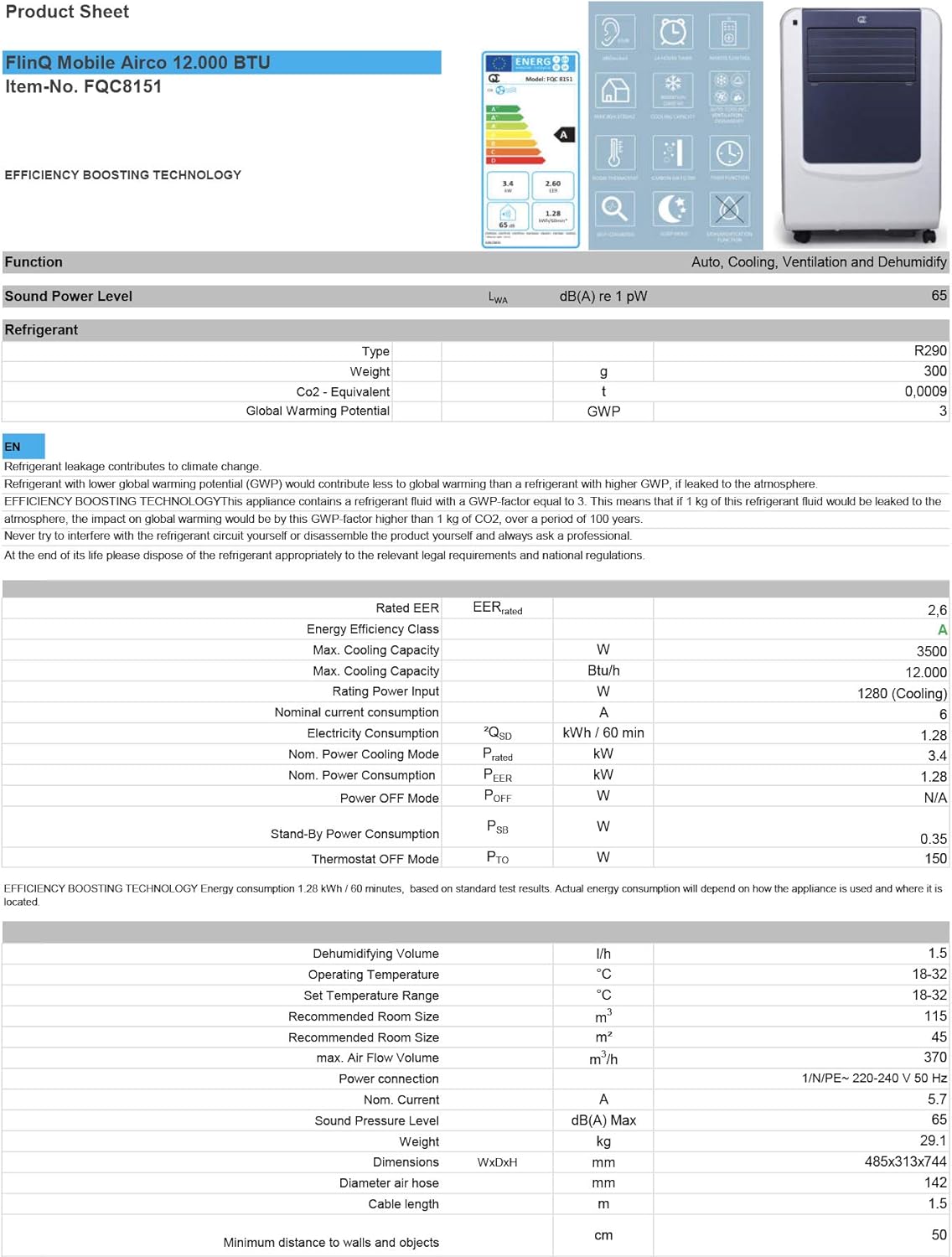
Figure 3.1: The remote control and a visual representation of the unit's key features, including noise level (65dB), 24-hour timer, cooling capacity (12000 BTU/h), room thermostat, carbon air filter, self-diagnosis, sleep mode, remote control function, timer function, auto cooling/fan/dehumidification, and dehumidification function.
4. Enstalasyon ak Enstalasyon
4.1 Debake
Carefully remove the air conditioner and all accessories from the packaging. Inspect for any damage during transit. Keep the original packaging for future storage or transport.
4.2 Plasman
Place the unit on a flat, stable surface. Ensure there is at least 30 cm (12 inches) of clear space around the unit for proper airflow. Do not place it near heat sources or in direct sunlight.
4.3 Enstalasyon Twous Fenèt
To ensure efficient cooling, the hot air extracted by the unit must be vented outside. Use the provided window sealing kit for this purpose.
- Konekte konektè tiyo echapman an nan priz lè a ki sou dèyè aparèy la.
- Ralonje tiyo echapman an epi tache adaptè fenèt la nan lòt bout la.
- Adjust the window slider/plate to fit your window opening.
- Insert the window adapter into the opening of the window slider/plate.
- Close the window as much as possible to seal the opening around the kit, minimizing air leakage.

Figi 4.1: Side view of the mobile air conditioner, illustrating the connection point for the exhaust hose, which expels hot air from the room.
5. Operasyon Enstriksyon
5.1 Kontwòl Panel
The control panel is located on the top of the unit and features various buttons and an LED display for setting modes, temperature, and timer functions.
5.2 Kontwòl Remote
The remote control allows you to operate all functions of the air conditioner from a distance. Ensure the remote control batteries are inserted correctly.
5.3 Mòd Fonksyònman
Press the 'Mode' button to cycle through the available operating modes:
- Mòd refwadisman: Pou refwadi chanm nan. Mete tanperati ou vle a avèk bouton ajisteman tanperati yo.
- Mòd dezimidifikasyon: Removes excess moisture from the air. The fan speed is typically fixed in this mode. Consider connecting a drain hose for continuous drainage.
- Mòd fanatik: Circulates air without cooling. You can adjust the fan speed (Low, Medium, High).

Figi 5.1: Close-up view of the adjustable louvers on the air conditioner's front panel, which direct the airflow.
6. Antretyen
Antretyen regilye asire pèfòmans optimal epi pwolonje dire lavi èkondisyone ou a.
6.1 Netwayaj Filtè Lè yo
The air filters should be cleaned every two weeks or more frequently depending on usage and air quality. Dirty filters reduce efficiency and can damage the unit.
- Debranche èkondisyone a nan priz kouran an.
- Locate and remove the air filters (usually on the back or side of the unit).
- Wash the filters under running water (warm, not hot) or use a vacuum cleaner to remove dust.
- Allow the filters to air dry completely before reinserting them. Do not expose them to direct sunlight.

Figure 6.1: Illustration of how to remove the air filter from the mobile air conditioner for cleaning, highlighting the accessible filter panel.
6.2 Vide Dlo
The unit collects condensed water during cooling and dehumidification. The internal tank will fill up, and the unit may stop operating when full. Drain the water regularly.
- Place a shallow pan or tray under the drain port (usually at the bottom rear of the unit).
- Retire bouchon drenaj la pou kite dlo a koule soti.
- For continuous drainage in dehumidification mode, attach the provided drain hose to the drain port.
6.3 Depo
Lè w ap estoke aparèy la pou yon peryòd tan pwolonje:
- Vide tout dlo ki nan inite a.
- Netwaye filtè lè yo.
- Debranche kòd kouran an epi vlope l byen.
- Sere aparèy la nan yon kote ki sèk epi fre, de preferans nan anbalaj orijinal li.
NAN. Depanaj
Anvan ou kontakte sèvis kliyan, tanpri gade tablo sa a pou pwoblèm komen ak solisyon yo:
| Pwoblèm | Kòz posib | Solisyon |
|---|---|---|
| Inite pa limen | No power; Power cord not plugged in; Full water tank | Tcheke priz kouran an; Branche kòd kouran an; Vide tank dlo a |
| Unit cools insufficiently | Dirty air filters; Exhaust hose blocked/leaking; Room too large; Doors/windows open | Clean filters; Check hose for blockages/proper sealing; Ensure room size is within capacity; Close doors/windows |
| Inite a fè bwi | Unit not on a flat surface; Air filters dirty | Place on flat surface; Clean air filters |
| Dlo koule nan inite a | Drain plug not properly sealed; Unit tilted | Asire w ke bouchon drenaj la byen sere; Mete aparèy la sou yon sifas ki plat. |
8. Espesifikasyon
Technical details for the FlinQ Mobile Air Conditioner:
| Karakteristik | Valè |
|---|---|
| Nimewo Modèl | 8720168680396 |
| Dimansyon pwodwi | 74 x 48 x 31 cm |
| Pwa atik | 29 g (Note: This weight seems unusually low for an AC unit, please refer to product packaging for accurate weight) |
| Nivo bri | 65 dB |
| Kapasite refwadisman | 12000 BTU/h |
| Gwosè chanm rekòmande | Jiska 45 m² |
| Karakteristik espesyal | Kontwòl Remote |
| Klas enèji | A |

Figure 8.1: Official product sheet detailing technical specifications, energy consumption, cooling capacity, and dimensions of the FlinQ Mobile Air Conditioner.
9. Garanti ak sipò
This FlinQ Mobile Air Conditioner comes with a limited warranty. Please refer to the warranty card included with your purchase for specific terms and conditions.
For technical support, service, or warranty claims, please contact your retailer or the manufacturer directly. Keep your proof of purchase for warranty validation.
Enfòmasyon pou kontakte:
- Mak: FLINQ
- Websit: www.flinq.nl (Egzample, please refer to actual product documentation for correct websit)
- Imèl: support@flinq.nl (Egzample, please refer to actual product documentation for correct email)
Ask a question about this manual
Ask about setup, troubleshooting, compatibility, parts, safety, or missing instructions. Manuals+ will review the question and use this page’s manual context to help answer it.