
1. Enfòmasyon enpòtan sou sekirite
Before operating the Razor T25 Electric Scooter, please read and understand all safety warnings and instructions. Failure to follow these instructions may result in serious injury or property damage.
- Toujou mete ekipman sekirite apwopriye, tankou yon kas, kousinen jenou, ak koud koud.
- Observe all local laws and regulations regarding electric scooter use.
- Pa monte bisiklèt nan kondisyon mouye, sou sifas inegal, oswa lannwit san bon ekleraj.
- Ensure the battery is fully charged and all components are securely fastened before each ride.
- The scooter is designed for riders aged 18 and up, with a maximum weight limit of 220 pounds (100 kg).
2. Pwodwi souview
The Razor T25 Electric Scooter is a foldable and portable electric scooter designed for urban commuting and travel. It features a 250-watt brushless hub-driven motor and a 36V lithium-ion battery, offering a balance of speed and range for adult riders.
Karakteristik kle:
- Motè: 250-watt, kick-to-start, variable-speed, brushless, hub-driven motor.
- Batri: UL certified rechargeable 36V lithium-ion battery pack.
- Vitès: Jiska 25 km/h (15.5 mph).
- Ranje: Jiska 18 mil (29 km) sou yon sèl chaj.
- Monte mòd: Three selectable modes (Pedestrian, Cruising, Sport).
- Fren: Hand-operated electronic front brake and rear disc brake.
- Vizibilite: LED headlight, brake-activated taillight, and reflectors.
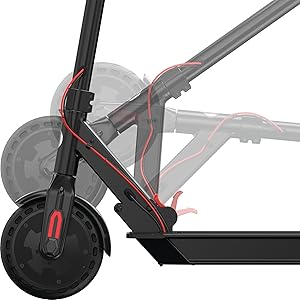
- Pòtabilite: Folding design for easy storage and transport.

3. Enstalasyon
3.1 Debale ak Premye Asanblaj
The Razor T25 Electric Scooter comes partially assembled. Follow these steps to complete the setup:
- Ak anpil atansyon retire tout eleman nan anbalaj la.
- Depliye scooter a lè w lage l.asing the folding mechanism. Ensure it locks securely into the upright position.
- Insert the handlebar assembly into the stem.
- Secure the handlebars using the provided four screws and Allen wrench. Ensure they are tightened firmly.
3.2 Premye Chaj Batri a
Before first use, fully charge the scooter's battery. The initial charge time is approximately 8 hours.
- Locate the charging port, typically on the bottom of the scooter deck.
- Connect the charger to the scooter and then to a standard wall outlet.
- The charger indicator light will change (e.g., red to green) when charging is complete.
- Pa chaje batri a twòp. Dekonekte chajè a yon fwa chaj la fini.
4. Operasyon Enstriksyon
4.1 Limen/Etenyen
To power on the scooter, press and hold the power button on the handlebar display until the display illuminates. To power off, press and hold the power button again until the display turns off.

4.2 Mòd Monte
The T25 offers three riding modes to suit different preferences and environments:
- Mòd pyeton: Approximately 9.3 mph (15 km/h) maximum speed. Suitable for crowded areas or when a slower pace is desired.
- Mòd kwazyè: Approximately 12.4 mph (20 km/h) maximum speed. A balanced mode for general riding.
- Mòd espò: Approximately 15.5 mph (25 km/h) maximum speed. For maximum performance and speed.
Chanje ant mòd yo lè l sèvi avèk bouton espesyal la sou ekran gidon an.
4.3 Akselerasyon
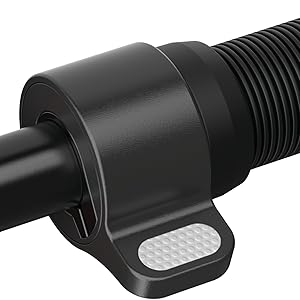
The scooter features a thumb-activated acceleration control. Gently press the thumb lever to engage the motor and increase speed. The scooter is kick-to-start, meaning you need to push off with your foot to initiate movement before the motor engages.
4.4 Frenaj
The T25 is equipped with a single hand-operated control that activates both the electronic front brake and the rear disc brake. Apply gentle pressure to the brake lever to slow down. Practice braking in a safe, open area to become familiar with its response, as the disc brake can be quite responsive.


5. Chaje batri a
The Razor T25 Electric Scooter is powered by a 36V lithium-ion battery. Proper charging procedures ensure battery longevity and safe operation.
- Use only the charger supplied with your Razor T25 scooter.
- Ensure the charging port is clean and dry before connecting the charger.
- Connect the charger to the scooter's charging port, then plug the charger into a standard 100-240V AC wall outlet.
- The charging indicator light on the charger will typically be red during charging and turn green when the battery is fully charged.
- A full charge from empty takes approximately 8 hours.
- Do not leave the scooter charging unattended for extended periods after the light indicates a full charge.
- Store the scooter and charger in a dry, well-ventilated area away from direct sunlight and extreme temperatures.
6. Antretyen
Regular maintenance helps ensure the safety and longevity of your Razor T25 Electric Scooter.
6.1 Swen Jeneral ak Netwayaj
- Siye scooter a pwòp ak piblisiteamp Siye twal la apre chak itilizasyon. Evite itilize pwodui chimik ki agresif oswa pwodui netwayaj abrazif.
- Do not use a high-pressure washer or submerge the scooter in water.
- Inspect the frame for any cracks or damage before each ride.
6.2 Rou ak Kawotchou
The T25 features airless tires, which require less maintenance than pneumatic tires. However, regularly inspect them for wear, cuts, or embedded debris.
6.3 Fren
- Regularly check the brake lever for proper function and responsiveness.
- Ensure the rear disc brake is clean and free of obstructions.
- If the brakes feel too grabby or too loose, consult a qualified technician for adjustment.
6.4 Depo
When not in use, store the scooter in a cool, dry place. If storing for an extended period, ensure the battery is partially charged (around 50%) and recharge it every 30-60 days to prevent deep discharge.
NAN. Depanaj
This section addresses common issues you might encounter with your Razor T25 Electric Scooter.
7.1 Scooter Not Powering On
- Asire batri a chaje nèt.
- Tcheke tout koneksyon kab yo pou wè si yo lach oswa domaje.
- Si pwoblèm nan kontinye, kontakte sipò kliyan.
7.2 Loss of Power or Reduced Range
- Verify the battery is fully charged before each ride.
- Riding conditions (e.g., uphill, heavy loads, cold weather) can affect range and power.
- Pèfòmans batri a ka degrade avèk tan avèk yon itilizasyon pwolonje.
7.3 Throttle Malfunction
If the throttle is unresponsive or inconsistent, inspect the thumb lever for any physical damage or obstruction. Issues with the throttle may require professional service.
8. Espesifikasyon
| Karakteristik | Spesifikasyon |
|---|---|
| Mak | razwa |
| Non modèl | T25 |
| Motè | 250-watt, brushless, hub-driven |
| Batri | 36V Lityòm-ion |
| Vitès maksimòm | 15.5 mph (25 km / h) |
| Maksimòm Range | 18 mil (29 km) |
| Limit Pwa | 220 liv (100 kg) |
| Pwa atik | 27 liv (12.2 kg) |
| Materyèl ankadreman | Aliminyòm |
| Materyèl wou | An poliyiretàn |
| Gwosè wou | 200 Milimèt |
| Manyen wotè | 42.5 pous (108 cm) |
| Style fren | Hand-operated, electric front and rear disc |
| Ranje laj (Deskripsyon) | Granmoun |
9. Garanti ak sipò
9.1 Enfòmasyon sou Garanti
The Razor T25 Electric Scooter comes with a 90-day Limited Manufacturer Warranty. This warranty covers manufacturing defects and workmanship under normal use. Please retain your proof of purchase for warranty claims. For full details, refer to the warranty documentation included with your product or visit the official Razor websit.
9.2 Sipò pou Kliyan
For technical assistance, troubleshooting not covered in this manual, or warranty inquiries, please contact Razor USA, LLC customer support.
- Manifakti: Razor USA, LLC
- Sipò sou entènèt: Vizite la Razor Store on Amazon pou enfòmasyon sou pwodwi ak resous sipò.