
Iproda T1045A
iProda T1045A 10.1 inch Android Tablet User Manual
Comprehensive instructions for your iProda T1045A Android Tablet.
1. Entwodiksyon
This manual provides detailed instructions for the setup, operation, maintenance, and troubleshooting of your iProda T1045A 10.1 inch Android Tablet. Please read this manual thoroughly before using your device to ensure proper functionality and to maximize your user experience.
The iProda T1045A is a 10.1-inch tablet featuring an HD IPS display with 1280x800 resolution, powered by a 64-bit Quad-core processor running Android 9 Pie. It includes 3GB RAM, 64GB internal storage expandable up to 128GB via TF card, dual-band Wi-Fi, HDMI output, and a 5000mAh battery for extended use.
2. Pwodwi souview
2.1 Kontni pake a
Lè w ap ouvri pake a, verifye si tout bagay yo la:
- iProda T1045A 10.1 inch Android Tablet
- USB kab
- Adaptè pouvwa
- Manyèl Itilizatè (dokiman sa a)

Image: Contents of the iProda T1045A tablet package.
2.2 Layout Aparèy
Familiarize yourself with the physical components and ports of your tablet:
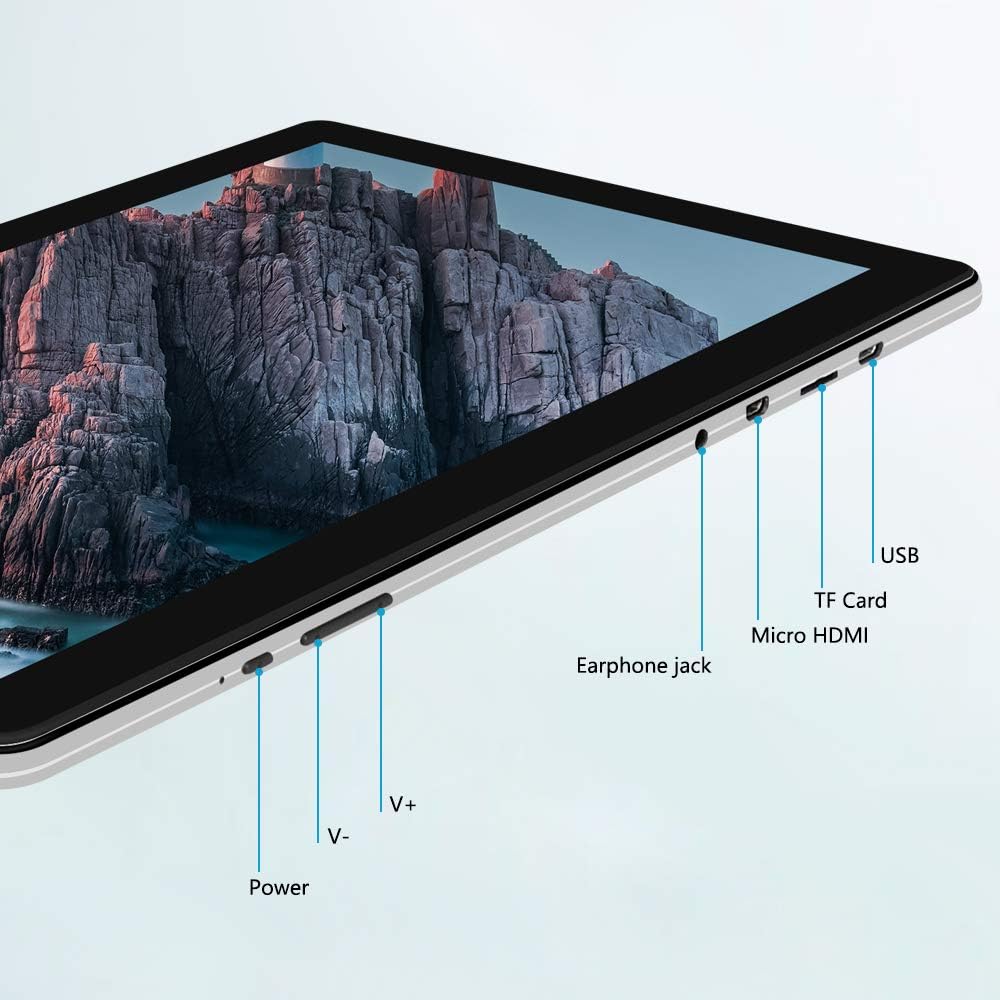
Imaj: Bò kote view of the iProda T1045A tablet highlighting port locations.
- Bouton pouvwa: Press and hold to power on/off or restart the tablet. Short press to turn the screen on/off.
- Volume Buttons (V+, V-): Ajiste volim odyo a.
- Ekouteur Jack: Konekte kas ekoutè 3.5mm.
- TF Kat plas: Insert a microSD card for expandable storage (up to 128GB).
- Pò mikwo HDMI: Connect to an external display using a Micro HDMI to HDMI cable.
- Pò USB: Connect to a computer for data transfer or for charging the device.
3. Enstalasyon
3.1 Premye chaj
Before first use, fully charge the tablet. Connect the provided USB cable to the tablet's USB port and the power adapter, then plug the adapter into a wall outlet. The charging indicator will typically illuminate. A full charge may take several hours.
3.2 Limen/Etenyen
- Pou limen: Peze epi kenbe bouton pouvwa a jiskaske ekran an limen.
- Pou etenn: Peze epi kenbe bouton pouvwa a jiskaske yon meni pouvwa parèt sou ekran an. Chwazi "Etenn" epi konfime.
- Pou rekòmanse: From the power menu, select "Restart".
- Ekran On/Off: Briefly press the Power button to turn the screen off (sleep mode) or wake it up.
3.3 Asistan Enstalasyon Inisyal
The first time you power on the tablet, you will be guided through an initial setup process. Follow the on-screen prompts to:
- Chwazi lang ou pi pito.
- Konekte nan yon rezo Wi-Fi.
- Kreye kont Google ou a (opsyonèl, men rekòmande pou telechaje aplikasyon).
- Konfigure paramèt dat ak lè.
3.4 Inserting a TF Card (MicroSD)
To expand the tablet's storage:
- Jwenn fant kat TF la sou bò tablèt la.
- Carefully insert a microSD card (up to 128GB) into the slot with the gold contacts facing down until it clicks into place.
- Pou retire li, pouse kat la dousman anndan jiskaske li soti.
4. Operasyon Enstriksyon
4.1 Navigasyon debaz
The iProda T1045A uses a touch-sensitive screen for navigation:
- Tape: Chwazi yon atik oubyen louvri yon aplikasyon.
- Tape epi kenbe: Jwenn aksè nan meni kontèks yo oubyen deplase ikòn yo.
- Glise: Defile nan lis yo oubyen chanje ant ekran prensipal yo.
- Zongle: Agrandi oswa diminye imaj yo epi web paj.
4.2 Koneksyon Wi-Fi
Pou konekte ak yon rezo san fil:
- Ale nan Anviwònman > Rezo & Entènèt > Wi-Fi.
- Aktive Wi-Fi a On.
- Chwazi rezo ou vle a nan lis la.
- Antre modpas la si yo mande w, epi tape Konekte.
The tablet supports both 2.4G and 5G dual-band Wi-Fi for faster and more stable connections.
4.3 Bluetooth Pairing
To pair with Bluetooth devices (e.g., headphones, speakers):
- Ale nan Anviwònman > Aparèy ki konekte > Bluetooth.
- Aktive Bluetooth On.
- Asire w aparèy Bluetooth ou a nan mòd koneksyon.
- Chwazi aparèy ou an nan lis aparèy ki disponib yo epi swiv nenpòt enstriksyon ki parèt sou ekran an pou konplete koneksyon an.
4.4 Sèvi ak Kamera yo
Tablèt la ekipe ak yon kamera devan 2MP ak yon kamera dèyè 5MP.
- Louvri a Kamera application from the app drawer.
- Tape ikòn kamera a pou chanje ant kamera devan ak dèyè.
- Tap the shutter button to take photos or start/stop video recording.

Image: Tablet in use, showcasing its camera capabilities.
4.5 Connecting to an External Display (HDMI)
To display your tablet's screen on a larger monitor or TV:
- Connect one end of a Micro HDMI cable to the tablet's Micro HDMI port.
- Connect the other end of the cable to an HDMI input on your external display.
- Select the correct HDMI input source on your external display.
- The tablet's screen content should now be mirrored on the external display.
4.6 Jesyon Aplikasyon
The tablet runs Android 9 Pie and supports applications from the Google Play Store.
- Enstale aplikasyon: Louvri a Jwe magazen app, search for your desired application, and tap Enstale.
- Dezenstalasyon aplikasyon yo: Tap and hold an app icon on the home screen or in the app drawer, then drag it to "Uninstall" or select "App info" and choose "Uninstall". Alternatively, go to Anviwònman > Aplikasyon ak notifikasyon, chwazi aplikasyon an, epi tape Dezenstale.
5. Antretyen
5.1 Netwaye Aparèy la
Pou netwaye tablèt ou a:
- Power off the tablet before cleaning.
- Sèvi ak yon twal mou, ki pa gen pousyè, yon ti kras mouyeampRense avèk dlo oswa yon pwodui netwayaj ekran, pou siye ekran an ak kò a.
- Evite itilize pwodui chimik ki fò, pwodui netwayaj abrazif, oswa imidite twòp.
5.2 Mizajou lojisyèl
Periodically check for software updates to ensure optimal performance and security:
- Ale nan Anviwònman > Sistèm > Avanse > Aktyalizasyon sistèm lan.
- Follow the on-screen instructions to download and install any available updates. Ensure your tablet is sufficiently charged or connected to power during updates.
5.3 Jesyon Depo
To manage internal storage and the TF card:
- Ale nan Anviwònman > Depo.
- Isit la ou kapab view storage usage, free up space, and manage files on both internal storage and the inserted TF card.
NAN. Depanaj
This section addresses common issues you might encounter with your iProda T1045A tablet.
6.1 Aparèy la pa limen
- Ensure the tablet is sufficiently charged. Connect it to the power adapter and allow it to charge for at least 30 minutes before attempting to power on again.
- Try holding the Power button for 10-15 seconds to force a restart.
6.2 Pwoblèm Koneksyon Wi-Fi
- Verify that Wi-Fi is enabled in Anviwònman.
- Asire w ke w ap antre kòrèk modpas Wi-Fi.
- Rekòmanse routeur Wi-Fi ou a ak tablèt la.
- Try connecting to a different Wi-Fi network to determine if the issue is with the tablet or the network.
6.3 Pèfòmans Ralanti
- Fèmen aplikasyon background ki pa nesesè yo.
- Clear cached data for apps in Anviwònman > Aplikasyon ak notifikasyon > [Non Aplikasyon an] > Depo ak kach > Klè kachèt.
- Ensure sufficient free storage space. Uninstall unused apps or move large files nan yon kat TF.
- Rekòmanse tablèt la.
6.4 Batri a ap dechaje byen vit
- Diminye klète ekran an.
- Dezaktive Wi-Fi, Bluetooth, ak GPS lè w pa ap itilize yo.
- Fèmen aplikasyon ki an background epi ki konsome anpil enèji.
- Tcheke itilizasyon batri a nan Anviwònman > Batri pou idantifye aplikasyon ki konsome anpil enèji.
- Ensure the tablet is not allowed to run below 15% charge frequently, as this can impact battery longevity.
6.5 Reset faktori
Si pwoblèm pèsiste, yon reset faktori ka rezoud yo. Avètisman: Sa ap efase tout done ki sou tablèt ou a. Fè yon kopi done enpòtan yo anvan ou kontinye.
- Ale nan Anviwònman > Sistèm > Avanse > Reyajiste opsyon.
- Chwazi Efase tout done (reset faktori).
- Konfime desizyon ou epi swiv enstriksyon yo sou ekran an.
7. Espesifikasyon
Below are the technical specifications for the iProda T1045A tablet:
| Non modèl | T1045A |
| Sistèm operasyon | Android 9 Tat |
| Gwosè ekspozisyon | 10.1 pous |
| Rezolisyon ekspozisyon | 1280 x 800 piksèl (HD IPS) |
| Processeur | MediaTek Quad-core 1.5Ghz |
| RAM | 3 GB |
| Depo Entèn | 64 GB SSD |
| Depo dilatabl | Up to 128 GB via TF Card (MicroSD) |
| Koprosesè grafik | ARM Mali-T720 MP2 |
| Kamera dèyè | 5 MP |
| Kamera devan | 2 MP |
| Kapasite batri | 5000 mAh Lityòm Polymère |
| Mwayèn lavi batri | Jiska 8 èdtan |
| Koneksyon san fil | Dual-Band Wi-Fi (802.11a/b/g/n), Bluetooth 4.0 |
| Pò | 1x USB 2.0, 1x Micro HDMI, 3.5mm Earphone Jack, TF Card Slot |
| Dimansyon | 34.5 x 19.7 x 5.5 cm |
| Pwa | 550 g |

Image: Key performance specifications of the tablet.

Image: Tablet portability and battery details.
8. Garanti ak sipò
8.1 Pwodwi Garanti
The iProda T1045A tablet comes with a 12-mwa garanti apati dat acha a. Garanti sa a kouvri domaj fabrikasyon ak fonksyònman ki pa kòrèk nan itilizasyon nòmal. Li pa kouvri domaj ki koze pa move itilizasyon, aksidan, reparasyon san otorizasyon, oswa mete ak chire nòmal.
8.2 Sipò pou Kliyan
If you encounter any issues not covered in the troubleshooting section or require further assistance, please contact iProda customer support. Refer to your purchase documentation or the iProda official websit pou enfòmasyon kontak.
When contacting support, please have your tablet's model number (T1045A) and purchase details readily available.
Ask a question about this manual
Ask about setup, troubleshooting, compatibility, parts, safety, or missing instructions. Manuals+ will review the question and use this page’s manual context to help answer it.