
1. Entwodiksyon
Thank you for choosing the Alfawise TV Box S95. This device is a high-performance multimedia player designed to enhance your home entertainment experience. It features a powerful Amlogic S905W Quad-core processor, 2GB of RAM, and 16GB of internal storage, running on Android 7.1. This manual provides detailed instructions for setting up, operating, and maintaining your TV Box to ensure optimal performance and longevity.
2. Enfòmasyon sou Sekirite
- Pa ekspoze aparèy la nan imidite, lapli, oswa tanperati ekstrèm.
- Evite mete aparèy la toupre sous chalè oswa nan limyè solèy la dirèk.
- Sèvi sèlman ak adaptè kouran ki vini ak li a pou evite domaj.
- Pa eseye ouvri oswa repare aparèy la tèt ou. Konfye tout antretyen bay pèsonèl kalifye.
- Kenbe aparèy la lwen timoun ak bèt kay.
- Asire bon vantilasyon alantou aparèy la pou anpeche surchof.
3. Pake kontni
Tanpri verifye sa ki nan pake a ak anpil atansyon. Si gen nenpòt atik ki manke oswa ki domaje, kontakte revandè ou a.
- Alfawise TV Box S95
- Manyèl itilizatè
- Kontwòl Remote
- HD Data Cable (HDMI Cable)
- Pouvwa ekipman pou adaptè

Image: Contents of the Alfawise TV Box S95 package, including the TV box, user manual, remote control, HD data cable, and power supply.
4. Pwodwi souview
The Alfawise TV Box S95 is a compact device designed for easy integration into your home entertainment system. It features various ports for connectivity and expansion.

Imaj: Devan view of the Alfawise TV Box S95, showing its sleek black design and digital display.
4.1. Pò ak Koneksyon
The TV Box S95 is equipped with multiple ports to connect to your television, external storage, and network.
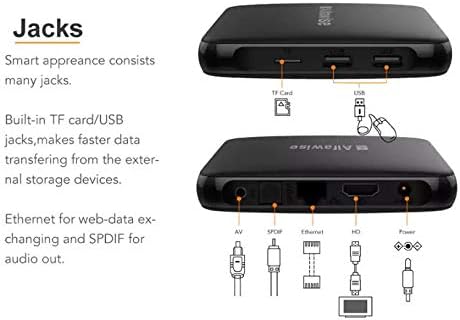
Image: Diagram illustrating the various ports on the Alfawise TV Box S95, including USB, TF Card, AV, SPDIF, Ethernet, HDMI, and Power.
- Pò USB: For connecting USB devices such as external hard drives, USB flash drives, mouse, or keyboard.
- TF Kat plas: For inserting a MicroSD (TF) card to expand storage.
- Pò AV: For connecting to older televisions using an AV cable (composite video and stereo audio).
- SPDIF Port: For digital audio output to a home theater system or soundbar.
- Ethernet Port: For a wired network connection to your router.
- HDMI Port: For connecting to an HDTV or monitor for high-definition video and audio output.
- Antre pouvwa: Pou konekte adaptè pouvwa a.

Imaj: Gwo plan view of the rear ports on the Alfawise TV Box S95, showing the AV, SPDIF, Ethernet, HDMI, and Power input connections.
5. Enstalasyon
Follow these steps to set up your Alfawise TV Box S95:
- Konekte ak televizyon an: Connect one end of the HDMI cable to the HDMI port on the TV Box and the other end to an available HDMI input on your television. Note the HDMI input number (e.g., HDMI 1, HDMI 2).
- Konekte pouvwa: Plug the power adapter into the DC 5V port on the TV Box, then plug the adapter into a wall outlet.
- Konekte Rezo a (Si ou vle): For a wired connection, connect an Ethernet cable from your router to the Ethernet port on the TV Box. For Wi-Fi, you will configure it after powering on.
- Konekte periferik yo (opsyonèl): If using a wired USB mouse or keyboard, plug them into the USB ports on the TV Box.
- Pouvwa sou: Turn on your television and select the correct HDMI input using your TV remote. The TV Box should automatically power on and display the boot screen.
6. Operasyon Enstriksyon
6.1. Initial Setup and Navigation
- Upon first boot, you may be guided through an initial setup process for language, time zone, and network connection.
- Use the provided remote control or a connected USB mouse/keyboard to navigate the Android 7.1 interface.
- The home screen typically displays shortcuts to popular apps and settings.
6.2. Koneksyon rezo
To access online content, connect your TV Box to the internet.
- Koneksyon filaire: If you connected an Ethernet cable during setup, the device should automatically connect to the internet.
- Koneksyon Wi-Fi:
- Ale nan Anviwònman > Rezo.
- Chwazi Wi-Fi epi vire l On.
- Chwazi rezo Wi-Fi ou nan lis la.
- Enter the Wi-Fi password using the on-screen keyboard or connected keyboard.
- Chwazi Konekte.
6.3. Using External Storage
Ou ka jwe medya filesoti nan kle USB oswa kat TF.
- Insert your USB drive into a USB port or your TF card into the TF card slot.
- The system may prompt you to open a file manager or media player. If not, navigate to the Aplikasyon yo section and open a file manager application to browse your content.
7. Antretyen
- Netwayaj: Sèvi ak yon twal mou epi sèk pou netwaye deyò aparèy la. Pa sèvi ak pwodui netwayaj likid oswa ayewosòl.
- Vantilasyon: Asire w ke ouvèti vantilasyon yo pa bloke pou anpeche surchof.
- Mizajou lojisyèl: Periodically check for system updates in the settings menu to ensure optimal performance and security.
- Depo: Lè w pa itilize aparèy la pou yon bon bout tan, dekonekte adaptè kouran an epi sere l nan yon kote ki fre epi sèk.
NAN. Depanaj
If you encounter issues with your Alfawise TV Box S95, refer to the following common problems and solutions:
| Pwoblèm | Kòz posib | Solisyon |
|---|---|---|
| Pa gen pouvwa | Adaptè kouran an pa konekte oswa li gen pwoblèm. | Asire w adaptè kouran an byen konekte ak aparèy la epi li nan yon priz kouran ki fonksyone. Eseye yon lòt priz. |
| Pa gen ekspozisyon sou televizyon | Ou chwazi yon antre HDMI ki pa kòrèk oubyen yon kab HDMI ki gen pwoblèm. | Verify your TV is on the correct HDMI input. Try a different HDMI port on your TV or a different HDMI cable. |
| Remote kontwòl pa travay | Batteries are low or inserted incorrectly. Obstruction between remote and device. | Replace batteries. Ensure correct polarity. Remove any obstructions. Point the remote directly at the TV Box. |
| Pa ka konekte ak Wi-Fi | Modpas ki pa kòrèk, koneksyon an pa nan zòn nan, oubyen pwoblèm routeur. | Double-check the Wi-Fi password. Move the TV Box closer to the router. Restart your router. |
| Device is slow or freezes | Too many apps running in the background or low storage. | Close unused applications. Clear cache. Restart the device. Consider a factory reset if issues persist (backup data first). |
9. Espesifikasyon
Detailed technical specifications for the Alfawise TV Box S95:
| Karakteristik | Deskripsyon |
|---|---|
| Mak | Alfawise |
| Non modèl | TV Box S95 |
| Nimewo Modèl Atik | S95 |
| Manifakti | Alfawise |
| CPU | Amlogic S905W, Quad-core, up to 2GHz |
| Sistèm operasyon | Android 7.1 |
| Gwosè RAM enstale a | 2 GB |
| Kapasite Depo memwa | 16 GB |
| Koneksyon Teknoloji | USB, Wi-Fi, Ethernet |
| Kalite Connector | Micro USB, HDMI, AV, SPDIF, Ethernet |
| Aparèy konpatib | Televizyon |
10. Garanti ak sipò
The Alfawise TV Box S95 comes with a standard manufacturer's warranty. Please refer to the warranty card included in your package for specific terms and conditions. For technical support, troubleshooting assistance beyond this manual, or warranty claims, please contact your retailer or the official Alfawise customer support channels.