
1. Entwodiksyon
Thank you for choosing the Xiaomi Mi 55-inch 4K UHD Smart Android TV. This manual provides essential information for the safe and efficient use of your television. Please read it thoroughly before operating the device and retain it for future reference.

Imaj 1.1: Devan view of the Xiaomi Mi 55-inch 4K UHD Smart Android TV.
2. Enfòmasyon sou Sekirite
Pou asire yon operasyon an sekirite epi pou anpeche domaj, swiv prekosyon sa yo:
- Pa ekspoze televizyon an ak lapli oswa imidite.
- Pa bloke ouvèti vantilasyon.
- Asire w ke ploge kouran an byen konekte atè.
- Evite mete televizyon an sou sifas ki pa estab.
- Keep the TV away from direct sunlight, heat sources, and open flames.
- Dekonekte televizyon an pandan tanpèt zèklè oswa lè ou pa itilize li pou yon bon bout tan.
- Refere tout sèvis yo bay pèsonèl sèvis kalifye.
3. Pake kontni
Verifye ke tout atik yo prezan nan pakè a:
- 1 × Xiaomi Mi 55-inch TV
- 1 × Remote control with voice control
- 1 × Remote control batteries
- 1 × kab pouvwa
- 1 × User manual (this document)
- 1 × Support legs
- 4 × Screws for support legs
4. Enstalasyon
4.1. Enstalasyon Fizik
Your TV can be installed on a stand or wall-mounted. The TV is VESA mounting standard compatible.
4.1.1. Enstalasyon kanpe
- Mete televizyon an fas anba sou yon sifas ki plat e mou pou evite domaje ekran an.
- Attach the support legs to the designated slots at the bottom of the TV using the provided screws. Ensure they are securely fastened.
- Mete televizyon an sou yon sifas ki estab e ki plat.
4.1.2. Montaj sou miray (Si ou vle)
If you choose to wall-mount your TV, use a VESA-compatible wall mount kit (sold separately) and follow the instructions provided with the wall mount. Ensure the wall can support the weight of the TV.
4.2. Konekte periferik
Konekte aparèy ekstèn ou yo nan pò televizyon an:
- HDMI: Connect Blu-ray players, game consoles, or set-top boxes to the HDMI ports (3 available). HDMI ARC is supported for audio return channel functionality.
- USB: Connect USB storage devices for media playback (2 available).
- LAN: Pou yon koneksyon entènèt filaire, konekte yon kab Ethernet nan pò LAN an.
- Sòti Odyo Dijital (Optik): Connect to an external audio system for high-quality digital sound.
4.3. Premye Limen
- Konekte kab kouran an nan televizyon an epi answit nan yon priz kouran.
- Peze bouton pouvwa a sou kontwòl remote la oswa sou televizyon an.
- Swiv enstriksyon ki sou ekran an pou w konplete konfigirasyon inisyal la, tankou seleksyon lang lan, koneksyon rezo a (Wi-Fi oswa Ethernet), epi koneksyon ak kont Google la.
5. Operasyon Enstriksyon
5.1. Kontwòl Remote
The included remote control allows you to navigate the TV's features. It supports voice control for convenient interaction with Google Assistant.
- Bouton pouvwa: Limen oswa etenn televizyon an.
- Pav Navigasyon (Anwo/Anba/Agoch/Dwat/OK): Navige nan meni yo epi chwazi opsyon yo.
- Bouton Volim: Ajiste nivo son an.
- Bouton chanèl: Chanje chanèl televizyon yo.
- Bouton Asistan Google la: Aktive kontwòl vokal.
- Bouton Kay: Retounen nan ekran prensipal Android TV a.
- Bouton tounen: Retounen nan ekran anvan an.
- Bouton Aplikasyon yo: Dedicated buttons for popular apps like Netflix and YouTube.
5.2. Karakteristik Smart TV (Android TV)
Your TV runs on Android TV (version 9), providing access to a wide range of smart features:
- Google Asistan: Sèvi ak kòmandman vokal pou chèche kontni, kontwole aparèy kay entelijan epi jwenn enfòmasyon.
- Google Play Store: Download and install various apps, games, and streaming services.
- Chromecast entegre: Voye kontni ki soti nan telefòn entelijan, tablèt, oswa òdinatè w dirèkteman sou televizyon an.
- Aplikasyon pre-enstale: Access Netflix, YouTube, and a web navigatè dirèkteman.
- Sipò pou aplikasyon SmartThings: Integrate with other compatible smart home devices.
5.3. Anviwònman Imaj ak Son
Ajiste paramèt imaj ak son pou optimize ou vieweksperyans nan:
- Mòd foto: Select from various presets (e.g., Standard, Vivid, Movie, Game) or customize brightness, contrast, color, and sharpness.
- HDR: The TV supports HDR for enhanced contrast and color with compatible content.
- Mòd son: Chwazi nan prereglaj tankou Estanda, Mizik, Fim, oubyen pèsonalize paramèt egalizatè yo.
- DTS/Dolby Audio: The TV supports DTS and Dolby audio technologies for immersive sound.
6. Antretyen
6.1. Netwayaj
To clean your TV:
- Toujou debranche televizyon an anvan ou netwaye li.
- Sèvi ak yon twal mou epi sèk pou siye ekran an ak kabinè a.
- Pou mak ki difisil pou retire, pase yon ti krasampRense twal la avèk dlo oswa yon pwodui netwayaj ekran espesyalize. Pa janm flite pwodui netwayaj la dirèkteman sou ekran an.
- Evite itilize pwodui netwayaj abrazif oswa solvang.
6.2. Mizajou lojisyèl
Periodically check for software updates to ensure your TV has the latest features and performance improvements. Updates can usually be found in the TV's settings menu under 'About' or 'System Update'.
NAN. Depanaj
Si ou rankontre pwoblèm, gade pwoblèm ak solisyon komen sa yo:
| Pwoblèm | Solisyon posib |
|---|---|
| Pa gen pouvwa | Check if the power cable is securely connected and the power outlet is working. Try a different outlet. |
| Pa gen imaj, men gen son | Asire w ou chwazi bon sous done a. Tcheke koneksyon kab yo ak aparèy ekstèn yo. |
| Pa gen son, men imaj la la | Check volume level and mute settings. Verify audio cable connections. If using external audio, ensure it's powered on and correctly configured. |
| Remote kontwòl pa travay | Ranplase pil yo. Asire w pa gen okenn obstak ant telekòmand lan ak televizyon an. Rekonekte telekòmand lan si se yon telekòmand Bluetooth. |
| Pa ka konekte ak Wi-Fi | Check if the Wi-Fi router is on and working. Re-enter the Wi-Fi password. Try restarting the TV and router. |
| Aplikasyon yo ralanti oswa yo ap plante | Close unused apps. Clear app cache. Restart the TV. Ensure sufficient internet speed. |
Si pwoblèm nan kontinye, kontakte sipò kliyan.
8. Espesifikasyon
| Karakteristik | Detay |
|---|---|
| Nimewo Modèl | L55M5-5ASP |
| Gwosè ekran | 55 pous |
| Teknoloji ekspozisyon | dirije |
| Rezolisyon | 3840 x 2160 (4K UHD) |
| Rafrechisman pousantaj | 60Hz |
| Viewing Ang | 178 degre |
| Karakteristik videyo | HDR sipò |
| Sistèm operasyon | Android TV (Android 9) |
| RAM | 2GB |
| Kapasite Depo | 8GB |
| Sòti odyo | 2 x 10W oratè |
| Teknoloji Odyo | DTS/Dolby Audio |
| Karakteristik entelijan | Google Assistant, Google Play, Web Browser, SmartThings app support, YouTube, Netflix (subscription not included), Chromecast built-in, DVB-T2 + DVB-C tuner |
| Koneksyon | 3 x HDMI (with ARC), 2 x USB, 1 x LAN (Ethernet 100Mbps), 1 x Digital Optical Audio Out, Built-in Wi-Fi (2.4G/5G), Bluetooth 4.2 |
| Aspè rapò | 16:9 |
| Estanda Montaj | VESA konpatib |
| Pwodwi Dimansyon (W x D x H) | 124.2 x 24.5 x 78 cm (ak sipò a) |
| Pwa pwodwi | 13 kg |
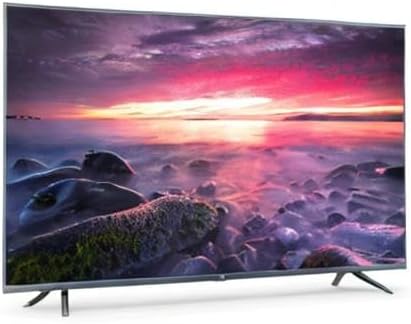
Image 8.1: Energy efficiency label for the Xiaomi Mi 55-inch TV.
9. Garanti ak sipò
Pou enfòmasyon sou garanti a, tanpri gade kat garanti ki vini ak pwodwi w la oswa vizite sit ofisyèl Xiaomi a. websit pou rejyon ou an. Kenbe resi acha ou kòm prèv acha.
For technical support, troubleshooting assistance beyond this manual, or service inquiries, please contact Xiaomi customer service through their official channels.