
Prtukyt Prtukyt 8S
Prtukyt 8S Wireless Bluetooth Headset User Manual
Model: Prtukyt 8S (PT-1088)
1. Entwodiksyon
Thank you for choosing the Prtukyt 8S Wireless Bluetooth Headset. This manual provides detailed instructions on how to set up, operate, and maintain your new headset. Please read this manual carefully before use to ensure optimal performance and longevity of your device.
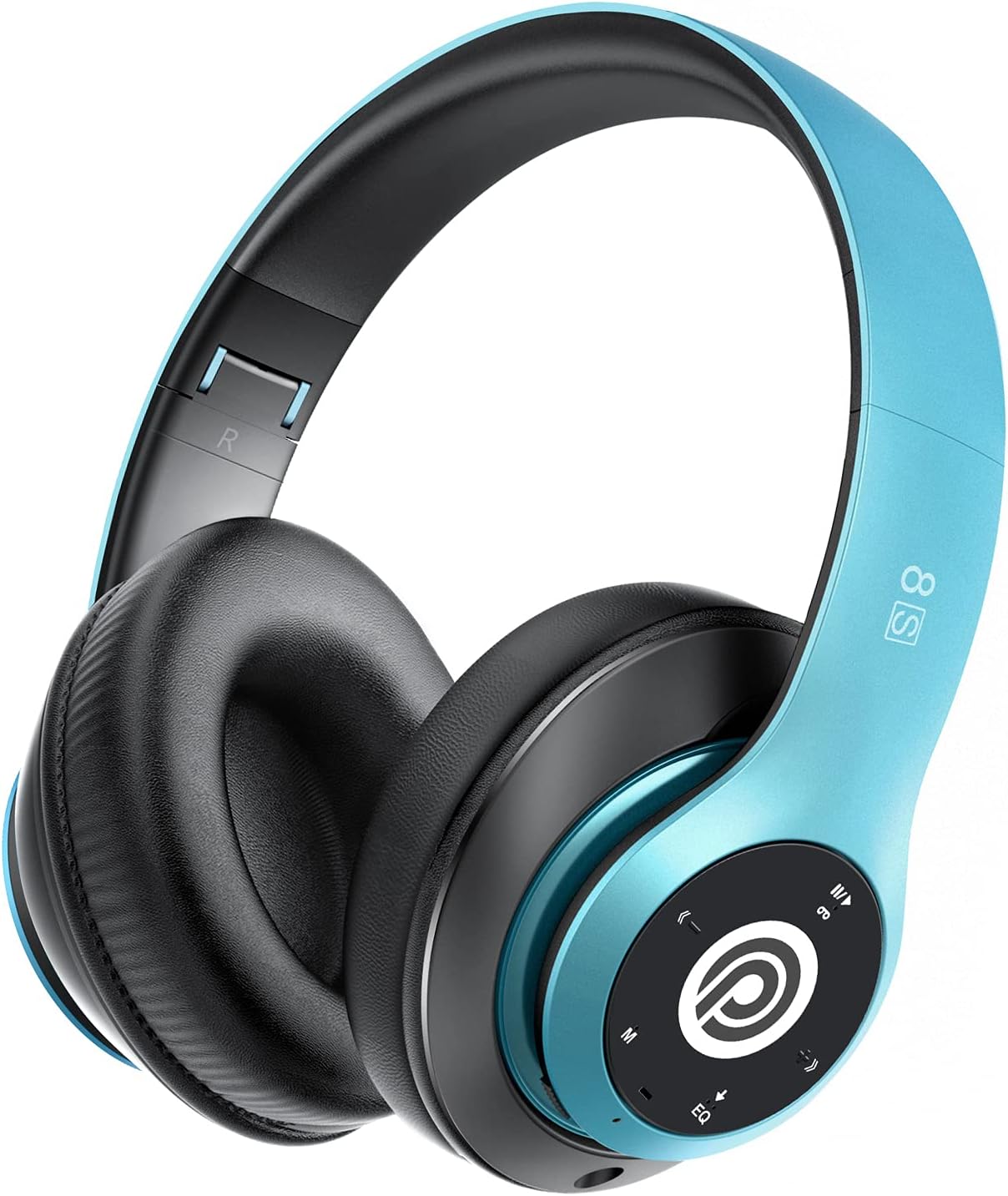
Image: The Prtukyt 8S Wireless Bluetooth Headset in blue, showcasing konsepsyon elegant li yo ak ekoutè konfòtab li yo.
2. Enfòmasyon sou Sekirite
To ensure safe and proper use, please observe the following guidelines:
- Pa ekspoze kas ekoutè a nan tanperati ekstrèm, imidite, oswa sibstans koroziv.
- Evite lage kas ekoutè a oswa soumèt li a gwo enpak.
- Do not disassemble or modify the headset. This will void the warranty and may cause damage.
- Keep the headset away from water and liquids as it is not waterproof.
- Koute mizik pandan lontan ak yon volim ki wo ka lakòz pwoblèm nan zòrèy ou. Ajiste volim nan sou yon nivo modere.
- Jete pwodwi a ak batri li yon fason responsab dapre règleman lokal yo.
3. Pake kontni
Tanpri tcheke pake a pou atik sa yo:
- 1 x Prtukyt 8S Wireless Bluetooth Headset
- 1 x Audio Cable (3.5mm Jack)
- 1 x USB Chaje Kab
- 1 x manyèl itilizatè
4. Pwodwi souview
Familiarize yourself with the various parts and controls of your Prtukyt 8S headset.
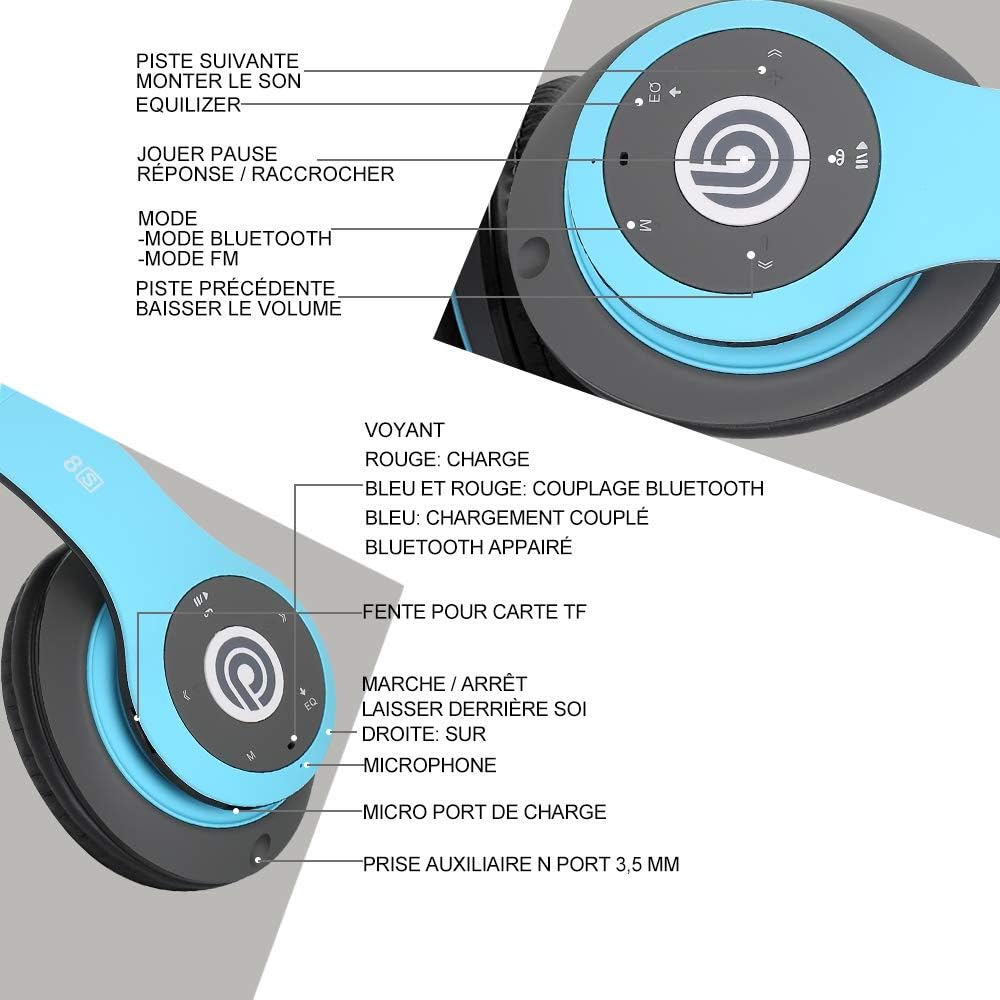
Imaj: Detaye view of the Prtukyt 8S headset's control panel and ports, including buttons, indicator light, TF card slot, microphone, charging port, and 3.5mm AUX port.
Control Panel & Ports:
- 1. Pwochen mizik / Ogmante volim: Peze yon ti kras pou pwochen mizik la, peze lontan pou ogmante volim nan.
- 2. EQ Button: Press to cycle through equalizer sound effects.
- 3. Play / Pause / Answer / Hang Up: Multi-function button for music and calls.
- 4. Mode Button (M): Short press to switch between Bluetooth, FM Radio, and TF Card modes.
- 5. Chante anvan / Diminye volim: Peze yon ti kras pou ale nan mizik anvan an, peze lontan pou diminye volim nan.
- 6. Limyè Endikatè: Shows charging status, Bluetooth pairing, and connection status.
- 7. Plas pou kat TF: Insert a Micro SD/TF card for direct music playback.
- 8. Power On/Off Switch: Glise pou vire kask la sou oswa etenn.
- 9. Mikwofòn: Pou apèl men-gratis.
- 10. Mikwo USB chaje Port: Konekte kab chaje USB a isit la.
- 11. 3.5mm AUX Port: Pou koneksyon filaire ak aparèy odyo.
Karakteristik konsepsyon:
- Konsepsyon pliable: The headset features a unique foldable design for easy portability and storage, saving space.

Image: The Prtukyt 8S headset demonstrating its multi-angle rotation and adjustable headband for ultimate comfort.
- Comfortable Earcups: Super soft foam earcups and an adjustable headband ensure a comfortable fit for extended listening sessions.
- Odyo ki gen anpil fidelite: Equipped with powerful 57mm stereo drivers and Bluetooth 5.0 chip for deep bass and clear sound.

Imaj: Yon entèn view highlighting the large aperture drivers and Bluetooth 5.0 chip for powerful performance.
5. Enstalasyon
5.1 Premye chaj
Before first use, fully charge the headset. Connect the USB charging cable to the Micro USB charging port on the headset and the other end to a USB power adapter (not included) or a computer's USB port.
- The indicator light will be WOUJ pandan chaje.
- Limyè endikatè a ap vire BLE lè chaje a fini.
- Yon chaj konplè pran apeprè 2-3 èdtan anjeneral.

Image: The Prtukyt 8S headset illustrating its impressive 52-hour battery life on a single charge.
6. Operasyon Enstriksyon
6.1 Power On/Off
- Pouvwa sou: Slide the Power On/Off switch to the "ON" position. The indicator light will flash blue, indicating it's ready for pairing or connecting.
- Pouvwa Off: Slide the Power On/Off switch to the "OFF" position. The indicator light will turn off.
6.2 Bluetooth Pairing
- Asire ekoutè a koupe.
- Slide the Power On/Off switch to the "ON" position. The headset will enter pairing mode, and the indicator light will flash BLE epi WOUJ altènativman.
- Aktive Bluetooth sou aparèy ou an (telefòn entelijan, tablèt, òdinatè, elatriye).
- Chèche pou "Prtukyt 8S" or "PT-1088" in the list of available Bluetooth devices.
- Select "Prtukyt 8S" to connect. Once successfully paired, the indicator light will flash BLE dousman.
- Si yo mande w yon modpas, antre "0000".
Note: The headset will automatically attempt to reconnect to the last paired device when powered on.
6.3 Lekti Mizik (Mòd Bluetooth)
- Jwe/Poz: Kout peze la Jwe/Poz bouton.
- Pwochen Track: Kout peze la Next Track / Volim Up bouton.
- Track Previous: Kout peze la Previous Track / Volim desann bouton.
- Volim moute: Long peze la Next Track / Volim Up bouton.
- Volim desann: Long peze la Previous Track / Volim desann bouton.
6.4 Fonksyon Rele
- Reponn apèl: Kout peze la Jwe/Poz/Reponn/Kwoke bouton an lè yon apèl k ap antre sonnen.
- Fini apèl: Kout peze la Jwe/Poz/Reponn/Kwoke bouton pandan yon apèl.
- Rejte apèl: Long peze la Jwe/Poz/Reponn/Kwoke bouton an lè yon apèl k ap antre sonnen.
- Recomposition Dènye Nimewo: Doub peze la Jwe/Poz/Reponn/Kwoke bouton.
6.5 FM Radio Mode
- Limen headset la.
- Kout peze la Mòd (M) button to switch to FM Radio mode. You will hear a voice prompt indicating the mode change.
- Kout peze la Jwe/Poz bouton an pou eskane epi sove estasyon FM ki disponib yo otomatikman.
- Sèvi ak la Next Track epi Previous Track bouton pou navige ant estasyon ki anrejistre yo.
6.6 Mòd Kat TF
- Insert a Micro SD/TF card (with MP3 audio files) into the TF Card Slot.
- Turn on the headset. It should automatically switch to TF Card mode and begin playing music. If not, short press the Mòd (M) bouton an pou chwazi mòd Kat TF la.
- Sèvi ak la Jwe/Poz, Next Track, Previous Track, and volume buttons as in Bluetooth mode.
6.7 Fonksyon EQ
The headset features an equalizer function to customize your listening experience.
- Kout peze la EQ button to cycle through different equalizer presets (e.g., Pop, Rock, Jazz, Classic, Bass, Normal).
6.8 Wired Mode (AUX)
You can use the headset with non-Bluetooth devices via the included 3.5mm audio cable.
- Connect one end of the 3.5mm audio cable to the 3.5mm AUX Port on the headset.
- Connect the other end to the audio output jack of your device (e.g., computer, MP3 player).
- In wired mode, the headset's buttons (except volume control on some devices) will not function. Control playback and volume directly from your connected device.
7. Antretyen
- Netwaye kas ekoutè a regilyèman avèk yon twal mou epi sèk. Pa sèvi ak pwodui netwayaj abrazif oswa solvan.
- Store the headset in a cool, dry place when not in use. The foldable design helps save space.
- Evite ekspozisyon pwolonje nan limyè solèy dirèk oswa tanperati ekstrèm.
- Do not expose the headset to water or moisture.
NAN. Depanaj
| Pwoblèm | Kòz posib | Solisyon |
|---|---|---|
| Kas ekoutè a pa vle limen. | Batri a fèb oswa mouri. | Chaje kas ekoutè a nèt. |
| Pa ka asosye ak aparèy Bluetooth. | Bluetooth la etenn sou aparèy la; kas ekoutè a pa an mòd koneksyon; li twò lwen aparèy la. | Ensure Bluetooth is enabled on your device. Put headset in pairing mode (flashing blue/red). Keep devices within 10 meters. Clear previous pairings on your device. |
| Pa gen son oswa volim nan ba. | Volume too low on headset or device; incorrect mode selected; loose cable in wired mode. | Increase volume on both headset and connected device. Ensure correct mode (Bluetooth, FM, TF, AUX) is selected. Check 3.5mm cable connection. |
| Resepsyon radyo FM lan pa bon. | Siyal fèb; entèferans anviwònman. | Try moving to a different location. The audio cable can act as an antenna; ensure it's connected if using FM. |
| Kat TF la pa ap jwe. | Kat la pa byen antre; li pa sipòte file fòma; kat pèvèti. | Reinsert TF card firmly. Ensure music fileYo an fòma MP3. Eseye yon lòt kat TF. |
9. Espesifikasyon
| Non modèl | Prtukyt 8S |
| Nimewo Modèl | PT-1088 |
| Koneksyon Teknoloji | San fil (Bluetooth 5.0), Filaire (3.5mm Jack) |
| Gamme frekans | 20 Hz - 20,000 Hz |
| Gwosè Chofè | 57mm Stereo Drivers |
| Karakteristik | Integrated Microphone, FM Radio, TF Card Playback, EQ Function, Foldable Design |
| Dire batri (apeprè) | Up to 52 hours (Music/Talk time) |
| Port chaje | Mikwo USB |
| Rezistans dlo | Pa enpèmeyab |
| Koulè | Ble |
10. Garanti & Sipò
Prtukyt is committed to providing an excellent customer experience. If you encounter any quality issues with your product, please contact us immediately. Our customer support team is ready to assist you with any questions or concerns regarding your Prtukyt 8S Wireless Bluetooth Headset.
For support, please refer to the contact information provided on your purchase platform or the official Prtukyt websit.
Ask a question about this manual
Ask about setup, troubleshooting, compatibility, parts, safety, or missing instructions. Manuals+ will review the question and use this page’s manual context to help answer it.