
1. Entwodiksyon
Thank you for choosing the Arcam SA10 Class A/B Integrated Amplifier. This manual provides essential information for setting up, operating, and maintaining your amplifier to ensure years of high-quality audio enjoyment. The SA10 is designed to deliver class-leading sound quality, bringing your music to life with its powerful 50W per channel output, high-performance ESS9016K2M Sabre DAC, and low noise floor. It offers a listening experience as close to the artist's original performance as possible.
2. Enfòmasyon sou Sekirite
Please read all safety instructions carefully before operating the unit. Keep this manual for future reference.
- Pa ekspoze aparèy sa a ak lapli oswa imidite.
- Pa bloke okenn ouvèti vantilasyon. Enstale li dapre enstriksyon manifakti a.
- Pa enstale tou pre okenn sous chalè tankou radyatè, rejis chalè, recho, oswa lòt aparèy (tankou amplifiers) ki pwodui chalè.
- Pwoteje kòd elektrik la pou yo pa mache oswa kwense, sitou nan priz, resipyan konvenyans, ak pwen kote yo sòti nan aparèy la.
- Itilize sèlman atachman/akseswa manifakti a espesifye.
- Deploge aparèy sa a pandan tanpèt zèklè oswa lè li pa itilize pou yon peryòd tan ki long.
- Refere tout sèvis yo bay pèsonèl sèvis ki kalifye yo. Antretyen obligatwa lè aparèy la te domaje nan okenn fason.
- Pwodui sa a gen pwodui chimik Eta Kalifòni konnen ki lakòz kansè ak domaj nesans oswa lòt domaj repwodiktif.
3. Pake kontni
Upon opening the box, please ensure all the following items are present:
- Arcam SA10 Integrated Amplifier
- AC pouvwa kòd
- Kontwòl remote (avèk 2 pil AAA enkli)
- Manyèl Itilizatè (dokiman sa a)
4. Pwodwi souview
Familiarize yourself with the front and rear panels of your Arcam SA10 amplifier.
4.1 Panèl devan
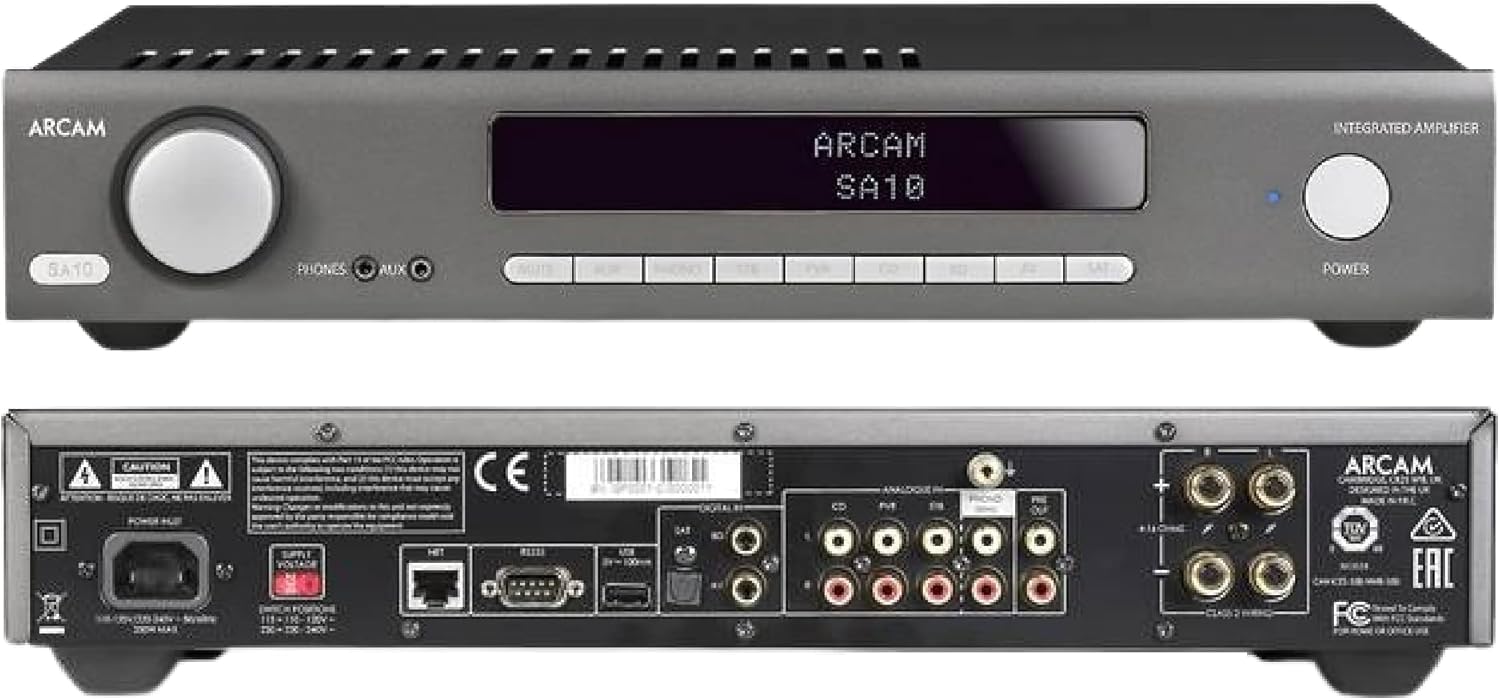
Figure 4.1: Front and Rear Panels of the Arcam SA10. The front panel features a large volume knob on the left, a display screen in the center, input selection buttons below the display, and a power button on the right. Headphone and auxiliary inputs are also present.
- Volim bouton: Ajiste volim pwodiksyon jeneral la.
- Ekspozisyon ekran: Shows current input, volume level, and other status information.
- Input Selection Buttons: Allows selection between various audio sources (CD, Tuner, AV, SAT, etc.).
- Bouton pouvwa: Baskile la amplifier between standby and operational modes.
- Sòti ekoutè: Jack 3.5mm pou konekte kas ekoutè.
- Antre oksilyè: 3.5mm jack for connecting portable audio devices.
4.2 Panèl dèyè
The rear panel provides all the necessary connections for your audio system.
Figure 4.2: Detailed Rear Panel Connections. This view highlights the speaker terminals, analog RCA inputs (including Phono), digital optical and coaxial inputs, and the power inlet.
- Oratè Tèminal: Connect your passive speakers (left and right channels).
- Analog Inputs (RCA): Multiple stereo RCA inputs for connecting analog audio sources like CD players, tuners, or other line-level devices.
- Phono Input (RCA): Dedicated input for turntables with moving magnet (MM) cartridges.
- Entran Digital:
- Optik (Toslink): For digital audio sources like TVs or game consoles.
- Kowaksyal: For digital audio sources like CD players or network streamers.
- Pre-soti: Pou konekte ak yon pouvwa ekstèn amplifier oswa subwoofer ki mache ak pisans.
- Pò USB: For firmware updates or service.
- Ethernet Port: For network control and future updates.
- AC Power Inlet: Konekte a amplifier nan ekipman pou kouran elektrik la.
5. Enstalasyon
5.1 Plasman
Place the Arcam SA10 on a stable, level surface away from direct sunlight, heat sources, and excessive moisture. Ensure adequate ventilation around the unit to prevent overheating. Do not place other components directly on top of the amplifier.
5.2 Konekte moun kap pale yo
Connect your passive speakers to the speaker terminals on the rear panel. Ensure correct polarity (+ to + and - to -) for both left and right channels. Use high-quality speaker cables for optimal sound performance.
5.3 Konekte Sous Odyo yo

Figure 5.3: The Arcam SA10 offers convenient connections including Toslink optical, two digital coaxial inputs, and three stereo analog RCA inputs, plus a dedicated phono input.
- Analog Sources: Connect CD players, tuners, or other line-level devices to the RCA analog inputs (CD, Tuner, AV, SAT).
- Platin: Connect a turntable with a moving magnet (MM) cartridge to the dedicated PHONO input.
- Sous Dijital: Connect digital audio sources using either the optical (Toslink) or coaxial digital inputs.
- Aparèy pòtab: Use the 3.5mm AUX input on the front panel for quick connection of portable media players.
5.4 Koneksyon pouvwa
Once all audio connections are made, connect the supplied AC power cord to the AC power inlet on the rear panel of the amplifier and then to a suitable wall outlet.
6. Operasyon Enstriksyon
6.1 Limen/Etenyen
Peze a POUVWA button on the front panel or the remote control to switch the amplifier on or into standby mode. The blue LED next to the power button indicates operational status.
6.2 Seleksyon Antre
Use the input selection buttons on the front panel or the remote control to choose your desired audio source. The selected input will be displayed on the front panel screen.
6.3 Kontwòl Volim
Vire gwo a VOLIM knob on the front panel clockwise to increase volume and counter-clockwise to decrease it. Alternatively, use the volume up/down buttons on the remote control.
6.4 Itilizasyon kas ekoutè
Plug your headphones into the 3.5mm TELEFÒN jack on the front panel. Connecting headphones will automatically mute the main speaker outputs.
6.5 Kontwòl a distans ak kontwòl aplikasyon

Figure 6.5: Control your SA10 with the included remote or via UPnP audio and basic functions using the FREE MusicLife App on your iPad, iPhone, or Android device.
The included remote control provides full functionality for the SA10. Ensure the supplied AAA batteries are correctly inserted. For advanced control and UPnP audio streaming, download the free Arcam MusicLife App from your device's app store (available for iOS and Android).
7. Antretyen
To maintain the appearance and performance of your Arcam SA10:
- Siye sifas ekstèn yo ak yon twal mou, sèk, epi ki pa gen pousyè.
- Pa sèvi ak pwodui netwayaj abrazif, sir, oswa solvan.
- Ensure the ventilation grilles are free from dust and obstructions.
- Disconnect the power cord from the wall outlet before cleaning.
NAN. Depanaj
If you experience issues with your Arcam SA10, refer to the following common problems and solutions:
| Pwoblèm | Kòz posib | Solisyon |
|---|---|---|
| Pa gen pouvwa | Kòd kouran an pa konekte; priz kouran an gen pwoblèm. | Asire w kòd kouran an byen konekte. Eseye yon lòt priz kouran. |
| Pa gen son | Yo chwazi move antre; kab oratè yo lach; volim nan twò ba; yo aktive silans. | Select correct input. Check speaker cable connections. Increase volume. Deactivate mute. |
| Son defòme | Source signal too high; speaker impedance mismatch; faulty cables. | Reduce source output level. Ensure speakers are compatible (8 ohms recommended). Check/replace cables. |
| Remote kontwòl pa travay | Batteries depleted or incorrectly inserted; obstruction between remote and amplifier. | Replace batteries. Ensure correct polarity. Remove obstructions. |
If the problem persists, please contact Arcam customer support or your authorized dealer.
9. Espesifikasyon
Key technical specifications for the Arcam SA10 Integrated Amplifier:

Figure 9.1: The Arcam SA10 delivers 50 watts per channel, features 5 analog inputs (including phono), 3 digital inputs, a 32-bit DAC, and boasts a low total harmonic distortion + noise of 0.003%.
- Sorti pouvwa: 50W per channel (8 ohms, 20-20,000 Hz, at 0.5% THD)
- AmpKalite lifikasyon: Klas A/B
- Digital-to-Analog Converter (DAC): 32-bit ESS9016K2M Sabre DAC
- Entran analog: 5 (including 1 dedicated Phono input for Moving Magnet cartridges)
- Entran Digital: 3 (1 Optical Toslink, 2 Coaxial)
- Total distòsyon Harmony + Bri: 0.003%
- Dimansyon (W x P x H): 17.05 x 12.72 x 3.43 pous (433 x 323 x 87 mm)
- Pwa: 2.03 liv (0.92 kg)
- Kontwòl: Full I/P control, Remote Control, MusicLife App compatibility
- Pil pou telekòmand: 2 AAA (enkli)
10. Garanti ak sipò
Arcam products are designed and manufactured to the highest standards. For information regarding warranty coverage, technical support, or service, please refer to the warranty card included with your product or visit the official Arcam websit la. Kenbe prèv acha ou pou reklamasyon garanti.