
Entwodiksyon
The EVOLVEO EASYPHONE FM is a user-friendly mobile phone designed for straightforward communication. It features large, separated keys, a clear display, and essential functions to ensure ease of use. This manual provides instructions for setting up, operating, and maintaining your device.
1. Pake kontni
Tanpri tcheke pake a pou atik sa yo:
- EVOLVEO EASYPHONE FM Mobile Phone
- Chaje waf
- AC adaptè
- Batri Li-ion 1000 mAh
- Manyèl itilizatè
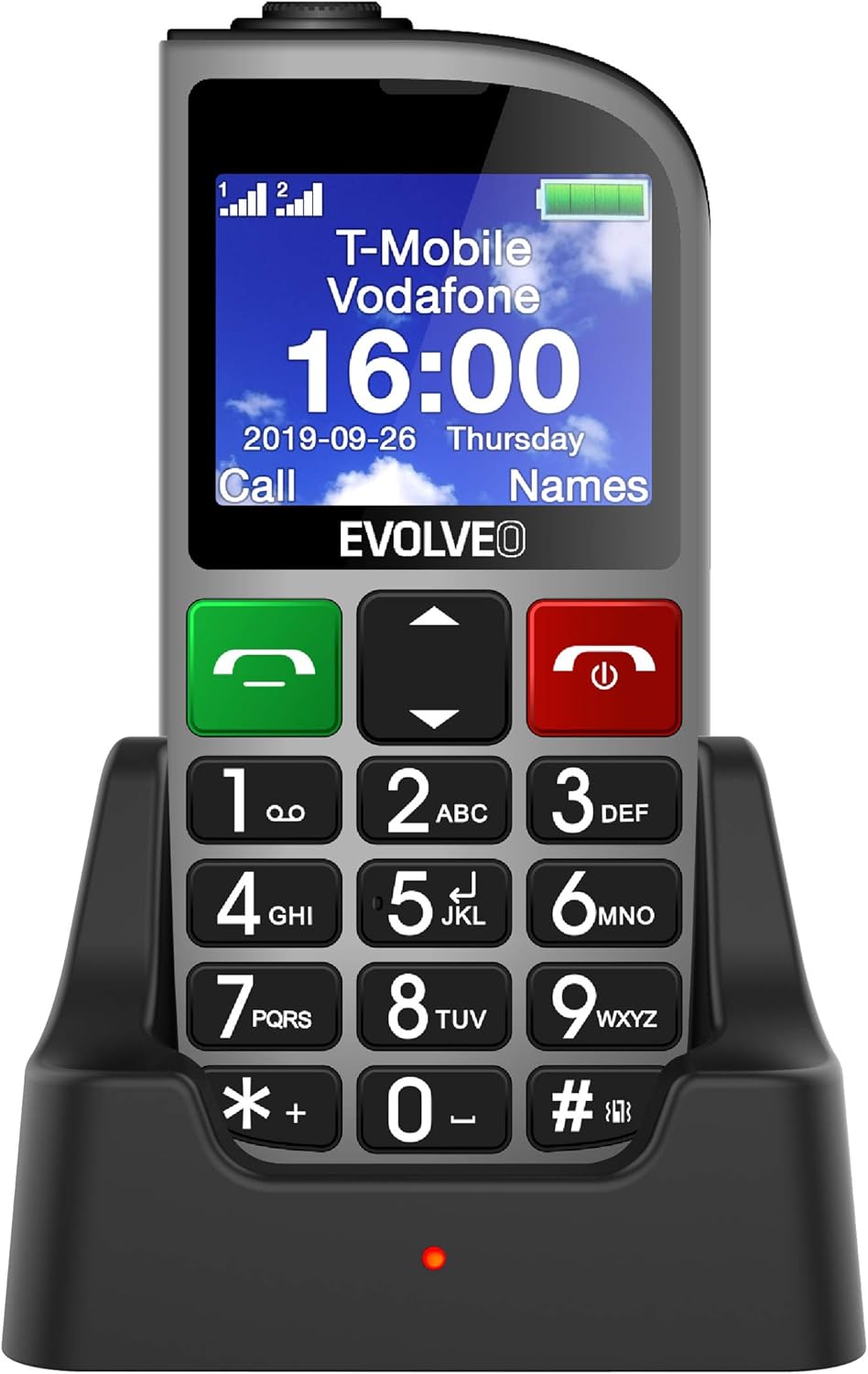
Figi 1.1: EVOLVEO EASYPHONE FM placed in its charging dock. The phone features a large display showing time and network information, with prominent green call and red end call buttons, and a numeric keypad below.
2. Enstalasyon
2.1. Enstalasyon ak Chaje Batri
- Retire kouvèti dèyè telefòn lan.
- Insert the Li-ion 1000 mAh battery, ensuring the contacts align correctly.
- Ranplase kouvèti dèyè a.
- Connect the AC adapter to the charging dock.
- Place the phone into the charging dock. The charging indicator light will illuminate.
- Kite telefòn nan chaje nèt anvan premye itilizasyon an.
2.2. Mete Kat SIM (yo)
The phone supports two SIM cards (Dual SIM) for GSM/GPRS 850/900/1800/1900 MHz networks.
- Asire w ke telefòn nan etenn.
- Retire kouvèti dèyè a ak batri a.
- Locate the SIM card slots.
- Insert your SIM card(s) into the designated slots, ensuring correct orientation.
- Remete batri a ak kouvèti dèyè.
2.3. Inserting a MicroSDHC Card
You can expand the phone's storage for music, photos, and other files by inserting a MicroSDHC card.
- Asire w ke telefòn nan etenn.
- Retire kouvèti dèyè a ak batri a.
- Locate the MicroSDHC card slot.
- Gently insert the MicroSDHC card until it clicks into place.
- Remete batri a ak kouvèti dèyè.
3. Operasyon Enstriksyon
3.1. Power On/Off
- Pou limen: Peze epi kenbe bouton an Red End Call/Power bouton jiskaske ekran an limen.
- Pou etenn: Peze epi kenbe bouton an Red End Call/Power button until the power off options appear, then confirm.

Figi 3.1: Devan view of the EVOLVEO EASYPHONE FM, highlighting the large display, call buttons, and numeric keypad for easy dialing.
3.2. Fè ak resevwa apèl
- Fè yon apèl: Dial the number using the numeric keypad and press the Green Call bouton.
- Vitès Rele: The phone supports quick access to 8 popular contacts. Assign numbers to keys 2-9 for speed dialing. Press and hold the assigned key to dial.
- Resevwa yon apèl: Peze a Green Call bouton pou reponn yon apèl k ap fèk ap rantre.
- Fini yon apèl: Peze a Red End Call/Power button to end an active call.
3.3. Sending and Receiving SMS Messages
The separated keyboard keys facilitate easy writing of SMS messages.
- Navigate to the Messaging menu.
- Select "Write Message" to compose a new SMS.
- Antre nimewo moun k ap resevwa a oubyen chwazi nan kontak yo.
- Tape mesaj ou a lè l sèvi avèk klavye a.
- Press "Send" to transmit the message.
3.4. Kontwòl Volim
Adjust the call and ringtone volume using the dedicated volume control button located on the left side of the phone.

Figi 3.2: Left side of the phone, showing the volume control buttons and the FM radio activation button.
3.5. SOS bouton ijans
The SOS button, located on the back of the device, allows for quick emergency calls and messages.
- Before use, configure up to five emergency contact numbers in the phone settings.
- Nan yon ijans, peze epi kenbe bouton an SOS bouton.
- The phone will automatically dial the predefined emergency numbers sequentially and send an emergency message to these contacts.

Figi 3.3: Dèyè view of the EVOLVEO EASYPHONE FM, showing the prominent red SOS emergency button and the camera lens.
3.6. FM Radyo
The phone includes an FM radio with a dedicated activation button.
- To turn on the FM radio, press the independent FM button on the side of the device.
- The radio can play in the background, allowing you to use other phone functions.
- During an incoming or outgoing call, the radio will automatically mute and resume playback after the call ends.
3.7. Flach
A powerful flashlight is integrated into the phone, activated by a dedicated button.
- Press the dedicated flashlight button on the side of the phone to turn the flashlight on or off.

Figi 3.4: Right side of the phone, showing the dedicated flashlight button.
3.8. Lòt Karakteristik
- Kamera: The phone includes a VGA camera for basic photo capture.
- Jwè Klas Mizik: Jwe mizik files stored on your MicroSDHC card.
- Digital Recorder (Dictaphone): Record voice notes.
- Kalandriye: Kenbe tras de dat enpòtan ak evènman yo.
- Revèy Alam: Mete alam pou rapèl.
- Kalkilatris: Fè kalkil debaz yo.
- Loup: Utilize the screen as a magnifying glass.
4. Antretyen
4.1. Netwaye Aparèy la
- Use a soft, dry cloth to clean the phone's surface and screen.
- Avoid using liquid cleaners or abrasive materials, as they may damage the device.
- Ensure no moisture enters the charging port or other openings.
4.2. Swen batri
- To prolong battery life, avoid exposing the phone to extreme temperatures.
- Charge the battery regularly, but avoid overcharging or letting it completely drain for extended periods.
- If the phone will not be used for a long time, charge the battery to about 50% before storing it.
NAN. Depanaj
If you encounter issues with your EVOLVEO EASYPHONE FM, refer to the following common problems and solutions:
5.1. Telefòn nan pa limen
- Asire w ke batri a kòrèkteman enstale ak chaje.
- Connect the phone to the charger and wait a few minutes before attempting to power it on again.
- Tcheke si kontak batri yo pwòp.
5.2. Cannot Make or Receive Calls
- Check if the SIM card(s) are correctly inserted and activated.
- Ensure you have network coverage.
- Verify that the phone is not in airplane mode (if applicable).
- Check your account balance or subscription status with your service provider.
5.3. FM Radio Not Working
- Asire w ou nan yon zòn ki gen bon resepsyon siyal FM.
- Check if the FM radio is properly activated using its dedicated button.
5.4. Pwoblèm ekspozisyon
- If the display is dim, check the brightness settings.
- If the screen is unresponsive, try restarting the phone.
6. Espesifikasyon
| Mak | Evolve |
| Modèl | EASYPHONE FM |
| Gwosè ekspozisyon | 1.8 pous |
| Rezolisyon ekspozisyon | 320 x 240 px |
| Teknoloji selilè | 2G (GSM/GPRS 850/900/1800/1900 MHz) |
| Sipò SIM | Doub SIM |
| Koneksyon | Bluetooth, Jack 3.5 mm |
| Batri | Li-ion 1000 mAh |
| Dimansyon | 130 × 61 × 16.5 mm |
| Pwa | 105 g (ak batri) |
| Kamera | VGA |
| Ekspansyon Depo | Plas pou kat MicroSDHC |
Remak: Espesifikasyon yo sijè a chanje san avètisman davans.
7. Garanti ak sipò
For warranty information and technical support, please refer to the warranty card included in your package or visit the official Evolveo websit la. Kenbe prèv acha ou pou reklamasyon garanti.