
POOLEX PC-SLP090N
Manyèl Itilizatè Ponp Chalè POOLEX Silverline Inverter 90
Model: PC-SLP090N
Entwodiksyon
This manual provides essential information for the safe and efficient operation of your POOLEX Silverline Inverter 90 Heat Pump. Please read this manual thoroughly before installation, operation, or maintenance to ensure proper use and to prevent damage to the unit or injury to yourself.
Enfòmasyon sou Sekirite
Always adhere to local electrical codes and regulations. Installation must be performed by a qualified professional. Disconnect power before performing any maintenance or service. Do not operate the unit if any part is damaged. Keep children and pets away from the unit during operation. Ensure proper ventilation around the heat pump.
- Ensure the power supply matches the unit's requirements.
- Pa bloke ouvèti pou antre lè a oswa ouvèti pou sòti lè a.
- Avoid direct contact with moving parts, such as the fan.
- In case of unusual noise, smell, or smoke, immediately turn off the unit and disconnect power.
Kontni pake
Verifye ke tout konpozan ki nan lis anba a yo prezan nan pake ou a:
- POOLEX Silverline Inverter Heat Pump Unit: The main heat pump unit, designed for efficient pool heating.

Image: The primary POOLEX Silverline Inverter heat pump unit in gray, featuring a large fan on the side and the 'FULL INVERTER' logo.
- Anti-Vibration Mounts: A set of four rubber mounts to reduce vibration and noise during operation.

Image: Four black U-shaped anti-vibration rubber mounts.
- PVC Connectors (Ø 50 mm, 1 ½): Two white PVC connectors for plumbing the heat pump into your pool's filtration system.

Image: Two white PVC pipe connectors with threaded ends and O-rings.
- Condensate Drain Hose: A flexible hose for draining condensation from the unit.
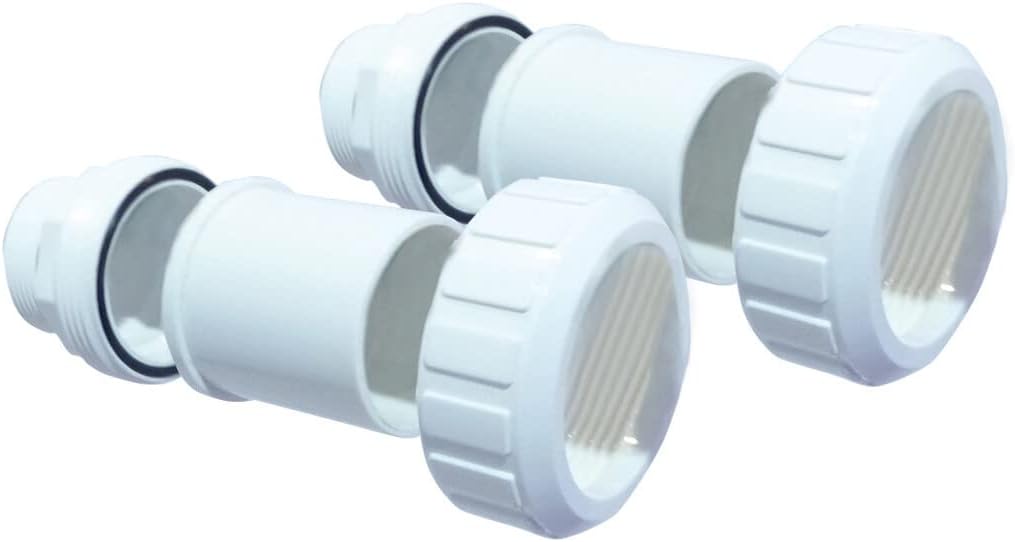
Image: A coiled translucent white hose with a black elbow connector at one end, used for condensate drainage.
- Cable Remote Control Extension (10 m): A 10-meter cable to extend the reach of the remote control panel.

Image: A coiled white electrical cable with connectors at both ends, serving as a 10-meter extension for the remote control.
- Multilingual Operating Manual / Maintenance Folder: Documentation for installation, operation, and maintenance.

Image: A blue folder with the POOLEX logo, likely containing the operating manual and other documentation.
- Kouvèti pwoteksyon: A silver protective cover for the heat pump unit.

Image: A folded silver protective cover, likely for the heat pump unit.
Enstalasyon
- Plasman: Position the heat pump on a stable, level surface, ensuring adequate clearance for air circulation around the unit. Use the provided anti-vibration mounts to minimize noise and vibration.
- Koneksyon plonbri: Connect the heat pump to your pool's filtration system using the supplied PVC connectors (Ø 50 mm, 1 ½). Ensure all connections are watertight. The unit is suitable for pools up to 50 m³.
- Koneksyon elektrik: Connect the heat pump to a dedicated electrical circuit as per local regulations. This should be done by a certified electrician.
- Drenaj kondansasyon: Attach the condensate drain hose to the designated outlet on the unit and route it to a suitable drainage point.
- Panèl Kontwòl Adistans: The LED control panel can be moved up to 10 meters away from the unit using the extension cable for convenient access.
- Premye pouvwa-up: Once all connections are secure, power on the unit.
Enstriksyon Operasyon
The POOLEX Silverline Inverter 90 Heat Pump is designed for efficient and quiet operation, featuring a Mitsubishi multi-frequency compressor and variable fan.
- Operasyon panèl kontwòl: Use the integrated LED control panel to set the desired water temperature and operating mode. Refer to the detailed operating manual for specific button functions and menu navigation.
- Wi-Fi Connectivity (Smart Life App): The heat pump features Wi-Fi technology for control via a dedicated smartphone application.
- Download the official POOLEX or compatible Smart Life application from your device's app store.
- Follow the in-app instructions to pair your heat pump with your smartphone.
- Once connected, you can monitor and adjust settings remotely.
- Note: Some users have reported issues with Smart Life functionality. Ensure your Wi-Fi network is stable and the app is updated to the latest version. Consult the troubleshooting section or manufacturer support if issues persist.
- Pèfòmans chofaj: The Twisted Tech Titan spiral exchanger ensures rapid temperature increase. The unit boasts a high COP (Coefficient of Performance) of 16 at 26°C/26°C, indicating high energy efficiency.
Antretyen
Regular maintenance ensures the longevity and optimal performance of your heat pump.
- Netwayaj: Netwaye deyò aparèy la detanzantan avèk yon twal mou, damp cloth. Ensure the air intake and exhaust grilles are free from debris, leaves, and other obstructions.
- Enspeksyon Bobin: Annually inspect the evaporator coils for dirt buildup. If dirty, gently clean them with a soft brush or low-pressure water spray.
- Drenaj kondansasyon: Ensure the condensate drain hose is clear and free-flowing to prevent water accumulation.
- Winterization: Before the cold season, follow the winterization procedures outlined in the detailed operating manual to protect the unit from freezing temperatures. This typically involves draining water from the heat pump and plumbing lines.
- Tcheke pwofesyonèl: Consider an annual inspection by a qualified HVAC technician to ensure all components are functioning correctly.
Depanaj
Seksyon sa a adrese pwoblèm komen ou ka rankontre.
| Pwoblèm | Kòz posib | Solisyon |
|---|---|---|
| Unit not heating pool water. | Insufficient water flow; low ambient temperature; incorrect settings. | Check pool pump operation and filter cleanliness. Ensure ambient temperature is within operating range. Verify temperature settings on control panel/app. |
| Inite pa limen. | No power supply; tripped circuit breaker; internal fault. | Check power connection and circuit breaker. If problem persists, contact qualified technician. |
| Smart Life App connectivity issues. | Unstable Wi-Fi network; incorrect pairing procedure; app version outdated. | Ensure strong Wi-Fi signal. Re-attempt pairing process as per manual. Update the Smart Life app. If issues continue, contact POOLEX support. |
| Bri dwòl ki soti nan inite a. | Debris in fan; loose components; anti-vibration mounts not installed correctly. | Inspect fan for obstructions (power off first). Check for loose screws. Ensure anti-vibration mounts are properly seated. |
Espesifikasyon
| Karakteristik | Detay |
|---|---|
| Nimewo Modèl | PC-SLP090N |
| Dimansyon pwodwi | 82.4 x 33.4 x 65.6 cm |
| Pwa | 25 Kilogram |
| Kalite Materyèl | Titan (for heat exchanger) |
| Kondwi Kalite | Idwolik ki mache ak |
| Manifakti | Poolstar |
| Suitable Pool Volume | Jiska 50 m³ |
| COP (Koyefisyan Pèfòmans) | 16 (at 26°C/26°C) |
Garanti ak sipò
POOLEX is committed to 100% customer satisfaction. If you have any questions regarding the product, installation, operation, or require technical assistance, please visit the official POOLEX websit oswa kontakte sèvis kliyan yo.
For further support, you can visit the POOLEX store on Amazon: POOLEX Store
Ask a question about this manual
Ask about setup, troubleshooting, compatibility, parts, safety, or missing instructions. Manuals+ will review the question and use this page’s manual context to help answer it.