
POOLEX PC-SLP70N
Manyèl Itilizatè Ponp Chalè POOLEX Silverline Inverter FI 120
Model: PC-SLP70N
Entwodiksyon
This manual provides comprehensive instructions for the safe and efficient operation, installation, and maintenance of your POOLEX Silverline Inverter FI 120 Heat Pump. Designed for optimal performance, this heat pump is suitable for swimming pools up to 110 m³ and incorporates advanced features for energy efficiency and quiet operation.
Please read this manual thoroughly before installing or operating the unit to ensure proper function and longevity of your heat pump.
Enfòmasyon sou Sekirite
Always adhere to local electrical codes and regulations during installation. Ensure the unit is properly grounded. Do not operate the heat pump if any part is damaged or if it is not functioning correctly. Keep children and pets away from the unit during operation. Disconnect power before performing any maintenance or troubleshooting.
- Asire bon vantilasyon alantou inite a.
- Pa bloke antre oswa priz lè.
- Keep flammable materials away from the heat pump.
- Se sèlman pèsonèl kalifye ki ta dwe fè koneksyon elektrik yo.
Pwodwi souview
POOLEX Silverline Inverter FI 120 Heat Pump

The main unit of the POOLEX Silverline Inverter FI 120 Heat Pump, featuring a sleek grey design and a prominent fan grille. This unit is designed for efficient pool heating with its inverter technology.
Pwodwi pou Telefòn enkli

Anti-vibration Supports: Four black U-shaped rubber pads designed to reduce vibration and noise during operation.
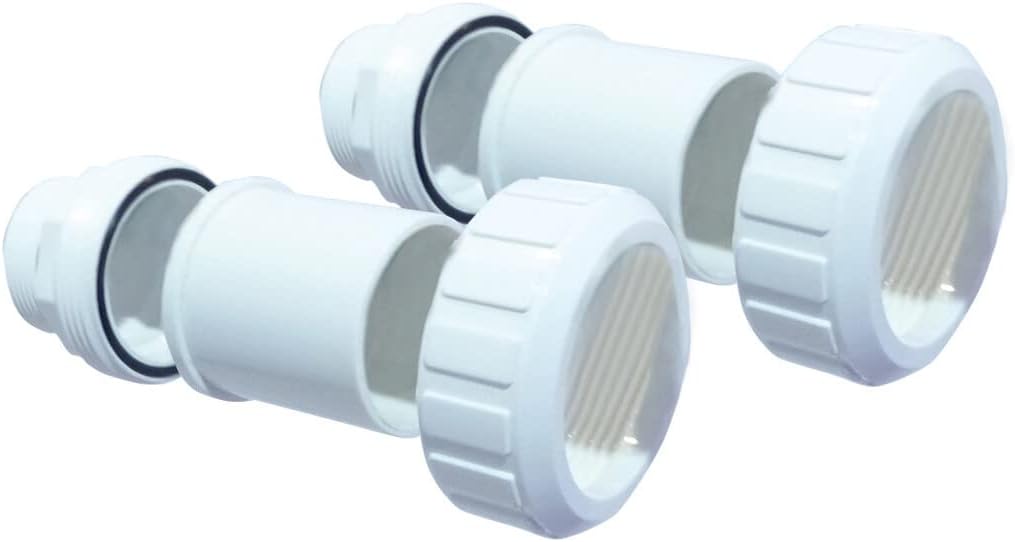
PVC Connectors (Ø 50mm 1½''): Two white PVC connectors with threaded ends and O-rings for secure plumbing connections to your pool system.

Condensate Drain Hose: A flexible white corrugated hose with a black elbow fitting, used to drain condensation from the unit.

Wired Control Extension (10m): A long, coiled white cable with connectors, allowing the LED control panel to be placed up to 10 meters away from the main unit.

Kouvèti pwoteksyon: A silver-grey protective cover with tie-downs, designed to shield the heat pump from elements when not in use.

Maintenance Kit & Multi-language User Manual: A blue folder containing the user manual and other maintenance documentation.
Enstalasyon ak Enstalasyon
1. Seleksyon Sit
Choose a well-ventilated outdoor location, away from direct sunlight and obstructions. Ensure sufficient clearance around the unit for proper airflow (refer to specific clearance requirements in the detailed manual). The surface should be level and capable of supporting the unit's weight.
2. Monte inite a
Place the anti-vibration supports under the heat pump's feet to minimize noise and vibration. Secure the unit if necessary, following local guidelines.
3. Koneksyon plonbri
Connect the heat pump to your pool's filtration system using the provided PVC connectors (Ø 50mm 1½''). Ensure all connections are watertight. The heat pump should be installed after the filter and before any chemical injection points.
4. Koneksyon elektrik
All electrical work must be performed by a qualified electrician in accordance with local codes. Ensure the correct voltage and circuit breaker size are used. The unit requires a dedicated power supply.
5. Condensate Drainage
Attach the condensate drain hose to the designated outlet on the unit. Route the hose to a suitable drainage point, ensuring it has a continuous downward slope to prevent water accumulation.
6. Control Panel Extension
If desired, use the 10-meter wired control extension to relocate the LED control panel for easier access. Connect the extension cable securely between the main unit and the control panel.
Enstriksyon Operasyon
1. Inisyal demaraj
Before starting the heat pump, ensure your pool's filtration system is running and water is circulating through the unit. Turn on the power supply to the heat pump.
2. Using the LED Control Panel
The integrated LED control panel allows you to set the desired water temperature, select operating modes, and view system status. Refer to the detailed manual for specific button functions and menu navigation.
3. Wi-Fi Connectivity and Smartphone App
The POOLEX Silverline Inverter FI 120 features Wi-Fi connectivity for remote control via a dedicated smartphone application. Download the app from your device's app store and follow the in-app instructions to pair your heat pump. This allows for simplified operation and monitoring from your smartphone.
4. Anviwònman Tanperati
Set your desired pool water temperature using the control panel or smartphone app. The inverter technology will automatically adjust its power output to efficiently reach and maintain the set temperature.
5. Optimal Performance
For optimal heating efficiency, ensure your pool is covered when not in use, especially overnight. The heat pump's multi-frequency compressor and variable fan contribute to its high Coefficient of Performance (COP) and quiet operation.
Antretyen
1. Netwayaj regilye
Periodically clean the exterior of the heat pump with a soft, damp cloth. Ensure the air intake and exhaust grilles are free from debris, leaves, and other obstructions to maintain proper airflow.
2. Chimi Dlo
Maintain proper pool water chemistry as recommended by your pool professional. Imbalanced water can affect the longevity of your heat pump's components.
3. Preparasyon pou ivè (Depo andeyò sezon an)
Before the cold season, it is crucial to properly winterize your heat pump to prevent damage from freezing. This typically involves draining all water from the unit, disconnecting plumbing, and covering the unit with the provided protective cover. Consult the detailed manual for specific winterization procedures.
4. Enspeksyon Pwofesyonèl
It is recommended to have a qualified technician inspect your heat pump annually to ensure it is operating efficiently and to identify any potential issues.
Depanaj
This section addresses common issues you might encounter with your POOLEX Silverline Inverter FI 120 Heat Pump. For more complex problems, please refer to the comprehensive troubleshooting guide in the full user manual or contact customer support.
| Pwoblèm | Kòz posib | Solisyon |
|---|---|---|
| Heat pump not turning on | No power supply; circuit breaker tripped; control panel off. | Check power connection; reset circuit breaker; ensure control panel is on. |
| Insufficient heating / Low performance | Low ambient temperature; dirty coils; insufficient water flow; pool not covered. | Ensure proper airflow; clean coils; check filter and pump; cover pool when not in use. |
| Bri etranj | Debris in fan; loose components; vibration. | Inspect fan for obstructions; check for loose parts; ensure anti-vibration supports are in place. |
| Control panel difficult to use / App issues | Software glitch; connectivity issue; outdated app. | Restart unit; check Wi-Fi connection; update smartphone app; consult app's help section. |
Espesifikasyon
| Karakteristik | Detay |
|---|---|
| Nimewo Modèl | PC-SLP70N |
| Manifakti | Poolstar |
| Dimansyon pwodwi (L x W x H) | 82.4 x 33.4 x 65.6 cm (32.4 x 13.1 x 25.8 pous) |
| Pwa | 25 kg (55.1 liv) |
| Max Pool Volume Compatibility | Up to 110 m³ (29,000 gallons) |
| Kalite COMPRESSOR | Multi-frequency (Mitsubishi) |
| Echanjeur chalè | Twisted Tech with twisted titanium coil |
| Koneksyon | Wi-Fi enabled (smartphone app control) |
| Kontwòl Panel | LED, detachable with 10m extension cable |
| COP (26°C/26°C) | Jiska 16 |
Garanti ak sipò
POOLEX is committed to 100% customer satisfaction. We believe that an excellent product is supported by excellent customer service. If you have any questions about your product, require technical assistance, or need to inquire about warranty services, please visit the official POOLEX websit la oubyen kontakte sèvis kliyan yo dirèkteman.
For detailed warranty terms and conditions, please refer to the documentation included with your product or visit the manufacturer's websit.
Manifakti: Poolstar
Ask a question about this manual
Ask about setup, troubleshooting, compatibility, parts, safety, or missing instructions. Manuals+ will review the question and use this page’s manual context to help answer it.