
Entwodiksyon
Thank you for choosing the HONOR Magic Watch 2. This smartwatch is designed to enhance your daily life with advanced fitness tracking, communication features, and a long-lasting battery. It features a vibrant 1.39-inch AMOLED display, a durable metal and plastic body, and a range of sensors to monitor your health and activities. This manual provides essential information for setting up, operating, maintaining, and troubleshooting your device.
Enstalasyon
1. Debale ak Premye Chajman
Upon unboxing, ensure all standard components are present. It is recommended to fully charge your HONOR Magic Watch 2 before first use. The watch is equipped with a 455 mAh battery, providing up to 14 days of typical usage on a single charge.

Imaj: Devan view of the HONOR Magic Watch 2, showcasing its round AMOLED display and black strap.
2. Konekte ak telefòn entelijan ou
- Download the official HONOR Health or Huawei Health app from your smartphone's app store (compatible with iOS and Android devices).
- Louvri app a epi swiv enstriksyon ki sou ekran an pou kreye yon kont oswa konekte.
- Asire w ke Bluetooth aktive sou smartphone ou.
- In the app, navigate to 'Devices' and select 'Add device'. Choose your HONOR Magic Watch 2 from the list of available devices.
- Konfime demann koneksyon an sou mont ou ak sou telefòn entelijan ou.
3. Inisyal Konfigirasyon
After successful pairing, the app will guide you through initial settings such as personal information, notification preferences, and watch face selection.
Itilizasyon Smartwatch ou a
1. Navigasyon debaz
- Ekran tactile: Glise anlè, anba, agoch, oswa adwat pou navige nan meni ak notifikasyon yo. Tape pou chwazi atik yo.
- Bouton: The watch features push buttons for various functions, typically a power/home button and a function button. Refer to the on-screen prompts for specific button actions.
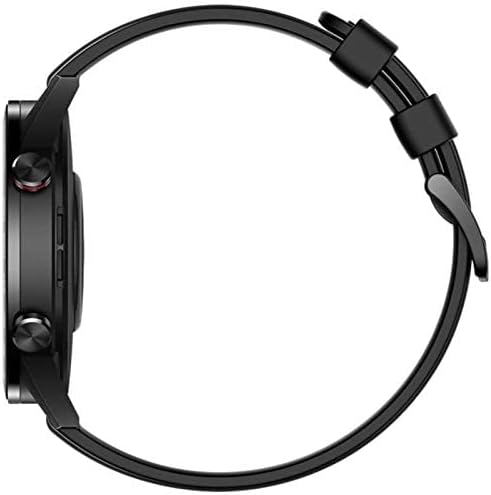
Imaj: Bò kote view of the HONOR Magic Watch 2, showing the two physical buttons on the right side of the watch case.
2. Karakteristik kominikasyon
- Apèl Bluetooth: Make and receive calls directly from your watch when connected to your smartphone via Bluetooth. The watch includes a microphone for hands-free communication.
- Notifikasyon: Receive alerts for incoming calls, text messages, and app notifications directly on your watch display.
3. Fitness and Health Tracking
The HONOR Magic Watch 2 offers comprehensive tracking capabilities:
- 15 Fitness Modes: Track various sports activities including climbing, running, walking, long-distance walking, and cycling.
- Monitè batman kè: An optical heart rate sensor continuously monitors your heart rate.
- Monitè SpO2: Mezire nivo saturation oksijèn nan san an.
- Suivi dòmi: Monitors your sleep patterns and provides insights for improvement.
- Siveyans estrès: Helps you manage stress levels throughout the day.
- GPS: Integrated GPS provides accurate route tracking for outdoor activities.
- Suivi distans: Records distances covered during your workouts.
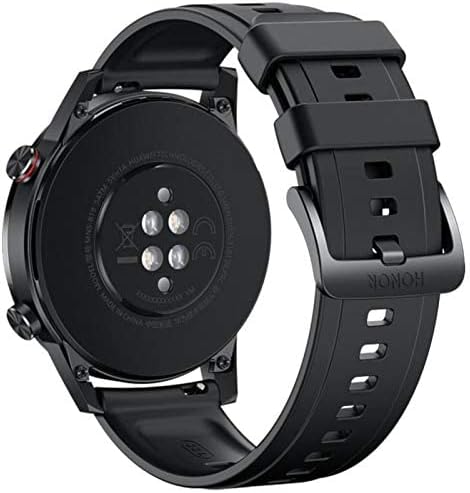
Imaj: Dèyè view of the HONOR Magic Watch 2, showing the heart rate sensors and charging contacts.
4. Mizik lèktur
Store and play music directly from your watch (4GB storage capacity) or control music playback on your connected smartphone.
Antretyen
1. Netwaye Mont Ou a
- Siye ekran an ak kò mont lan ak yon twal mou ki pa gen pousyè.
- Pou tach fè tèt di, dampRense twal la yon ti kras avèk dlo. Evite itilize pwodui chimik ki agresif oswa materyèl abrazif.
- Netwaye kontak chaj yo regilyèman pou asire chaj la byen fèt.
2. Rezistans dlo
The HONOR Magic Watch 2 is water-resistant up to 50 meters. This means it can be used for shallow-water activities like swimming in a pool or ocean. It is not suitable for diving, waterskiing, or other activities involving high-velocity water or submersion below shallow depth.
- Rinse the watch with fresh water after exposure to saltwater or chlorinated water.
- Pa peze bouton anba dlo.
- Ensure the watch is dry before charging to prevent damage to the charging contacts.
3. Swen batri
- Evite ekspoze mont lan nan tanperati ekstrèm, sa ki ka diminye lavi batri a.
- For long-term storage, charge the watch to approximately 50% and store it in a cool, dry place.
Depanaj
Pwoblèm komen ak solisyon yo
| Pwoblèm | Solisyon posib |
|---|---|
| Gade pa limen | Asire w ke mont lan chaje nèt. Konekte l nan plato a pou omwen 30 minit. |
| Pa ka konekte ak telefòn entelijan an | Check if Bluetooth is enabled on both devices. Restart both the watch and smartphone. Ensure the app is updated to the latest version. |
| Done sou batman kè/aktivite ki pa egzak | Asire w ke mont lan byen sere sou ponyèt ou, ni twò sere ni twò lach. Netwaye detèktè ki dèyè mont lan. |
| Kout lavi batri | Reduce screen brightness, disable always-on display, limit background app refresh, and turn off unnecessary notifications. |
| Gade pa chaje | Ensure the charging cable and adapter are working correctly. Clean the charging contacts on both the watch and the charger. |
If you encounter issues not listed here, try restarting your watch and smartphone. For persistent problems, refer to the support section.
Espesifikasyon
| Karakteristik | Detay |
|---|---|
| Non modèl | Magic Watch 2 |
| Nimewo Modèl | Minos-B19S |
| Gwosè ekspozisyon | 1.39 pous |
| Kalite ekspozisyon | AMOLED |
| Rezolisyon | 454 x 454 piksèl |
| Max Screen Brightness | 600 nits |
| Sistèm operasyon | Android Wear (Compatible with iOS and Android) |
| Kapasite Depo | 4 GB |
| Kapasite batri | 455 mAh |
| Lavi batri | Jiska 336 èdtan (14 jou) |
| Koneksyon | Bluetooth |
| GPS | Yes (Global Positioning System) |
| Rezistans dlo | 50 mèt |
| Dimansyon atik | 46 x 46 x 11 mm |
| Ka Materyèl | Metal |
| Bann Materyèl | Silicone (standard), Stainless Steel (variant dependent) |
| Detèktè | Accelerometer, Optical Heart Rate Sensor |
| Antre Entèfas Imèn | Buttons, Microphone |
| Karakteristik espesyal | Phone calls, Notifications, SMS, Music Player, Calendar Mode |
Enfòmasyon sou Garanti
This product comes with a manufacturer's warranty of 18 months from the date of purchase. For service or further details, you may contact the manufacturer or its authorized service agent. Alternatively, you may contact Amazon for assistance.
Sipò
For additional support, frequently asked questions, or to download the latest version of the user manual, please visit the official HONOR support website. You can also find troubleshooting tips and community forums online.
- Resous sou entènèt: Visit the HONOR official websit pou sipò pwodwi.
- Sèvis Kliyan: Contact HONOR customer service for direct assistance.