
1. Entwodiksyon
Thank you for choosing the SUNSHINE P-1503T Analog Power Supply. This manual provides essential information for the safe and efficient operation, setup, maintenance, and troubleshooting of your device. Please read this manual thoroughly before using the product and keep it for future reference.
The SUNSHINE P-1503T is a versatile 15-volt, 3-amp analog power supply designed primarily for mobile phone maintenance. It features touch-sensitive controls and includes two USB ports for convenient mobile testing and charging.
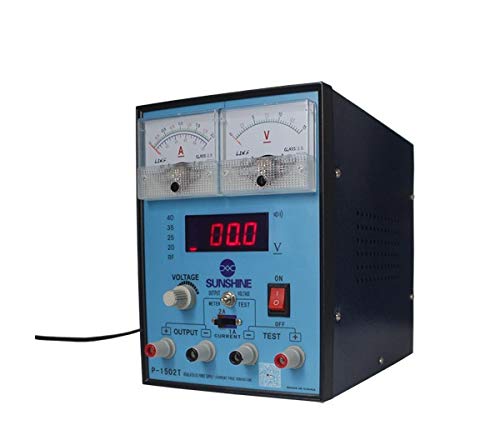
Figi 1: Devan view of the SUNSHINE P-1503T Analog Power Supply. This image shows the device's display, control knobs, and output terminals, including the two USB ports.
2. Enfòmasyon sou Sekirite
AVÈTISMAN: Si ou pa swiv enstriksyon sekirite sa yo, sa ka lakòz chòk elektrik, dife, oswa blesi grav.
- Always connect the power supply to a grounded electrical outlet.
- Pa opere aparèy la nan mouye oswa damp kondisyon yo.
- Asire bon vantilasyon pou anpeche surchof. Pa bloke ouvèti vantilasyon yo.
- Pa ouvri c laasing of the power supply. There are no user-serviceable parts inside. Refer all servicing to qualified personnel.
- Avoid touching output terminals when the device is powered on.
- Disconnect the power cord from the outlet before cleaning or if the device will not be used for an extended period.
- Sèvi ak sèlman volim antre espesifye atage (15 Volts) as indicated on the device.
3. Enstalasyon
3.1 Debake
- Retire ekipman pouvwa a nan anbalaj li avèk prekosyon.
- Inspect the device for any signs of damage during transit. If damaged, do not use and contact your supplier.
- Ensure all accessories are present (e.g., power cord, test leads if included).
3.2 Konekte sou pouvwa
- Place the power supply on a stable, level surface with adequate ventilation.
- Connect the provided power cord to the power input socket on the rear of the device.
- Plug the other end of the power cord into a suitable grounded electrical outlet.
4. Operasyon Enstriksyon
4.1 Limen/Etenyen
- To power on the device, press the power switch located on the front panel. The display will illuminate.
- To power off, press the power switch again.
4.2 Adjusting Output
The P-1503T is an analog power supply, typically meaning voltage and current are set via rotary knobs.
- Sèvi ak la Voltage Bouton Ajisteman pou fikse volim pwodiksyon vle atage. Monitor the voltage ekspozisyon.
- Sèvi ak la Kouran bouton ajisteman to set the desired current limit. Monitor the current display.
- The device emits a sound upon touch, indicating interaction with its controls.
4.3 Itilizasyon pò USB yo
The power supply features two USB ports on the front panel:
- USB Port 1 (Mobile Testing): Connect a mobile device here for diagnostic purposes. This port is designed to provide stable power for testing mobile phone circuits.
- USB Port 2 (Mobile Charging): Connect a mobile device here for charging. This port delivers power suitable for recharging mobile phone batteries.
Note: Always ensure the output voltage and current settings are appropriate for the device being connected to prevent damage.
5. Antretyen
5.1 Netwayaj
- Ensure the power supply is turned off and disconnected from the main power outlet before cleaning.
- Sèvi ak yon twal mou, sèk pou siye eksteryè aparèy la.
- Do not use liquid cleaners, aerosols, or solvents, as these may damage the casing oswa konpozan entèn yo.
- Kenbe ouvèti vantilasyon yo pwòp san pousyè ak debri.
5.2 Depo
When not in use, store the power supply in a cool, dry place, away from direct sunlight and extreme temperatures.
NAN. Depanaj
| Pwoblèm | Kòz posib | Solisyon |
|---|---|---|
| Aparèy pa limen. |
|
|
| Pa gen pwodiksyon voltage / kouran. |
|
|
| USB ports not working. |
|
|
7. Espesifikasyon
| Karakteristik | Detay |
|---|---|
| Mak | SOLÈY |
| Modèl | P-1503T |
| Aparèy konpatib | Telefòn mobil |
| Kalite Connector | ATX |
| Faktè fòm | ATX |
| Metòd refwadisman | Air |
| Maksimòm Antre Voltage | 15 Volts |
| Minimòm Antre Voltage | 15 Volts |
| Manifakti | SOLÈY |
| System Bus Connector Type | Konektè 2 |
| Sous pouvwa | Eksteryè |
| ASIN | B0847QS2FX |
8. Garanti ak sipò
This product is covered by a standard manufacturer's warranty. Please refer to the warranty card included with your purchase for specific terms and conditions. For technical support, service, or warranty claims, please contact your retailer or the manufacturer directly.
For the latest information and support, please visit the official SUNSHINE websit (si disponib).