
TWS i17
i17 Dual Earbuds User Manual
Model: i17 | Brand: TWS
1. Entwodiksyon
Mèsi pou acha aasing the TWS i17 Dual Earbuds. This manual provides essential information for setting up, operating, and maintaining your new wireless earbuds. Please read this manual thoroughly before use to ensure optimal performance and longevity of your device.
2. Enfòmasyon sou Sekirite
To prevent damage to your earbuds or injury to yourself or others, please observe the following precautions:
- Pa ekspoze ekoutè yo oswa bwat chaje a nan tanperati, imidite, oswa likid ekstrèm.
- Evite lage l, frape l, oswa demonte aparèy la.
- Do not use abrasive cleaners or solvents. Clean with a soft, dry cloth.
- Koute nan yon volim modere pou evite domaj nan zòrèy ou.
- Kenbe soti nan atenn timoun yo.
- Pwodui sa a pa reziste dlo. Evite ekspoze li a dlo oswa imidite twòp.
3. Pake kontni
Verifye ke tout atik yo prezan nan pakè ou a:
- TWS i17 Dual Earbuds (Left and Right)
- Ka chaje
- USB Chaje Kab
- Manyèl itilizatè

Image: The TWS i17 Dual Earbuds, with one earbud partially removed from its charging case, showcasing bèl konsepsyon nwa a.
4. Enstalasyon
4.1 Chaje ekoutè yo ak bwat la
Anvan premye itilizasyon an, chaje ekoutè yo ak bwat chaje a nèt.
- Mete tou de ekoutè yo nan bwat chaje a. Asire w yo byen chita.
- Connect the USB charging cable to the charging port on the bottom of the case and the other end to a USB power source (e.g., computer, wall adapter).
- The indicator light on the case will show charging status. It will turn off or change color when fully charged.
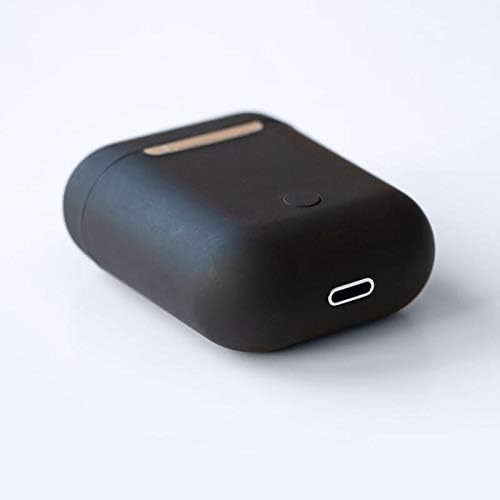
Imaj: Yon gwo plan view of the bottom of the TWS i17 charging case, highlighting the USB charging port and a small button.
4.2 Konekte ak Aparèy ou an
The i17 earbuds use Bluetooth for wireless connection.
- Asire ke ekoutè yo chaje.
- Louvri bwat chaje a. Ekoutè yo ap antre otomatikman nan mòd koneksyon (limyè endikatè yo ap flache).
- On your mobile phone or Bluetooth-enabled device, go to Bluetooth settings and turn Bluetooth on.
- Chèche pou available devices. Select "i17" from the list.
- Once connected, the indicator lights on the earbuds will stop flashing. You are now ready to use your earbuds.

Image: The TWS i17 Dual Earbuds resting inside their open charging case, ready for pairing or use.
5. Operasyon Enstriksyon
5.1 Power On/Off
- Pouvwa sou: Take the earbuds out of the charging case. They will automatically power on and connect to the last paired device.
- Pouvwa Off: Mete ekoutè yo tounen nan bwat chaje a. Y ap etenn otomatikman epi y ap kòmanse chaje.
5.2 Mizik lèktur
- Jwe/Poz: Tape swa ekoutè yon fwa.
- Pwochen Track: Tape doub ekoutè dwat la.
- Track Previous: Tape doub ekoutè gòch la.
5.3 Jesyon Apèl
- Reponn/Fen Apèl: Tape swa ekoutè yon fwa.
- Rejte apèl: Peze epi kenbe swa ekoutè pou 2 segonn.
5.4 Asistan Vwa
- Aktive Asistan Vwa a (Siri/Asistan Google): Tape twa fwa swa ekoutè a.
6. Antretyen
Proper maintenance ensures the longevity of your earbuds:
- Netwayaj: Use a soft, dry, lint-free cloth to clean the earbuds and charging case. Do not use liquids or sprays.
- Depo: Lè w pa ap itilize ekoutè yo, mete yo nan bwat chajman yo pou pwoteje yo epi kenbe yo chaje. Sere yo nan yon kote ki fre epi sèk.
- Swen batri: Pou pwolonje lavi batri a, evite dechaje ekoutè yo nèt souvan. Chaje yo regilyèman.

Image: The TWS i17 Dual Earbuds securely stored within their closed charging case, ready for transport or charging.
NAN. Depanaj
| Pwoblèm | Kòz posib | Solisyon |
|---|---|---|
| Ekoutè pa asosye | Low battery; Out of range; Not in pairing mode; Bluetooth off on device. | Charge earbuds; Move closer to device; Ensure case is open for pairing; Turn on Bluetooth on device. |
| Se yon sèl ekoutè k ap travay | One earbud not charged; Earbuds not properly synced. | Ensure both earbuds are charged; Place both earbuds back in case, close, then reopen to re-sync. |
| Pa gen son | Volume too low; Not connected; Media paused. | Increase volume on device; Reconnect earbuds; Check media playback status. |
| Ka chaje pa chaje | Faulty cable/adapter; Loose connection. | Try a different USB cable or power adapter; Ensure cable is securely plugged in. |
8. Espesifikasyon
| Karakteristik | Detay |
|---|---|
| Nimewo Modèl | i17 |
| Mak | TWS |
| Koneksyon Teknoloji | San fil (Bluetooth) |
| Ekoutè fòm faktè | Nan-zòrèy |
| Mikwofòn enkli | Wi |
| Anile Bri | Non |
| Konpatib ak | Telefòn mobil yo |
| Koulè | Nwa |
| Materyèl | Plastik |
| Kab Karakteristik | Cable-free |
| Nivo rezistans dlo | Pa reziste dlo |
| Dimansyon Shipping | 12.6 x 8.8 x 3.6 cm |
| Pwa | 96 gram |
| Premye Dat ki disponib | 15 janvye 2020 |
9. Garanti ak sipò
For warranty information and customer support, please refer to the contact details provided on the product packaging or the official TWS websit la. Kenbe prèv acha ou pou reklamasyon garanti.
For further assistance, please contact TWS customer service.
Ask a question about this manual
Ask about setup, troubleshooting, compatibility, parts, safety, or missing instructions. Manuals+ will review the question and use this page’s manual context to help answer it.