
Entwodiksyon
Thank you for choosing the WILLED Rechargeable Touch Light Bar. This versatile 3W LED light features a built-in 2000mAh battery and a convenient stick magnet mount, making it ideal for various applications such as reading, illuminating closets, cabinets, makeup mirrors, bedsides, and study areas. This manual provides detailed instructions for setup, operation, maintenance, and troubleshooting to ensure optimal performance and longevity of your device.
Kontni pake
- 1 x WILLED Rechargeable Touch Light Bar
- 2 x Magnetic Mounting Bases with 3M Adhesive
- 1 x tip-C USB chaje kab
- 1 x manyèl itilizatè

Figure 1: Package contents showing the light bar, magnetic bases, and charging cable.
Enstalasyon
Inisyal chaje
Before first use, please fully charge the light bar for approximately 3 hours. Connect the provided Type-C USB charging cable to the charging port on the light bar and to a 5V/1A USB power source (e.g., USB socket, USB adapter, power bank). The red indicator light will be on during charging and will turn off once fully charged.
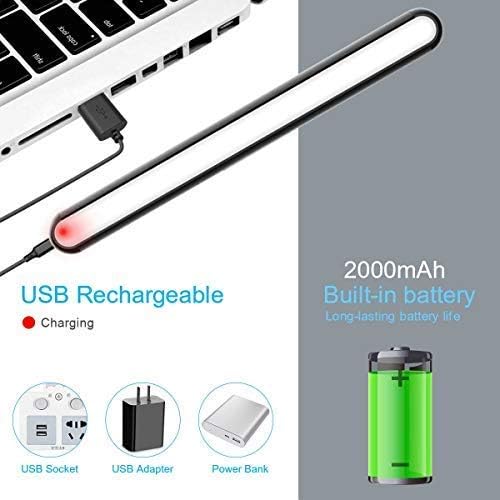
Figure 2: Charging the light bar using the Type-C USB cable. The red indicator signifies charging status.
Enstalasyon
The light bar features a strong magnetic connection for easy mounting. It comes with two magnetic bases with upgraded 3M adhesive for non-metal surfaces.
- Choose a clean, dry, and smooth surface for installation.
- Peel off the protective film from the 3M adhesive on the back of the magnetic mounting base.
- Firmly press the adhesive side of the base onto the desired surface and hold for 30 seconds to ensure strong adhesion.
- Attach the light bar to the magnetic base. The strong magnetic connection will hold it securely.
- For metal surfaces, the light bar can be directly attached without the adhesive bases.

Figure 3: Magnetic mounting and adjustable angles of the light bar.
Video 1: Demonstrates the installation process and various applications of the WILLED Dimmable LED Light Bar.
Enstriksyon Operasyon
Power ON/OFF and Dimming
- Manyen kout: A short touch on the touch sensor will turn the light ON or OFF.
- Long Touch: A long touch on the touch sensor will adjust the brightness steplessly, making it brighter or dimmer.
- Memwa klète: The light bar remembers your last brightness setting, so there is no need to readjust it every time you turn it on.

Figure 4: Touch control for power and brightness adjustment.
Ang reglabl
The light bar can be adjusted on its magnetic holder to angles of 45, 90, and 135 degrees, allowing you to direct light precisely where needed.
Video 2: Shows the touch control, dimming, and rotatable features of the WILLED Dimmable Touch Light Bar.
Antretyen
Netwayaj
To clean the light bar, gently wipe it with a soft, dry cloth. Avoid using abrasive cleaners or solvents, as these may damage the finish or electronic components.
Swen batri
- Recharge the battery when the light output becomes dim or the red indicator light flashes.
- Evite vide batri a nèt souvan pou pwolonje dire lavi li.
- Store the light bar in a cool, dry place if not used for extended periods, and recharge it periodically.
Rezistans dlo
This light is not waterproof. Avoid exposing it to water or high humidity to prevent damage.
Depanaj
| Pwoblèm | Kòz posib | Solisyon |
|---|---|---|
| Limyè pa limen. | Batri ap vide. | Charge the light bar for 3 hours. |
| Limyè fèb. | Low battery or brightness setting is low. | Recharge the battery or long-press the touch sensor to increase brightness. |
| Limyè pa reyaji lè ou touche l. | Battery is completely depleted or a temporary software glitch. | Charge the light bar. If the issue persists, contact customer support. |
| Magnetic mount is not holding. | Surface is not clean/dry, or not a suitable material. | Ensure the surface is clean and dry before applying adhesive. For non-metal surfaces, use the provided adhesive bases. |
Espesifikasyon
- Pouvwa: 3W
- Chaje: 5V/1A (Tip-C USB)
- Koulè ekleraj: Blan 4500K
- Batri ityòm: Bati-an 2000mAh
- Main Housing Material: Aliminyòm, Plastik
- Dimansyon pwodwi: 13.9"D x 1.46"W x 13.6"H
- Pwa atik: 0.66 liv
- Kalite switch: Manyen
- Metòd kontwòl: Manyen
- Kalite montaj: Portable, Surface (Magnetic)
- Nivo rezistans dlo: Pa reziste dlo
- Eleman ki enkli: Kalite C Chaje Kab
Garanti ak sipò
WILLED provides a 12-month warranty for this product. If you encounter any problems or have questions, please contact our customer support team for assistance. Please refer to your purchase documentation for specific contact information or visit the official WILLED store on Amazon.
Nòt: Tanpri chaje aparèy la anvan premye itilize.