
1. Entwodiksyon
Thank you for choosing the FeinTech LED Desk Lamp LTL00600. This high-quality desk lamp is designed to provide optimal lighting for your workspace while offering convenient features such as a USB charging port, adjustable brightness, and customizable color temperature. Please read this manual thoroughly before use to ensure proper operation and to maximize the lifespan of your product.
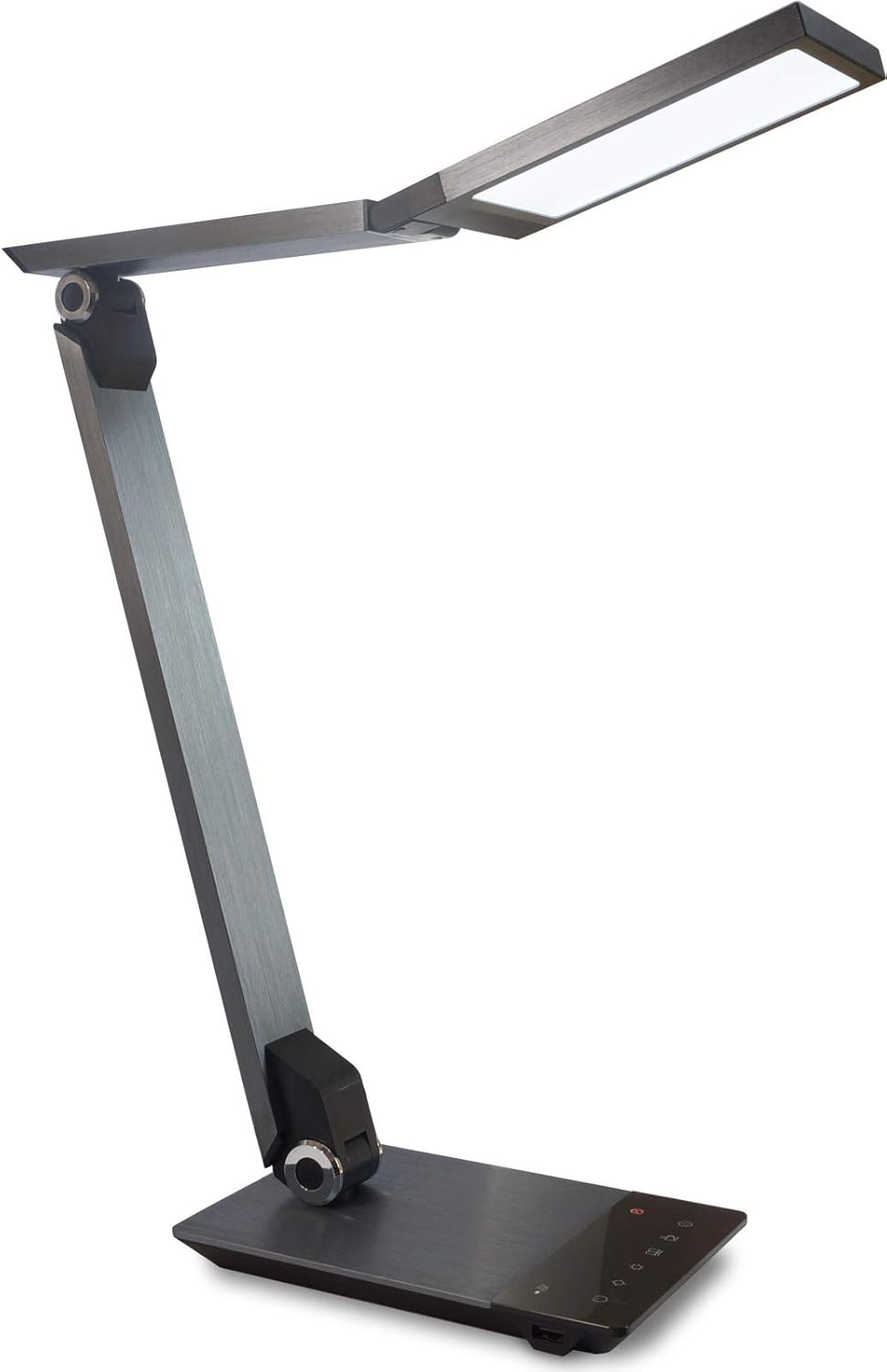
Image 1.1: FeinTech LED Desk Lamp LTL00600. This image displays the lamp in its upright position, showcasing its brushed aluminum finish and sleek design.
2. Enstriksyon Sekirite
Pou evite domaj oswa blesi, tanpri obsève prekosyon sekirite sa yo:
- Asire w adaptè kouran an konekte nan yon priz kouran ki apwopriye.
- Pa ekspoze lamp to water or excessive humidity.
- Evite demonte oswa modifye l laampSe sèlman pèsonèl kalifye ki dwe fè reparasyon yo.
- Kenbe l laamp lwen sous chalè ak limyè solèy la dirèk.
- Netwaye lamp sèlman avèk yon twal mou epi sèk. Pa sèvi ak pwodui netwayaj abrazif oswa solvan.
- Pa gade dirèkteman nan sous limyè LED la pou yon peryòd tan pwolonje.
3. Pake kontni
Tanpri verifye ke tout atik yo prezan nan pakè a:
- Biwo FeinTech LED Lamp (Model: LTL00600)
- Adaptè pouvwa (12V/2A)
4. Pwodwi souview
Familiarize yourself with the components of your FeinTech LED Desk Lamp:
- Lamp Tèt: Contains the LED light source.
- Zam reglabl: Multiple joints for flexible positioning.
- Baz: Provides stability and houses the control panel and USB port.
- Kontwòl Panel: Touch-sensitive buttons for power, brightness, color temperature, and timer.
- USB chaje Port: Located on the side of the base for device charging.

Imaj 4.1: Anwo-anba view nan l laamp's base and control panel. This image highlights the touch-sensitive buttons for various functions.

Imaj 4.2: Kote view nan l laamp's base, showing the integrated USB charging port. This port allows for convenient charging of compatible devices.
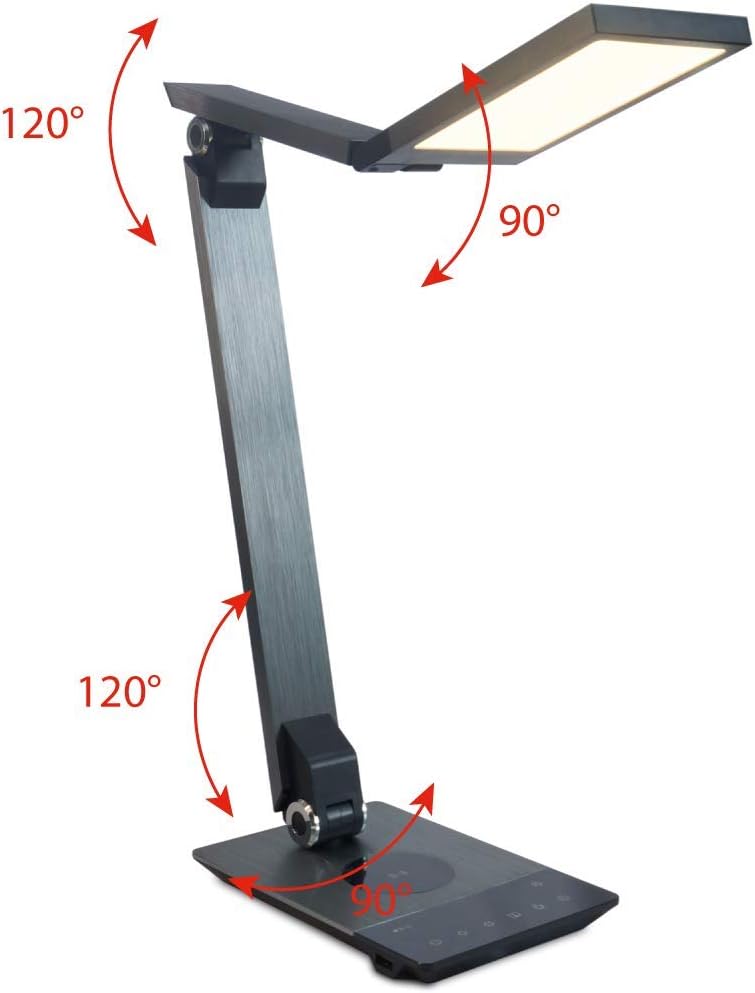
Image 4.3: Diagram illustrating the articulation angles of the lamp's joints. The lamp head can rotate 90 degrees, the upper arm 120 degrees, and the lower arm 120 degrees, allowing for flexible positioning.
5. Enstalasyon
Swiv etap sa yo pou premye konfigirasyon:
- Dekonpoze: Ak anpil atansyon retire tout eleman nan anbalaj la.
- Plasman: Mete l laamp base on a stable, flat surface. Ensure there is enough space for the lamp to be adjusted without obstruction.
- Konekte pouvwa: Insert the power adapter cable into the DC input port on the back of the lamp base. Plug the power adapter into a standard electrical outlet.
6. Operasyon Enstriksyon
The FeinTech LED Desk Lamp features intuitive touch controls on its base.
6.1 Power On/Off
- Manyen an Bouton pouvwa on the control panel (refer to Image 4.1) to turn the lamp sou oswa koupe.
6.2 Brightness Adjustment (Dimming)
- Avèk lamp on, touch and hold the Klere moute or Klète desann buttons (refer to Image 4.1) to steplessly adjust the light intensity.
- L laamp base will vibrate slightly when the minimum or maximum brightness level is reached.
6.3 Ajisteman Tanperati Koulè
- Avèk lamp on, touch and hold the Color Temperature Up or Color Temperature Down buttons (refer to Image 4.1) to steplessly adjust the light color from warm white (2700K) to cool white (6500K).
- L laamp base will vibrate slightly when the minimum or maximum color temperature is reached.
6.4 Favorite Settings
- L laamp allows you to store and recall 3 favorite light settings (brightness and color temperature).
- To save a setting: Adjust the brightness and color temperature to your desired level. Then, touch and hold one of the Bouton pi renmen yo (refer to Image 4.1) until the lamp flashes briefly, indicating the setting is saved.
- To recall a setting: Simply touch the corresponding bouton pi renmen.
- The last used brightness and color temperature settings are automatically saved even after the lamp se etenn.
6.5 USB Chaje Fonksyon
- Connect your smartphone or other compatible device to the USB charging port on the side of the lamp base (refer to Image 4.2) using a suitable USB cable.
- The intelligent USB port delivers up to 2.4A for fast charging.
- An LED indicator will signal ongoing and completed charging status.
6.6 Fonksyon revèy
- Manyen an Bouton revèy (refer to Image 4.1) to activate the timer function.
- The first touch activates a 3-minute timer.
- A second touch activates a 1-hour timer.
- L laamp will automatically turn off after the selected time period.
7. Antretyen
Pou kenbe l ouamp's appearance and functionality:
- Toujou dekonekte lamp soti nan ekipman pou pouvwa a anvan netwaye.
- Siye lamp ak yon twal mou, sèk, ki pa gen pèl.
- Pa sèvi ak pwodui netwayaj likid oswa ayewosòl, paske yo ka domaje fini an oswa konpozan entèn yo.
- Avoid scratching the brushed aluminum surface.
NAN. Depanaj
Si ou rankontre pwoblèm ak l ou aamp, gade pwoblèm ak solisyon komen sa yo:
| Pwoblèm | Kòz posib | Solisyon |
|---|---|---|
| Lamp pa limen. | Pa gen ekipman pou pouvwa. | Check if the power adapter is securely connected to the lamp and the electrical outlet. Test the outlet with another device. |
| Chaje USB a pa fonksyone. | Aparèy la pa konpatib oswa kab la gen pwoblèm. | Ensure your device is compatible with USB charging. Try a different USB cable. Verify the lamp se limen. |
| Kontwòl manyen yo pa reponn. | Pwoblèm lojisyèl tanporè oswa pwoblèm kouran. | Disconnect the power adapter for 30 seconds, then reconnect it. Ensure your fingers are clean and dry when operating the touch controls. |
9. Espesifikasyon
| Nimewo Modèl | LTL00600 |
| Dimansyon (L x W x H) | 36 x 13.5 x 44 cm (apeprè 14.2 x 5.3 x 17.3 pous) |
| Pwa | 1.84 kg (apeprè 4.06 lbs) |
| Materyèl | Aliminyòm fwose |
| Sous limyè | dirije |
| Max. Light Output | 500 lumens (1000 lux at 40 cm distance) |
| Tanperati Koulè (CCT) | 2700 K (Warm White) to 6500 K (Cool White) |
| Power Consumption (Lamp sèlman) | Max. 10 W |
| Power Consumption (Lamp & Charging) | Max. 22 W |
| USB Sòti | Jiska 2.4 A |
| Antre Voltage (adaptè) | 12 V / 2 A |
| Chanje Kalite | Manyen |

Image 9.1: Diagram showing the dimensions of the FeinTech LED Desk Lamp. L laamp measures approximately 36 cm in length, 13.5 cm in width, and 44 cm in height.
10. Garanti ak sipò
FeinTech products are designed for reliability and performance. For warranty information or technical support, please refer to the warranty card included with your purchase or visit the official FeinTech websit la. Tanpri konsève prèv acha ou a pou reklamasyon garanti.