
1. Entwodiksyon
The WAVLINK 8-Port Fast Ethernet Switch is designed to expand your network connectivity with ease. It features 8 RJ45 ports supporting 10/100 Mbps auto-negotiation and Auto-MDI/MDIX, eliminating the need for crossover cables. This plug-and-play device is ideal for extending network connections in various environments, from home offices to conference rooms, providing a reliable and efficient solution for your networking needs. It incorporates Green IT technology for energy saving.
2. Pake kontni
Verifye ke pake ou a gen atik sa yo:
- WAVLINK 8-Port 10/100 Mbps Fast Ethernet Switch (Model RC-N081M2-EU)
- Adaptè pouvwa
- Manyèl itilizatè
3. Pwodwi Features
- 8 RJ45 10/100 Mbps ports with auto-negotiation and Auto-MDI/MDIX.
- Green IT technology for up to 75% energy savings.
- IEEE802.3x flow control ensures reliable data transfer.
- Durable ABS plastic housing for desktop mounting.
- Plug and Play: No configuration or software required.
- Layer 2 switch functions including IGMP Snooping, Port Mirroring, and Spanning Tree.
4. Materyèl Plis paseview
The WAVLINK Fast Ethernet Switch features a compact design with essential ports and indicators for easy monitoring and connectivity.
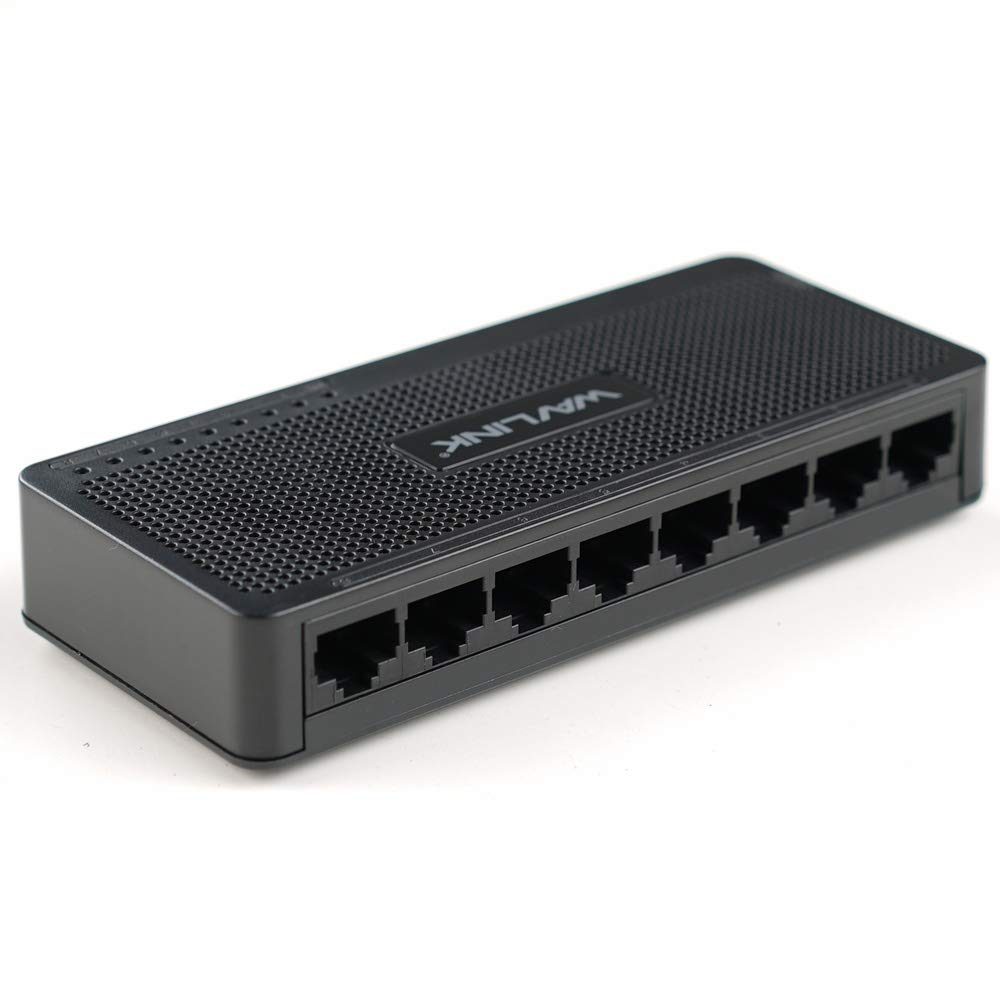
Figi 4.1: Top view of the WAVLINK 8-Port Fast Ethernet Switch, showing the brand logo and ventilation holes.
Front Panel
The front panel includes the 8 RJ45 Ethernet ports and LED indicators for status monitoring.

Figi 4.2: Devan view of the switch, displaying the eight RJ45 Ethernet ports.
- Pò RJ45 (1-8): Connect your network devices (computers, printers, gaming consoles, etc.) using standard Ethernet cables.
- Endikatè ki ap dirije: Each port has an associated LED that indicates connection status and activity.
Panèl dèyè
The rear panel typically contains the power input port.

Figi 4.3: Side view of the switch, illustrating its compact dimensions (13cm x 5.5cm x 2.1cm) and the power input port.
- Antre pouvwa: Konekte adaptè kouran ki founi an isit la.
5. Gid Enstalasyon
The WAVLINK Fast Ethernet Switch is designed for simple plug-and-play installation. No complex configuration is required.
5.1 Konekte switch la
- Plasman: Choose a stable, flat surface for the switch, such as a desktop. Ensure adequate ventilation around the device.
- Konekte pouvwa: Plug the provided power adapter into the switch's power input port, then plug the other end into a standard electrical outlet. The power LED on the switch should illuminate.
- Konekte ak routeur/modèm: Use an Ethernet cable to connect one of the switch's RJ45 ports to a LAN port on your router or modem.
- Konekte Aparèy Rezo yo: Connect your computers, printers, network-attached storage (NAS), gaming consoles, or other network devices to the remaining RJ45 ports on the switch using Ethernet cables.

Figure 5.1: Connection diagram illustrating how the switch integrates into a network, connecting to a router and multiple end devices like computers, printers, and gaming consoles.

Figure 5.2: Visual representation of the plug-and-play setup, showing Ethernet cables ready for connection to the switch's ports.
Once all connections are made, the switch will automatically detect and configure the connected devices. The corresponding port LEDs will light up to indicate an active connection.
6. Itilizasyon switch la
The WAVLINK Fast Ethernet Switch operates automatically once powered on and connected. It functions as a central connection point for your wired network devices.
- Transfè Done: The switch intelligently forwards data packets between connected devices at 10/100 Mbps speeds.
- Oto-MDI/MDIX: This feature automatically detects the type of Ethernet cable (straight-through or crossover) and adjusts accordingly, simplifying connections.
- Endikatè ki ap dirije:
- Solid vèt: Indicates a stable link connection.
- Vèt flache: Endike aktivite done sou pò a.
- Off: No device connected or device is powered off.

Figure 6.1: The Ethernet switch acting as a splitter, providing additional wired connections for multiple devices such as laptops, gaming consoles, and printers.
7. Antretyen
To ensure optimal performance and longevity of your WAVLINK Fast Ethernet Switch, follow these simple maintenance guidelines:
- Kenbe pwòp: Regularly wipe the exterior of the switch with a soft, dry cloth. Avoid using liquid cleaners or aerosols.
- Vantilasyon: Asire w ke ouvèti vantilasyon yo pa bouche pou anpeche yo chofe twòp.
- Etenn kouran an san danje: If you need to power off the device, disconnect the power adapter from the electrical outlet.
- Kondisyon anviwònman: Operate the switch within the recommended temperature range of 0°C to 40°C (32°F to 104°F). Avoid extreme humidity.
NAN. Depanaj
If you encounter issues with your WAVLINK Fast Ethernet Switch, refer to the following common problems and solutions:
8.1 Pa gen pouvwa
- Asire w ke adaptè kouran an byen konekte ak switch la ak yon priz elektrik ki fonksyone.
- Verifye si priz kouran an ap fonksyone byen lè w branche yon lòt aparèy.
8.2 No Link/Activity LED
- Tcheke ke kab Ethernet la byen konekte ak pò switch la ak aparèy rezo a.
- Eseye yon lòt kab Ethernet pou elimine si kab la gen pwoblèm.
- Asire w ke aparèy rezo ki konekte a limen epi li fonksyone byen.
- Eseye konekte aparèy la nan yon pò diferan sou switch la.
8.3 Vitès rezo ralanti
- Ensure all connected devices and cables support 10/100 Mbps speeds.
- Tcheke pou wè si gen twòp trafik rezo oubyen aplikasyon ki konsome anpil Pleasant k ap fonksyone sou aparèy ki konekte yo.
- Verify that your router/modem is providing adequate internet speed.
9. Espesifikasyon
| Karakteristik | Deskripsyon |
|---|---|
| Mak | WAVLINK |
| Nimewo Modèl | RC-N081M2-EU |
| Kantite pò | 8 |
| Pò Tip | RJ45 |
| Pousantaj Transfè Done | 10/100 Mbps (Ethernet vit) |
| Oto-Negosyasyon | Sipòte |
| Oto-MDI/MDIX | Sipòte |
| Kontwòl koule | IEEE802.3x |
| Materyèl Lojman | ABS plastik |
| Enstalasyon | Desktop |
| Tanperati Fonksyònman | 0°C ~ 40°C (32°F ~ 104°F) |
| Dimansyon (Apeprè) | 13 cm x 5.5 cm x 2.1 cm (5.1 pous x 2.2 pous x 0.8 pous) |
10. Kondisyon sistèm
The WAVLINK Fast Ethernet Switch is compatible with any operating system that supports standard Ethernet connectivity. No specific drivers are required for the switch itself.
- Microsoft Windows (10/8/2012/7/2008/Vista/2003/XP/2000/Me/NT/98/95/3.11)
- macOS
- NetWare
- UNIX
- Linux
11. Garanti ak sipò
WAVLINK products are designed for reliability and performance. For warranty information and technical support, please refer to the warranty card included with your product or visit the official WAVLINK websit. Kenbe resi acha ou pou reklamasyon garanti.
For further assistance, you may contact WAVLINK customer support through their official channels.