
1. Pwodwi souview
The Wendry I8 Plus is a compact 2.4GHz wireless mini QWERTY keyboard featuring an integrated touchpad and LED backlighting. Designed for convenience, it offers a versatile input solution for various devices, allowing for comfortable operation from a distance.
This device combines the functionality of a keyboard and a mouse, making it ideal for controlling smart TVs, PCs, Android TV boxes, and other compatible systems. Its plug-and-play design ensures easy setup without the need for additional software installation.

Image 1.1: The Wendry I8 Plus keyboard demonstrating compatibility with multiple devices.
2. Pake kontni
- Wendry I8 Plus Mini LED Backlit Keyboard
- USB Receiver (located in the battery compartment)
- Rechargeable Lithium-ion Battery (if included, or compartment for AAA batteries)
- USB Chaje Kab (si sa aplikab)
- Manyèl Itilizatè (dokiman sa a)
3. Gid Enstalasyon
3.1 Enstalasyon batri
- Jwenn konpatiman batri a sou dèyè klavye a.
- Glise louvri kouvèti batri a.
- Insert the provided rechargeable battery or two AAA batteries, ensuring correct polarity (+/-).
- Fèmen kouvèti batri a byen.
3.2 Koneksyon Reseptè USB
- Louvri kouvèti lòj batri a.
- Carefully remove the USB receiver, which is magnetically stored inside.
- Plug the USB receiver into an available USB port on your device (e.g., PC, Smart TV, Android TV Box).
- The device will automatically detect and install the necessary drivers. No additional software is required.
- Klavye a se kounye a pare pou itilize.

Image 3.1: Location of the USB receiver and battery compartment.
4. Operasyon Enstriksyon
4.1 Itilizasyon debaz klavye ak touchpad la
- Sezisman: Sèvi ak layout QWERTY a pou antre tèks.
- Touchpad: The central area functions as a high-sensitivity touchpad for mouse cursor control.
- Tape yon sèl dwèt: Fonksyone kòm yon klike sou sourit gòch.
- Tape ak de dwèt: Functions as a right mouse click.
- Two Finger Drag: For scrolling up and down.

Image 4.1: Using the high-sensitivity touchpad for navigation.
4.2 LED Backlighting Control
The keyboard features colorful LED backlighting for improved visibility in low-light conditions. To control the backlighting:
- Peze a Fn kle a an menm tan ak la F2 key to toggle the backlight on/off or change its color.

Image 4.2: The keyboard displaying its colorful LED backlighting.
4.3 DPI Ajisteman
The touchpad's sensitivity (DPI) can be adjusted to suit your preference and screen size. There are 3 levels of DPI available:
- Pou ajiste DPI a, peze bouton an Fn kle a an menm tan ak la Bar espas. Repeat to cycle through the DPI levels.
4.4 kle miltimedya
The keyboard includes dedicated multimedia control keys for easy access to functions like volume control, play/pause, and track navigation.
- Volim monte/desann: Sèvi ak la V+ epi V- bouton.
- Play/Pause, Next/Previous Track: Use the dedicated media control buttons on the left side.
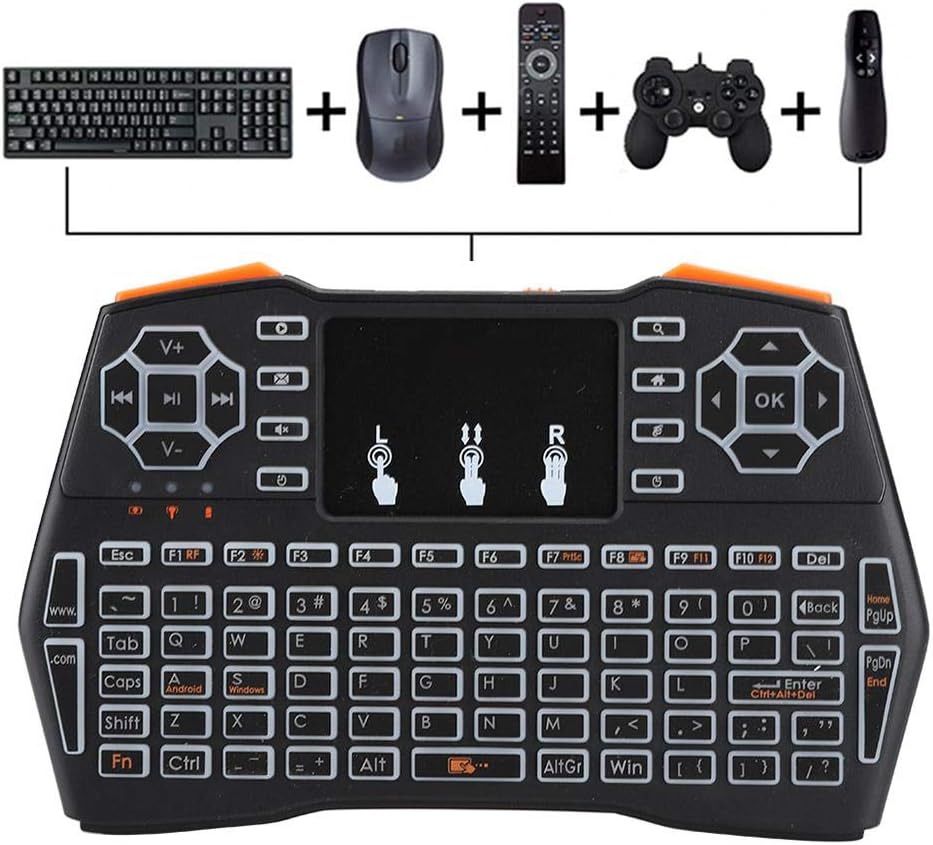
Image 4.3: Using the keyboard for multimedia control and gaming.
5. Antretyen
- Netwayaj: Sèvi ak yon twal mou epi sèk pou netwaye sifas klavye a. Pou pousyè tè ki difisil pou retire, yon ti kras twal mouye.amp Ou ka itilize twal, men asire w pa gen imidite ki antre nan aparèy la.
- Depo: Lè w pa itilize klavye a pou yon bon bout tan, sere l nan yon kote ki fre epi sèk.
- Swen batri: If using a rechargeable battery, ensure it is charged regularly. If using AAA batteries, remove them if the device will not be used for a long time to prevent leakage.
- Reseptè USB: Always store the USB receiver in its designated magnetic slot within the battery compartment to prevent loss.
NAN. Depanaj
- Klavye a pa reponn:
- Ensure the battery is charged or replaced.
- Verifye ke reseptè USB a byen branche nan aparèy la.
- Eseye konekte reseptè USB a nan yon pò USB diferan.
- Ensure the keyboard is within the 20-meter operating range of the receiver.
- Rekòmanse aparèy ki konekte a.
- Touchpad not working or erratic:
- Ensure your fingers are clean and dry when using the touchpad.
- Adjust the DPI settings (Fn + Space Bar) to see if sensitivity improves.
- Netwaye sifas touchpad la.
- Limyè dèyè a pa fonksyone:
- Asire w ke batri a gen ase chaj.
- Press Fn + F2 to toggle the backlight.
- Kout ranje fonksyònman:
- Ensure there are no significant obstructions between the keyboard and the USB receiver.
- Avoid using the keyboard near strong electromagnetic interference sources.
7. Espesifikasyon
| Karakteristik | Detay |
|---|---|
| Nimewo Modèl | I8 Plus (Wendryng7y53ptgu) |
| Koneksyon Teknoloji | 2.4GHz Radio Frequency, USB |
| Karakteristik espesyal | Touchpad, LED Backlighting |
| Aparèy konpatib | Gaming Console, Personal Computer, Television |
| Deskripsyon klavye | QWERTY Mini Keyboard |
| Distans fonksyònman | Jiska 20 mèt (apeprè 65 pye) |
| Sous pouvwa | 1 Nonstandard Battery (rechargeable) or AAA batteries |
| Pwa atik | 6.3 ons (apeprè 178 gram) |
| Manifakti | Wendry |
8. Garanti ak sipò
For warranty information and technical support, please refer to the documentation provided at the time of purchase or contact your retailer. General support inquiries can often be directed to the manufacturer's official websit oswa chanèl sèvis kliyan.
Tanpri konsève prèv acha ou a pou nenpòt reklamasyon garanti.