
Hyperkin M07399-bk
Hyperkin Armor3 NuWave Controller User Manual
Model: M07399-bk
Entwodiksyon
The Hyperkin Armor3 NuWave Controller is designed to provide accurate and fluid motion control for your Nintendo Wii U and Wii consoles. Featuring built-in Nu+ technology, this controller enhances your gaming experience by offering a wider range of motion in compatible titles. This manual provides essential information on setting up, operating, maintaining, and troubleshooting your NuWave Controller.
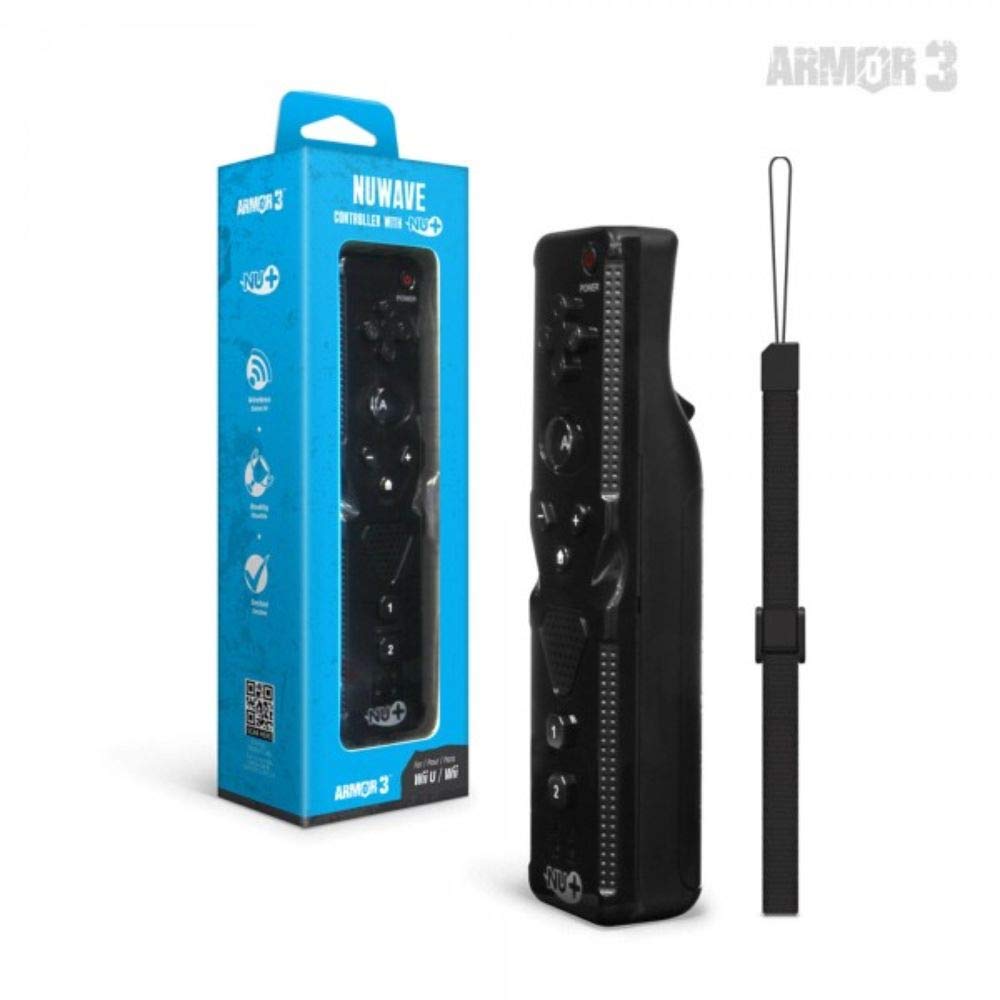
Figi 1: Hyperkin Armor3 NuWave Controller and its packaging. The controller is black with a wrist strap, and the packaging highlights its Nu+ technology and compatibility with Wii U and Wii.
Pwodwi souview
The Armor3 NuWave Controller is a motion-sensing controller compatible with both Wii U and Wii systems. It integrates advanced Nu+ technology for enhanced motion detection and precision in supported games.
Karakteristik kle:
- Konpatibilite: Fully compatible with Nintendo Wii U and Nintendo Wii consoles.
- Nu+ Technology: Built-in technology for a wider range of motion and improved accuracy in compatible titles.
- Konsepsyon ergonomique: Designed for comfortable grip and extended gameplay sessions.
- Sous pouvwa: Egzije 2 pil AA (pa enkli).
Enstalasyon
1. Enstalasyon batri
- Jwenn konpatiman batri a sou dèyè kontwolè a.
- Glise kouvèti batri a anba pou ouvri li.
- Mete de (2) pil AA, asire w polarite ki kòrèk la (+/-) jan yo endike anndan konpatiman an.
- Replace the battery cover by sliding it upwards until it clicks into place.
2. Connecting to Your Console
To connect the NuWave Controller to your Wii U or Wii console, follow these steps:
- Asire w ke konsole ou a limen.
- On your Wii U or Wii console, press the SYNC button (usually located near the SD card slot or battery compartment).
- On the NuWave Controller, open the battery cover and locate the small red SYNC button inside the battery compartment.
- Press and release the SYNC button on the controller.
- The player indicator lights on the bottom of the controller will flash. Once a single light remains lit, the controller is successfully connected.
- If connection fails, repeat steps 2-5. Ensure the controller is within range of the console.
Enstriksyon Operasyon
Kontwòl debaz:
- Pad direksyonèl (D-Pad): Used for menu navigation and character movement.
- Yon bouton: Primary action button, often used for selection or interaction.
- Bouton B (Deklanchè): Located on the underside, typically used for grabbing or firing.
- 1 & 2 Buttons: Auxiliary action buttons, functions vary by game.
- Bouton Kay: Returns to the console's Home Menu.
- Plus (+) & Minus (-) Buttons: Often used for zooming, adjusting settings, or specific in-game actions.
- Bouton pouvwa: Limen/etenn kontwolè a.
Motion Sensing with Nu+ Technology:
The built-in Nu+ technology provides enhanced motion tracking. For games that support it, you will experience more precise and responsive movements. Hold the controller firmly and ensure clear line of sight to the sensor bar for optimal performance.
- Kalibrasyon: Some games may require initial calibration. Follow on-screen prompts.
- senti ponyèt: Always use the included wrist strap to prevent accidental drops during active gameplay.
Antretyen
Netwayaj:
- Siye kontwolè a ak yon twal mou epi sèk.
- Pou pousyè tè ki difisil pou retire, yon ti kras dampRense twal la avèk dlo. Pa sèvi ak pwodui chimik ki agresif oswa pwodui netwayaj abrazif.
- Ensure no liquid enters the controller's openings.
Depo:
- Sere kontwolè a nan yon kote ki fre epi sèk, lwen limyè solèy dirèk ak tanperati ekstrèm.
- Si w ap sere l pou yon bon bout tan, retire pil yo pou anpeche yo koule.
Swen batri:
- Always use new, high-quality AA batteries.
- Pa melanje ansyen ak nouvo pil, oswa diferan kalite pil.
- Jete pil yo itilize yon fason responsab selon règleman lokal yo.
Depanaj
| Pwoblèm | Kòz posib | Solisyon |
|---|---|---|
| Kontwolè a pa limen. | Pil ki mouri oswa ki mal mete. | Ranplase pil yo ak nouvo pil AA, asire polarite ki kòrèk la. |
| Controller does not sync with console. | Incorrect syncing procedure; out of range; console interference. | Ensure console is on. Repeat syncing steps (press SYNC on console, then on controller). Move closer to console. Check for other wireless device interference. |
| Buttons are unresponsive or delayed. | Low battery; connection issue; physical obstruction. | Replace batteries. Re-sync the controller. Ensure buttons are not stuck. |
| Motion control is inaccurate. | Sensor bar obstruction; improper calibration; environmental factors. | Ensure clear line of sight to the sensor bar. Re-calibrate in-game if prompted. Avoid strong light sources directly facing the sensor bar. |
Espesifikasyon
- Modèl: M07399-bk
- Mak: Hyperkin
- Konpatibilite: Nintendo Wii U, Nintendo Wii
- Sous pouvwa: 2 x AA pil (pa enkli)
- Dimansyon: 2.8 x 1.8 x 8 pous (apeprè)
- Pwa: 3.88 ons (apeprè, san pil)
- Teknoloji: Built-in Nu+ motion technology
- Koulè: Nwa
Garanti ak sipò
For specific warranty information and terms, please refer to the documentation included with your purchase or visit the official Hyperkin website. Hyperkin provides customer support for their products.
Sipò sou entènèt: Visit the official Hyperkin websit pou FAQ, gid depanaj, ak enfòmasyon kontak. www.hyperkin.com
Kontakte: Refer to the Hyperkin website for the most current customer service contact methods (phone, email, etc.).
Ask a question about this manual
Ask about setup, troubleshooting, compatibility, parts, safety, or missing instructions. Manuals+ will review the question and use this page’s manual context to help answer it.