
Andoer HDV-201LM
Andoer HDV-201LM 1080p Digital Video Camera User Manual
Model: HDV-201LM
1. Entwodiksyon
This manual provides detailed instructions for the safe and effective use of your Andoer HDV-201LM Digital Video Camera. Please read this manual thoroughly before operating the device and retain it for future reference.
The Andoer HDV-201LM is a 1080p Full HD digital video camera featuring a 5-megapixel CMOS sensor, capable of capturing video at 1920x1080p at 30 frames per second and still images up to 24 megapixels (interpolated). It includes a 16X digital zoom, a 3.0-inch TFT-LCD screen with 270-degree rotation, and supports external accessories via a hot shoe mount.
2. Pake kontni
Verifye ke tout atik ki nan lis anba a yo enkli nan pakè ou a. Si gen nenpòt atik ki manke oswa ki domaje, tanpri kontakte machann ou an.
- 1 x Andoer HDV-201LM Digital Video Camera
- 1 x Camera Bag
- 2 x Rechargeable 3.7V 800mAh Batteries (one pre-installed)
- 1 x USB kab
- 1 x AV kab
- 1 x kontwòl remote
- 1 x Camera User Manual (English)
- 1 x 0.39X Wide-Angle Lens
- 1 x mikwofòn ekstèn
- 1 x Microphone Connection Cable
- 1 x Microphone User Manual (Chinese)
Note: A memory card is not included. A Class 10 or higher SD card (up to 32GB) is strongly recommended for optimal performance.
3. Pati Idantifikasyon
Familiarize yourself with the various components of your digital video camera.

Figi 3.1: Devan view of the Andoer HDV-201LM camera with attached wide-angle lens and external microphone.

Figi 3.2: Detaye views highlighting the hot shoe mount, control buttons, battery compartment, and 1/4-inch tripod thread.
- Lantiy: Main optical component for capturing images and videos.
- Ekran LCD: 3.0-inch TFT-LCD display for viewing and menu navigation. Rotates 270 degrees.
- Bouton pouvwa: Limen oswa etenn kamera a.
- Record/Stop Button: Initiates or stops video recording.
- bouton foto: Kaptire imaj fiks.
- Levier Zoom (W/T): Adjusts digital zoom (Wide/Telephoto).
- Bouton meni: Aksè nan paramèt kamera yo.
- Bouton Navigasyon: Itilize pou navigasyon meni ak seleksyon.
- Monte soulye cho: For attaching external accessories like microphones or LED lights.
- Fil tripod: 1/4-inch thread for mounting the camera on a tripod.
- Lòj batri: Li gen pil rechargeable la.
- Plas kat SD: Pou mete yon kat memwa.
- Pò USB: Pou konekte ak yon òdinatè oubyen pou chaje.
- AV Sòti: Pou konekte ak yon televizyon.
- Limyè ranpli LED: Bay plis ekleraj nan kondisyon ki pa twò klere.
4. Enstalasyon
4.1. Chaje batri a
- Louvri kouvèti lòj batri a.
- Insert the provided 3.7V 800mAh battery, ensuring correct polarity. If an insulator tab is present, remove it before insertion.
- Fèmen kouvèti lòj batri a.
- Connect the camera to a power source using the USB cable. The charging indicator will illuminate.
- Once fully charged, the indicator light will change or turn off.
4.2. Mete yon kat memwa
- Asire w ke kamera a etenn.
- Jwenn plas kat SD la.
- Insert a Class 10 or higher SD card (up to 32GB) into the slot until it clicks into place.
- Pou retire kat la, peze l dousman jiskaske li soti.
4.3. Attaching the Wide-Angle Lens
- Remove the protective cap from the camera lens.
- Carefully screw the 0.39X wide-angle lens onto the camera's main lens thread until secure.

Figure 4.1: The camera with the 0.39X super wide-angle lens attached, demonstrating its expanded field of view.
4.4. Konekte mikwofòn ekstèn lan
- Slide the external microphone into the hot shoe mount on top of the camera.
- Connect the microphone cable to the camera's external microphone input port.
5. Itilizasyon Kamera a
5.1. Powering On / Off
- To power on, open the LCD screen or press the Pouvwa bouton.
- To power off, close the LCD screen or press and hold the Pouvwa bouton.
5.2. Anrejistreman videyo
- Ensure the camera is in video mode (indicated on the LCD screen). If not, press the Mode bouton pou chanje.
- Peze a Dosye/Stop button to start recording. A red indicator will typically flash.
- Peze a Dosye/Stop bouton ankò yo sispann anrejistreman.
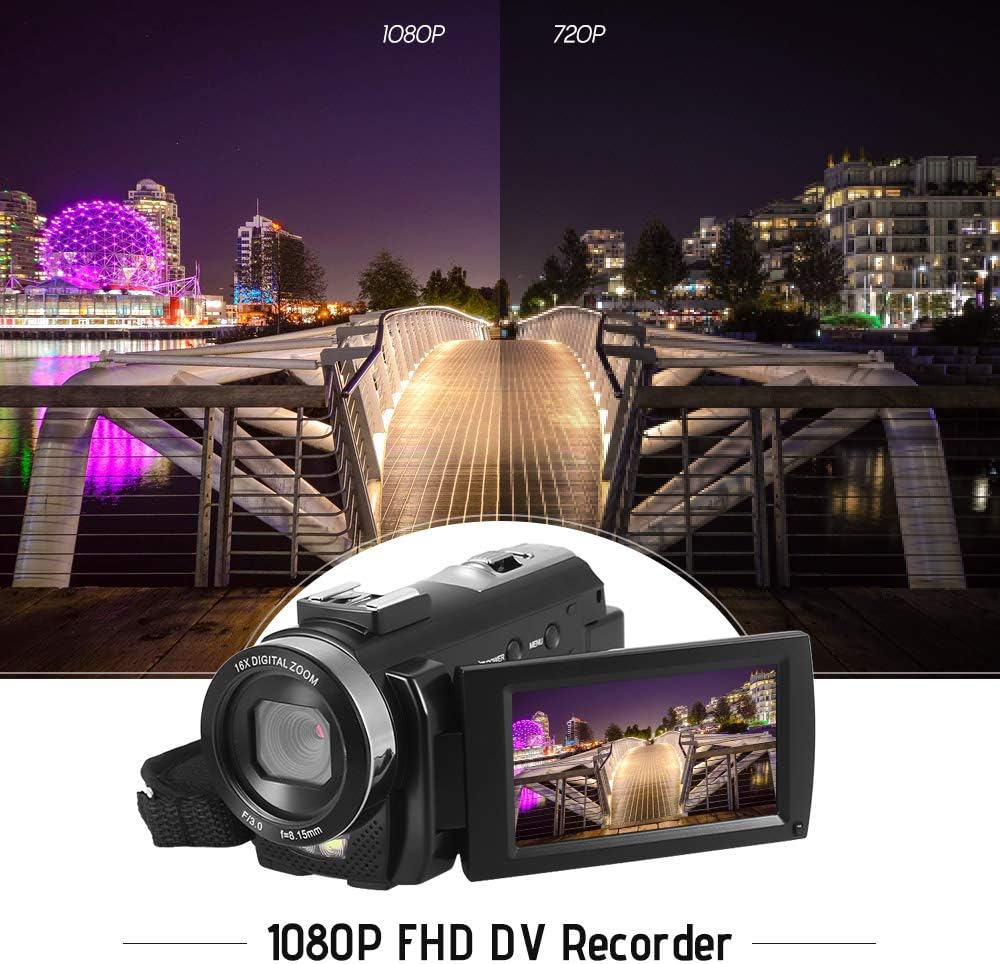
Figure 5.1: The camera is capable of recording in 1080p Full HD and 720p HD resolutions.
5.3. Pran foto
- Ensure the camera is in photo mode. If not, press the Mode bouton pou chanje.
- Ankadre foto ou a avèk ekran LCD a.
- Peze a Foto button to capture an image.
5.4. Sèvi ak Zoom Dijital
- Sèvi ak la W (Wide) epi T (Telephoto) lever to adjust the 16X digital zoom.

Figure 5.2: The camera's 16X digital zoom allows for closer views of subjects.
5.5. Anviwònman meni
- Peze a Menu bouton pou jwenn aksè nan paramèt yo.
- Use the navigation buttons to scroll through options such as:
- Balans blan: Auto, Daylight, Cloudy, Fluorescent, Tungsten.
- Mode sèn: Auto, Night, Portrait, Landscape, Backlight, Sport, Party, Beach, High Sensitivity.
- Mòd Fiziyad: Single, Continuous.
- Ekspoze: Adjust ±3.0EV.
- Oto-revèy: Off, 2s, 5s, 10s.
- Auto Power Off: Off, 1min, 3min, 5min.
- Lang: English, German, French, Spanish, Italian, Turkish, Russian, Portuguese, Dutch, Simplified Chinese, Traditional Chinese, Japanese, Polish.
- Lòt Fonksyon: Face Detection, Smile Capture, Beauty Face, Anti-Shake.
- Peze a OK or Dosye/Stop bouton pou konfime seleksyon yo.
- Peze a Menu bouton ankò pou sòti.
5.6. Konekte ak yon televizyon
- Use the provided AV cable to connect the camera's AV output to your television's AV input.
- Select the correct AV input channel on your TV to view camera content.
6. Antretyen
6.1. Netwaye Kamera a
- Sèvi ak yon twal mou epi sèk pou netwaye kò kamera a.
- Pou lantiy la ak ekran LCD a, sèvi ak yon twal espesyal ak yon solisyon pou netwaye lantiy. Evite pwodui chimik ki agresif.
6.2. Depo
- Sere kamera a nan yon kote ki fre epi sèk, lwen limyè solèy dirèk ak tanperati ekstrèm.
- Retire batri a si kamera a pa pral itilize pou yon peryòd pwolonje.
NAN. Depanaj
| Pwoblèm | Kòz posib | Solisyon |
|---|---|---|
| Kamera a pa limen. | Batri a fin itilize oswa li pa byen mete. | Charge the battery fully. Ensure the battery is inserted with correct polarity and the insulator tab is removed. |
| Pa ka anrejistre videyo oswa pran foto. | Kat memwa a plen, li pa mete nan plas li, oswa li pèvèti. | Insert a memory card. Delete unnecessary files or format the card (this will erase all data). Replace the card if corrupted. |
| Move kalite videyo/imaj. | Insufficient lighting, dirty lens, or incorrect settings. | Ensure adequate lighting. Use the LED fill light if necessary. Clean the lens. Adjust white balance and scene mode settings. |
| Kamera a bloke oswa li pa reponn. | Glitch lojisyèl oswa batri ki ba. | Remove and reinsert the battery to reset the camera. Ensure the battery is charged. |
8. Espesifikasyon
| Karakteristik | Spesifikasyon |
|---|---|
| Mak | Andoer |
| Modèl | HDV-201LM |
| Capteur Imaj | 5 megapiksèl CMOS sensor |
| Rezolisyon videyo | 1920x1080P (FHD 30fps), 1280x720 (HD 30fps), 640x480 (VGA 30fps), 320x240 (VGA 30fps) |
| Fòma videyo | AVI |
| Rezolisyon imaj | 24MP (Interpolated), 20MP (Interpolated), 16MP (Interpolated), 12MP (Interpolated), 10MP (Interpolated), 7M Wide (Interpolated), 5MP, 3MP, 2M Wide, VGA |
| Fòma Imaj | JPG |
| Zoom dijital | 16X |
| Lantiy | ff (F/3.0 f=8.15mm) |
| Max Ouverture | 8.15 F |
| Ekran LCD | 3.0-inch TFT-LCD (16:9), 270-degree rotation |
| Depo | SD Card (up to 32GB, Class 10 recommended) |
| Koneksyon | USB 2.0, AV Output (NTSC/PAL) |
| Pwovizyon pou pouvwa | 1 x 3.7V 800mAh Batri Rechargeable |
| Batri kontwòl Remote | 1 x 3V CR2025 pil |
| Sistèm operasyon sipò | Windows XP/Vista/7/8/10 |
| Karakteristik espesyal | Anti-shake, Face Detection, Smile Capture, Beauty Face, Self-Timer, LED Fill Light, Hot Shoe Mount |
| Dimansyon | XNX x 13.5 x 5.5 cm (6.5 x 5.3 x 2.2 nan) |
| Pwa | 273g (9.6oz) ak pil |
| Koulè | Nwa |
9. Garanti ak sipò
For warranty information and technical support, please refer to the documentation provided with your purchase or contact your retailer. Keep your proof of purchase for any warranty claims.
Ask a question about this manual
Ask about setup, troubleshooting, compatibility, parts, safety, or missing instructions. Manuals+ will review the question and use this page’s manual context to help answer it.