
1. Entwodiksyon
Mèsi pou acha aasing the Moukey MAMP1 220W Bluetooth Dual Channel Power Amplifier. Sa a amplifier is designed to provide powerful and versatile audio amplification for various applications, including karaoke, home theater systems, and general audio playback. It features multiple input options, Bluetooth 5.0 connectivity, and intuitive controls for an enhanced audio experience. Please read this manual thoroughly before use to ensure proper operation and to maximize the product's performance.
2. Enstriksyon Sekirite
Pou evite chòk elektrik, dife, oswa domaj nan aparèy la, tanpri obsève prekosyon sekirite sa yo:
- Pa ekspoze aparèy sa a ak lapli oswa imidite.
- Pa ouvri c laasing. Pa gen pyès ki ka sèvi ak men itilizatè a anndan an. Konfye tout antretyen bay pèsonèl kalifye.
- Asire ekipman pou pouvwa a voltage koresponn ak egzijans ki espesifye sou inite a.
- Place the unit on a stable, flat surface with adequate ventilation. Do not block ventilation openings.
- Keep the unit away from heat sources, direct sunlight, and excessive dust.
- Disconnect the power plug from the outlet if the unit will not be used for an extended period.
- Pa opere inite a ak men mouye.
3. Pake kontni
Verifye ke tout atik yo prezan nan pakè a:
- Moukey MAMP1 Pouvwa Amplifier Inite
- Kontwòl Remote
- FM antèn
- Manyèl itilizatè (dokiman sa a)
4. Pwodwi souview
4.1 Front Panel Controls and Functions
The front panel provides access to all primary controls and input ports for easy operation.

Image: Detailed diagram of the Moukey MAMP1 front panel, highlighting each control and port with corresponding numbers.
- Pouvwa switch: Limen oswa etenn inite a.
- USB / SD Slot: Pou jwe odyo files from USB drives (max 32GB) or SD cards (max 16GB).
- bouton mòd: Cycles through input modes (Bluetooth, USB, SD, AUX, FM).
- Bouton BT: Chanje dirèkteman nan mòd Bluetooth.
- Prev Button: Sote nan track/estasyon anvan an.
- Bouton jwe/poz: Jwe oswa mete lekti odyo a sou poz.
- Pwochen bouton: Sote nan pwochen track/estasyon an.
- Dirije ekspozisyon: Shows current mode, track information, or frequency.
- Folder / Track: Navigates through folders or tracks on USB/SD.
- Bouton Volim Mèt: Ajiste volim pwodiksyon jeneral la.
- Kas ekoutè Jack: 3.5mm output for monitor headphones.
- Microphone 1 Input: 6.35mm jack for microphone connection.
- Microphone 2 Input: 6.35mm jack for a second microphone connection.
- Bouton Volim Mikwofòn: Ajiste volim mikwofòn ki konekte yo.
- Bouton eko: Controls the echo effect for microphones.
- Bouton bas: Ajiste pwodiksyon odyo ba-frekans lan.
- Treble bouton: Ajiste pwodiksyon odyo wo-frekans lan.
- Bouton balans: Ajiste balans chanèl gòch/dwat la.
- AUX Antre Jack: Antre 3.5mm pou aparèy odyo ekstèn.
- Seleksyon Antre: Rotary switch to select between CD, AUX, DVD, and MP3/W inputs.
4.2 Koneksyon Panèl Dèyè
The rear panel houses the main audio input and output connections.

Imaj: Dèyè view of the Moukey MAMP1 amplifier, showing all input and output ports.

Image: Detailed diagram of the Moukey MAMP1 rear panel, highlighting each connection point.
- Audio Input for DVD (RCA): Connect DVD players or other audio sources.
- Audio Input for CD (RCA): Connect CD players or other audio sources.
- Line Out Jack (RCA): Pou konekte ak yon lòt amplifier oswa aparèy anrejistreman.
- FM Antenna Jack: Konekte antèn FM ki enkli a pou resepsyon radyo.
- Speaker Output Jacks: Connect passive speakers (4-16 Ohm impedance).
- Pouvwa kab Antre: Konekte fil elektrik AC a.
5. Enstalasyon
5.1 Plasman
Mete la amplifier on a flat, stable surface. Ensure there is sufficient space around the unit for proper ventilation to prevent overheating.
5.2 Koneksyon pouvwa
Connect the power cable to the Power Cable Input on the rear panel of the amplifier, then plug the other end into a suitable AC power outlet (115V AC).
5.3 Koneksyon oratè
MAMP1 amplifier supports two sets of passive speakers with an impedance of 4-16 Ohms. Use appropriate speaker wire to connect your speakers to the Speaker Output Jacks on the rear panel.

Image: Diagram illustrating how to connect speakers to the amplifier's binding posts.
- Rotate and loosen the speaker knob on the binding post.
- Insert the bare wire (remove approximately 10mm of insulation) into the hole. Ensure correct polarity (+ to + and - to -).
- Tighten the knobs to secure the wires firmly.
5.4 Input Device Connection
Connect your audio sources (CD player, DVD player, tuner, etc.) to the corresponding RCA Audio Input jacks on the rear panel. For microphones, use the 6.35mm jacks on the front panel. For 3.5mm AUX devices, use the front panel AUX Input Jack.
6. Operasyon Enstriksyon
6.1 Power On/Off
Peze a Chanjman pouvwa on the front panel to turn the amplifier on or off. The LED display will illuminate when the unit is powered on.
6.2 Seleksyon Antre
Sèvi ak la Bouton Mode on the front panel or the remote control to cycle through available input sources (Bluetooth, USB, SD, AUX, FM). Alternatively, use the Seleksyon Antre knob on the front panel for RCA inputs (CD, AUX, DVD, MP3/W).
6.3 Kontwòl Volim
- Mèt Volim: Vire a Bouton Volim Mèt to adjust the overall output level of the amplifier.
- Volim Mikwofòn: Sèvi ak la Mikwofòn Volim Knob to control the volume of connected microphones independently.
6.4 Kontwòl Ton
Adjust the audio characteristics using the Bas Knob epi Treble bouton to suit your preference. The Balans Knob allows adjustment of the left and right channel output levels.

Image: Close-up of the Moukey MAMP1 showing the Bass and Treble adjustment knobs.
6.5 Echo Control
Vire a Echo bouton to add or reduce the echo effect on the microphone inputs, suitable for karaoke applications.
6.6 Bluetooth Pairing
Pou konekte yon aparèy Bluetooth:
- Peze a Bouton BT or cycle through modes until "BLUE" appears on the LED display.
- Aktive Bluetooth sou telefòn entelijan ou, tablèt ou, oswa òdinatè ou.
- Chèche pou "Moukey MAMP1" in your device's Bluetooth settings and select it to pair.
- Once paired, you can stream audio wirelessly. Playback will temporarily pause during phone calls to protect privacy.
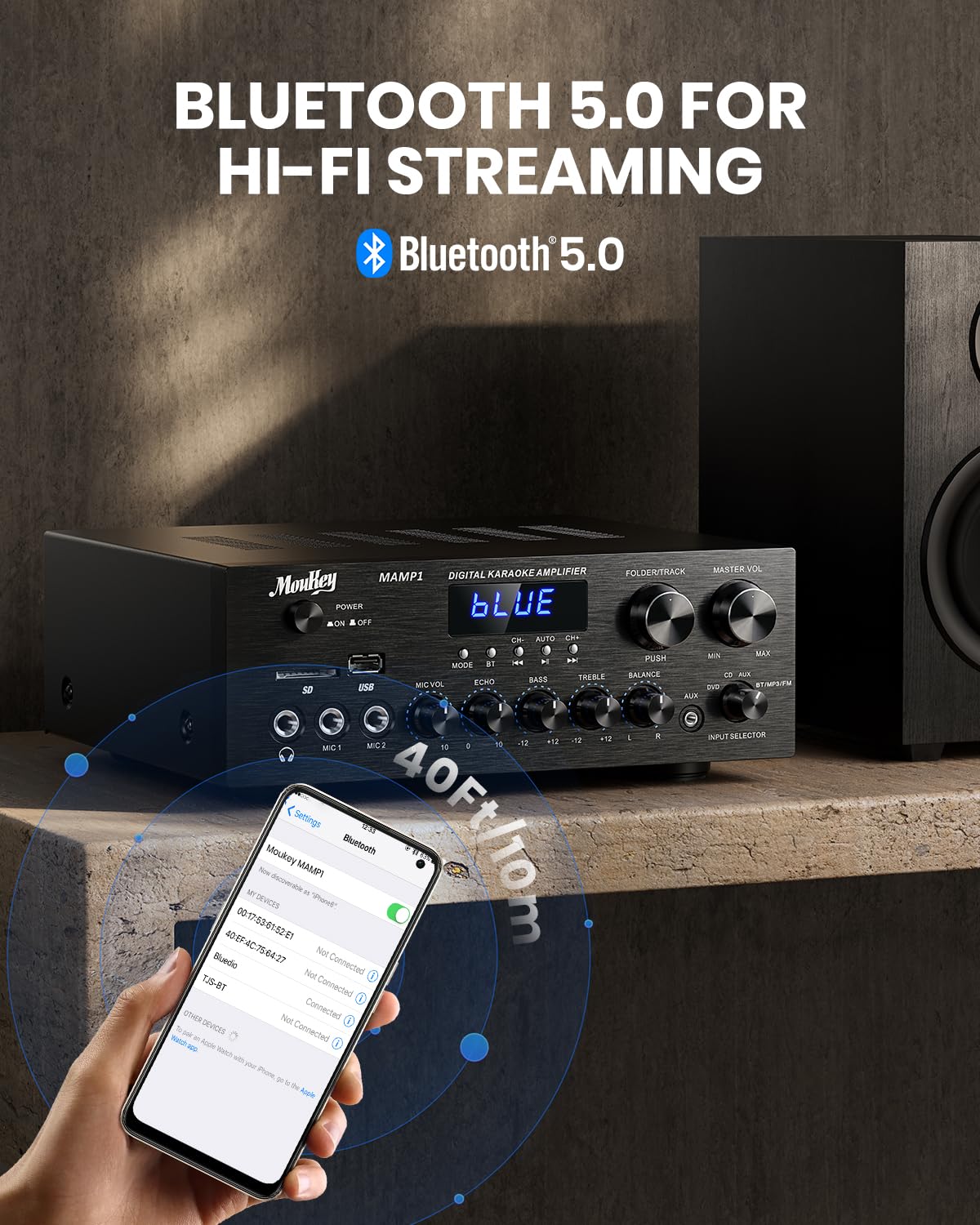
Image: The Moukey MAMP1 amplifier displaying "BLUE" on its screen, indicating Bluetooth mode, with a smartphone showing pairing options.
6.7 Lekti USB/SD
Insert a USB drive (max 32GB) or SD card (max 16GB) into the respective slot on the front panel. The amplifier will automatically switch to USB/SD mode and begin playback. Use the Prev, Jwe/Poz, Next, ak Folder/Track bouton pou kontwole lèktur.
6.8 FM Radyo
Ensure the FM antenna is connected to the rear panel. Select FM mode using the Bouton Mode. Sèvi ak la Prev epi Next buttons to tune to radio stations. The LED display will show the current frequency.
7. Antretyen
To maintain the performance and appearance of your amplifier:
- Netwayaj: Use a soft, dry cloth to wipe the exterior of the unit. Do not use liquid cleaners or abrasive chemicals.
- Vantilasyon: Asire w ouvèti vantilasyon yo pwòp pa gen pousyè ak debri.
- Depo: Si w ap sere aparèy la pou yon bon bout tan, dekonekte l nan kouran an epi sere l nan yon kote ki fre epi sèk.
NAN. Depanaj
If you encounter issues with your Moukey MAMP1 amplifier, refer to the following table for common problems and solutions:
| Pwoblèm | Kòz posib | Solisyon |
|---|---|---|
| Pa gen pouvwa | Kab kouran an pa konekte; Priz kouran an gen pwoblèm; Entèriptè kouran an etenn. | Ensure power cable is securely connected. Try a different power outlet. Press the power switch to ON. |
| Pa gen pwodiksyon son | Incorrect input selected; Volume too low; Speakers not connected; Speaker wires loose; Mute function active. | Select the correct input source. Increase Master Volume. Check speaker connections and polarity. Ensure mute is off. |
| Bluetooth pa konekte | Amplifier not in Bluetooth mode; Device too far; Device already paired to another unit. | Asire w amplifier is in Bluetooth mode ("BLUE" on display). Move device closer to amplifier. Disconnect from other devices. |
| Mikwofòn pa mache | Microphone not connected; Mic volume too low; Echo knob set to minimum. | Connect microphone securely. Increase Microphone Volume. Adjust Echo knob. |
| Pwoblèm lekti USB/SD | Pa sipòte file format; USB drive/SD card corrupted; Capacity exceeded. | Asire odyo files are in supported formats (e.g., MP3). Try a different USB drive/SD card. Check capacity limits (USB max 32G, SD max 16G). |
Si pwoblèm nan pèsiste apre ou fin eseye solisyon sa yo, tanpri kontakte sèvis kliyan.
9. Espesifikasyon
| Karakteristik | Spesifikasyon |
|---|---|
| Mak | Moukey |
| Modèl | MAMP1 |
| Sortie pouvwa | 220 Watts |
| Chanèl | 2 |
| Voltage | 115 Vòlt (AC) |
| Enpedans Oratè | 4-16 Ohms |
| Bluetooth vèsyon | 5.0 |
| Gamme Bluetooth | Over 12 meters (40 feet) |
| Sipò Kat USB/SD | USB: Max 32GB, SD: Max 16GB |
| Dimansyon (L x W x H) | 25cm x 21.3cm x 9.5cm (approx. 10in x 8in x 4in) |
| UPC | 715802779039 |
| Peyi orijin | Lachin |

Image: The Moukey MAMP1 amplifier with its dimensions labeled.
10. Garanti ak sipò
This Moukey MAMP1 Pouvwa Amplifier vini ak yon 1-ane garanti apati dat acha a. Garanti sa a kouvri domaj fabrikasyon ak atizan konn fè nan itilizasyon nòmal.
Garanti a pa kouvri:
- Damage caused by accident, abuse, misuse, flood, fire, or other natural causes.
- Damage caused by unauthorized modification or repair.
- Damage caused by improper installation or connection.
- Cosmetic damage, such as scratches, dents, and broken plastic on ports.
For warranty claims or technical support, please contact the retailer where you purchased the product or visit the official Moukey website for contact information. Please have your purchase receipt and product model number (MAMP1) ready when contacting support.