
1. Entwodiksyon
The Zoom B1X Four is a multi-effects processor specifically designed for electric bass. It features an integrated expression pedal for dynamic control over effects, a 30-second looper, and 68 built-in rhythm patterns. This pedal allows users to chain up to five effects simultaneously and save custom configurations in 50 user-preset patches. This bundle also includes Polsen HPC-A30 Monitor Headphones for accurate audio monitoring, a 9V AC Power Adapter for reliable power, and a durable 10ft Strukture Instrument Cable for connectivity.
2. Sa ki enkli
- Zoom B1X Four Bass Multi-Effects Pedal with Expression Pedal
- Polsen HPC-A30 Closed-Back Studio Monitor Headphones
- ART 9V AC Power Adapter
- Strukture SC10R 10 Feet Instrument Guitar Cable
- 4 x AA Batteries (for portable use)
- 1/4" Adapter (for headphones)
3. Pwodwi souview

Figure 1: Zoom B1X Four Bass Multi-Effects Pedal with Expression Pedal.

Figi 2: Top view of the B1X Four, highlighting the control knobs, footswitches, and display.
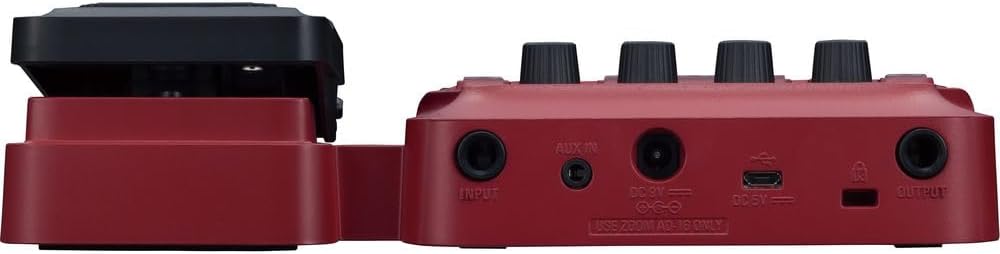
Figi 3: Side view of the B1X Four, illustrating connectivity options.

Figure 4: Polsen HPC-A30 Closed-Back Studio Monitor Headphones.

Figure 5: ART 9V AC Power Adapter.

Figure 6: Strukture SC10R 10 Feet Instrument Guitar Cable.
4. Enstalasyon
4.1 Koneksyon pouvwa
- Connect the included 9V AC Power Adapter to the DC 9V input jack on the B1X Four.
- Ploge adaptè a nan yon priz AC estanda.
- Alternatively, insert four AA batteries into the battery compartment for portable use.
4.2 Instrument and Amplifier Koneksyon
- Connect your electric bass to the B1X Four's INPUT jack using the 10ft Instrument Cable.
- Connect the B1X Four's OUTPUT jack to your bass amplifier oswa koòdone odyo.
4.3 Koneksyon kas ekoutè
- For silent practice, connect the Polsen HPC-A30 Monitor Headphones to the B1X Four's OUTPUT jack. Use the included 1/4" adapter if necessary.
5. Operasyon Enstriksyon
5.1 Limen/Etenyen
- To power on, ensure the power adapter is connected or batteries are inserted. The unit will power on automatically.
- To power off, disconnect the power adapter or remove the batteries.
5.2 Navige nan Prereglaj yo
- Use the footswitches to scroll through the 50 user-preset patches.
- The display screen will show the current patch number and name.
5.3 Using the Expression Pedal
- The expression pedal provides continuous, variable control over selected effects, such as wah, volume, or pitch.
- Refer to the on-screen menu to assign specific effects to the expression pedal.
5.4 Looper Function
- Activate the 30-second looper function using the dedicated footswitch.
- Record, overdub, and play back your bass lines to create layered performances.
5.5 Rhythm Patterns
- The B1X Four includes 68 built-in rhythm patterns for practice and performance.
- Select and adjust the tempo of rhythm patterns via the control knobs and display.
5.6 Chaining Effects and Saving Patches
- Up to five effects can be used simultaneously and arranged in any order.
- Adjust individual effect parameters using the control knobs.
- Save your customized effect chains as user-preset patches for quick recall.
6. Antretyen
- Netwayaj: Wipe the pedal and accessories with a soft, dry cloth. Avoid using abrasive cleaners or solvents.
- Ranplasman batri: If using batteries, replace all four AA batteries when the low battery indicator appears on the display. Ensure correct polarity.
- Swen kab: Store cables neatly to prevent kinks and damage. Avoid excessive bending or pulling.
- Swen ekoutè: Keep headphones clean and store them in a protective case to prevent damage to earcups and drivers.
NAN. Depanaj
- Pa gen son: Tcheke tout koneksyon kab yo (enstriman, amplifier, headphones). Ensure the pedal is powered on and volume levels are appropriately set on both the pedal and your amplifier.
- Son defòme: Verify input and output levels are not clipping. Adjust gain settings on the pedal and ampTcheke pou kab ki domaje.
- Pedal la pa reponn: Ensure the power supply is stable. If using batteries, replace them. If issues persist, perform a factory reset (refer to the full product manual for instructions).
- For further assistance, consult the official Zoom support websit oswa kontakte sèvis kliyan.
8. Espesifikasyon
| Karakteristik | Detay |
|---|---|
| Nimewo Modèl Atik | Zoom B1X Four |
| Efè | Over 70 Bass Effects, 9 Amp Modèl |
| Simultaneous Effects | 5 |
| Patch itilizatè | 50 |
| Looper | 30 segonn |
| Modèl ritm | 68 |
| Pedal Ekspresyon | Built-in for variable control |
| Materyèl kò | Metal |
| Sous pouvwa | 9V AC Adapter (included), 4x AA Batteries |
| Kalite Connector | Jack odyo 1/4 pous (6.35mm) |
| Pwa atik | 4.53 liv |
| Polsen HPC-A30 Headphones | 50mm drivers, 18Hz-22kHz frequency response |
9. Garanti ak sipò
The Zoom B1X Four Bass Multi-Effects Pedal, Polsen HPC-A30 Monitor Headphones, ART 9V AC Power Adapter, and Strukture SC10R Instrument Cable each come with a 1-Year Warranty. For detailed warranty information, technical support, or service inquiries, please visit the official Zoom website or the respective manufacturer's support pages.