
1. Entwodiksyon
The Hom-Io HOM-Mod-Switch2 is an in-wall smart Wi-Fi switch module designed to convert traditional lights and devices into smart, wirelessly controllable units. This module allows for remote control via a smartphone application or a compatible physical switch, and integrates seamlessly with Amazon Alexa and Google Home for voice control. It supports advanced features such as timer programming and custom scenario creation.
2. Enfòmasyon sou Sekirite
WARNING: Risk of Electric Shock. Installation should only be performed by a qualified electrician or service personnel.
- Ensure power is disconnected at the circuit breaker before installation, maintenance, or removal.
- This device is designed for indoor use in dry locations only (IP20 rating). Do not expose to moisture or extreme temperatures.
- Pa depase chaj maksimòm ki espesifye nan espesifikasyon pwodwi a.
- Verify all wiring connections are secure and correct to prevent short circuits or electrical hazards.
- Kenbe soti nan atenn timoun yo.
3. Pake kontni
- 1 x Hom-Io HOM-Mod-Switch2 Module
- 1 x manyèl enstriksyon
4. Pwodwi souview
The Hom-Io HOM-Mod-Switch2 is a compact in-wall module designed for smart control of two independent electrical circuits. It features Wi-Fi connectivity for remote operation and integration with smart home ecosystems.
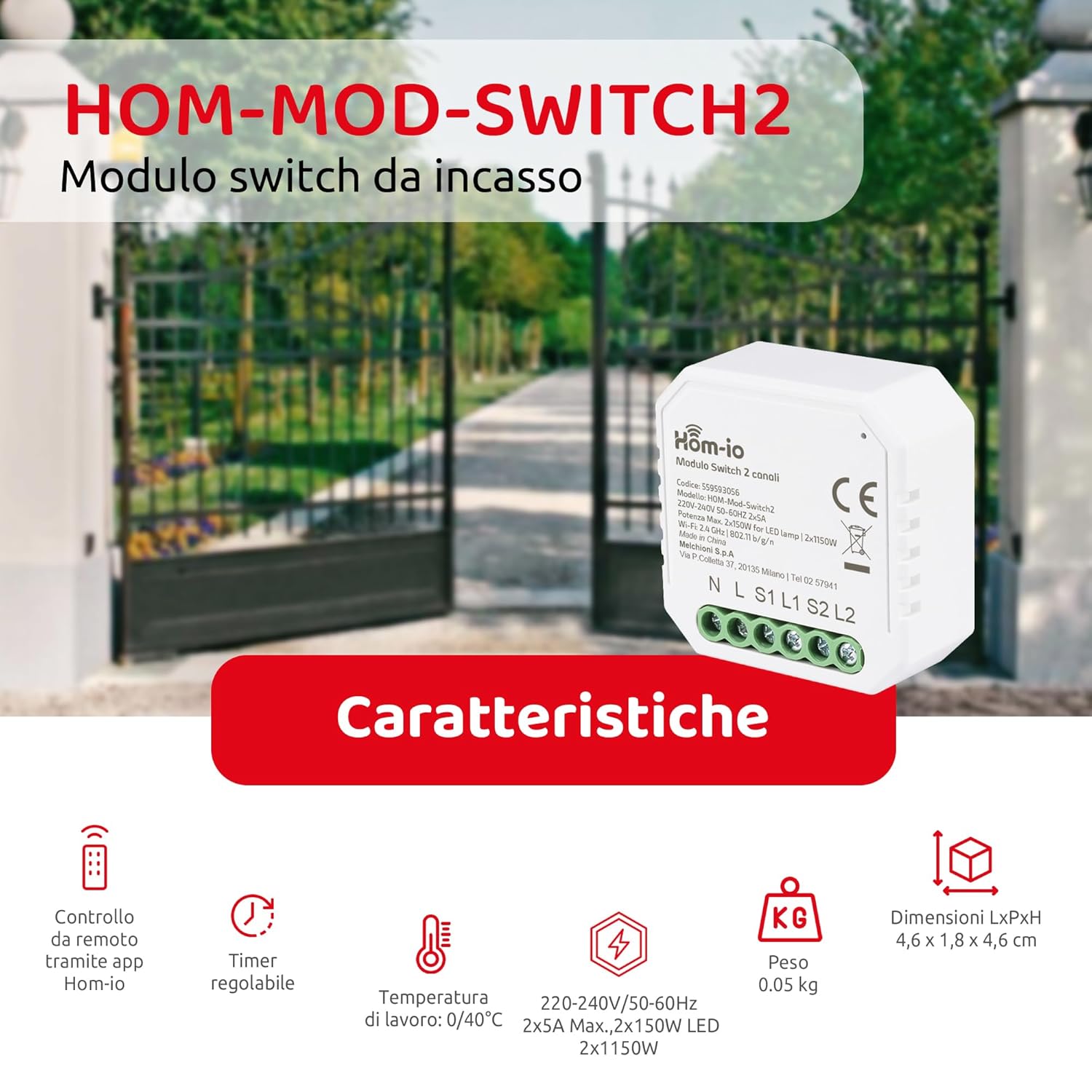
Image 1: Hom-Io HOM-Mod-Switch2 module with its technical specifications and features such as remote app control, adjustable timer, operating temperature, voltage, weight, and dimensions.
Karakteristik kle yo enkli:
- Smart kontwòl: Remote operation of lights and devices via smartphone or traditional wall switch.
- Doub Chèn: Controls two separate circuits (2x5A).
- Koneksyon Wi-Fi: 2.4 GHz 802.11 b/g/n for seamless integration into your home network.
- Asistan vwa konpatibilite: Li fonksyone avèk Amazon Alexa ak Google Home.
- Fonksyon avanse: Timer programming and custom scenario creation for automated control.
- Konsepsyon kontra enfòmèl ant: Suitable for installation in standard junction boxes (ø60mm).
5. Espesifikasyon
| Modèl | HOM-Mod-Switch2 |
| Mak | Hom-io |
| Opere Voltage | 220-240V / 50-60Hz |
| Rated aktyèl | 10 Amperes (2x5A) |
| Chaj Maksimòm (Rezistan) | 2300 Watts |
| Chaj Maksimòm (LED) | 2x150W |
| Wi-Fi estanda | 2.4 GHz 802.11 b / g / n |
| Rating Pwoteksyon Entènasyonal | IP20 (Indoor use in dry locations) |
| Tanperati Fonksyònman | 0 ° C a 40 ° C |
| Operasyon Imidite | ≤80% |
| Dimansyon (LxWxH) | 4.6 x 1.8 x 4.6 santimèt (18 x 45 x 45 milimèt) |
| Junction Box Compatibility | Ø60mm |
| Materyèl Lojman | Plastik (ABS) |
| Kontakte Materyèl | Kwiv |
| Metòd kontwòl | Remote (App, Voice), Manual Switch |
| Vwa kontwòl konpatibilite | Amazon Alexa, Google Kay |
6. Enstalasyon ak Enstalasyon
6.1 Dyagram fil elektrik
The Hom-Io HOM-Mod-Switch2 module is designed for in-wall installation within a standard Ø60mm junction box. Refer to the diagram below for proper wiring connections. Always ensure the main power supply is OFF before proceeding with any wiring.

Imaj 2: Detaye view of the Hom-Io HOM-Mod-Switch2 module, illustrating its compact size and terminal connections for Line (L), Neutral (N), Load 1 (L1), Load 2 (L2), Switch 1 (S1), and Switch 2 (S2).
- Dekonekte pouvwa: Turn off the main power supply at the circuit breaker before starting installation.
- Connect Neutral (N): Connect the neutral wire from your electrical system to the 'N' terminal on the module.
- Connect Live (L): Connect the live wire from your electrical system to the 'L' terminal on the module.
- Connect Load 1 (L1): Connect the live wire of the first light/device to be controlled to the 'L1' terminal.
- Connect Load 2 (L2): Connect the live wire of the second light/device to be controlled to the 'L2' terminal.
- Connect Switches (S1, S2): Connect your traditional wall switches to the 'S1' and 'S2' terminals for manual control. These are typically connected to the live wire (L) and then to S1/S2. Consult a qualified electrician if unsure.
- Modil Monte: Carefully place the module into the junction box.
- Retabli pouvwa: Remete ekipman pou kouran prensipal la.
6.2 Enstalasyon ak koneksyon aplikasyon an
To utilize the smart features of your Hom-Io switch, you need to install the Hom-io application on your smartphone or tablet.

Image 3: Hom-Io app interface on a smartphone, showing download options for App Store and Google Play, and indicating compatibility with Amazon Alexa and Hey Google.
- Telechaje App: Download the "Hom-io" app from the App Store (iOS) or Google Play Store (Android).
- Enskri/Konekte: Louvri aplikasyon an epi kreye yon nouvo kont oubyen konekte ak yon kont ki deja egziste.
- Ajoute Aparèy: Follow the in-app instructions to add a new device. Typically, this involves selecting "Electrical Switch" or "Smart Switch" and then following the pairing mode instructions.
- Antre nan Mode Pè: The module usually enters pairing mode automatically when first powered on, indicated by a blinking LED. If not, you may need to press and hold the physical switch connected to S1 for 5-10 seconds until the LED blinks rapidly.
- Konekte ak Wi-Fi: Ensure your smartphone is connected to a 2.4 GHz Wi-Fi network. The app will guide you through connecting the switch to your home Wi-Fi.
- Non Aparèy: Once paired, assign a name to your switch (e.g., "Living Room Light 1", "Kitchen Device").
7. Operasyon Enstriksyon
7.1 Kontwòl App
After successful pairing, you can control your devices using the Hom-io app from anywhere with an internet connection.

Image 4: Smartphone screen displaying the Hom-Io app with a large "ON" button for controlling a smart switch, along with options for Timer and Settings.
- On/Off kontwòl: Tap the device icon in the app to toggle connected lights or devices on/off.
- Fonksyon revèy: Set schedules for automatic on/off times. Access this feature through the device settings in the app.
- Scenario Creation: Create custom scenarios to control multiple devices simultaneously or based on specific conditions (e.g., "Good Morning" scene to turn on lights and coffee maker).

Imaj 5: Yon ansyenample of precise control, showing a smart sprinkler system being activated, illustrating the ability to accurately set the on and off times for connected devices.
7.2 Voice Control (Amazon Alexa / Google Home)
Integrate your Hom-Io switch with Amazon Alexa or Google Home for convenient voice control.
- Kont lyezon: In the Alexa or Google Home app, search for the "Hom-io" skill/service and link your Hom-io account.
- Dekouvri Aparèy: Yon fwa konekte, mande asistan vwa ou pou "Dekouvri aparèy yo" oubyen ajoute yo manyèlman atravè aplikasyon an.
- Kòmandman vwa: Sèvi ak kòmandman tankou:
- "Alexa, limen [Non Aparèy]"
- "Hey Google, etenn [Non Aparèy]"
- "Alexa, set [Device Name] to 50%" (if dimmable, though this switch is on/off)
7.3 Kontwòl switch manyèl
The Hom-Io HOM-Mod-Switch2 retains compatibility with traditional wall switches. You can still manually turn your lights or devices on/off using the connected physical switch, even if the Wi-Fi connection is unavailable.
8. Antretyen
- Netwayaj: Siye aparèy la avèk yon twal mou epi sèk. Pa sèvi ak pwodui netwayaj likid oswa ayewosòl.
- Mizajou mikrolojisyèl: Periodically check the Hom-io app for available firmware updates to ensure optimal performance and security.
- Kondisyon anviwònman: Ensure the device remains within its specified operating temperature (0-40°C) and humidity (≤80%) ranges.
NAN. Depanaj
| Pwoblèm | Kòz posib | Solisyon |
|---|---|---|
| Aparèy la pa reponn a kòmandman aplikasyon/vwa yo. | No Wi-Fi connection, incorrect pairing, power issue. |
|
| Physical switch not working. | Incorrect wiring, faulty switch. |
|
| Module gets warm. | Normal operation, or overloaded circuit. |
|
10. Enfòmasyon sou Garanti
The Hom-Io HOM-Mod-Switch2 comes with a 2-ane garanti manifakti from the date of purchase. This warranty covers defects in materials and workmanship under normal use. It does not cover damage caused by misuse, unauthorized modifications, improper installation, or external factors such as power surges.
For warranty claims, please retain your proof of purchase and contact your retailer or Hom-io customer support.
11. Sipò
For further assistance, technical support, or to explore other Hom-io smart home products, please visit the official Hom-io websit oswa kontakte sèvis kliyan.
- Hom-io Brand Store: Visit Hom-io on Amazon
- Hom-io App Download: Download the Hom-io App