
1. Pwodwi souview
The Haier HWM65-826NZP is a 6.5 Kg fully-automatic top load washing machine designed for efficient and convenient laundry care. This appliance combines advanced features with user-friendly controls to deliver effective cleaning results for various fabric types.
The washing machine features a compact design, making it suitable for various living spaces. Its Moonlight Grey finish provides a sleek and modern aesthetic.
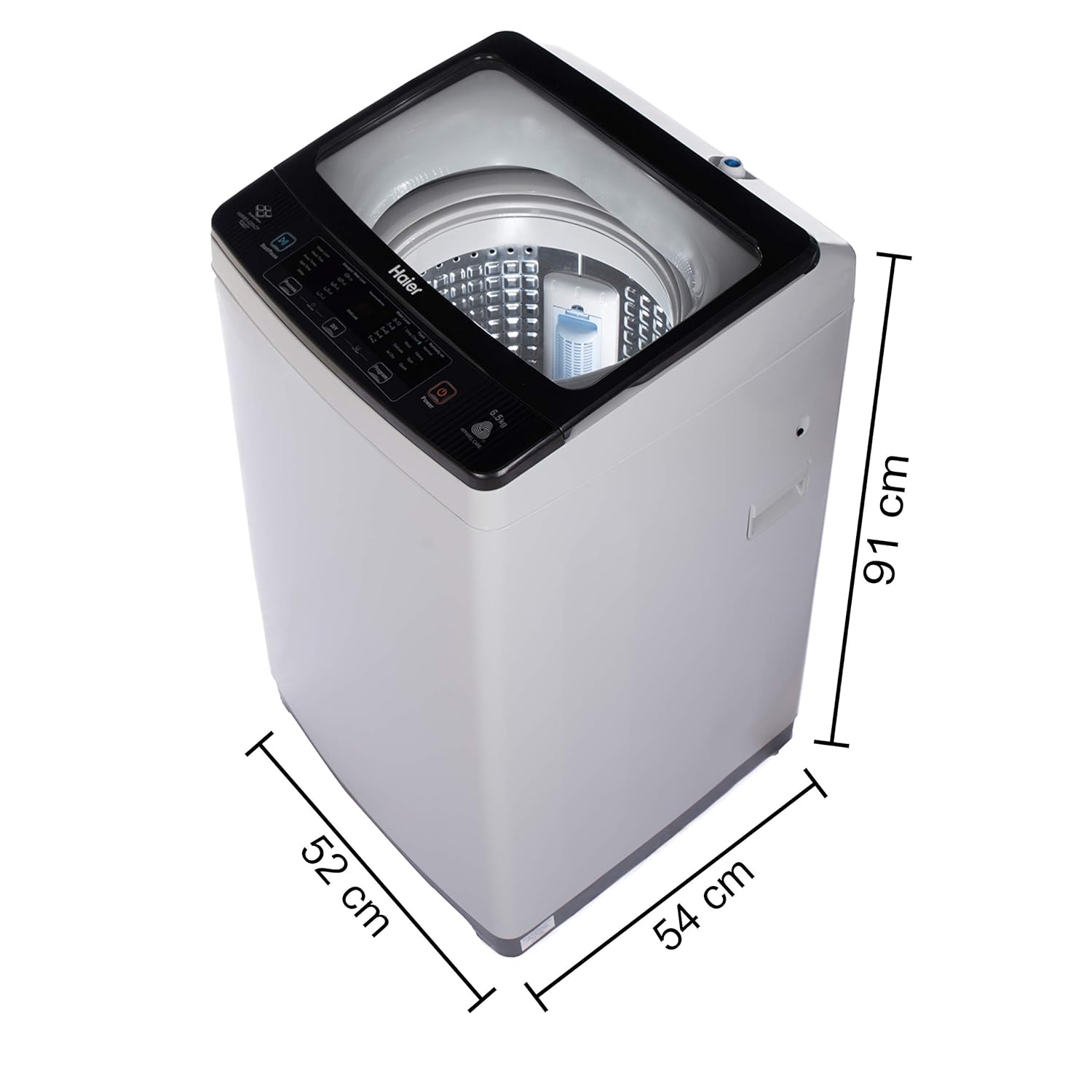
Figure 1: Haier HWM65-826NZP Washing Machine
2. Karakteristik kle
This section highlights the primary features of your Haier HWM65-826NZP washing machine, designed to enhance your laundry experience.
2.1 Softfall Technology
The transparent glass lid is equipped with Softfall Technology, ensuring a slow and gentle closure. This feature prevents accidental drops and reduces noise, enhancing safety and durability.

Figure 2: Softfall Technology in action, showing the lid closing gently.
2.2 Balance Clean Pulsator
The Balance Clean Pulsator is engineered to create a powerful motion within the drum, effectively combining water and detergent to penetrate fabrics. This ensures thorough cleaning for both light and heavy laundry loads.

Figure 3: The Deep Plate Pulsator design for enhanced cleaning.
2.3 8 Pwogram Lavaj
The washing machine offers 8 distinct wash programs to cater to various fabric types and cleaning needs. These programs include options such as Deep Clean, Wool, Delicate, Air Dry, Spin, Normal, Heavy, and Quick Wash, providing versatility for your laundry.

Figi 4: Plis paseview of the 8 wash programs available on the control panel.
2.4 Bionic Magic Filter
Equipped with a Bionic Magic Filter, this washing machine effectively captures lint and debris from your clothes during the wash cycle. This ensures cleaner laundry and helps maintain the machine's performance.

Figure 5: The Dual Magic Filter system for lint collection.
2.5 Near Zero Pressure (NZP) Technology
The Near Zero Pressure (NZP) Technology allows the washing machine to operate efficiently even with extremely low water pressure (as low as 0.001-0.002 MPa). This ensures consistent performance regardless of your home's water supply conditions.

Figure 6: Visual representation of Near Zero Pressure Technology.
2.6 Oceanus Wave Drum
The Oceanus Wave Drum is designed with a unique pattern that creates a stronger water flow for gentle yet effective washing. This design minimizes abrasion on clothes while ensuring thorough cleaning.

Figure 7: The Oceanus Wave Drum's textured surface.
2.7 Timoun Lock
For added safety, the washing machine includes a Child Lock feature. Once activated, this function freezes the control panel settings, preventing accidental changes by children during operation.
2.8 dirije Digital Display
The intuitive LED digital display provides clear information about the selected wash program, remaining time, and other settings, allowing for easy monitoring and control of the wash cycle.
2.9 Pwodwi souview Videyo
Gade videyo sa a pou yon ti pale rapidview of the Haier HWM65-826NZP washing machine, including its design and key features.
Video 1: Haier HWM65-826NZP Washing Machine Overview
3. Enstriksyon Enstalasyon
Proper installation is crucial for the optimal performance and longevity of your washing machine. Please follow these steps carefully.
3.1 Debake
- Retire tout materyèl anbalaj yo avèk prekosyon, tankou anbalaj debaz la ak nenpòt fim pwoteksyon.
- Ensure all included components are present: 1 Washing Machine, User Manual, Components of Water Inlet Hose, Tapping Screw, Warranty Card.
3.2 Plasman
- Mete machin a lave a sou yon sifas ki plat e solid pou evite twòp vibrasyon ak bri pandan l ap fonksyone.
- Ensure there is adequate ventilation around the machine.
- Avoid direct sunlight or placing the machine in excessively damp zòn yo.

Figi 8: Dimansyon pwodwi a pou plasman kòrèkteman.
3.3 Koneksyon Antre Dlo
- Connect the water inlet hose to the water tap and the inlet valve on the back of the washing machine.
- Asire ke tout koneksyon yo sere pou anpeche koule.
- Louvri tiyo dlo a konplètman.
3.4 Koneksyon Kawoutchou Drenaj
- Position the drain hose to ensure proper water drainage. It can be hooked over a sink or connected to a dedicated drain pipe.
- Asire w ke tiyo drenaj la pa pliye oswa bloke.
3.5 Koneksyon pouvwa
- Ploge kòd elektrik la nan yon priz elektrik ki gen tè.
- Asire voltage koresponn ak egzijans machin nan (220 Vòlt).
4. Operasyon Enstriksyon
Follow these steps to operate your Haier HWM65-826NZP washing machine effectively.
4.1 Chaje lesiv
- Louvri kouvèti an tèt la.
- Load clothes loosely into the drum, ensuring not to overload the machine. The maximum capacity is 6.5 Kg.
- Close the lid gently using the Softfall Technology.
4.2 Ajoute Detèjan
- Add the appropriate amount of detergent to the detergent dispenser according to the load size and soil level.
- Refer to the detergent manufacturer's instructions for recommended quantities.
4.3 Chwazi yon Pwogram
- Peze bouton 'Power' la pou limen machin nan.
- Use the 'Program' button to cycle through the available wash programs (Deep Clean, Wool, Delicate, Air Dry, Spin, Normal, Heavy, Quick Wash).
- The selected program will be indicated on the LED digital display.
4.4 Ajiste Anviwònman
Depending on the selected program, you may adjust settings such as:
- Nivo dlo: Adjust according to the load size.
- Tan lave: Modify the duration of the wash cycle.
- Tan pou rense: Select the number of rinse cycles.
- Tan vire: Adjust the duration of the spin cycle for drying.
- Reta: Set a delayed start time for the wash cycle.
4.5 Kòmanse Sik Lavaj la
- Once the program and settings are selected, press the 'Start/Pause' button to begin the wash cycle.
- To pause the cycle, press 'Start/Pause' again. Press it once more to resume.
4.6 Fonksyon Lock Timoun
- To activate Child Lock, press and hold the designated Child Lock button (or combination of buttons as indicated on the control panel) for a few seconds until the Child Lock indicator appears on the display.
- Pou dezaktive, repete menm aksyon an.
4.7 Pwogram Netwayaj Basen
Regularly use the 'Tub Clean' program to maintain the cleanliness of the washing machine drum and prevent odor buildup. Refer to the control panel for initiating this program.
5. Antretyen
Antretyen regilye asire lonjevite ak fonksyònman efikas machin lave ou a.
5.1 Cleaning the Bionic Magic Filter
- Periodically remove and clean the Bionic Magic Filter to ensure effective lint collection.
- Rinse the filter under running water to remove accumulated lint and debris.
- Reinsert the clean filter securely into its position.
5.2 Netwaye tanbou a
- Utilize the 'Tub Clean' program monthly to clean the inner drum and remove detergent residue or mold.
- You may use a washing machine cleaner specifically designed for this purpose.
5.3 Netwayaj Eksteryè
- Siye eksteryè machin nan ak yon mou, damp twal.
- Evite itilize pwodui netwayaj abrazif oswa solvan ki ka domaje fini an.
5.4 Water Inlet Filter Cleaning
- If water supply is slow, check and clean the filter screen at the water inlet hose connection.
- Turn off the water supply before disconnecting the hose.
NAN. Depanaj
If you encounter issues with your washing machine, refer to the following common troubleshooting tips before contacting customer service.
6.1 Machine Not Starting
- Asire w ke kòd kouran an byen konekte.
- Tcheke si ekipman pou pouvwa a aktif.
- Verify that the lid is properly closed.
- Confirm that the 'Start/Pause' button has been pressed.
6.2 Water Not Filling or Draining
- Asire w ke tiyo dlo a byen louvri.
- Check if the water inlet hose is kinked or blocked.
- Enspekte tiyo drenaj la pou wè si li pa pliye oswa blokaj.
- Clean the water inlet filter if water flow is restricted.
6.3 Vibrasyon oswa Bri Twòp
- Ensure the machine is placed on a level and stable surface. Adjust the leveling feet if necessary.
- Verify that the transit bolts (if any) have been removed during installation.
- Distribute the laundry evenly inside the drum to prevent imbalance.
6.4 Poor Wash Results
- Ensure you are using the correct amount and type of detergent for your load.
- Select the appropriate wash program for the fabric type and soil level.
- Avoid overloading the machine, as this can hinder proper cleaning.
- Clean the Bionic Magic Filter regularly.
7. Espesifikasyon
| Karakteristik | Spesifikasyon |
|---|---|
| Mak | Haier |
| Non modèl | HWM65-826NZP |
| Kapasite | 6.5 Kilogram |
| Dimansyon pwodwi (D x W x H) | 54P x 51W x 91H santimèt |
| Aksè Kote | Top chaj |
| Kontwòl Kalite | Totalman otomatik |
| Vitès wotasyon maksimòm | 800 RPM |
| Voltage | 220 Volts |
| Kantite Pwogram yo | 8 |
| Pwa atik | 31000 gram |
| Koulè | Moonlight Grey |
| Kalite Materyèl | Steel (Body), Plastic/Glass (Drum) |
| Karakteristik espesyal | 10 Year Warranty on motor, Oceanus Wave Drum, Softfall Technology, Near Zero Pressure, Two Bionic Magic Filter, Balance Clean Pulsator |
8. Garanti ak sipò
8.1 Enfòmasyon sou Garanti
Your Haier HWM65-826NZP washing machine comes with a comprehensive warranty:
- 2 zan garanti konplè sou pwodwi a.
- 10 ane garanti sou motè a.

Figure 9: Warranty details for the Haier HWM65-826NZP.
Please retain your purchase receipt and warranty card for any future claims.
8.2 Sipò pou Kliyan
For any assistance, service requests, or further information, please contact Haier customer support:
- Enfòmasyon pou kontakte manifakti: 18001029999