
1. Entwodiksyon
This manual provides comprehensive instructions for the IMILAB CMSXJ16A Smart Home Security Camera, a product of XIAOMI. It covers setup, operation, maintenance, and troubleshooting to ensure optimal performance and security monitoring. Please read this manual carefully before using the product and retain it for future reference.
2. Pwodwi souview
2.1 Kontni pake a
Verifye ke tout atik yo prezan nan pakè a:
- IMILAB Home Security Camera Basic x 1
- Manyèl Enstriksyon x 1
- Pouvwa kab x 1
- Power Adapter (UK/EU/US) x 1
- Wall Mounting Package x 1 (includes screws and wall plugs)
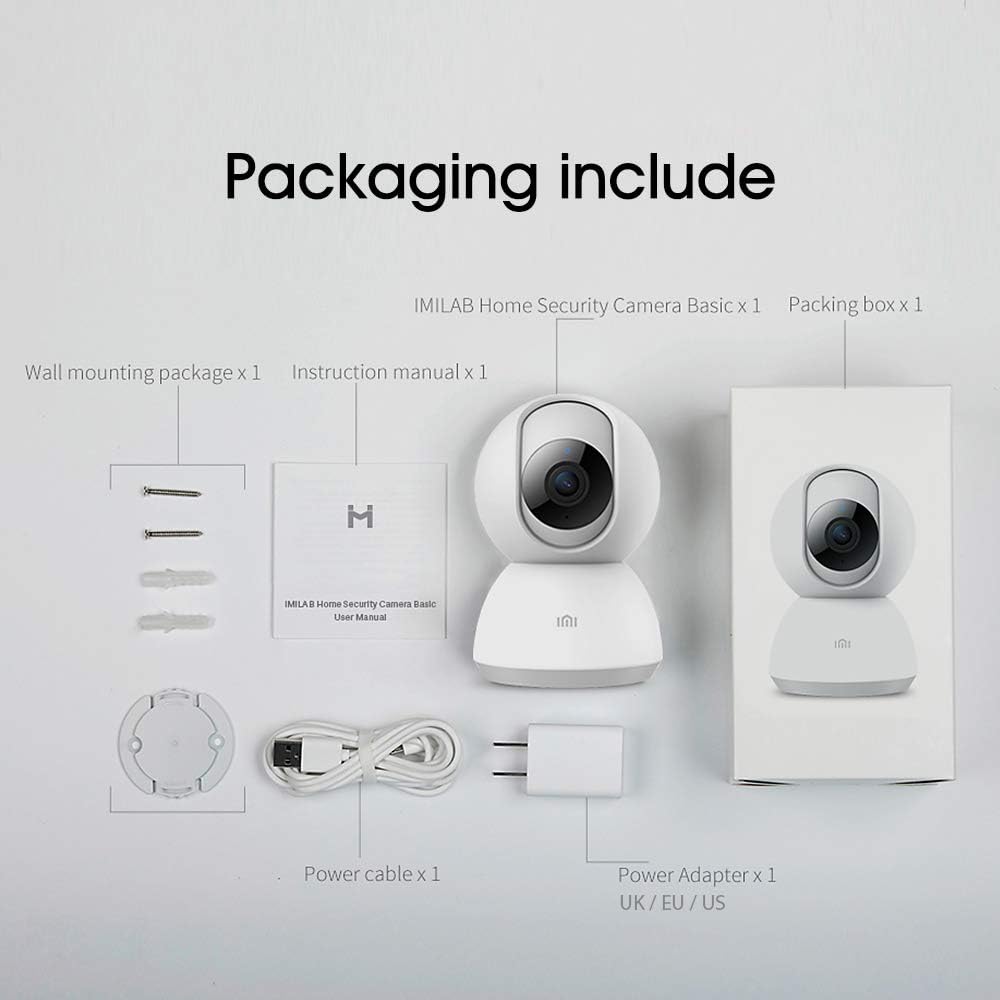
Image: Contents of the IMILAB CMSXJ16A camera package.
2.2 Konpozan Kamera
The IMILAB CMSXJ16A camera features a compact, spherical design with a rotating base for 360-degree coverage. Key components include the lens, microphone, speaker, status indicator light, and power port.

Imaj: Devan view of the IMILAB CMSXJ16A camera.
2.3 Karakteristik kle
- FHD (1080P) Resolution: Provides clear and detailed image quality.
- 360 ° wotasyon: Ofri panoramique viewing for comprehensive area coverage.
- Glare-Free Night Vision: Equipped with F2.1 aperture and 8x 940mm infrared LEDs for a visible distance of 10m.
- Vizyon lannwit koulè reyèl: Maintains full color in low light conditions, even at 100 lumens.
- AI Deteksyon Imèn: Advanced AI reduces unnecessary alerts by 70% for more accurate notifications.
- Crying Baby Notification: Alerts you to the sound of a crying baby.
- Plizyè Opsyon Depo: Supports cloud storage, up to 64GB Micro TF card, and NAS storage.
- H.265 Video Encoding: Efficiently compresses video, saving storage space while maintaining quality.
3. Enstalasyon
3.1 Limen
- Connect the power cable to the camera's power port.
- Ploge adaptè pouvwa a nan yon priz elektrik estanda.
- The camera will power on, and the status indicator light will begin to flash, indicating it is ready for connection.
3.2 Enstalasyon App
Download the official IMILAB Home Security app from your smartphone's app store. The app is compatible with Android 4.4 and above, and iOS 8.0 and above.
- Chèche pou "IMILAB Home Security" in the Google Play Store (for Android) or Apple App Store (for iOS).
- Telechaje epi enstale aplikasyon an.
- Louvri app a epi swiv enstriksyon ki sou ekran an pou kreye yon kont oswa konekte.
3.3 Konekte ak Wi-Fi
Follow the in-app instructions to connect your camera to your home Wi-Fi network. This typically involves scanning a QR code generated by the app with the camera's lens.
3.4 Monte Kamera a
The camera supports wall mounting. Use the provided wall mounting package for secure installation.
- Choose a suitable location for mounting, ensuring a clear field of view ak aksè nan yon priz kouran.
- Use the mounting base as a template to mark drill holes on the wall.
- Fè twou epi mete ploge miray yo.
- Secure the mounting base to the wall with screws.
- Atache kamera a sou baz montaj la.
4. Operasyon Enstriksyon
4.1 Viv View ak kontwòl remote
Once connected, open the IMILAB Home Security app to access the live video feed from your camera. You can remotely control the camera's 360-degree rotation to view different areas of your space.

Image: Live view of the camera feed on mobile devices, demonstrating H.265 encoding efficiency.
4.2 Vizyon lannwit
The camera automatically switches to night vision mode in low light conditions. It features glare-free infrared night vision and true color night vision for clear visibility even in very dim environments.

Image: Demonstration of glare-free and true color night vision capabilities.
4.3 AI Human Detection and Notifications
The camera utilizes AI to detect human movement, significantly reducing false alarms from pets or other non-human movements. You will receive precise notifications on your smartphone when human activity is detected.

Image: AI movement notification interface in the mobile application.
4.4 Crying Baby Detection
Enable the crying baby detection feature in the app to receive alerts if the camera detects the sound of a baby crying, providing an additional layer of monitoring for nurseries.
4.5 Anrejistreman ak Depo Videyo
The camera supports real-time video recording with multiple storage options:
- Depo nwaj: Subscribe to cloud services for secure off-site storage of your recordings.
- Micro TF Card: Insert a Micro TF card (up to 64GB, not included) into the camera for local storage.
- Depo NAS: Connect the camera to a Network Attached Storage (NAS) device for expanded local storage capabilities.
4.6 H.265 Video Encoding
The camera uses H.265 video encoding, which allows for more efficient compression of video files. This means you can save the same quality video with approximately 50% less file size compared to H.264, optimizing storage and bandwidth usage.
5. Antretyen
To ensure the longevity and optimal performance of your camera, follow these maintenance guidelines:
- Netwayaj: Siye lantiy kamera a ak kò a dousman avèk yon twal mou epi sèk. Pa sèvi ak pwodui chimik ki agresif oswa pwodui netwayaj abrazif.
- Plasman: Ensure the camera is placed in a stable environment, away from direct sunlight, extreme temperatures, and high humidity.
- Mizajou mikrolojisyèl: Regularly check the app for available firmware updates to ensure your camera has the latest features and security enhancements.
NAN. Depanaj
If you encounter issues with your IMILAB CMSXJ16A camera, refer to the following common solutions:
- Kamera a pa konekte: Ensure your Wi-Fi network is 2.4GHz (5GHz is not supported). Check Wi-Fi signal strength. Restart the camera and your router.
- Kalite imaj pòv: Clean the camera lens. Ensure adequate lighting in the environment. Check your internet connection speed.
- Pa gen Notifikasyon: Verify that notifications are enabled in both the camera app settings and your smartphone's system settings. Check network connectivity.
- Kamera Offline: Check the power connection. Ensure your Wi-Fi network is active and the camera is within range. Restart the camera.
- Micro TF Card Not Detected: Ensure the card is inserted correctly. Format the card through the app if it's new or has issues. Use a compatible Micro TF card (up to 64GB).
7. Espesifikasyon
| Karakteristik | Spesifikasyon |
|---|---|
| Nimewo Modèl | CMSXJ16A |
| Dimansyon (L x W x H) | 10.8 x 7.6 x 7.6 cm |
| Pwa | 211 gram |
| Rezolisyon videyo | 1080p (FHD) |
| Jaden nan View / Angle of View | 360 Degre |
| Distans Vizyon lannwit | 10 mèt |
| LED enfrawouj | 8 x 940mm |
| Ouverture | F2.1 |
| Koneksyon Teknoloji | Wired, Wireless (Wi-Fi 2.4GHz) |
| Sous pouvwa | Mains Powered (via 5V, 5W adapter) |
| Aparèy konpatib | Telefòn entelijan (Android 4.4+, iOS 8.0+) |
| Opsyon Depo | Cloud, Micro TF Card (max 64GB), NAS |
| Fòma Capture Videyo | MP4 (H.265 encoding) |
| Andedan kay la / Deyò Itilizasyon | Andedan kay la |
| Kalite aliye | Mi mòn |
8. Garanti ak sipò
Pou enfòmasyon sou garanti ak sipò teknik, tanpri al gade sit ofisyèl IMILAB la. websit la oubyen kontakte sèvis kliyan yo. Kenbe resi acha w la kòm prèv acha pou reklamasyon garanti.