
RAPOO H1030
Rapoo H1030 Bluetooth Stereo Headset User Manual
Model: H1030 | Brand: RAPOO
1. Entwodiksyon
Thank you for choosing the Rapoo H1030 Bluetooth Stereo Headset. This manual provides detailed instructions to help you set up, operate, and maintain your headset for optimal performance. Please read this manual thoroughly before using the product.
2. Pwodwi souview
The Rapoo H1030 is a wireless over-ear stereo headset designed for comfortable audio listening and communication. It features Bluetooth connectivity, an integrated microphone, and volume controls.

Figi 2.1: Devan view of the Rapoo H1030 Bluetooth Stereo Headset. This image shows the overall design of the headset, with both earcups and the headband visible from the front.

Figi 2.2: Side view of the Rapoo H1030 Bluetooth Stereo Headset, illustrating the adjustable headband and the design of the over-ear cushions.
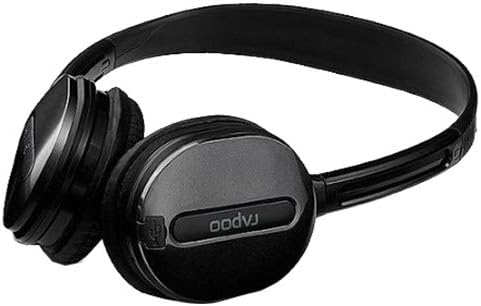
Figi 2.3: Fèmen view of an earcup, highlighting the integrated controls and the "rapoo" branding. This image details the buttons for volume and playback control, and potentially the charging port or microphone location.
2.1 Karakteristik kle
- Wireless Bluetooth connectivity (2.4 GHz, up to 10 meters / 33 feet range)
- Konsepsyon sou zòrèy pou konfò
- Built-in omni-directional microphone with noise cancelling
- Kontwòl volim entegre
- Batri ityòm rechargeable (360mAh)
- Bando reglabl
3. Enstalasyon
3.1 Chaje kas ekoutè a
Before initial use, fully charge the headset. The Rapoo H1030 features a built-in 360mAh rechargeable lithium battery.
- Locate the charging port on the headset (refer to Figure 2.3 for general control area).
- Connect the charging cable (typically Micro-USB) to the headset and the other end to a USB power source (e.g., computer USB port, USB wall adapter).
- The charging indicator light will illuminate (color may vary, refer to product packaging for specifics).
- Yon chaj konplè pran apeprè 2 èdtan. Limyè endikatè a ap chanje oswa etenn yon fwa chaj la fini.
A fully charged headset provides approximately 6 hours of usage time.
3.2 Bluetooth Pairing
The headset uses smart connection technology for easy pairing.
- Asire w ke kas ekoutè a chaje epi li etenn.
- Press and hold the power button (or pairing button, if separate) on the headset until the indicator light begins to flash rapidly, indicating it is in pairing mode.
- Sou aparèy ou an (telefòn entelijan, tablèt, òdinatè), aktive Bluetooth epi chèche aparèy ki disponib yo.
- Select "RAPOO H1030" (or similar name) from the list of found devices.
- Once connected, the indicator light on the headset will typically stop flashing and remain solid, or turn off.
- The headset is now ready for use. It should automatically reconnect to the last paired device when powered on and within range.
4. Operasyon Enstriksyon
4.1 Power On/Off
- Pouvwa sou: Peze epi kenbe bouton pouvwa a pou apeprè 3 segonn jiskaske limyè endikatè a limen.
- Pouvwa Off: Press and hold the power button for approximately 3-5 seconds until the indicator light turns off.
4.2 Kontwòl Volim
The headset features integrated volume controls.
- Ogmante Volim: Peze bouton Ogmante Volim nan.
- Diminye Volim: Peze bouton Diminye Volim nan.
4.3 Jesyon Apèl
When connected to a smartphone, the headset can manage phone calls.
- Reponn/Fen Apèl: Press the Multi-function button (often the power button or a dedicated call button) once.
- Rejte apèl: Peze epi kenbe bouton milti-fonksyon an pou apeprè 2 segonn.
- Recomposition Dènye Nimewo: Doub peze bouton Multi-fonksyon an.
4.4 Mizik lèktur
When playing music from a connected device, use the headset controls.
- Jwe/Poz: Peze bouton Multi-fonksyon an yon fwa.
- Pwochen Track: Press and hold the Volume Up button (or a dedicated 'Next' button).
- Track Previous: Press and hold the Volume Down button (or a dedicated 'Previous' button).
5. Antretyen
- Netwayaj: Sèvi ak yon twal mou epi sèk pou netwaye kas ekoutè a. Pa sèvi ak pwodui netwayaj abrazif oswa solvan.
- Depo: Store the headset in a cool, dry place away from direct sunlight and extreme temperatures. When not in use, consider folding the headset (refer to Figure 5.1) to save space and protect it.
- Swen batri: Pou pwolonje lavi batri a, evite dechaje batri a nèt souvan. Chaje kas ekoutè a regilyèman, menm si w pa itilize l tout tan.
- Ekspozisyon dlo: Kas ekoutè a pa enpèmeyab. Evite ekspoze li a dlo oswa imidite twòp.

Figi 5.1: The Rapoo H1030 headset in a folded position, demonstrating its portability and ease of storage. This compact form helps protect the earcups and headband when not in use.
NAN. Depanaj
| Pwoblèm | Kòz posib | Solisyon |
|---|---|---|
| Kas ekoutè a pa limen. | Batri ki ba. | Charge the headset for at least 2 hours. |
| Pa ka konekte ak aparèy la. | Headset not in pairing mode; Bluetooth disabled on device; device too far. | Ensure headset is in pairing mode (flashing light). Enable Bluetooth on your device. Move headset closer to the device (within 10 meters). Try restarting both devices. |
| Pa gen son oswa volim nan ba. | Volume too low on headset or device; headset not properly connected. | Increase volume on both headset and connected device. Re-pair the headset. |
| Move kalite son oswa dekoneksyon. | Entèferans; aparèy la pa nan zòn nan; batri a fèb. | Move closer to the connected device. Avoid obstacles between headset and device. Charge the headset. Avoid environments with strong Wi-Fi or other 2.4 GHz signals. |
7. Espesifikasyon
| Modèl | H1030 |
| Mak | RAPOO |
| Koneksyon | Wireless (Bluetooth, 2.4 GHz) |
| Transmisyon Range | Jiska 10 mèt (33 pye) |
| Kalite kas ekoutè | Sou-zòrèy |
| Mikwofòn | Built-in, Omni-Directional, Noise Cancelling |
| Kalite batri | Rechargeable batri ityòm |
| Kapasite batri | 360mAh |
| Tan pou chaje | Apeprè 2 èdtan |
| Tan Itilizasyon | Apeprè 6 èdtan |
| Dimansyon (L x W x H) | 6.85 x 5.43 x 2.17 pous |
| Pwa | 80 g |
| Koulè | Nwa |
| Materyèl | Metal, kawotchou |
8. Garanti ak sipò
For warranty information and technical support, please refer to the warranty card included with your product or visit the official RAPOO websit la. Kenbe resi acha ou kòm prèv acha pou reklamasyon garanti.
Manifakti: Rapoo
Ask a question about this manual
Ask about setup, troubleshooting, compatibility, parts, safety, or missing instructions. Manuals+ will review the question and use this page’s manual context to help answer it.