
INIC UC68
Unic UC68 Multimedia Home Theatre LED Projector User Manual
Modèl: UC68
1. Entwodiksyon
Mèsi pou acha aasing the Unic UC68 Multimedia Home Theatre LED Projector. This manual provides essential information for setting up, operating, and maintaining your projector to ensure optimal performance and longevity. Please read this manual thoroughly before using the product and keep it for future reference.
2. Enfòmasyon sou Sekirite
Pou asire yon operasyon an sekirite epi pou anpeche domaj, tanpri obsève prekosyon sekirite sa yo:
- Pa gade dirèkteman nan lantiy pwojektè a lè l ap limen.amp is on, as the strong light can cause eye damage.
- Ensure adequate ventilation around the projector. Do not block any ventilation openings.
- Mete pwojektè a sou yon sifas ki estab e plat pou anpeche l tonbe.
- Use only the power adapter supplied with the projector. Using an incorrect adapter may cause damage or fire.
- Keep the projector away from water, moisture, and other liquids. Do not operate in wet environments.
- Do not attempt to open or repair the projector yourself. Refer all servicing to qualified service personnel.
- Debranche pwojektè a nan priz kouran an pandan tanpèt zèklè oswa lè ou pa itilize li pou yon bon bout tan.
3. Pake kontni
Tanpri verifye ke tout atik ki nan lis anba a yo enkli nan pakè ou a:
- Unic UC68 Projector Host
- Remote Controller
- Pouvwa kab
- AV Kab
- Manyèl Enstriksyon
- Lens Cap
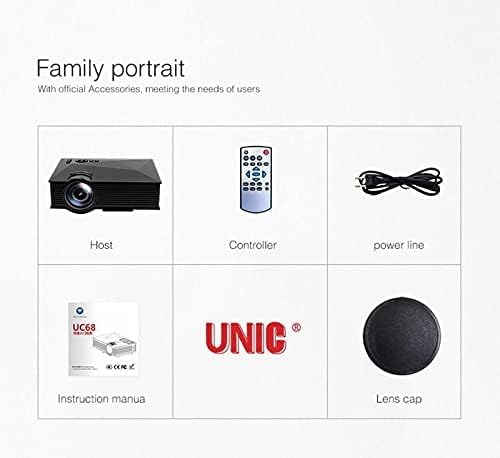
Image: The Unic UC68 projector package contents, showing the main unit, remote control, power cord, instruction manual, and lens cap.
4. Pwodwi souview
Familiarize yourself with the various parts and ports of your Unic UC68 projector.

Imaj: Yon imaj detaye view of the Unic UC68 projector, highlighting its lens, control buttons on top, and various input/output ports on the side.
Pò Antre / Sòti

Image: A visual representation of the Unic UC68 projector's rear and side panels, indicating ports for HDMI, USB, SD card, AV, VGA, and audio out, along with exampmwens aparèy ki ka konekte.
| Port | Deskripsyon |
|---|---|
| HDMI | Connect to devices like laptops, Blu-ray players, game consoles. |
| USB 2.0 (x2) | Connect USB flash drives for media playback or power external devices (5Vout-500mA). |
| Kat SD plas | Insert SD cards for direct media playback. |
| VGA | Konekte ak òdinatè oswa laptop ki pi ansyen. |
| AV | Connect to devices with composite video and stereo audio output (e.g., DVD players). |
| Headphone Port (3.5mm) | Konekte oratè ekstèn yo oswa kas ekoutè yo. |
5. Enstalasyon
Follow these steps for initial setup of your projector:
- Plasman: Place the projector on a stable, flat surface. Ensure there is enough space around the projector for proper ventilation. The ideal projection distance is between 1.07m and 3.8m.
- Koneksyon pouvwa: Connect the power cable to the projector's power input and then plug it into a wall outlet.
- Konekte sous Antre: Connect your desired input device (e.g., laptop, game console, USB drive) to the appropriate port on the projector (HDMI, VGA, USB, AV, SD card).
- Pouvwa sou: Press the power button on the projector or the remote control to turn on the projector. The LED indicator will light up.
- Ajisteman konsantre: Once an image is displayed, rotate the focus ring on the projector lens until the image appears clear and sharp.
- Koreksyon Keystone: If the projected image appears trapezoidal, adjust the keystone correction (if available on your model, typically a manual slider near the lens) to square the image.
6. Operasyon Enstriksyon
Power On/Off
- Pou limen: Peze bouton pouvwa a sou pwojektè a oswa kontwòl remote la.
- Pou etenn: Press the power button again. Wait for the fan to stop completely before unplugging the power cable.
Seleksyon sous Antre
Use the 'Source' button on the remote control or the projector's control panel to cycle through available input sources (HDMI, VGA, AV, USB, SD).
Navigasyon Menu
Use the arrow keys on the remote or projector to navigate through the on-screen menu. Press 'OK' or 'Enter' to confirm selections. Adjust settings such as picture mode, aspect ratio, and sound.
Lekti Medya (USB/SD)
Insert a USB flash drive or SD card into the respective port. The projector will typically prompt you to select the media type (Movie, Music, Photo, Text). Navigate to your desired file and press 'OK' to play.
7. Antretyen
Proper maintenance ensures the longevity and performance of your projector:
- Netwayaj lantiy: Sèvi ak yon twal mou ki pa gen pousyè, espesyalman fèt pou lantiy optik. Pa sèvi ak pwodui netwayaj abrazif oswa fòs twòp.
- Netwayaj Filtè Pousyè: Regularly check and clean the dust filter (if accessible) to maintain proper airflow and prevent overheating. Refer to the specific location in your manual if applicable.
- Netwayaj eksteryè: Siye deyò pwojektè a avèk yon twal mou epi sèk. Pou mak ki difisil pou retire, yon ti twal mouye.amp Ou ka itilize twal, men asire w pa gen imidite ki antre nan aparèy la.
- Depo: When not in use for extended periods, store the projector in a cool, dry, dust-free environment. Use the lens cap to protect the lens.
NAN. Depanaj
Si ou rankontre pwoblèm ak pwojektè ou a, tanpri al gade pwoblèm ak solisyon komen sa yo:
| Pwoblèm | Kòz posib | Solisyon |
|---|---|---|
| Pa gen pouvwa | Power cable not connected; Power outlet faulty; Projector in standby mode. | Check power cable connection; Try a different outlet; Press power button. |
| Pa gen Imaj | Incorrect input source selected; Input device not connected properly; Lens cap on. | Select correct input source; Reconnect input cable; Remove lens cap. |
| Imaj la se twoub | Focus not adjusted; Projection distance too far/close. | Ajiste bag konsantrasyon an; Ajiste distans pwojeksyon an. |
| Pa gen Son | Volume too low; Muted; External speakers not connected/configured. | Increase volume; Unmute; Check external speaker connection. |
| Remote Control pa travay | Pil yo mouri/yo pa byen mete; Gen pwoblèm ant telekòmand lan ak pwojektè a. | Ranplase pil yo; Asire w ke liy vizyon an klè ak reseptè IR la. |
| Projector Overheating | Ventilation blocked; Dusty filters. | Ensure clear ventilation; Clean dust filters. |
9. Espesifikasyon
| Karakteristik | Spesifikasyon |
|---|---|
| Nimewo Modèl | UC68 |
| Klète | 1800 Lumèn (80 ANSI) |
| Rezolisyon natif natal | 800 x 480 RGB |
| Sipò pou rezolisyon | Up to 1920 x 1080 pixels (1080p) |
| Aspè rapò | 4:3 / 16:9 |
| LCD Contrast Ratio | 800:1 |
| Dirije Lamp Lavi | Plis pase 20,000 èdtan |
| Lantiy | F = 125 |
| Viewing Distans | 1.07 - 3.8 mèt |
| Gwosè pwojeksyon | 34 - 130 pous |
| Jesyon | Manyèl |
| Konsomasyon pouvwa | 55 W Max |
| USB Sòti | 5 Vout-500 mA |
| Pwovizyon pou pouvwa | 100 V - 240 V / 0.9A (50/60Hz) |
| Pò Antre / Sòti | 1 AV, 1 Headphone (3.5mm), 2 USB 2.0, 1 SD Card Slot, 1 HDMI, 1 VGA |
| Koulè | Nwa |
| Pwa atik | 1.34 Kilogram |
| Dimansyon pake | 30 x 19.3 x 10.6 cm |
10. Garanti ak sipò
This product comes with a standard manufacturer's warranty. For warranty claims, technical support, or service inquiries, please refer to the contact information provided with your purchase documentation or visit the official UNIC website. Do not attempt to repair the device yourself, as this may void your warranty.
Ask a question about this manual
Ask about setup, troubleshooting, compatibility, parts, safety, or missing instructions. Manuals+ will review the question and use this page’s manual context to help answer it.