
1. Entwodiksyon
The Zoom LiveTrak L-8 is a portable 8-channel digital mixer and multitrack recorder designed for podcasting, music production, and live streaming. It offers a compact solution with intuitive controls, allowing users to record and mix audio with ease. This manual provides essential information for setting up, operating, maintaining, and troubleshooting your LiveTrak L-8.

Figure 1.1: Zoom LiveTrak L-8 Digital Mixer/Recorder. This image shows the top-down view of the L-8 mixer, highlighting its faders, knobs, and display screen.
2. Pwodwi souview
Karakteristik kle:
- Fonksyonalite Podcasting/Mizik pòtab.
- 10 Faders for precise audio level control.
- 6 XLR-1/4" Mic/Line Inputs with +48V phantom power.
- Multitrack Recording via SD Card and USB.
- Ability to track song demos with multiple musicians.
- Four independent headphone outputs for monitoring.
- Phone tap for call-in interviews.
- Six customizable sound pads.
- Battery or USB power supply operation.
Ki sa ki nan bwat la:
- Zoom LiveTrak L-8 Portable 8-Channel Digital Mixer and Multitrack Recorder
- AKG K 240 Studio Professional Semi-Open Stereo Headphones
- 20' XLR-XLR Cable
- 3.5mm TRRS Kab
- USB kab
- Zoom AD-17 AC Adapter
- Gold-Plated 1/4" Adapter (for headphones)
- Detachable Cable (for headphones)

Figure 2.1: AKG K 240 Studio Professional Semi-Open Stereo Headphones. These headphones feature a black and gold design with a self-adjusting headband and thick ear cushions.

Figure 2.2: 20-foot XLR-XLR Cable. This image displays a coiled black XLR cable with silver connectors, packaged for retail.
3. Enstalasyon
3.1 Powering the LiveTrak L-8
The LiveTrak L-8 can be powered in two ways:
- AC adaptè: Connect the included Zoom AD-17 AC adapter to the DC 5V port on the rear panel and plug it into a wall outlet.
- Batri: For portable use, insert four AA batteries into the battery compartment on the underside of the unit. Ensure correct polarity. The unit will power off if left idle when running on batteries.

Figure 3.1: The underside of the Zoom LiveTrak L-8, showing the battery compartment. This image illustrates where to insert AA batteries for portable operation.
3.2 Konekte Mikwofòn ak Enstriman
The L-8 features 6 XLR-1/4" combo inputs (channels 1-6) and 2 additional line inputs (channels 7/8). Use XLR cables for microphones and 1/4" cables for instruments or line-level devices.
- Connect microphones to the XLR inputs. For condenser microphones, activate +48V phantom power via the menu.
- Connect instruments (e.g., guitar, bass) to the 1/4" inputs. Channels 1 and 2 support Hi-Z input for direct instrument connection.
- Channels 7/8 can be used for stereo line input or for connecting a phone via the 3.5mm TRRS cable for call-in interviews.
3.3 Konekte kas ekoutè
The L-8 provides four independent headphone outputs (Monitor A, B, C, D). Connect your AKG K 240 Studio headphones or other monitoring headphones to these outputs. Each output has its own level control.
3.4 Mete Kat SD
Insert a compatible SD card (up to 512GB) into the SD card slot for multitrack recording. Ensure the card is formatted correctly by the L-8 before use.
3.5 USB Koneksyon
Connect the L-8 to a computer via the USB cable to use it as an 8-in/4-out audio interface or for data transfer to and from the SD card.
4. Operasyon Enstriksyon
4.1 Basic Mixing Controls
- Bouton pou ogmante ogmantasyon: Adjust the input level for each channel. Monitor the level meters to avoid clipping.
- Faders: Control the volume of each channel in the main mix.
- Bouton SEL: Press to select a channel for adjusting EQ, pan, and effects send.
- Bouton EQ yo (HIGH, MID, LOW): Adjust the equalization for the selected channel.
- Bouton PAN: Adjust the stereo position of the selected channel.
- Bouton bèbè: Mutes the selected channel.
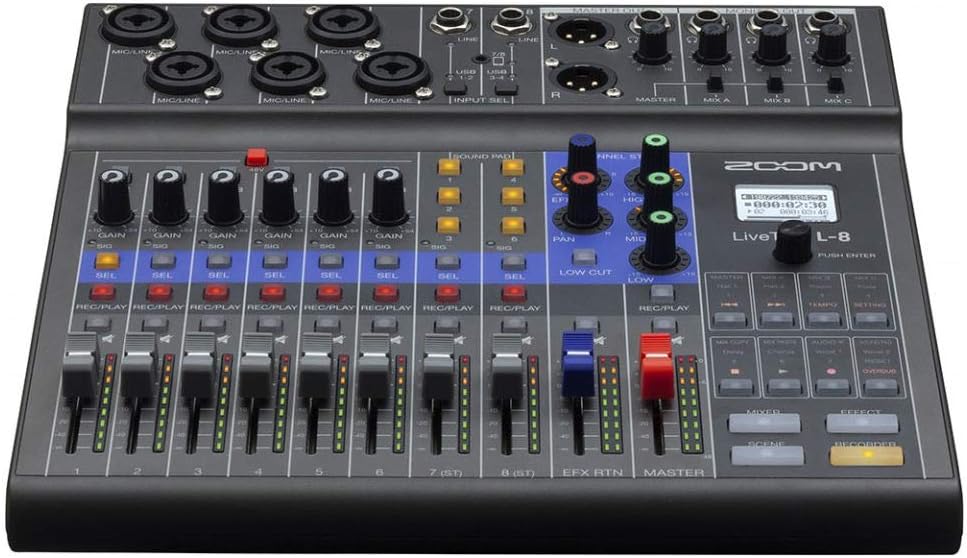
Figi 4.1: Top view of the Zoom LiveTrak L-8, showing the layout of input jacks, gain knobs, and main controls.
4.2 Recording to SD Card
- Peze a REC/PLAY bouton an sou chak chanèl ou vle anrejistre. Bouton an ap limen an wouj.
- Peze prensipal la RECORDER bouton pou kòmanse anrejistreman.
- Peze a JWE button to playback recorded tracks.
- The L-8 records up to 12 tracks simultaneously (10 discrete inputs + stereo mix).
4.3 Using Sound Pads
The six sound pads can be used to trigger sound effects, jingles, or music during podcasts or live performances. Load audio files onto the SD card and assign them to the pads via the menu.
4.4 Siveyans
Use the individual headphone outputs to provide custom mixes for each performer or guest. Adjust the monitor mix levels using the dedicated knobs.
4.5 Using as an Audio Interface
When connected to a computer via USB, the L-8 functions as an audio interface. Select the L-8 as your audio input/output device in your Digital Audio Workstation (DAW) or system settings. This allows for streaming and recording directly to your computer.
5. Antretyen
- Netwayaj: Wipe the unit with a soft, dry cloth. Avoid using abrasive cleaners or solvents.
- Swen batri: Retire pil yo si ou pa pral itilize aparèy la pou yon peryòd tan pwolonje pou anpeche flit.
- Mizajou mikrolojisyèl: Tcheke Zoom nan detanzantan website for firmware updates to ensure optimal performance and access to new features. Follow the instructions provided by Zoom for updating firmware.
- Depo: Sere aparèy la nan yon kote ki fre epi sèk, lwen limyè solèy dirèk ak tanperati ekstrèm.
NAN. Depanaj
- Pa gen Sòti Son:
- Tcheke tout koneksyon kab yo (antre, sòti, kas ekoutè).
- Ensure faders and gain knobs are set appropriately.
- Verify that channels are not muted.
- Tcheke nivo volim kas ekoutè yo.
- Pwoblèm anrejistreman:
- Asire w ke yon kat SD antre epi li byen fòmate.
- Check available space on the SD card.
- Konfime ke la REC/PLAY button is active (red) for desired channels.
- Aparèy pa limen:
- If using AC adapter, ensure it is securely connected and the outlet is functional.
- If using batteries, check battery levels and ensure they are inserted with correct polarity.
- Odyo defòme:
- Reduce input gain to prevent clipping (indicated by red peak lights).
- Tcheke entegrite kab.
For further assistance, please refer to the official Zoom support resources or contact customer service.
7. Espesifikasyon
| Karakteristik | Spesifikasyon |
|---|---|
| Mak | Zoom |
| Kantite Chanèl | 8 (12-track recording) |
| Koneksyon Teknoloji | USB |
| Sòti Connector Kalite | TRS, USB |
| Sous pouvwa | Fil elektrik, batri Powered |
| Dimansyon pake | 5.8 x 4.8 x 1 pous |
| Dat Premye Disponib | 17 desanm 2019 |
8. Garanti ak sipò
Enfòmasyon sou garanti:
- Zoom LiveTrak L-8: Garanti 1-ane limite.
- AKG K 240 Studio Headphones: 2-ane garanti.
Please retain your proof of purchase for warranty claims. Warranty terms and conditions may vary by region. Refer to the official warranty documentation included with your product or visit the manufacturer's websit pou detay konplè.
Sipò Kliyan:
For technical support, service, or additional information regarding your Zoom LiveTrak L-8 or bundled accessories, please visit the official Zoom websit entènèt la oubyen kontakte depatman sèvis kliyan yo. Anjeneral, ou ka jwenn enfòmasyon pou kontakte yo sou sit entènèt manifakti a. websit oswa nan anbalaj pwodwi a.