
1. Entwodiksyon
Welcome to the user manual for your Merten MEG5935-0000 Wiser Radiator Thermostat. This document provides essential information for the safe and efficient installation, operation, and maintenance of your device. Please read this manual thoroughly before using the product and retain it for future reference.
The Merten MEG5935-0000 is a smart radiator thermostat designed to provide precise temperature control for individual rooms, enhancing comfort and energy efficiency within your home. It integrates with the Wiser smart home system for convenient app-based control.
2. Enfòmasyon sou Sekirite
- Sekirite elektrik: Se sèlman yon elektrisyen kalifye oswa yon moun konpetan ki ta dwe fè enstalasyon an, dapre règleman fil elektrik nasyonal yo.
- Manyen batri: Use only the specified battery type (3 Volt). Do not mix old and new batteries, or different types of batteries. Dispose of used batteries according to local regulations.
- Kondisyon anviwònman: Do not expose the device to extreme temperatures, direct sunlight, moisture, or corrosive environments.
- Timoun: Kenbe aparèy la ak konpozan li yo lwen timoun yo.
- Itilizasyon entansyonèl: This device is intended for controlling radiator heating systems in residential environments. Any other use is considered improper.
3. Pake kontni
Tanpri verifye ke tout atik yo prezan nan pakè ou a:
- Merten MEG5935-0000 Wiser Radiator Thermostat
- Enstalasyon pyès ki nan konpitè
- Manyèl Itilizatè (dokiman sa a)
4. Pwodwi souview
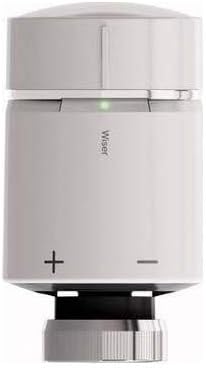
The image displays the Merten MEG5935-0000 Wiser Radiator Thermostat. It is a compact, cylindrical device, primarily light grey with a darker grey base. The top section is a rotatable cap for manual temperature adjustment. A small green LED indicator is visible below the cap. The word 'Wiser' is printed vertically on the main body. Below this, '+' and '-' symbols indicate manual temperature adjustment buttons or areas. The base features a threaded connection for mounting onto a radiator valve.
The Merten MEG5935-0000 Wiser Radiator Thermostat features a sleek design with intuitive controls. It includes a rotatable cap for manual temperature adjustments, an LED indicator for status feedback, and integrated buttons for fine-tuning settings. Its primary function is to regulate the flow of hot water into your radiator, maintaining your desired room temperature.
5. Enstalasyon
5.1. Enstalasyon Fizik
- Prepare the Radiator Valve: Ensure your radiator valve is compatible with the thermostat. If necessary, use appropriate adapters from the included installation hardware.
- Mete pil: Open the battery compartment (usually located at the back or bottom of the device). Insert the required 3 Volt batteries, ensuring correct polarity. Close the compartment securely.
- Mount the Thermostat: Carefully screw the radiator thermostat onto the radiator valve. Tighten it firmly but do not overtighten.
- Kalibrasyon inisyal: The thermostat may perform an initial calibration cycle after installation. Follow any on-screen prompts or LED indicators.
5.2. Premye koneksyon ak koneksyon
The Merten MEG5935-0000 uses Wi-Fi connectivity and app control for smart functionality. To pair your device:
- Download the Wiser App: Chèche pou the 'Wiser' app on your Android or iOS device's app store and install it.
- Kreye yon kont: Open the app and follow the instructions to create a new user account or log in to an existing one.
- Ajoute Aparèy: In the Wiser app, navigate to the 'Add Device' section. Select 'Radiator Thermostat' or a similar option.
- Swiv enstriksyon ki nan aplikasyon an: The app will guide you through the pairing process, which typically involves putting the thermostat into pairing mode (refer to the device's LED indicators) and connecting it to your home Wi-Fi network.
- Bay aparèy ou non: Assign a descriptive name to your thermostat (e.g., 'Living Room Radiator').
6. Opere
6.1. Manyèl Kontwòl
You can adjust the temperature directly on the thermostat:
- Ajiste Tanperati: Rotate the top cap clockwise to increase the temperature or counter-clockwise to decrease it. Alternatively, use the '+' and '-' buttons/areas on the device body for fine adjustments.
- Endikatè ki ap dirije: Observe the LED indicator for feedback on the current status or temperature setting.
6.2. Kontwòl App
For advanced control and scheduling, use the Wiser app:
- Ajisteman tanperati a distans: Change the temperature from anywhere using your smartphone.
- Orè: Set up heating schedules for different times of the day and week to optimize comfort and energy usage.
- Mòd: Utilize various heating modes (e.g., Away, Eco, Boost) available in the app.
- Zòn kontwòl: If you have multiple Wiser devices, manage different heating zones independently.
7. Antretyen
- Netwayaj: Clean the exterior of the thermostat with a soft, dry cloth. Do not use abrasive cleaners, solvents, or excessive moisture.
- Ranplasman batri: When the battery level is low (indicated by the app or a specific LED pattern on the device), replace the batteries promptly with new 3 Volt batteries. Follow the instructions for battery insertion carefully.
- Mizajou mikrolojisyèl: Periodically check the Wiser app for available firmware updates for your thermostat to ensure optimal performance and access to new features.
NAN. Depanaj
- Aparèy pa reponn: Check battery level. Ensure the device is properly mounted and not obstructed.
- Pa gen koneksyon aplikasyon: Verify your home Wi-Fi network is active and the thermostat is within range. Restart your Wi-Fi router and the thermostat. Re-attempt the pairing process if necessary.
- Lekti tanperati ki pa kòrèk: Ensure the thermostat is not exposed to direct heat sources (e.g., sunlight, other appliances) or drafts that could affect its sensor.
- Radiator Not Heating/Cooling: Check if the valve is fully open/closed. Ensure the thermostat is correctly calibrated. Verify the desired temperature setting in the app or on the device.
- Pwoblèm endikatè ki ap dirije: Refer to the Wiser app or online support resources for specific LED pattern meanings.
9. Espesifikasyon
| Karakteristik | Spesifikasyon |
|---|---|
| Mak | MERTEN |
| Nimewo Modèl | MEG5935-0000 |
| Dimansyon pwodwi | 58 x 23 x 23cm; 80g |
| Sous Enèji | Batri |
| Voltage | 3 Volt |
| Koneksyon Teknoloji | Wi-Fi |
| Kalite kontwòl | App Control (Android) |
| Konpozan ki enkli | Enstalasyon pyès ki nan konpitè |
| Premye Dat ki disponib | 15 janvye 2020 |
10. Enfòmasyon sou Garanti
The Merten MEG5935-0000 Wiser Radiator Thermostat is covered by a manufacturer's warranty. Please refer to the warranty card included with your product or visit the official Merten websit la pou wè kondisyon detaye konsènan pwoteksyon garanti a, dire a, ak pwosedi pou fè reklamasyon yo. Kenbe prèv acha ou a pou rezon garanti.
11. Sipò
For further assistance, technical support, or inquiries not covered in this manual, please contact Merten customer support. You can typically find contact information (phone numbers, email, support portals) on the official Merten website or within the Wiser app's help section. When contacting support, please have your product model number (MEG5935-0000) and purchase details ready.