
1. Entwodiksyon
This manual provides detailed instructions for setting up and operating your Rapoo 8000M Multi-Mode Wireless Keyboard and Mouse Combo. This combo offers versatile connectivity options, including Bluetooth 3.0, Bluetooth 4.0, and 2.4 GHz wireless, allowing seamless switching between multiple devices.
The Rapoo 8000M is designed for productivity and convenience, featuring a compact, spill-resistant keyboard and a silent, high-performance optical mouse.
2. Pake kontni
Tanpri verifye ke tout atik yo prezan nan pakè ou a:
- Wireless klavye
- Sourit san fil
- USB Receiver (for 2.4 GHz connection)
- 2 AA Alkaline Batteries (pre-installed)
- Gid Quick Start

Image: Rapoo 8000M Multi-Mode Wireless Keyboard and Mouse Combo, showcasing both the keyboard and mouse in white.
3. Enstriksyon Enstalasyon
3.1. Enstalasyon batri
The Rapoo 8000M combo comes with pre-installed batteries. If replacement is needed:
- Jwenn konpatiman batri a anba klavye a ak sourit la.
- Louvri kouvèti lòj la.
- Insert 2 AA alkaline batteries into the keyboard and 1 AA alkaline battery into the mouse, ensuring correct polarity (+/-).
- Fèmen kouvèti lòj la byen.
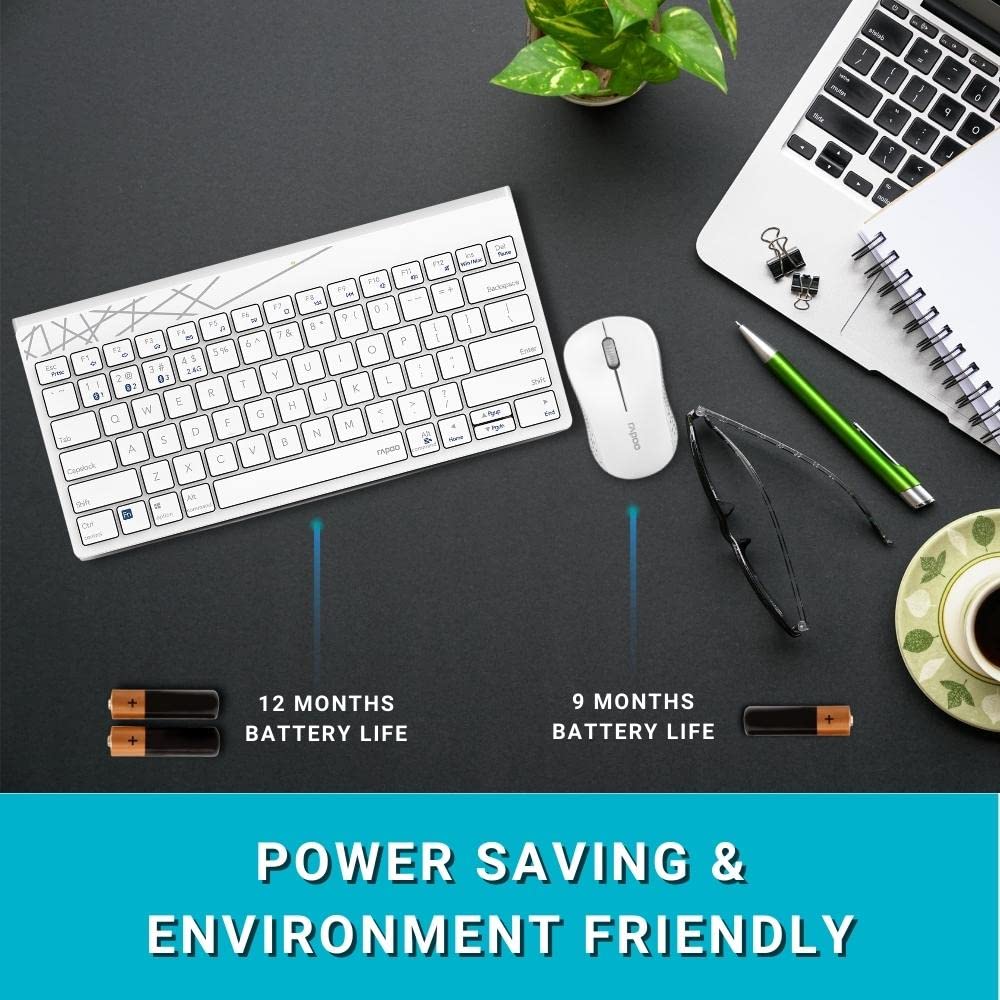
Image: Illustration of the Rapoo 8000M keyboard and mouse, highlighting their extended battery life.
3.2. Koneksyon san fil 2.4 GHz
For 2.4 GHz wireless connectivity:
- Remove the USB receiver from its storage slot, typically found in the mouse battery compartment.
- Ploge reseptè USB a nan yon pò USB ki disponib sou òdinatè w lan.
- The keyboard and mouse should automatically connect. If not, ensure the devices are powered on and within range.
3.3. Bluetooth Koneksyon
The Rapoo 8000M supports Bluetooth 3.0 and 4.0. You can pair up to three Bluetooth devices.
- Pèsonaj klavye:
Peze epi kenbe la Fn + 1, Fn + 2, oswa Fn + 3 Peze konbinezon kle yo pandan 3 segonn pou chwazi yon chanèl Bluetooth. Limyè endikatè a ap flache dousman. - Sou aparèy ou an (òdinatè, tablèt, telefòn entelijan), aktive Bluetooth epi chèche nouvo aparèy.
- Select "Rapoo 8000M Keyboard" from the list of available devices. Follow any on-screen prompts to complete pairing.
- Koupman sourit:
Press the Bluetooth button on the underside of the mouse to switch to a Bluetooth channel (indicated by a slow flash). - On your device, search for new Bluetooth devices and select "Rapoo 8000M Mouse". Follow any on-screen prompts.

Image: The Rapoo 8000M keyboard and mouse connected to a desktop, laptop, and tablet, demonstrating multi-device connectivity.
4. Operasyon Enstriksyon
4.1. Chanje ant aparèy yo
Pou chanje ant aparèy konekte:
- Klavye: Peze Fn + 1, Fn + 2, Fn + 3 to switch to the corresponding Bluetooth device, or Fn + 4 for the 2.4 GHz connection.
- Sourit: Press the Bluetooth button on the underside of the mouse to cycle through the paired Bluetooth devices and the 2.4 GHz connection.
4.2. Rakoursi klavye miltimedya
The keyboard features multimedia hotkeys for quick access to various functions. These keys are typically located on the F-row and can be activated by pressing them directly or in combination with the Fn kle, selon mòd pa defo klavye ou a.
- F1-F12: Functions may include media player control (play/pause, next/previous track), volume adjustment, mute, homepage, and more. Refer to the keycap legends for specific functions.
4.3. Mouse DPI
The mouse operates at 1300 DPI, providing accurate and smooth cursor control on various surfaces.
5. Antretyen
5.1. Netwayaj
The keyboard features a spill-resistant design, offering protection against accidental liquid spills. However, it is recommended to clean the keyboard and mouse regularly to maintain performance and hygiene.
- Sèvi ak yon mou, damp twal pou siye sifas yo.
- Evite itilize pwodwi chimik piman bouk oswa materyèl abrazif.
- For spills, immediately disconnect the device, wipe dry, and allow it to air dry completely before reuse.

Image: Close-up of the Rapoo 8000M keyboard with water splashing on it, illustrating its spill-resistant design.
5.2. Lavi batri
With Rapoo's energy-saving technology and power switch, the keyboard and mouse can achieve a battery life of up to 9 months. To conserve battery:
- Turn off the devices using their respective power switches when not in use for extended periods.
- Replace batteries when performance degrades.

Image: The Rapoo 8000M mouse, highlighting its silent click design for a quiet working environment.
NAN. Depanaj
If you encounter issues with your Rapoo 8000M combo, refer to the following common problems and solutions:
- No Connection / Device Not Detected:
- Ensure batteries are correctly installed and charged.
- For 2.4 GHz, ensure the USB receiver is securely plugged into a working USB port.
- For Bluetooth, ensure Bluetooth is enabled on your device and the keyboard/mouse are in pairing mode or selected channel.
- Try re-pairing the devices (refer to Section 3.3).
- Try a different USB port for the receiver. - Keys Not Responding / Mouse Not Tracking:
- Check battery levels and replace if necessary.
- Ensure the device is connected to the correct channel (2.4 GHz or Bluetooth 1/2/3).
- Clean the optical sensor of the mouse if tracking is erratic.
- Ensure no physical obstructions are blocking the keys or mouse movement. - Koneksyon tanzantan:
- Move the devices closer to the receiver or Bluetooth-enabled device.
- Avoid using the devices near strong interference sources (e.g., Wi-Fi routers, other wireless devices).
- Ensure your computer's Bluetooth drivers are up to date.
7. Espesifikasyon
| Karakteristik | Deskripsyon |
|---|---|
| Mak | Rapoo |
| Modèl | 8000M |
| Koneksyon Teknoloji | Bluetooth 3.0, Bluetooth 4.0, 2.4 GHz san fil |
| Aparèy konpatib | Personal Computer (Windows OS), Tablets, Smartphones |
| DPI sourit | 1300 DPI Optical |
| Karakteristik espesyal | Multi-Mode, Multi-Device Switching, Multimedia Hotkeys, Spill-Resistant Keyboard, Silent Mouse Design |
| Lavi batri | Jiska 9 mwa |
| Sous pouvwa | Battery Powered (2 AA for keyboard, 1 AA for mouse) |
| Dimansyon pwodwi | 36.4 x 14.8 x 3.4 cm (Keyboard); 350 g (Total Item Weight) |

Image: The Rapoo 8000M keyboard and mouse, illustrating their compact dimensions for productivity.
8. Garanti ak sipò
The Rapoo 8000M Multi-Mode Wireless Keyboard and Mouse Combo is covered by a 3-ane garanti apati dat acha a. Garanti sa a kouvri domaj fabrikasyon epi li asire yon fonksyònman serye nan itilizasyon nòmal.
For warranty claims, technical support, or further assistance, please contact Rapoo customer service through their official websit la oswa magazen kote ou te achte pwodwi a. Kenbe prèv acha ou pou validasyon garanti a.
Pou plis enfòmasyon, vizite ofisyèl la Magazen Rapoo sou Amazon.