
Entwodiksyon
Thank you for choosing the Vector Optics SCRD-12 Maverick 1x22 Gen2 Red Dot Sight. This manual provides essential information for the safe and effective use of your red dot sight. Please read it thoroughly before installation and operation to ensure optimal performance and longevity of your device.
Karakteristik pwodwi
- Konsepsyon amelyore: The Gen2 model features an updated design and a stylish mount for improved aesthetics and functionality.
- Optimal Magnification: 1x magnification for true-to-life, unmagnified viewing.
- Clear Reticle: 3 MOA red dot reticle for precise aiming.
- Wide Field nan View: 22mm objective lens diameter provides a broad sight picture.
- Klate reglabl: 11 levels of red dot illumination for various lighting conditions, including daylight and night vision compatibility.
- Konstriksyon dirab: Lightweight yet robust aluminum alloy body, weighing only 188g.
- Gwosè kontra enfòmèl ant: Overall length of 75mm, with a lens center height of 38mm.
- Montaj versatile: Compatible with Picatinny rails, includes both Quick Detach (QD) high mount and low mount options.
- Pouvwa efikas: Operates on a single CR2032 battery.
- Konsepsyon ki enpèmeyab: Engineered for reliable performance in various weather conditions.
Kontni pake
Lè w ap ouvri pake a, tanpri verifye si tout bagay yo la epi yo an bon eta:
- Vector Optics SCRD-12 Maverick 1x22 Gen2 Red Dot Sight
- Quick Detach (QD) High Mount
- Low Mount
- Rubber Lens Cover
- CR2032 Batri
- Adjustment Tools (Hex key, etc.)
- Netwaye twal
- Manyèl itilizatè
Idantifikasyon konpozan
Familiarize yourself with the various parts of your red dot sight:

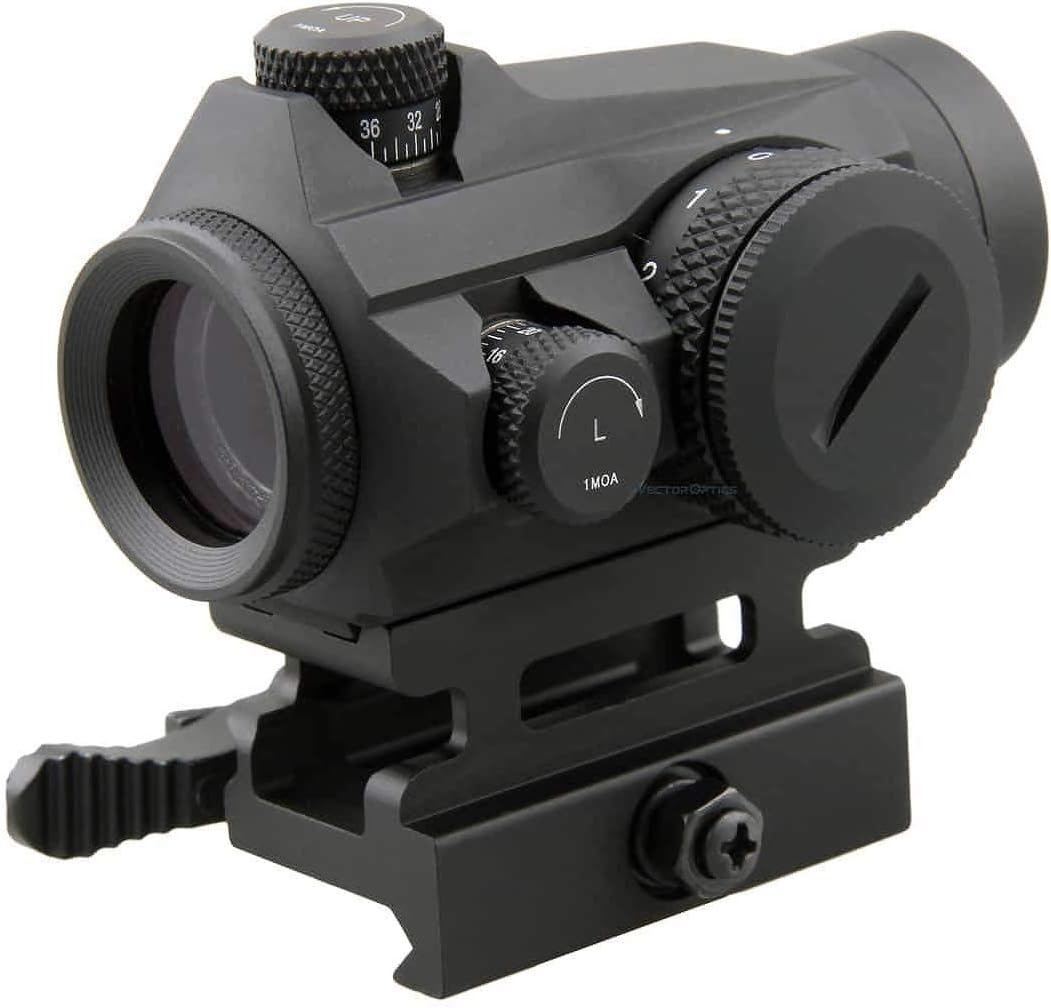
Figi 1: An jeneral view of the Vector Optics SCRD-12 Maverick 1x22 Gen2 Red Dot Sight, showing its compact design and integrated mount.

Figi 2: Side view highlighting the elevation adjustment turret and the Quick Detach (QD) mount with safety lock button.

Figi 3: Angle view displaying the windage adjustment turret (marked 'L' for left adjustment) and the rotary brightness control dial. The objective lens is visible with a slight tint.
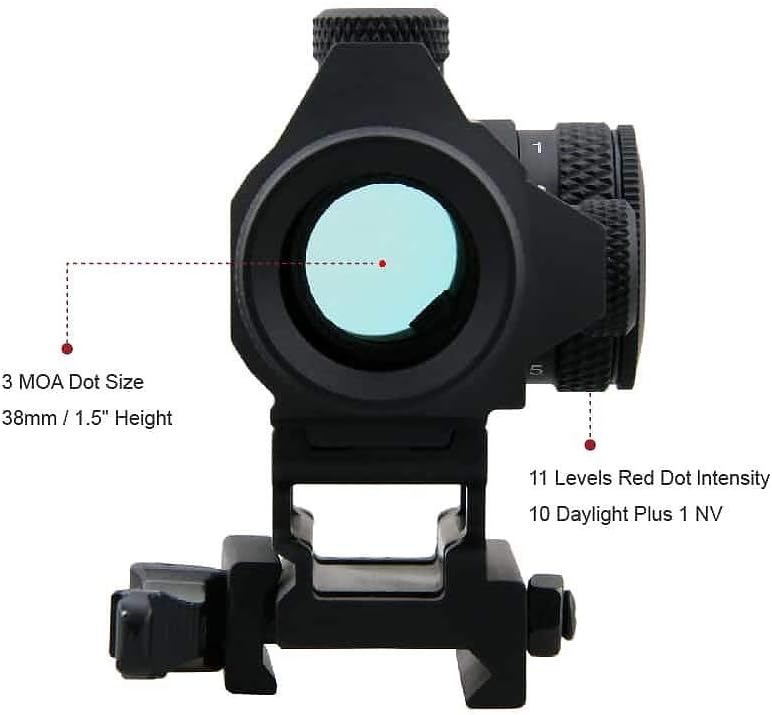
Figi 4: Dèyè view illustrating the 3 MOA red dot reticle and the sight's height of 38mm (1.5 inches) to the center of the lens. It also indicates 11 levels of red dot intensity, including 10 daylight and 1 night vision setting.
Figi 5: Fèmen view of the windage and elevation adjustment turrets, each marked for 1 MOA clicks, allowing for precise zeroing.

Figi 6: Anba view of the red dot sight, showing the Quick Detach (QD) mount mechanism designed for secure attachment to Picatinny rails.
Enstalasyon
1. Enstalasyon batri
- Locate the battery compartment, typically on the side or top of the brightness adjustment dial.
- Unscrew the battery cap counter-clockwise.
- Insert one CR2032 battery with the positive (+) side facing outwards (towards the cap).
- Vise bouchon pil la avèk prekosyon nan sans zegwi mont lan jiskaske li byen sere ak dwèt ou. Pa sere l twòp.
2. Mounting the Red Dot Sight
- Asire w ke zam ou a dechaje epi lonje l nan yon direksyon ki an sekirite.
- Choose the appropriate mount (high or low QD mount) for your application.
- Loosen the QD lever on the mount.
- Place the red dot sight onto your Picatinny rail at your desired position.
- Close the QD lever firmly until it locks into place. Ensure the sight is securely attached and does not wobble.
- Adjust the eye relief to a comfortable position. This red dot sight offers unlimited eye relief.
Enstriksyon Operasyon
1. Pouvwa pou limen/etenn ak ajisteman klète
- To turn on the red dot sight, rotate the brightness adjustment dial (located on the side) clockwise from the "0" (OFF) position.
- Continue rotating the dial clockwise to increase the brightness level. There are 11 distinct brightness settings.
- To decrease brightness, rotate the dial counter-clockwise.
- To turn off the red dot sight, rotate the dial counter-clockwise until it clicks into the "0" (OFF) position.
2. Zeroing the Red Dot Sight
Zeroing is the process of aligning the red dot with your point of impact. This should be done at a controlled range with proper safety precautions.
- Mount the red dot sight securely on your firearm.
- Set up a target at a known distance (e.g., 25 yards/meters).
- Fire a group of shots. Observe where the shots impact relative to your aiming point.
- Ajisteman Elevasyon: The top turret adjusts elevation. Turning the dial clockwise moves the point of impact DESANN. Turning it counter-clockwise moves the point of impact UP. Each click represents 1 MOA (Minute of Angle) adjustment.
- Ajisteman Windage: The side turret adjusts windage. Turning the dial clockwise moves the point of impact DWA. Turning it counter-clockwise moves the point of impact GÒCH. Each click represents 1 MOA adjustment.
- Make small adjustments, fire another group, and repeat until your point of aim matches your point of impact.
Antretyen
1. Netwayaj
- Lantiy: Use the provided cleaning cloth or a soft, lint-free cloth with lens cleaning solution. Gently wipe the lenses to remove dust and smudges. Avoid harsh chemicals or abrasive materials.
- Kò: Wipe the exterior of the sight with a soft, damp twal. Pou pousyè tè ki difisil pou retire, ou ka itilize yon solisyon savon dou, epi answit yon twal pwòp.amp twal. Asire w ke pa gen imidite ki antre nan konpozan elektwonik yo.
2. Depo
- When not in use, turn the red dot sight OFF to conserve battery life.
- Store the sight in a cool, dry place, away from direct sunlight and extreme temperatures.
- Use the rubber lens cover to protect the lenses from dust and scratches during storage.
- For long-term storage (several months or more), it is recommended to remove the CR2032 battery to prevent potential leakage and damage to the electronics.
Depanaj
| Pwoblèm | Kòz posib | Solisyon |
|---|---|---|
| Pwen wouj la pa parèt. | Battery is dead or incorrectly installed. Brightness setting is too low or OFF. | Check battery orientation and replace if necessary. Increase brightness using the dial. |
| Pwen wouj la fèb oswa li ap tranble. | Low battery. Loose battery cap. | Replace battery. Ensure battery cap is securely tightened. |
| Red dot is blurry or distorted. | Dirty lens. Astigmatism (user's eye condition). | Clean lenses with a soft cloth. If the issue persists, it may be due to astigmatism; consult an eye care professional. |
| Point of impact shifts after zeroing. | Sight not securely mounted. Mount screws loose. | Ensure QD lever is fully engaged. Check and tighten any mounting screws with appropriate tools. |
Espesifikasyon
| Karakteristik | Detay |
|---|---|
| Mak | Vector Optics |
| Modèl | SCRD-12 Maverick 1x22 Gen2 |
| Agrandisman | 1x |
| Dyamèt lantiy objektif | 22mm |
| Kalite retikul | 3 MOA Red Dot |
| Anviwònman klète | 11 levels (10 Daylight + 1 NV) |
| Windage/Elevation Adjustment | 1 MOA per click, Total 100 MOA Range |
| Sekou je | San limit |
| Parallax Anviwònman | Parallax gratis |
| Materyèl | High-grade Aluminum Alloy |
| Pwa | 188g |
| Longè | 75mm |
| Height to Lens Center | 38mm |
| Kalite mòn | Picatinny Rail (QD High & Low Mounts included) |
| Kalite batri | CR2032 |
| Ki enpèmeyab | Wi |
| UPC | 192687275892 |
Enfòmasyon sou Garanti
The Vector Optics SCRD-12 Maverick 1x22 Gen2 Red Dot Sight is covered by a Garanti manifakti 5 zan from the date of purchase. This warranty covers defects in materials and workmanship under normal use. Please retain your proof of purchase for warranty claims. For specific terms and conditions, refer to the warranty card included in your package or contact Vector Optics customer service.
Sipò
Should you encounter any issues not covered in this manual or require further assistance, please contact Vector Optics customer support. Visit the official Vector Optics website for contact details, FAQs, and additional product resources.