
1. Entwodiksyon
The Okaysou AirMic4S Air Purifier is designed to provide clean and fresh air in your home or office. It features an advanced filtration system to capture and reduce airborne particles, odors, and harmful gases, contributing to a healthier indoor environment.

Figure 1.1: Okaysou AirMic4S Air Purifier, illustrating its capability to filter various airborne contaminants including dust, pollen, dander, smoke, and VOCs.
This manual provides detailed instructions for the setup, operation, maintenance, and troubleshooting of your AirMic4S Air Purifier. Please read it thoroughly before use and keep it for future reference.
2. Enfòmasyon sou Sekirite
Pou diminye risk dife, chòk elektrik, oswa blesi, tanpri obsève prekosyon sekirite sa yo:
- Always unplug the air purifier before moving, cleaning, or replacing filters.
- Pa opere aparèy la ak yon kòd oswa ploge ki domaje.
- Kenbe fil elektrik la lwen sifas ki chofe.
- Do not block air openings or place the unit on a soft surface where openings may be blocked.
- Pa plonje inite a nan dlo oswa lòt likid.
- Aparèy sa a pa fèt pou itilize pa moun (ki gen ladan timoun) ki gen kapasite fizik, sansoryèl oswa mantal redwi, oswa ki pa gen eksperyans ak konesans, sof si yo te bay sipèvizyon oswa enstriksyon konsènan itilizasyon aparèy la pa yon moun ki responsab sekirite yo. .
- Use only genuine Okaysou replacement filters to maintain optimal performance and warranty.
3. Pwodwi souview
The Okaysou AirMic4S features a compact design with powerful air purification capabilities. It utilizes a multi-stage filtration system to effectively clean the air.

Figi 3.1: Devan view of the Okaysou AirMic4S Air Purifier, showcasing konsepsyon elegant li yo.
3.1 Konpozan kle
- Griy pou antre lè a: Located on the lower section, designed to capture hair and large particles.
- Kontwòl Panel: Top-mounted touch panel for all functions.
- Priz lè: Top grille for purified air release.
- Konpatiman Filtè: Houses the multi-stage filtre.
3.2 sistèm filtraj
The AirMic4S employs an advanced 3-stage H13 True HEPA filtration system:
- Prefiltre ou ka lave: The first defense, capturing large particles like hair and fur.
- H13 Vrè Filtè HEPA: Captures pollen, dander, dust, smell, and smoke particles as small as 0.3 microns.
- Filtè kabòn aktif: Effectively absorbs stubborn and unwanted odors, harmful gases, and VOCs.

Figure 3.2: Illustration of the advanced 3-stage H13 True HEPA filtration system, detailing the washable pre-filter, H13 True HEPA filter, and active carbon filter.
4. Enstalasyon
Follow these steps to set up your Okaysou AirMic4S Air Purifier:
- Depakete inite a: Retire pirifikatè lè a nan anbalaj li avèk prekosyon.
- Retire anbalaj filtè a: Before first use, unscrew the bottom cover (twist counter-clockwise) and remove the plastic packaging from the filter.
- Re-enstale filtè a: Place the filter back into the unit, ensuring it is seated correctly.
- Fèmen kouvèti anba a byen: Remèt kouvèti ki anba a epi vire l nan sans zegwi mont lan pou byen fèmen l.
- Plasman: Place the air purifier on a firm, level surface. Ensure there is adequate space around the unit for proper airflow (at least 6 inches from walls or furniture).
- Ploge nan: Konekte fil elektrik la nan yon priz elektrik apwopriye.
5. Operasyon Enstriksyon
The AirMic4S features an intuitive touch control panel for easy operation.

Figure 5.1: The control panel of the AirMic4S, showing buttons for power, fan speed, timer, filter reset, and night light/sleep mode.
5.1 Fonksyon Panel Kontwòl
- Bouton pouvwa (⑁): Peze pou limen oswa etenn inite a.
- Fan Speed Button (✴): Chanje vitès fanatik la (Ba, Mwayen, Wo).
- Timer Button (⌛): Li fikse revèy fonksyònman an pou 2, 4, oswa 8 èdtan. Aparèy la ap etenn otomatikman apre tan ki chwazi a.
- Night Light Mode (🌙): Aktive oswa dezaktive fonksyon limyè lannwit lan.
- Sleep Mode (🌛): Activates a quiet operation mode (as low as 24dB) for undisturbed sleep.
- Filter Reset Indicator (📄): Lights up when it's time to replace the filter. Press and hold to reset after filter replacement.
5.2 Operasyon Jeneral
- Pouvwa sou: Press the Power button to start the air purifier. It will typically start on a low fan speed.
- Ajiste vitès fanatik: Press the Fan Speed button repeatedly to cycle through the desired fan speeds (Low, Medium, High).
- Mete revèy: Press the Timer button to select 2H, 4H, or 8H. The corresponding indicator will light up.
- Aktive Mòd Dòmi: Press the Sleep Mode button to enter ultra-quiet operation. The night light may dim or turn off in this mode.
- Control Night Light: Use the Night Light button to toggle the light on or off independently.
- Pouvwa Off: Peze bouton Power la ankò pou etenn aparèy la.
6. Antretyen
Antretyen regilye asire pèfòmans optimal epi pwolonje dire lavi pirifikatè lè ou la.
6.1 Ranplasman Filtè
The filter replacement indicator will illuminate when it's time to change the filter. Filter lifespan varies based on usage and air quality.
- Deploge purifikateur lè a soti nan priz kouran an.
- Vire aparèy la tèt anba epi vire kouvèti ki anba a nan sans kontrè zegwi mont lan pou retire li.
- Retire ansyen filtè a.
- Insert a new genuine Okaysou filter into the unit.
- Remèt kouvèti ki anba a epi vire l nan sans zegwi mont lan pou byen fèmen l.
- Plug in the unit. With the unit powered on, press and hold the Filter Reset button for 3-5 seconds until the indicator light turns off.
Okaysou offers 4 optional replacement filters tailored to specific needs:
- Filtè orijinal la: Best for general use, absorbing odors, dander, pollen, smoke.
- Customized Blue Filter (G-Defense Filter): Best for humid environments to absorb harmful substances.
- Customized Green Filter (Toxin Absorber Filter): Best for areas with high levels of toxins, vehicle exhaust, VOCs.
- Yellow Odor Remover Filter: Best for powerfully reducing odors from ash, wildfire, cooking.

Figure 6.1: Various optional replacement filters available for the AirMic4S, each designed for specific air purification needs.
6.2 Netwaye inite a
- Siye deyò pirifikatè lè a ak yon twal mou epi sèk.
- The washable pre-filter can be gently cleaned with a soft brush or vacuum cleaner to remove large dust and hair particles. Ensure it is completely dry before reinstallation.
- Pa sèvi ak pwodui netwayaj abrazif oswa solvang.
NAN. Depanaj
If you encounter issues with your AirMic4S Air Purifier, refer to the following table for common problems and solutions:
| Pwoblèm | Kòz posib | Solisyon |
|---|---|---|
| Inite pa limen. | Pa branche; kouran koupetage; filter not installed correctly. | Ensure unit is securely plugged in. Check power supply. Verify filter is unwrapped and correctly seated, and bottom cover is secured. |
| Sikilasyon lè a fèb oswa li fè bwi. | Filtè a sal oswa bouche; antre/soti lè yo bloke. | Clean or replace the filter. Ensure nothing is obstructing the air inlets or outlets. |
| Odè a pèsiste. | Filter needs replacement; strong external odor source. | Replace the filter, especially if using the Original filter for strong odors. Consider using an Odor Remover filter. Ensure the room is adequately ventilated. |
| Filter Reset light remains on after replacement. | Filter reset not performed correctly. | With the unit powered on, press and hold the Filter Reset button for 3-5 seconds until the light turns off. |
If the problem persists after trying these solutions, please contact Okaysou customer support.
8. Espesifikasyon
| Karakteristik | Detay |
|---|---|
| Nimewo Modèl | AirMic 4S |
| Dimansyon pwodwi | 8.7"D x 8.7"W x 11.89"H |
| Pwa | 6.6 liv |
| Rated pouvwa | 25 wat |
| Nivo bri | 24 dB (Mòd Dòmi) |
| Zòn Kouvèti | Up to 300 sq. ft. (5x per hour in 150 sq.ft, 3x per hour in 300 sq.ft, 2x per hour in 580 sq.ft) |
| Kalite filtraj | H13 True HEPA (3-Stage) |
| Ozòn gratis | 100% Ozone Free |
| Sètifikasyon | CARB, CE, RoHS, ETL Listed |
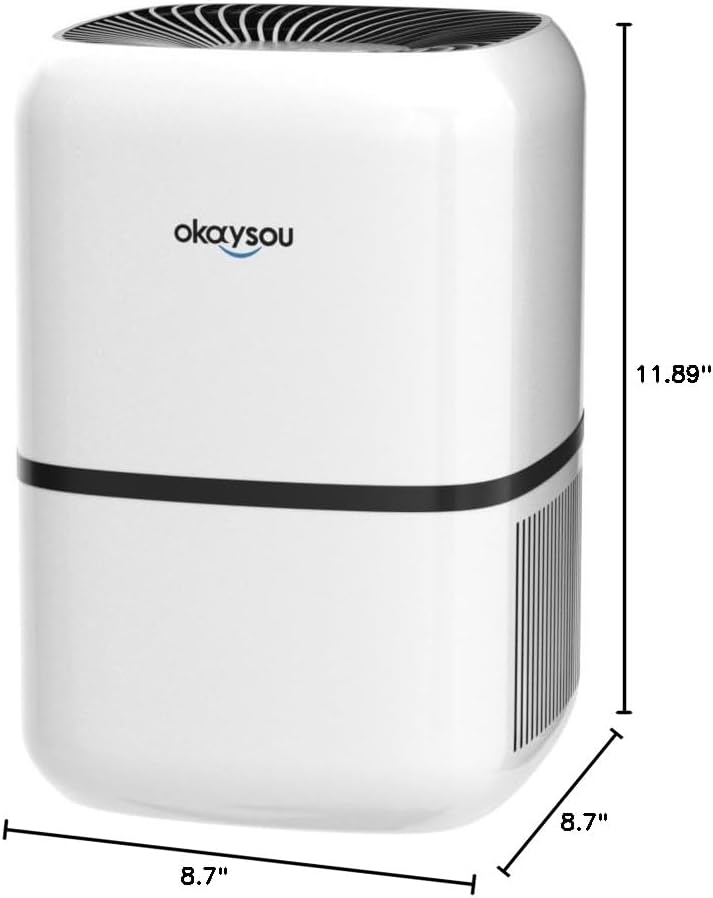
Figi 8.1: Dimansyon view of the Okaysou AirMic4S Air Purifier, showing its height, depth, and width.
9. Garanti ak sipò
The Okaysou AirMic4S Air Purifier comes with a 5-ane garanti. Okaysou also provides lifetime US-based customer support.
For warranty claims, technical assistance, or any questions regarding your product, please contact Okaysou customer support through their official channels or refer to the contact information provided with your purchase.
You can also visit the official Okaysou store on Amazon for more information and support: Okaysou Amazon Store