
1. Entwodiksyon
Welcome to the user manual for your Google Pixel 4 XL smartphone. This guide provides essential information to help you get started, understand its features, and maintain your device. The Google Pixel 4 XL is designed to offer a seamless Android experience with advanced camera capabilities, intuitive gesture controls, and the integrated Google Assistant.

Figure 1.1: Google Pixel 4 XL (Oh So Orange)
2. Enstalasyon
2.1 Sa ki nan bwat la
- Google Pixel 4 XL Smartphone
- AC adaptè
- Kab USB (USB-C pou USB-C)
- OTG Dongle (USB-A to USB-C adapter)
- Zouti pou retire plato SIM lan
- Gid Quick Start
2.2 Mete Kat SIM lan
- Jwenn plato kat SIM lan sou kote Pixel 4 XL ou a.
- Mete zouti pou retire plato SIM lan nan ti twou ki akote plato a epi peze byen fèm jiskaske plato a soti.
- Place your Nano SIM card into the tray with the gold contacts facing down. Ensure it fits securely.
- Pouse plato SIM lan tounen nan telefòn nan ak anpil atansyon jiskaske li fè yon klik.

Figi 2.1: Kote plato kat SIM lan ye
2.3 Premye Limen ak Konfigirasyon
- Peze epi kenbe bouton Pouvwa a (ki sitiye sou bò dwat la) jiskaske logo Google la parèt.
- Follow the on-screen instructions to select your language, connect to Wi-Fi, and transfer data from an old device if desired.
- Konekte avèk kont Google ou a oubyen kreye yon nouvo.
- Set up security features such as Face Unlock.
2.4 Chaje Aparèy la
Connect the USB cable to the AC adapter and plug it into a power outlet. Connect the other end of the USB cable to the USB-C port at the bottom of your Pixel 4 XL. The device supports fast charging. For optimal battery health, avoid fully discharging the battery frequently.
3. Operasyon Enstriksyon
3.1 Navigasyon debaz
The Pixel 4 XL uses a touchscreen interface for navigation. Swipe up from the bottom to go to the home screen, swipe from the left or right edge to go back, and swipe up and hold to view dènye aplikasyon yo.

Figure 3.1: Pixel 4 XL Front Display
3.2 Asistan Google
The new Google Assistant is integrated into the Pixel 4 XL. You can activate it by squeezing the sides of your phone or by saying "Hey Google." Use your voice to send texts, share photos, get directions, and more.
3.3 Karakteristik Kamera
The Pixel 4 XL camera offers advanced photography capabilities:
- Point and Shoot: Capture brilliant color and control exposure balance.
- Vizyon lannwit: Take clear photos in low-light conditions, including astrophotography for capturing the Milky Way.
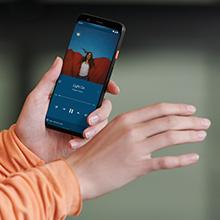
Figure 3.2: Using the Pixel 4 XL Camera
3.4 Motion Sense (Quick Gestures)
Utilize Quick Gestures to control your phone without touching it. Wave your hand above the screen to skip songs, silence calls, and more. Motion Sense functionality is available in specific regions including the US, Canada, Singapore, Australia, Taiwan, and most European countries.
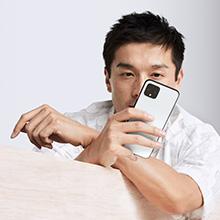
Figure 3.3: Motion Sense in Action
3.5 Call Screen
The Google Assistant's Call Screen feature helps filter out spam calls. It can proactively screen unknown callers and provide a transcript of the conversation, allowing you to decide whether to answer.
3.6 Videyo pwodwi ofisyèl la
Video 3.1: An official video from Google Inc showcasing the features of the Google Pixel 4, including Google Assistant and Motion Sense. This video provides a visual overview of key functionalities.
4. Antretyen
4.1 Netwaye aparèy ou an
To clean your Pixel 4 XL, use a soft, lint-free cloth. Avoid abrasive materials, solvents, or aerosol sprays. For stubborn marks, slightly dampRense twal la avèk dlo. Pa plonje aparèy la nan dlo.
4.2 Mizajou lojisyèl
Google regularly releases software updates to improve performance, add features, and enhance security. Ensure your device is connected to Wi-Fi and has sufficient battery life before installing updates. You can check for updates in Settings > System > System update.
4.3 Swen Batri
Pou pwolonje lavi batri:
- Evite tanperati ekstrèm.
- Use the provided charger or a compatible Qi-certified wireless charger.
- Enable Adaptive Battery in settings to optimize app usage.
- Disable features like Motion Sense and Always-on Display if not actively needed to conserve power.
4.4 Sovgad Done
Regularly back up your data to your Google Account. This includes photos, videos, contacts, and app data. Go to Settings > System > Backup to manage your backup settings.
NAN. Depanaj
5.1 Pwoblèm komen ak solisyon
- Aparèy pa reponn: Peze epi kenbe bouton Power la pandan apeprè 30 segonn pou fòse yon rekòmanse.
- Aplikasyon k ap kraze: Clear the cache and data for the problematic app in Settings > Apps & notifications > See all apps > [App Name] > Storage & cache.
- Pwoblèm koneksyon (Wi-Fi/Bluetooth): Try toggling Wi-Fi or Bluetooth off and on. If the issue persists, reset network settings in Settings > System > Reset options > Reset Wi-Fi, mobile & Bluetooth.
- Pòv lavi batri: Review battery usage in Settings > Battery to identify apps consuming excessive power. Adjust screen brightness and disable unnecessary features.
5.2 Reset faktori
A factory reset will erase all data from your phone and restore it to its original factory settings. This can resolve persistent software issues. Warning: Back up all important data before proceeding.
- Ale nan Anviwònman > Sistèm > Opsyon Reyajiste.
- Tap "Erase all data (factory reset)".
- Konfime desizyon ou epi swiv enstriksyon yo sou ekran an.
6. Espesifikasyon
Key technical specifications for the Google Pixel 4 XL:
| Karakteristik | Spesifikasyon |
|---|---|
| Mak | |
| Non modèl | Pixel 4 XL |
| Sistèm operasyon | Android |
| Kapasite Depo memwa | 64 GB |
| Gwosè memwa RAM enstale | 6 GB |
| Gwosè ekran | 6.3 pous |
| Rezolisyon | 1440 x 2960 |
| Rafrechisman pousantaj | 120 Hz |
| Modèl CPU | Snapdragon S3 |
| CPU vitès | 2.84 GHz |
| Koulè | Oh So Orange |
| Kantite plas kat SIM | Single SIM |
| Kalite Connector | USB Kalite C |
| Biometric Security Feature | Rekonesans figi |
| Nivo rezistans dlo | Dlo rezistan |
| Ekoutè Jack | Pa gen priz kas ekoutè |
| Front Photo Sensor Resolution | 8 MP |
| Rezolisyon Capture Videyo | 4k (30fps) |
| Kalite ekspozisyon | OLED |
| Founisè san fil | Debloke |
| Lavi Mwayèn Batri | 12 èdtan |
7. Enfòmasyon sou Garanti
Your Google Pixel 4 XL comes with a Garanti manifakti 2 zan. This warranty covers defects in materials and workmanship under normal use. It does not cover damage caused by accidents, misuse, unauthorized repairs, or normal wear and tear.
For detailed terms and conditions, please refer to the warranty card included with your product or visit the official Google support websit.
8. Sipò
If you require further assistance or encounter issues not covered in this manual, please utilize the following resources:
- Èd sou entènèt: Visit the official Google Pixel Help Center for comprehensive articles, FAQs, and troubleshooting guides.
- Fowòm Kominote: Engage with other Pixel users and experts in Google's official product forums.
- Kontakte sipò: Access direct support options (chat, phone, email) through the Google Pixel Help Center.
Always ensure you are referring to official Google support channels for accurate and up-to-date information.