
Entwodiksyon
This manual provides comprehensive instructions for the setup, operation, maintenance, and troubleshooting of your Alfawise S2 Smart Watch. Please read this manual carefully before using the device to ensure proper functionality and to maximize your user experience. Keep this manual for future reference.
Pwodwi souview
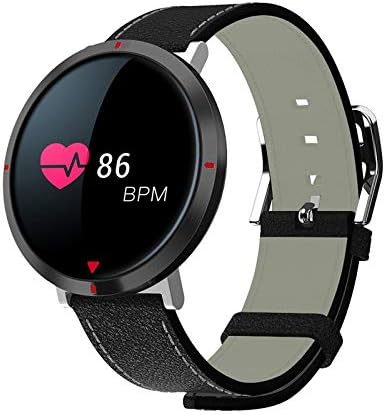
Figi 1: Alfawise S2 Smart Watch. The circular display shows a heart rate of 86 BPM, indicated by a heart icon and numerical value. The watch features a black case and a black mixed-material band with white stitching.
The Alfawise S2 Smart Watch is designed to track various daily activities and provide notifications. It features a circular display, a durable mixed-material band, and integrated sensors for health monitoring.
Konpozan kle:
- Ekspozisyon: Touch-sensitive screen for interaction and information display.
- Gade ka: Houses the internal electronics and sensors.
- Braslè: Mixed material band for comfortable wear.
- Kontak chaje: Located on the back of the watch for power input.
- Capteur batman kè: Sitiye sou do a pou siveyans kontinyèl batman kè.
Enstalasyon
1. Chaje Aparèy la
- Konekte kab chaje a nan yon adaptè kouran USB (pa enkli) oubyen nan yon pò USB òdinatè.
- Align the magnetic charging pins of the cable with the charging contacts on the back of the watch. The watch will vibrate and display a charging indicator.
- Charge the watch fully before first use. A full charge typically takes approximately 2 hours.
2. Enstalasyon ak koneksyon aplikasyon an
- Telechaje aplikasyon konpayon an: Chèche pou the official Alfawise S2 companion app in your smartphone's app store (Google Play Store for Android or Apple App Store for iOS). Install the app.
- Pèmèt Bluetooth: Asire w ke Bluetooth aktive sou smartphone ou.
- Louvri aplikasyon an: Launch the installed companion app on your smartphone.
- Pè aparèy la: Follow the in-app instructions to search for and pair your Alfawise S2 Smart Watch. The watch should appear in the list of available devices. Select it to establish a connection.
- Done senkronizasyon: Once paired, the watch will synchronize time and health data with your smartphone.
Enstriksyon Operasyon
Navigasyon debaz
- Reveye ekran: Raise your wrist or press the side button (if present) to wake the screen.
- Glise anlè/desann: Navige nan meni ak notifikasyon yo.
- Glise agoch/dwat: Jwenn aksè a fonksyon rapid oswa diferan ekran done.
- Tape: Chwazi yon atik oubyen konfime yon aksyon.
Karakteristik kle
- Apèl k ap rantre: The watch will vibrate and display caller ID for incoming calls when connected to your smartphone. You can typically reject calls from the watch.
- Pedomètr: Tracks your daily steps, distance, and estimated calories burned. View done sou mont lan oubyen nan aplikasyon konpayon an.
- Monitè batman kè: Continuously monitors your heart rate. Access real-time readings on the watch and historical data in the app.
- Mezi tansyon: Provides an estimate of your blood pressure. For accurate medical readings, consult a healthcare professional.
- Mezi oksijèn nan san: Measures your blood oxygen saturation (SpO2). This feature is for reference only and not for medical diagnosis.
- Monitè dòmi: Automatically tracks your sleep patterns, including deep sleep, light sleep, and wake times. Review sleep analysis in the companion app.
- Alam: Set alarms through the companion app. The watch will vibrate at the set time.
- Health Data Synchronization: All collected health and activity data automatically synchronizes with the companion app on your smartphone, allowing for detailed analysis and tracking over time.
Antretyen
Netwayaj
- Regularly clean the watch screen and case with a soft, damp twal.
- Clean the charging contacts and heart rate sensor on the back of the watch to ensure proper function.
- Evite itilize pwodui chimik ki fò, pwodui netwayaj abrazif, oswa solvan.
Swen batri
- Evite dechaje batri a nèt souvan.
- Do not expose the watch to extreme temperatures, as this can affect battery life.
- Si w ap sere mont lan pou yon peryòd tan pwolonje, chaje l apeprè 50% epi sere l nan yon kote ki fre epi sèk.
Depanaj
| Pwoblèm | Solisyon posib |
|---|---|
| Mont lan pa limen. | Asire w ke mont lan chaje nèt. Konekte l nan plato a pou omwen 30 minit. |
| Pa ka konekte ak telefòn entelijan an. |
|
| Inaccurate health data readings. |
|
| Notifikasyon yo pa resevwa. |
|
Espesifikasyon
| Karakteristik | Detay |
|---|---|
| Nimewo Modèl | S2 |
| Mak | Alfawise |
| Sistèm operasyon | Multi |
| Koneksyon | Bluetooth 4.0, San fil |
| Konpatibilite | Android & iOS |
| Bann Materyèl | Melanje |
| Koulè | Nwa |
| Pwa atik | 140 g |
| Dimansyon pake | 17 x 7.8 x 3 cm |
Garanti ak sipò
For warranty information, technical support, or service inquiries, please refer to the warranty card included with your product or visit the official Alfawise websit la. Kenbe resi acha ou kòm prèv acha.
Remak: Espesifikasyon ak karakteristik pwodwi yo ka chanje san avètisman alavans.