
1. Entwodiksyon
Thank you for choosing the Xiaomi MI TV 4S 55-inch Smart TV. This manual provides essential information for setting up, operating, and maintaining your television. Please read this manual thoroughly before using the product and retain it for future reference.
2. Enfòmasyon sou Sekirite
Pou asire yon operasyon ki an sekirite epi ki kòrèk, tanpri obsève prekosyon sekirite sa yo:
- Pa ekspoze televizyon an anba lapli oswa imidite pou evite dife oswa chòk elektrik.
- Pa ouvri televizyon an.asing. Konfye tout antretyen bay pèsonèl kalifye.
- Asire bon vantilasyon. Pa bloke ouvèti vantilasyon yo.
- Mete televizyon an sou yon sifas ki estab e plat pou anpeche l tonbe.
- Debranche kòd kouran an pandan tanpèt zèklè oswa lè ou pa itilize li pou yon bon bout tan.
- Keep the TV away from heat sources such as radiators, heat registers, stoves, or other apparatus that produce heat.
3. Pake kontni
Verifye ke tout atik yo prezan nan bwat la:
- Xiaomi MI TV 4S 55-inch Smart TV
- Kontwòl Remote
- Pouvwa kab
- Sipò pou televizyon (2 moso)
- Vis pou kanpe televizyon
- Manyèl Itilizatè (dokiman sa a)
4. Enstalasyon
4.1 Fikse Sipò Televizyon yo
- Mete televizyon an fas anba sou yon sifas ki plat e mou pou evite domaje ekran an.
- Aliyen chak sipò ak fant ki koresponn yo anba televizyon an.
- Fikse sipò yo avèk vis yo bay yo. Asire w ke yo byen sere.
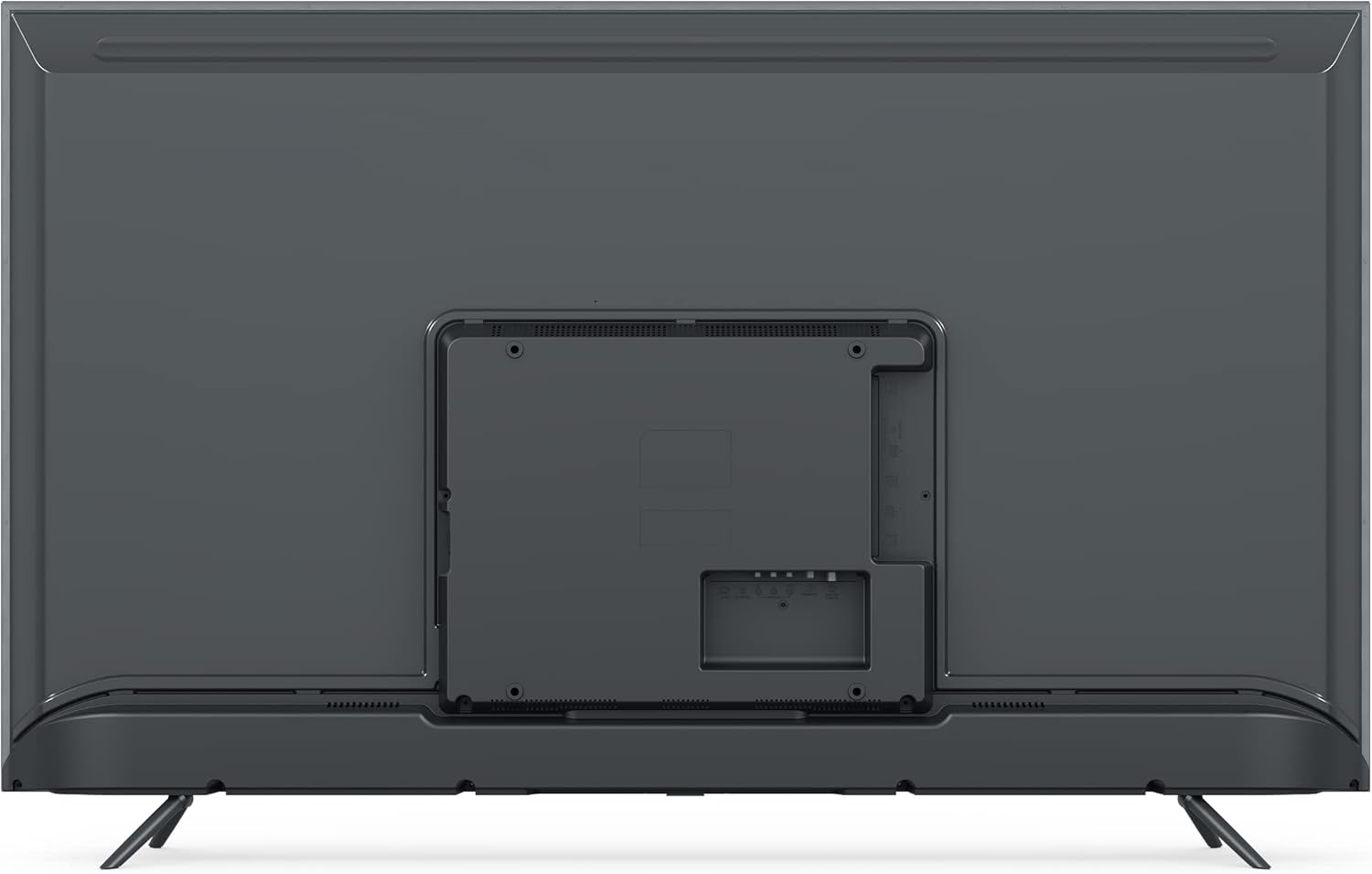
Imaj: Dèyè view of the Xiaomi MI TV 4S 55-inch, illustrating the stand mounting locations and various input ports.
4.2 Konekte kab
- Pouvwa: Konekte kab kouran an nan antre kouran televizyon an epi answit nan yon priz miray.
- Aparèy HDMI: Konekte aparèy ekstèn yo (pa egzanp, yon lektè Blu-ray, yon konsole jwèt) nan pò HDMI yo.
- Aparèy USB: Mete kle USB yo nan pò USB yo pou lekti medya.
- Ethernet: Pou yon koneksyon entènèt filaire, konekte yon kab Ethernet nan pò LAN an.

Imaj: Devan view of the Xiaomi MI TV 4S 55-inch, showcasing its display in a typical home environment.
4.3 Premye Limen ak Premye Enstalasyon
- Peze bouton Power (Power) ki sou kontwòl remote la oswa sou televizyon an.
- Swiv enstriksyon ki sou ekran an pou chwazi lang ou, rejyon ou, epi konekte ak yon rezo Wi-Fi.
- Konekte avèk kont Google ou pou jwenn aksè a fonksyonalite Android TV yo epi telechaje aplikasyon yo.
- Complete the channel scan for over-the-air broadcasts if applicable.
5. Itilizasyon televizyon an
5.1 Fonksyon kontwòl Remote
The remote control allows you to navigate the TV's features. Familiarize yourself with the buttons:

Image: The remote control for the Xiaomi MI TV 4S, displaying its layout and dedicated function buttons.
- Bouton Pouvwa (Wouj): Limen oswa etenn televizyon an.
- Bouton Asistan Google la: Aktive kontwòl vokal.
- Bouton nimewo (0-9): Seleksyon dirèk chanèl.
- Antre: Chwazi sous antre a (HDMI, AV, elatriye).
- Lis CH: Montre lis chanèl la.
- Anviwònman: Aksè nan meni paramèt televizyon an.
- Netflix / Prime Video: Dedicated buttons for quick access to these streaming services.
- Pav Navigasyon (Sikilè): Moves cursor up, down, left, right, and confirms selection (center button).
- Bouton tounen: Retounen nan ekran anvan an.
- Home Button (Mi Logo): Retounen nan ekran prensipal Android TV a.
- Volim +/-: Ajiste nivo volim.
5.2 Fonksyon Televizyon Debaz yo
- Limen/Etenyen: Press the red power button on the remote.
- Seleksyon sous Antre: Press the 'Input' button to cycle through available sources or select from a menu.
- Ajisteman Volim: Use the 'Volume +/-' buttons.
- Chèn Navigasyon: Use the number buttons for direct access or the 'CH List' button to browse.
5.3 Karakteristik Smart TV (Android TV)
Your Xiaomi MI TV 4S runs on Android TV, providing access to a wide range of apps and services:
- App Store: Telechaje aplikasyon yo nan Google Play Store la.
- Sèvis difizyon: Access pre-installed apps like Netflix and Prime Video, or download others.
- Google Asistan: Sèvi ak kòmandman vokal pou rechèch, kontwòl ak enfòmasyon.
- Chromecast entegre: Voye kontni ki soti nan telefòn entelijan ou oswa tablèt ou dirèkteman sou televizyon an.
6. Antretyen
6.1 Netwaye televizyon an
- Toujou debranche televizyon an anvan ou netwaye li.
- Sèvi ak yon twal mou, sèk, ki pa gen pousyè pou siye ekran an ak kabinè a.
- Pou mak ki difisil pou retire, pase yon ti krasampRense twal la avèk dlo oswa yon pwodui netwayaj ekran dou ki pa abrazif.
- Never spray cleaner directly onto the screen or allow liquid to drip into the TV.
6.2 Mizajou lojisyèl
Your TV may receive software updates to improve performance and add new features. Ensure your TV is connected to the internet. Updates are typically downloaded and installed automatically, or you may be prompted to install them. You can also check for updates manually in the TV's settings menu.
NAN. Depanaj
Si w rankontre pwoblèm ak televizyon w lan, gade pwoblèm ak solisyon komen sa yo:
- Pa gen pouvwa:
- Tcheke si kab kouran an byen konekte ak televizyon an ak priz kouran an.
- Asire w ke priz kouran an fonksyone lè w teste li ak yon lòt aparèy.
- Eseye peze bouton pouvwa a sou televizyon an menm, pa sèlman sou telekòmand lan.
- No Picture, but Sound is Present:
- Verifye ke sous opinyon ki kòrèk la chwazi.
- Check cable connections (HDMI, AV) to external devices.
- Ajiste anviwònman klète ak kontras.
- No Sound, but Picture is Present:
- Asire w ke volim nan pa bese oswa mete sou minimòm.
- Tcheke koneksyon kab odyo yo si w ap itilize oratè ekstèn.
- Verifye paramèt pwodiksyon odyo yo nan meni televizyon an.
- Kontwòl Remote pa travay:
- Ranplase pil yo nan kontwòl remote la.
- Asire w pa gen okenn obstak ant telekòmand lan ak detèktè IR televizyon an.
- Re-pair the Bluetooth remote if it's a Bluetooth model (refer to TV settings).
- Pwoblèm Koneksyon Rezo:
- Rekòmanse routeur ou ak modèm ou.
- Check Wi-Fi password and network settings in the TV menu.
- Si w ap itilize Ethernet, asire w kab la byen konekte.
8. Espesifikasyon
| Karakteristik | Spesifikasyon |
|---|---|
| Mak | XIAOMI |
| Non modèl | L55M5 |
| Nimewo Modèl Atik | L55M5-5ASP |
| Gwosè ekran | 55 pous |
| Koulè | Nwa |
| Teknoloji ekspozisyon | dirije |
| Rezolisyon | 4K |
| Rafrechisman pousantaj | 60 Hz |
| Karakteristik espesyal | Smart / Internet TV |
| Koneksyon Teknoloji | Bluetooth, Ethernet, HDMI, USB, Wi-Fi |
| Total pò USB | 3 |
| Rapò aspè imaj | 1.85:1 |
| Sèvis Entènèt Sipòte | Netflix |
| Batri (Remote) | 1 ityòm-ion (enkli) |
9. Garanti ak sipò
Pou enfòmasyon sou garanti a, tanpri gade kat garanti ki vini ak pwodwi w la oswa vizite sit ofisyèl Xiaomi a. website. For technical support, product registration, or service inquiries, please contact Xiaomi customer support through their official channels. Keep your purchase receipt as proof of purchase.