
1. Entwodiksyon
This manual provides essential information for the safe and efficient operation of your Eurom DryBest 30 WiFi dehumidifier. Please read these instructions carefully before use and retain them for future reference. This appliance is designed to reduce humidity levels in indoor environments, improving air quality and preventing issues related to excessive moisture.
2. Enstriksyon Sekirite
Toujou obsève prekosyon sekirite sa yo pou diminye risk dife, chòk elektrik, oswa blesi.
- Asire ekipman pou pouvwa a voltage koresponn ak etikèt evalyasyon ki sou aparèy la.
- Pa sèvi ak dezimidifikatè a si kòd la oswa ploge a domaje.
- Kenbe aparèy la lwen sous chalè, limyè solèy dirèk, ak materyèl ki ka pran dife.
- Pa bloke ni antre ni sòti lè a. Kenbe omwen 20 cm espas otou aparèy la.
- Pa janm mete objè nan vantilasyon yo.
- Unplug the unit before cleaning, maintenance, or when not in use.
- Do not use the appliance in bathrooms or other excessively wet environments where it could come into contact with water.
- Aparèy sa a pa fèt pou itilize pa moun (ki gen ladan timoun) ki gen kapasite fizik, sansoryèl oswa mantal redwi, oswa ki pa gen eksperyans ak konesans, sof si yo te ba yo sipèvizyon oswa enstriksyon konsènan itilizasyon aparèy la pa yon moun ki responsab sekirite yo.
- Timoun yo ta dwe sipèvize pou asire ke yo pa jwe ak aparèy la.
- Si kòd ekipman an domaje, li dwe ranplase pa manifakti a, ajan sèvis li yo, oswa moun ki kalifye menm jan an pou evite yon danje.
3. Pwodwi souview
The Eurom DryBest 30 WiFi is a powerful and efficient dehumidifier designed for domestic use. It features a quiet operation and can be controlled via WiFi for convenience.
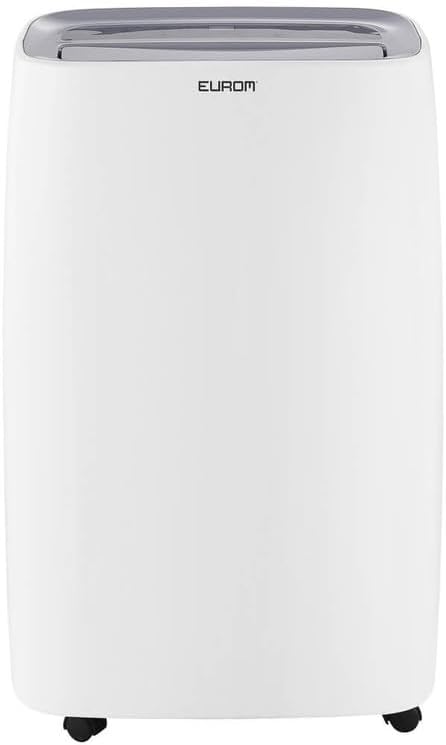
Figi 3.1: Devan view of the Eurom DryBest 30 WiFi dehumidifier. This image displays the unit's overall appearance, highlighting its modern white casing and integrated handles for portability.
3.1 Eleman prensipal yo
- Kontwòl Panel: Located on the top of the unit for easy access to settings and indicators.
- Priz lè: Top-mounted grille for expelling dry air.
- Antre/Filtè Lè: Rear-mounted for drawing in humid air, equipped with a removable air filter.
- Tank dlo: Tank detachable pou kolekte dlo kondanse.
- Priz drenaj kontinyèl: Pò pou konekte yon tiyo pou drenaj kontinyèl.
- Woulèt: Wou nan baz la pou deplase fasil.
4. Enstalasyon
4.1 Debake
- Retire dezumidifikatè a nan anbalaj li avèk prekosyon.
- Retire tout materyèl anbalaj yo, tankou nenpòt tep adezif oswa fim pwoteksyon.
- Inspect the unit for any signs of damage. If damaged, do not operate and contact your retailer.
4.2 Plasman
- Place the dehumidifier on a firm, level surface to prevent vibration and water leakage.
- Ensure there is at least 20 cm (8 inches) of space around the unit for proper airflow. Do not place it against a wall or furniture that could obstruct the air inlets or outlets.
- For optimal performance, place the unit in the center of the room or area requiring dehumidification.
- Evite mete aparèy la toupre aparèy ki pwodui chalè oswa anba limyè solèy dirèk.
4.3 Koneksyon pouvwa
- Ploge kòd elektrik la nan yon priz elektrik ki gen tè.
- Ensure the outlet meets the electrical requirements of the unit (230V, 50Hz).
4.4 Opsyon Drenaj
The dehumidifier offers two drainage methods: manual tank emptying or continuous drainage.
4.4.1 Drenaj Manyèl (Tank Dlo)
- When the water tank is full, the "FULL" indicator light will illuminate, and the unit will automatically stop operating.
- Rale tank dlo a avèk prekosyon soti nan devan aparèy la.
- Vide dlo ki te kolekte a.
- Glise tank dlo vid la tounen nan plas li jiskaske li fè yon klik byen fèm. Aparèy la ap rekòmanse fonksyone.
4.4.2 Drenaj Kontinyèl
- For continuous operation without emptying the tank, connect a suitable drain hose (not included) to the continuous drain outlet at the back of the unit.
- Ensure the hose is sloped downwards to allow gravity to drain the water into a floor drain or larger container.
- Verifye ke koneksyon tiyo a byen fèm pou anpeche flit.
4.5 WiFi Setup
The DryBest 30 WiFi can be controlled remotely via a smartphone app.
- Download the "Eurom Smart" app (or similar specified app) from your device's app store.
- Follow the in-app instructions to register an account and add your dehumidifier.
- Ensure your dehumidifier is powered on and the WiFi indicator light is blinking, indicating pairing mode.
- Once connected, the WiFi indicator light will become solid.
5. Operasyon Enstriksyon

Figi 5.1: Control Panel of the Eurom DryBest 30 WiFi. This image details the various buttons and indicators for operating the dehumidifier.
5.1 Kontwòl Panel Overview
- POUVWA bouton: Limen oswa etenn inite a.
- Bouton MODE: Cycles through operating modes (e.g., Auto, Continuous, Laundry).
- Bouton HEVE/BA: Adjust desired humidity level or timer settings.
- Bouton SPEED: Selects fan speed (High, Low).
- Bouton TIMER: Li fikse revèy pou limen oswa etenn otomatikman an.
- Bouton SWING: Aktive oswa dezaktive priz lè osilan an.
- PUMP Button: Activates the internal pump for continuous drainage (if applicable and hose connected).
- LOCK bouton: Fonksyon bloke timoun pou anpeche chanjman aksidantèl.
- Endikatè WIFI: Montre estati koneksyon WiFi a.
- FULL Indicator: Illuminates when the water tank is full.
- LAUNDRY Indicator: Illuminates when Laundry mode is active.
- FAN Indicator: Illuminates when fan is operating.
5.2 Operasyon debaz
- Pouvwa sou: Peze a POUVWA button. The unit will start in its default or last-used mode.
- Fikse Imidite Dezire a: Sèvi ak la UP epi DESANN buttons to set the target humidity level (e.g., 40% - 60% relative humidity is generally recommended). The unit will operate until this level is reached, then cycle on and off to maintain it.
- Chwazi mòd: Peze a MÒD button to choose between different operating modes.
- Mòd oto: The unit automatically adjusts operation based on the ambient humidity.
- Mòd kontinyèl: The unit runs continuously regardless of humidity level. Ideal for very damp conditions or for use with continuous drainage.
- Mòd lesiv: Designed to quickly dry clothes indoors. The unit operates at high fan speed and continuous dehumidification.
- Ajiste vitès fanatik: Peze a VITESSE button to toggle between High and Low fan speeds.
- Mete revèy: Peze a TIMER bouton, Lè sa a, sèvi ak UP epi DESANN to set the desired operating duration (e.g., 2 hours, 4 hours).
- Fonksyon balanse: Peze a Balanse button to activate the oscillating louvers, distributing dry air more evenly.
- Verrouillage timoun: Peze epi kenbe la KLE button for a few seconds to activate/deactivate the child lock.
- Pouvwa Off: Peze a POUVWA bouton ankò pou fèmen inite a.

Figi 5.2: Dehumidifier in use, illustrating its application for drying laundry. The image shows the unit positioned near a clothes rack, indicating its effectiveness in reducing drying times indoors.
6. Antretyen
Antretyen regilye asire pèfòmans optimal epi pwolonje dire lavi dezumidifikatè ou a.
6.1 Netwaye filtè lè a
Ou ta dwe netwaye filtè lè a chak de semèn oswa pi souvan selon itilizasyon an ak kalite lè a.
- Debranche dezumidifikatè a nan priz kouran an.
- Retire filtè lè a nan dèyè aparèy la.
- Gently vacuum any dust or debris from the filter. For heavy dirt, wash the filter with lukewarm water and a mild detergent.
- Rinse thoroughly and allow the filter to air dry completely before reinstalling. Do not expose to direct sunlight or high heat.
- Remete filtè sèk la nan aparèy la.
6.2 Netwaye tank dlo a
Netwaye tank dlo a regilyèman pou anpeche mwazi ak kanni grandi.
- Deploge inite a.
- Retire epi vide tank dlo a.
- Wash the tank with warm water and a mild detergent. Rinse thoroughly.
- Seche tank la nèt anvan ou mete l tounen nan aparèy la.
6.3 Depo
Si dezumidifikatè a pa pral itilize pou yon peryòd pwolonje:
- Debranche aparèy la epi vide tank dlo a.
- Clean the air filter and the exterior of the unit.
- Allow the unit to dry for at least 24 hours in a well-ventilated area to prevent mold growth inside.
- Store the dehumidifier upright in a cool, dry place, away from direct sunlight and extreme temperatures.
NAN. Depanaj
Anvan ou kontakte sèvis kliyan, tanpri al gade gid depanaj sa a pou pwoblèm komen yo.
| Pwoblèm | Kòz posib | Solisyon |
|---|---|---|
| Inite pa limen. | No power, power cord loose, water tank full. | Tcheke koneksyon kouran an, asire w tank la vid epi li byen mete l. |
| Pa gen dlo ki ranmase / Dezimidifikasyon ki ba. | Humidity level too low, air filter clogged, room temperature too low, unit size too small for area. | Increase desired humidity setting, clean air filter, ensure room temperature is above 5°C (41°F), close doors/windows. |
| Inite a fè bwi. | Aparèy la pa sou yon sifas ki plat, filtè lè a bouche. | Place on a flat, stable surface. Clean air filter. |
| Dlo koule soti nan inite a. | Water tank not inserted correctly, continuous drain hose loose or blocked. | Reinsert water tank properly. Check continuous drain hose for secure connection and obstructions. |
| Pwoblèm koneksyon WiFi. | Incorrect app, poor WiFi signal, incorrect pairing procedure. | Ensure correct app is used, check router and signal strength, repeat WiFi setup steps. |
8. Espesifikasyon
| Karakteristik | Spesifikasyon |
|---|---|
| Non modèl | DryBest 30 WiFi |
| Nimewo Referans | 1052 |
| Mak | Eurom |
| Kapasite dezumidifikasyon | 30 Lit/24 èdtan |
| Konsomasyon pouvwa | 580 W |
| Kapasite Airflow | 350 m³/èdtan |
| Nivo bri | <47 dBA |
| Dimansyon (L x W x H) | 64.2 x 43.1 x 30.1 cm |
| Pwa | 15.5 kg |
| Volim tank dlo | 6 Liters / 10 Liters (depending on mode/configuration) |
| Karakteristik espesyal | Silent operation, Adjustable humidity control, WiFi connectivity |
| Itilizasyon Rekòmande | Domestik |
| Koulè | Blan |
9. Garanti ak sipò
For warranty information, please refer to the terms and conditions provided at the time of purchase or contact your retailer. If you encounter any issues not covered in the troubleshooting section, or require further assistance, please contact Eurom customer support or your authorized dealer.
Kenbe resi acha ou a kòm prèv acha pou nenpòt reklamasyon garanti.