
1. Entwodiksyon
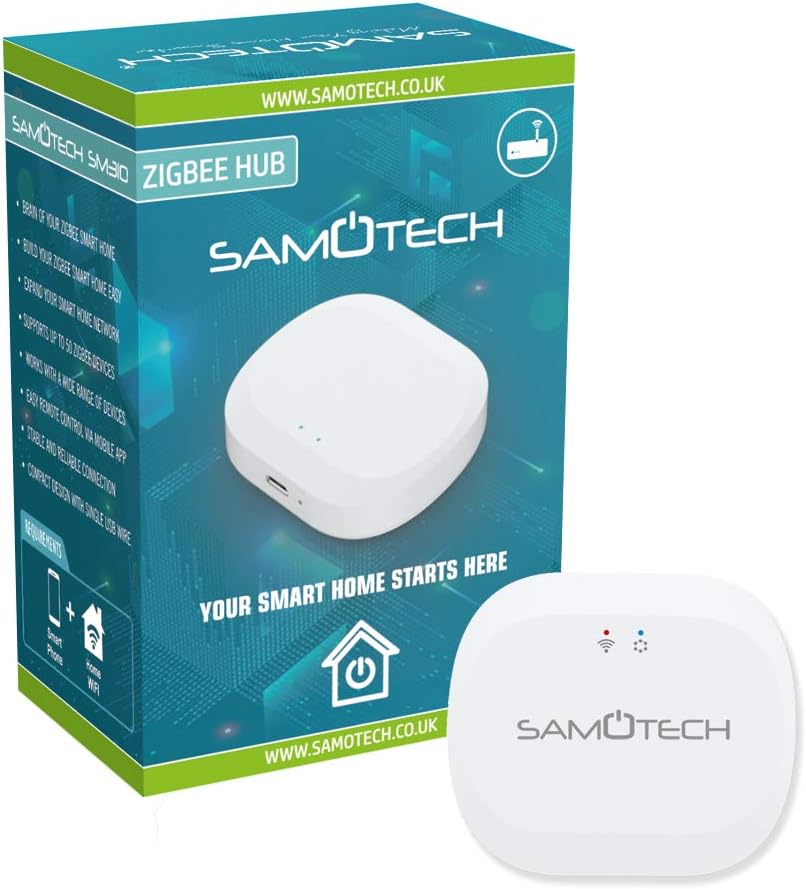
The SAMOTECH Zigbee Hub SM310 is a smart gateway designed to be the core of your Internet of Things (IoT) network. It bridges your IP network with various Zigbee-connected devices, enabling seamless communication and control. This hub is fully compatible with the Tuya platform, allowing you to connect and manage a wide range of Zigbee devices for home automation, smart energy management, healthcare applications, and home security systems.
2. Pwodwi Features
- Lajè konpatibilite: The Zigbee gateway hub is compatible with Tuya WiFi devices and Zigbee 3.0 smart products, offering flexibility to customize your smart home system based on individual needs and security requirements.
- Kontwòl konplè: The hub supports various smart application functionalities including adding devices, device reset, third-party control, and group control. Control your remote security kit system and connected devices anytime, anywhere using your smartphone.
- Stable and Reliable Connection: Provides a stable and reliable WiFi signal that covers a wide range of areas, ensuring consistent operation for all connected devices.
- Konsepsyon kontra enfòmèl ant: Features a compact design with no wiring required for setup. It offers an extremely quick and simple WiFi setup process, requiring no professional technical skills. A wired version is also available, which includes a network cable for connection to a WiFi router.
3. Pake kontni
Tanpri verifye ke tout atik yo prezan nan pakè ou a:
- 1 x SAMOTECH Zigbee Hub SM310
- 1 x Power Adapter (Type G - British standard square plug)
- 1 x Manyèl Itilizatè (dokiman sa a)
4. Enstriksyon Enstalasyon
Follow these steps to set up your SAMOTECH Zigbee Hub SM310:
- Pouvwa sou: Plug the provided power adapter into the hub's power input port and then into a standard wall outlet. The hub will power on, and an indicator light will illuminate.
- Telechaje App: Download the Tuya Smart or Smart Life app from your smartphone's app store (available for iOS and Android).
- Ajoute Aparèy: Open the app, register or log in, and then tap the '+' icon to add a new device. Select 'Gateway' or 'Control Hub' and follow the on-screen instructions to connect the SM310 hub to your 2.4GHz Wi-Fi network. Ensure your smartphone is connected to the same 2.4GHz Wi-Fi network during setup.
- Pair Zigbee Devices: Once the hub is successfully connected, you can begin pairing your Zigbee 3.0 compatible sensors and devices through the Tuya Smart app. Refer to the specific device's manual for its pairing mode instructions.

5. Operasyon Enstriksyon
After successful setup, you can manage your smart home devices using the Tuya Smart app:
- Jesyon aparèy: Nan app a, ou kapab view all connected Zigbee devices. Tap on a device to access its specific controls and settings.
- Automation and Scenes: Create custom automation rules and scenes to control multiple devices simultaneously or based on specific conditions (e.g., turn on lights when a motion sensor is triggered).
- Kontwòl Gwoup: Group similar devices together (e.g., all lights in a room) for unified control.
- Aksè Remote: Control your devices from anywhere with an internet connection using your smartphone.
- Reset aparèy: To reset a connected Zigbee device, follow the specific reset procedure for that device, usually involving pressing a button for a certain duration. To reset the hub itself, consult the app or manufacturer's support.

6. Antretyen
To ensure optimal performance and longevity of your SAMOTECH Zigbee Hub SM310:
- Netwayaj: Siye aparèy la avèk yon twal mou epi sèk. Pa sèvi ak pwodui netwayaj likid oswa materyèl abrazif.
- Anviwònman: Keep the hub in a dry environment, away from direct sunlight, extreme temperatures, and high humidity.
- Mizajou mikrolojisyèl: Regularly check the Tuya Smart app for any available firmware updates for the hub to ensure you have the latest features and security enhancements.
- Estabilite rezo: Ensure your home Wi-Fi network is stable and provides good coverage to the hub for reliable operation.
NAN. Depanaj
If you encounter issues with your SAMOTECH Zigbee Hub SM310, refer to the following common troubleshooting steps:
- Hub pa konekte ak Wi-Fi:
- Ensure your Wi-Fi network is 2.4GHz. The hub does not support 5GHz Wi-Fi.
- Verifye ke modpas Wi-Fi ou a kòrèk.
- Move the hub closer to your Wi-Fi router to improve signal strength.
- Restart your Wi-Fi router and the hub.
- Aparèy Zigbee yo pa konekte:
- Ensure the Zigbee device is in pairing mode (refer to the device's manual).
- Make sure the device is within range of the Zigbee hub.
- Check if the hub has reached its maximum device capacity.
- Eseye réinitialiser aparèy Zigbee a epi eseye konekte l ankò.
- Intermittent Connection/Unresponsive Devices:
- Check the stability of your home Wi-Fi network.
- Ensure the hub and Zigbee devices are not obstructed by large metal objects or other sources of interference.
- Rekòmanse mwaye a.
8. Espesifikasyon
| Manifakti | SAMOTECH |
| Modèl | SM310 Tuya Wireless Zigbee Gateway |
| Pwa atik | 100 g |
| Dimansyon pake | 8.4 x 6.7 x 5.3 cm |
| Koulè | Blan |
| Kantite pake atik | 1 |
| Ploge Profile | Mi mòn |
| Fòma Ploge | G - Square plugs. British type. |
| Karakteristik espesyal | Aksè Point Mode |
| Batri enkli? | Non |
| Batri obligatwa? | Non |
9. Garanti ak sipò
For warranty information, please refer to the documentation included with your product or visit the official SAMOTECH website. For technical support, product inquiries, or further assistance, please contact SAMOTECH customer service through their official channels.