
1. Entwodiksyon ak souview
This manual provides comprehensive instructions for the installation, operation, and maintenance of your Jensen CDX3119 CD Receiver. Please read this manual thoroughly before using your new receiver to ensure proper functionality and safety. The Jensen CDX3119 is a single-DIN CD receiver designed for vehicle audio systems, featuring Bluetooth connectivity, CD playback, USB input, and auxiliary input.
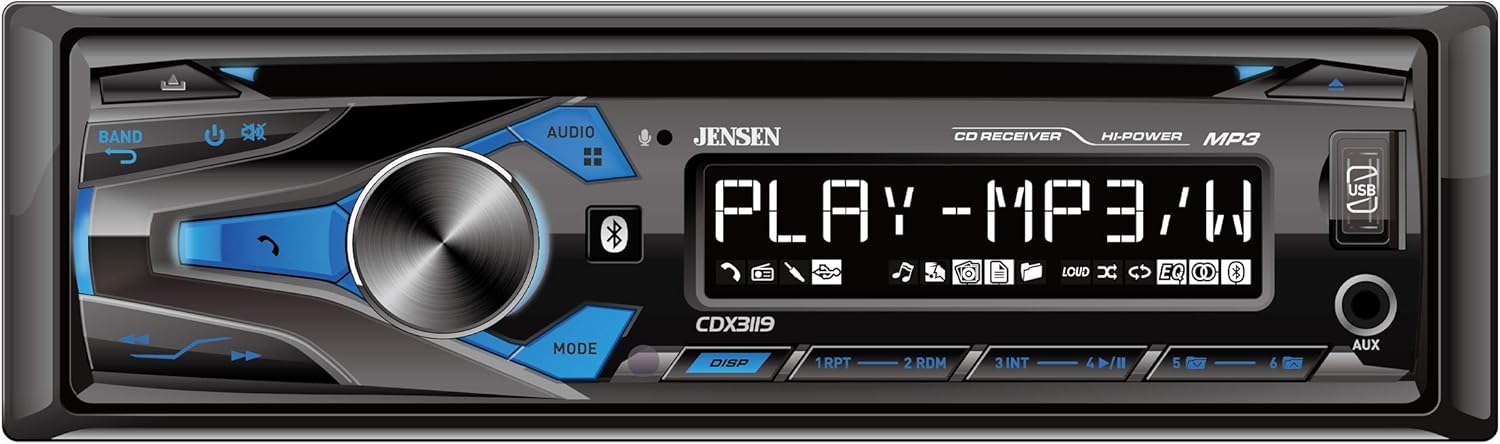
Figure 1: Front panel of the Jensen CDX3119 CD Receiver.
2. Pwodwi Features
- Bluetooth hands-free calling and audio streaming
- Plays MP3 music files
- Front panel USB input for media playback and device charging
- Front panel 3.5mm Auxiliary (AUX) input
- CD Player for audio CDs
- AM/FM Tuner with presets
- 2-chanèl preamp rezilta pou ekstèn ampkoneksyon lifier
- Multiple preset EQ curves for sound customization
3. Enstalasyon
3.1 Enstalasyon
Professional installation is highly recommended for car audio systems. Incorrect wiring can cause damage to the vehicle's electrical system or the receiver. Refer to the detailed wiring diagram included in the separate installation guide for specific connections.
- Koneksyon pouvwa: Connect the yellow wire to a constant 12V power source, the red wire to an accessory 12V power source (switched with ignition), and the black wire to a good chassis ground.
- Koneksyon oratè: Connect speaker wires according to the color codes provided in the installation diagram. Ensure correct polarity for optimal sound.
- Koneksyon antèn: Konekte kab antèn machin nan ak antre antèn reseptè a.
- Montaj: Secure the receiver in the vehicle's dashboard using the provided mounting hardware.
3.2 Premye pouvwa-sou
After installation, turn on your vehicle's ignition. The receiver should power on. If not, check all power connections and the vehicle's fuse box.
4. Operasyon Enstriksyon
4.1 Kontwòl debaz yo
- Bouton pouvwa/volim: Press to turn the unit ON/OFF. Rotate to adjust the volume level.
- Source (SRC) Button: Press to cycle through available audio sources (Tuner, CD, USB, Bluetooth, AUX).
- Bouton Band: In Tuner mode, press to switch between FM1, FM2, FM3, AM1, and AM2 bands.
- Tune/Seek Buttons: Use to manually tune radio frequencies or seek for the next/previous station. In media playback, use to skip tracks.
4.2 Operasyon radyo
Press the SRC button until 'TUNER' is displayed. Use the BAND button to select FM or AM. Use the seek buttons to find stations. To store a preset, tune to the desired station, then press and hold one of the numeric preset buttons (1-6) until the station number flashes on the display.
4.3 Lekti CD
Insert an audio CD into the disc slot. The unit will automatically switch to CD mode and begin playback. Use the track skip buttons to navigate between songs.
4.4 Koneksyon Bluetooth
Pou pair aparèy ou an:
- Asire w ke Bluetooth aktive sou aparèy mobil ou.
- On the CDX3119, press the SRC button to select 'BT AUDIO' or 'BT PHONE'.
- On your mobile device, search for available Bluetooth devices and select 'JENSEN CDX3119'.
- Confirm pairing if prompted. Once connected, 'CONNECTED' will appear on the receiver's display.
For hands-free calling, use the dedicated call buttons on the receiver's front panel. For audio streaming, play music from your paired device, and it will stream through the receiver.
4.5 USB ak Antre Oksilyè
- USB: Mete yon kondwi flash USB ki gen MP3 files into the front USB port. The unit will automatically switch to USB mode and begin playback. The USB port also provides charging for compatible devices.
- AUX: Connect an external audio device (e.g., MP3 player, smartphone) to the front 3.5mm AUX input using an audio cable. Press the SRC button to select 'AUX'.
Video 1: Demonstration of a Single DIN Car Stereo with CD Player, Bluetooth, and USB functionality. This video illustrates general features and operation similar to the Jensen CDX3119.
5. Antretyen
- Netwaye inite a: Use a soft, dry cloth to clean the front panel. Avoid abrasive cleaners or solvents.
- Swen CD: Manyen CD yo nan kwen yo. Kenbe yo pwòp epi san reyur. Sèvi ak yon twal mou ki pa gen pousyè pou siye CD yo soti nan sant la rive deyò.
- Swen Jeneral: Evite ekspoze aparèy la nan tanperati ekstrèm, limyè solèy dirèk pou peryòd pwolonje, oswa imidite twòp.
NAN. Depanaj
| Pwoblèm | Kòz posib | Solisyon |
|---|---|---|
| Pa gen pouvwa | Fil elektrik ki pa kòrèk; Fuzib boule; Kontwòl machin nan etenn. | Check power connections; Replace fuse; Turn vehicle ignition on. |
| Pa gen Son | Volim twò ba; Silans aktive; Fil elektrik oratè a pa kòrèk. | Ogmante volim nan; Dezaktive silans lan; Tcheke koneksyon oratè yo. |
| Bluetooth pa konekte | Bluetooth not enabled on device; Device not in pairing mode; Incorrect pairing procedure. | Ensure Bluetooth is on; Put device in pairing mode; Re-attempt pairing as per instructions. |
| CD Error | Dirty or scratched CD; Incorrect disc format. | Clean or replace CD; Ensure disc is an audio CD. |
| USB Not Reading | Incompatible USB format; Corrupt files; USB device not supported. | Asire w ke USB a se fòma FAT32; Tcheke file integrity; Try a different USB device. |
7. Espesifikasyon
- Modèl: CDX3119
- Pwa atik: 3.36 liv
- Dimansyon pwodwi: 9 x 9 x 3 pous
- Koneksyon Teknoloji: Oksilyè, Bluetooth, RCA, USB
- Kalite kontwolè: Pouse bouton
- Karakteristik espesyal: USB Port, Built-In Amplifier, High-Definition LCD Display
- Aparèy konpatib: Smartphone, Oratè
- Kalite konektè: 3.5mm Jack, USB
- Audio Sòti Mode: Stereo
- Konfigirasyon chanèl son antoure: 2 Chèn
- Sòti pouvwa: 50 Watts
8. Garanti ak sipò
Your Jensen CDX3119 CD Receiver comes with a 3-year warranty. For warranty claims or technical support, please refer to the contact information provided in your product packaging or visit the official Jensen websit la. Kenbe prèv acha ou a pou validasyon garanti a.